Selelekela
This manual provides comprehensive instructions for the safe and effective use of your Canon PowerShot SD1200IS Digital ELPH Camera. Please read this manual thoroughly before using the camera to ensure optimal performance and to prevent damage.
The Canon PowerShot SD1200IS is a 10.0-megapixel digital camera featuring a 3x optical zoom lens, a 2.5-inch LCD display, and Canon's DIGIC 4 Image Processor. It is designed for ease of use while delivering high-quality images.
Tlhophiso
1. Ho phutholla le Tlhahlobo ea Pele
Patlolla lintho tsohle ka lebokoseng ka hloko. Netefatsa hore likarolo tse latelang li teng:
- Canon PowerShot SD1200IS Digital ELPH Camera body
- Lithium-ion battery pack (NB-6L)
- Battery charger (CB-2LY)
- Wrist strap (WS-DC7)
- Digital Camera Tharollo CD-ROM
- USB interface cable (IFC-400PCU)
- AV cable (AVC-DC400)
Lekola khamera le lisebelisoa bakeng sa matšoao afe kapa afe a tšenyo. Haeba ho na le lintho tse sieo kapa li senyehile, ikopanye le morekisi oa hau.
2. Ho tjhaja Betri
- Insert the battery pack (NB-6L) into the battery charger (CB-2LY).
- Kenya tjhaja ka har'a sokete ea motlakase. Leseli la sesupo sa ho tjhaja le tla bonesa.
- Once charging is complete, the indicator light will change or turn off (refer to charger specific instructions for exact behavior). Remove the battery.
Note: A fully charged battery is essential for optimal camera performance.
3. Ho kenya betri le karete ea memori
The Canon PowerShot SD1200IS uses SD/SDHC, MMC/MMC Plus/HC MMC Plus memory cards (not included). Ensure you have a compatible memory card before proceeding.
- Open the battery/card compartment cover located on the bottom of the camera.
- Insert the charged battery pack into the compartment, ensuring the correct orientation.
- Insert a compatible memory card into the card slot until it clicks into place.
- Koala sekoaelo sa phaposi ka mokhoa o sireletsehileng.

Setšoantšo: Tlase view of the camera showing the open battery and memory card compartment. This illustrates where to insert the battery and memory card.
Litaelo tsa Ts'ebetso
1. Ho tima/Ho tima
Tobetsa ea BONAHALA/TSHA button located on the top of the camera to power it on or off. The lens will extend when powered on.

Setšoantšo: Holimo view of the camera, highlighting the ON/OFF button and shutter release.
2. Litšoantšo tsa motheo
- Khetha mokhoa oa ho thunya: Use the mode dial or slider (if present) to select your desired shooting mode. For general use, select Smart AUTO.
- Etsa setšoantšo sa hau: Use the 2.5-inch LCD display to compose your image.
- Tsepamisa maikutlo: Press the shutter button halfway down. The camera will automatically focus, and the focus frame will turn green when focus is achieved.
- Nka: Tobetsa konopo ea shutter ka botlalo tlase ho nka setšoantšo.

Setšoantšo: Ka morao view ea khamera, e bonts'a skrine ea LCD le likonopo tse fapaneng tsa taolo bakeng sa ho tsamaea le ho hlophisa.
3. Smart AUTO Mode
In Smart AUTO mode, the camera intelligently analyzes the scene and shooting conditions, then automatically selects the most appropriate settings from 18 predefined options. This allows you to focus on your subject without worrying about technical adjustments.
4. Ts'ebetso ea Zoom
The camera features a 3x optical zoom. Use the zoom lever (typically around the shutter button) to zoom in or out. Optical zoom maintains image quality, while digital zoom (up to 4x) can be used for further magnification but may reduce image clarity.
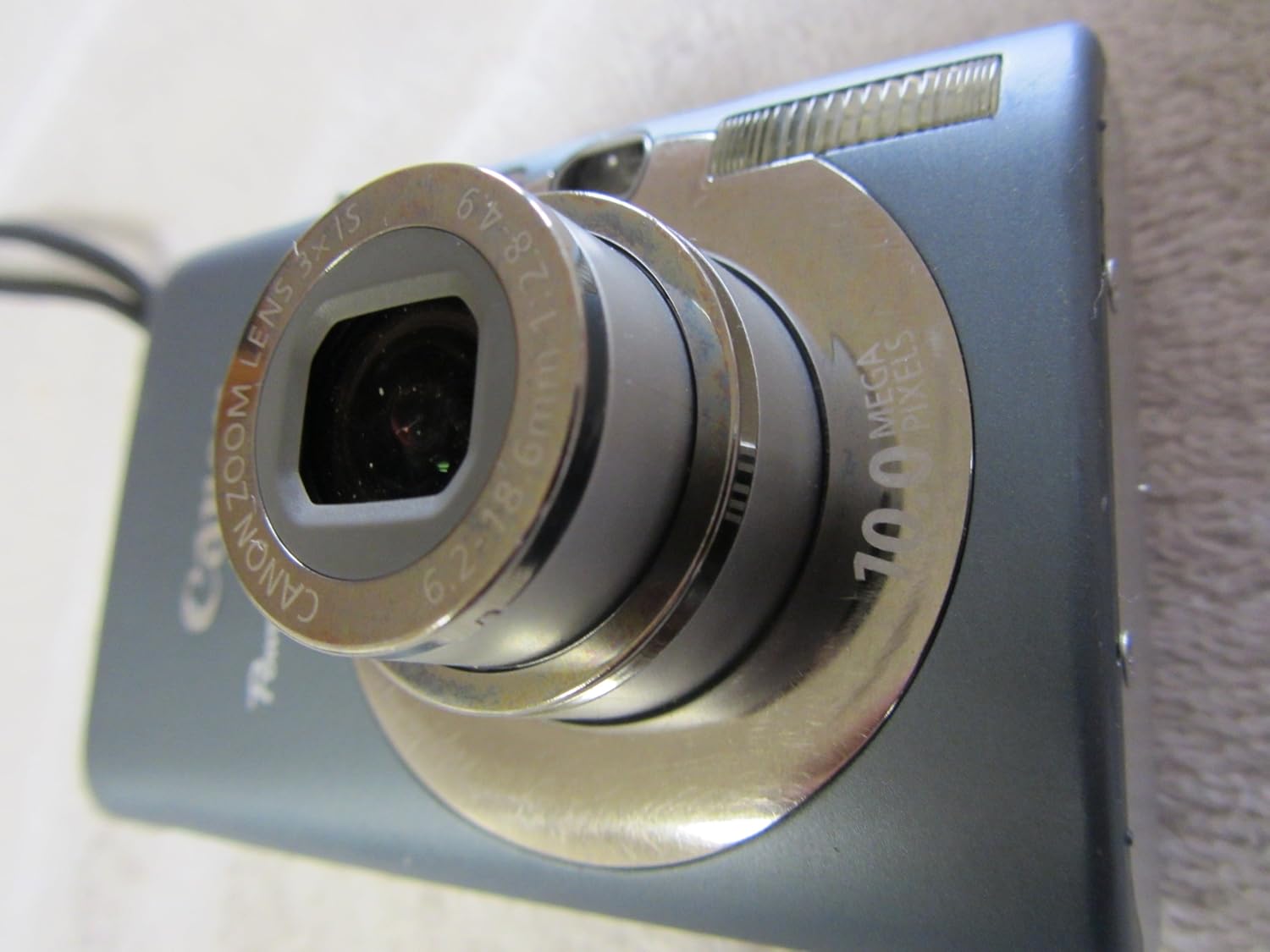
Setšoantšo: Ka pele e nang le angled view of the camera with its lens extended, demonstrating the optical zoom capability.
5. Likarolo Tse Khethehileng
- Theknoloji ea ho lemoha sefahleho: The DIGIC 4 Image Processor includes evolved Face Detection Technology that tracks moving subjects' faces and optimizes focus, exposure, flash, and white balance for natural skin tones.
- Face Detection Self-Timer: This feature automatically detects an increase in the number of faces in the frame (e.g., when the photographer joins a group shot) and delays the shutter release until all faces are detected.
- Optical Image Stabilizer: Automatically detects and corrects camera shake, reducing blur in photos, especially when zoomed in or in low light.
- i-Contrast (Intelligent Contrast Correction): Brightens dark areas of an image while preserving bright areas, resulting in more balanced exposures. This can be applied during shooting or playback.
- Red-eye Correction: Offers options to correct red-eye during shooting, automatically during playback, or manually during playback.
- ISO 1600/3200: High ISO settings (up to 1600, expandable to 3200 in Special Scene mode) reduce the effects of camera shake and improve performance in low-light conditions.
6. Mokhoa oa ho Bapala
Ho review your captured images and videos, press the Ho bapala button (often indicated by a triangle icon). Use the directional buttons to navigate through your media.
Tlhokomelo
1. Ho hloekisa Khamera
- 'Mele oa Khamera: Sebelisa lesela le bonolo, le omileng ho hlakola 'mele oa khamera. Bakeng sa litšila tse thata, tlosa litšila tse ngataampen the cloth with water and then wipe dry. Avoid using organic solvents.
- Lense: Gently remove dust with a blower brush. For smudges, use a lens cleaning cloth specifically designed for optical surfaces. Do not touch the lens with your fingers.
- LCD skrine: Use a soft, dry cloth to clean the LCD. Avoid pressing hard on the screen.
2. Tlhokomelo ea Battery
- Boloka libeteri sebakeng se phodileng, se omileng ha se sa sebelisoe.
- Qoba ho ntša betri ka botlalo khafetsa ho lelefatsa bophelo ba eona.
- U se ke ua beha libeteri mochesong o feteletseng.
3. Polokelo
When storing the camera for extended periods, remove the battery and memory card. Store the camera in a dry, well-ventilated area, away from direct sunlight and extreme temperatures.
Ho batle phoso
This section addresses common issues you might encounter with your Canon PowerShot SD1200IS camera.
Camera Does Not Power On
- Netefatsa hore betri e tjhajilwe ka botlalo mme e kentswe ka nepo.
- Hlahloba hore na mabitso a betri a hloekile.
- Leka ho sebelisa betri e fapaneng, e tjhajilwe ka botlalo haeba e fumaneha.
"No Memory Card" Error
- Ensure a compatible memory card is inserted correctly and fully clicked into place.
- Check if the memory card is damaged or corrupted. Try a different card.
- Format the memory card (this will erase all data, so back up first).
Litšoantšo tse Lerootho
- Netefatsa hore lense e hloekile ebile ha e na mafome kapa lerōle.
- Hold the camera steady during shooting. Utilize the Optical Image Stabilizer feature.
- Check lighting conditions; low light can lead to slower shutter speeds and blur. Increase ISO if necessary.
- Ensure the camera has focused correctly before taking the shot (half-press the shutter button).
Auto Focus Assist Beam Remains On/Flashes
- If you wish to disable the AF assist beam, ensure that the Red-Eye Lamp option is also turned off in the Flash menu settings, in addition to the AF assist beam setting itself.
Difficulty Transferring Photos to Computer
- Ensure the USB cable is securely connected to both the camera and the computer.
- Verify that the camera is powered on and in the correct connection mode (if applicable).
- For Windows XP users, the camera should be recognized as a removable drive without needing Canon software. For other operating systems, ensure the Canon Digital Camera Solution CD-ROM software is installed.
- Try using a memory card reader to transfer files directly from the card to the computer.
Litlhaloso
| Sebopeho | Lintlha |
|---|---|
| Lebitso la Mohlala | Canon PowerShot SD1200IS |
| Qeto ea Sensor ea Foto | 10 MP |
| Boholo ba Sensor ea Foto | 1/2.3-inch |
| Optical Zoom | 3x |
| Nyenyefatsa Digital | 4x |
| Ho tsitsisa setšoantšo | Optical |
| Boholo ba skrine | 2.5 lisenthimithara |
| Mofuta oa Pontšo | LCD (PureColor LCD II) |
| E tšehelitsoe File Sebopeho | JPEG |
| Qeto ea Video | 480p (640x480 ka lebelo la 30 fps) |
| Mofuta oa Memori ea Flash | SD/SDHC/MMC/MMCplus/HC MMCplus |
| Mofuta oa ISO | Auto, 80, 100, 200, 400, 800, 1600 (expandable to 3200) |
| Bonyane Lebelo la Shutter | 15 metsotsoana |
| Maximum Shutter Speed | 1/1500 Metsotsoana |
| Theknoloji ea Khokahano | USB |
| Mohloli oa Matla | Lithium-ion battery pack (NB-6L) |
| Boima ba 'mele | 5.6 ounces (hoo e ka bang 159 grams) |
| Litekanyo (hoo e ka bang) | Compact form factor |
Boitsebiso ba Warranty
Please note that this product is sold "AS-IS" and does not include any warranty. There are no provisions for returns. For specific details regarding your purchase, please refer to the terms and conditions provided by your retailer at the time of sale.
Tšehetso
For further assistance, technical support, or to download the full user manual and software updates, please visit the official Canon website. You can typically find support resources by searching for "Canon Support" and your camera model (PowerShot SD1200IS).
Lisebelisoa tsa Marang-rang li ka kenyelletsa:
- Canon USA Support Websebaka (Example sehokelo, sehokelo sa 'nete se ka fapana ho ea ka libaka)
- Lipotso tse atisang ho botsoa (FAQs)
- Driver and Software Downloads
- Contact Information for Customer Service


