1. Увод
Thank you for choosing the GOBOULT Z40 V2.0 True Wireless Earbuds. These earbuds are designed to provide a high-quality audio experience with features such as extended playtime, clear call quality, and low-latency gaming. This manual provides instructions for setup, operation, maintenance, and troubleshooting to ensure optimal use of your device.

Image 1.1: GOBOULT Z40 V2.0 True Wireless Earbuds and Charging Case.
2. Производ је готовview
2.1 Укључене компоненте
Пакет укључује следеће ставке:
- GOBOULT Z40 V2.0 Earbuds
- Футрола за пуњење
- УСБ кабл за пуњење
- Навлаке за уши (разних величина)
- Упутство за употребу
- Гарантни лист
2.2 Кључне карактеристике
- Укупно време репродукције до 70 сати
- Quad Mic Environmental Noise Cancellation (ENC) for clear calls
- 13mm Bass Drivers for enhanced audio
- 45ms Low Latency Gaming Mode
- Bluetooth v5.4 for stable connectivity
- ИПКС5 отпорност на воду
- Smart Touch Controls with Voice Assistant support
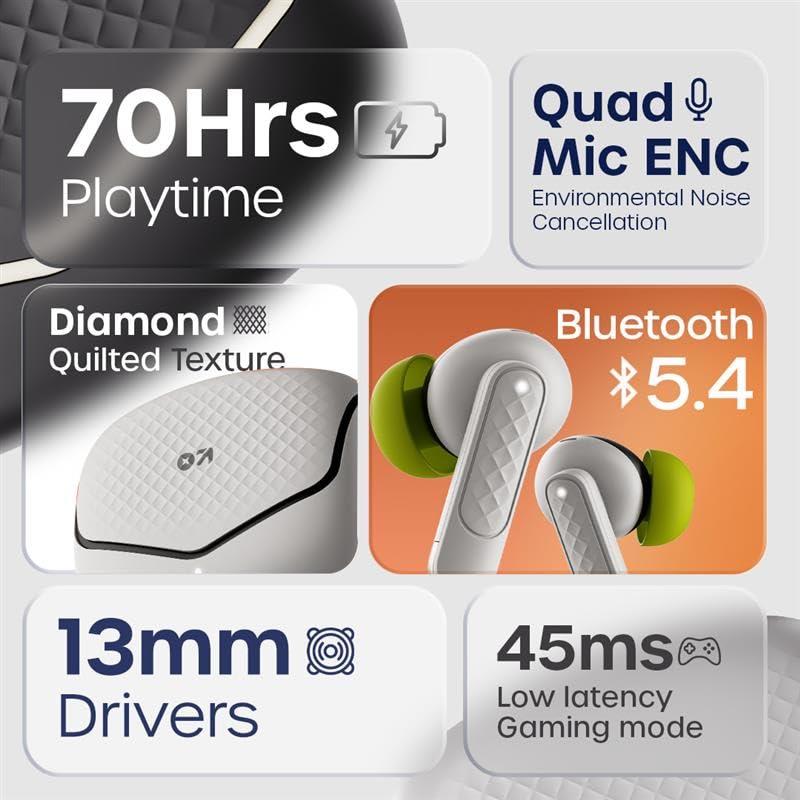
Слика 2.1: Готовоview of GOBOULT Z40 V2.0 key features.
3. Упутства за подешавање
3.1 Пуњење слушалица и футроле
Пре прве употребе, потпуно напуните слушалице и кућиште за пуњење.
- Ставите слушалице у кућиште за пуњење.
- Повежите УСБ кабл за пуњење са портом за пуњење на кућишту и са извором напајања.
- Индикаторска лампица на кућишту ће показати статус пуњења.
- A 10-minute charge provides approximately 120 minutes of playtime. The case offers up to 70 hours of total battery life for the earbuds.

Image 3.1: Charging and battery life details.
3.2 Блуетоотх упаривање
The GOBOULT Z40 V2.0 earbuds utilize Bluetooth v5.4 for quick and reliable pairing.
- Open the charging case. The earbuds will automatically enter pairing mode (Blink&Pair™ Tech).
- На свом уређају (паметном телефону, таблету, лаптопу) омогућите Блутут.
- Тражи available Bluetooth devices and select "GOBOULT Z40 V2.0" from the list.
- Једном када се повежу, слушалице ће назначити успешно упаривање.
- The earbuds will automatically reconnect to the last paired device when removed from the case.

Image 3.2: Bluetooth 5.4 and Blink&Pair™ technology.
4. Упутство за употребу
4.1 Контроле на додир
The earbuds feature intuitive touch controls for managing various functions:
- Пусти/паузирај: Један додир на обе слушалице.
- Следећа нумера: Двапут додирните десну слушалицу.
- Претходни запис: Двапут додирните леву слушалицу.
- Одговори/заврши позив: Један додир на обе слушалице.
- Одбиј позив: Притисните и држите било коју слушалицу 2 секунде.
- Активирање гласовног помоћника: Трипут додирните било коју слушалицу.
- Toggle Gaming Mode: Press and hold the right earbud for 2 seconds (specific gesture may vary, refer to quick start guide).

Image 4.1: Hands-free control and voice assistant activation.
4.2 Упућивање и примање позива
The Quad Mic ENC system ensures clear voice transmission during calls by reducing environmental noise.
- Ensure earbuds are connected to your device.
- Use the touch controls to answer, end, or reject calls.

Image 4.2: Quad Mic ENC for clear calls.
4.3 Режим играња
Activate Combat™ Gaming Mode for a low-latency audio experience, ideal for gaming and video playback.
- Refer to the touch control section for activating Gaming Mode (typically a press and hold gesture).
- This mode reduces audio latency to 45ms, providing synchronized sound with on-screen action.

Image 4.3: Low Latency Gaming Mode.
5. Одржавање
5.1 Чишћење
Редовно чишћење помаже у одржавању перформанси и дугог века трајања ваших слушалица.
- Користите меку, суву крпу која не оставља влакна да бисте обрисали слушалице и кућиште за пуњење.
- Gently remove any earwax or debris from the eartips and speaker mesh using a small brush or cotton swab.
- Избегавајте употребу абразивних материјала, алкохола или хемијских средстава за чишћење.
5.2 Отпорност на воду (IPX5)
The earbuds are rated IPX5 water-resistant, meaning they can withstand sweat and light splashes.
- Не потапајте слушалице у воду.
- Avoid exposing them to heavy rain or strong water jets.
- Уверите се да су слушалице суве пре него што их вратите у кућиште за пуњење како бисте спречили оштећења.
Image 5.1: IPX5 Water Resistance.
КСНУМКС. Решавање проблема
If you encounter any issues with your GOBOULT Z40 V2.0 earbuds, please refer to the following common solutions:
- Нема звука: Ensure the earbuds are charged and properly paired with your device. Check the volume level on both the earbuds and your device.
- Проблеми упаривања: Make sure Bluetooth is enabled on your device and the earbuds are in pairing mode. Try unpairing and re-pairing the earbuds.
- Интермитентна веза: Уверите се да сте у домету Bluetooth-а од 10 метара. Избегавајте препреке између слушалица и уређаја.
- Проблеми са пуњењем: Verify the charging cable is securely connected and the power source is active. Clean the charging contacts on both the earbuds and the case.
- Микрофон не ради: Ensure the earbuds are properly seated in your ears. Check if any debris is blocking the microphone ports.
If the problem persists, please contact GOBOULT customer support for further assistance.
7. Спецификације
Detailed technical specifications for the GOBOULT Z40 V2.0 True Wireless Earbuds:
| Феатуре | Спецификација |
|---|---|
| Назив модела | Z40 V2.0 (Airbass Earbuds) |
| Технологија повезивања | бежични (Блуетоотх) |
| Блуетоотх верзија | 5.4 |
| Блуетоотх домет | 10 метара |
| Величина аудио драјвера | 13 милиметара |
| Тип аудио драјвера | Динамички возач |
| Фреквенцијски одзив | 20 Хз |
| Осетљивост | 115 дБ |
| Трајање батерије (слушалице) | До 70 сати (са кућиштем за пуњење) |
| Време пуњења | 10 Minutes for 120 minutes playtime |
| Микрофон | Quad Mic with ENC |
| Аудио Латенци | 45 милисекунди (режим игре) |
| Отпорност на воду | ИПКС5 |
| Тип контролера | Додирните |
| Хардверски интерфејс | УСБ тип Ц |
| Постављање уха | Ин Еар |
| Димензије производа | 5.8 к 4 к 4.9 цм |
| Тежина артикла | 600 г (укупна тежина паковања) |

Image 7.1: 13mm Bass Drivers for enhanced audio.
8. Гаранција и подршка
8.1 Гаранција произвођача
The GOBOULT Z40 V2.0 True Wireless Earbuds come with a 1-year manufacturer’s warranty. This warranty covers manufacturing defects and ensures product quality and durability.
8.2 Корисничка подршка
For any product-related queries, technical assistance, or warranty claims, please contact GOBOULT customer support. Refer to the warranty card included in your package for contact details or visit the official GOBOULT webсајту.


