1. Увод
The Havit MS966SE is a high-performance tri-mode gaming mouse designed for versatility, precision, and comfort. It features a PixArt PMW3325 optical sensor, offering exceptional tracking accuracy and adjustable DPI settings up to 10,000. With its tri-mode connectivity, you can seamlessly switch between 2.4GHz wireless, Bluetooth 5.3, and USB-C wired modes to suit your gaming or work environment. The lightweight and ergonomic design ensures comfortable use during extended sessions, complemented by dynamic RGB lighting for a personalized aesthetic.

Figure 1: Havit MS966SE Gaming Mouse with USB-C cable.
2. Подешавање
2.1 Распакивање
Carefully remove the mouse and all accessories from the packaging. Ensure all components are present:
- Havit MS966SE Gaming Mouse
- УСБ-Ц на УСБ-А кабл
- 2.4ГХз УСБ пријемник
- Кориснички приручник (овај документ)
2.2 Повезивање миша
The MS966SE offers three connectivity options:
2.2.1 Бежични режим од 2.4 GHz
- Insert the 2.4GHz USB receiver into an available USB-A port on your computer.
- Locate the mode switch on the bottom of the mouse and slide it to the 2.4Г положај.
- The mouse will automatically connect to your computer.
2.2.2 Режим Bluetooth 5.3
- Locate the mode switch on the bottom of the mouse and slide it to the BT положај.
- На рачунару или мобилном уређају отворите подешавања за Bluetooth и потражите нове уређаје.
- Select "Havit MS966SE" from the list of available devices to pair.
2.2.3 Жични режим USB-C
- Connect one end of the provided USB-C cable to the mouse and the other end to an available USB-A port on your computer.
- Миш ће се аутоматски пребацити у жични режим и почети са пуњењем.
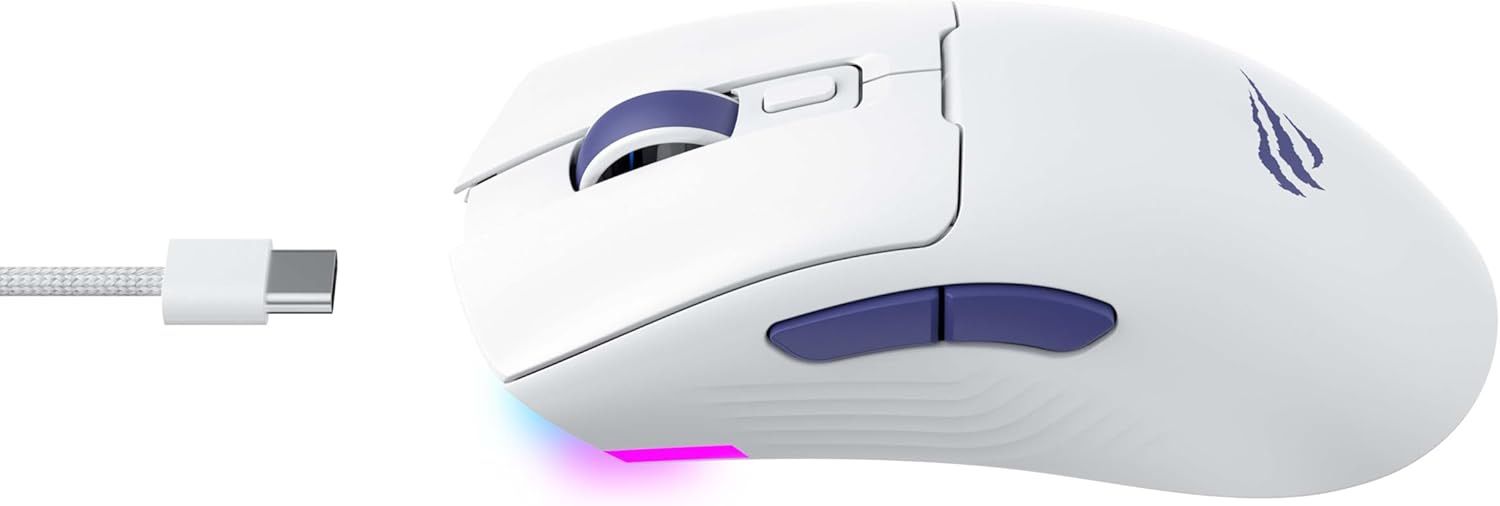
Слика 2: Страна view of the mouse, highlighting the USB-C port.
2.3 Пуњење миша
To charge the mouse, connect it to your computer using the USB-C cable. The mouse can be used in wired mode while charging. An indicator light on the mouse will show the charging status (refer to the manufacturer's website or product packaging for specific light behaviors).
3. Упутство за употребу
3.1 Функције дугмета
The Havit MS966SE features several programmable buttons for enhanced control:
- Леви клик: Стандардна функција примарног клика.
- Десни клик: Стандардна функција секундарног клика.
- Точак за померање: Scrolls up/down, and acts as a middle click button.
- Дугме за циклус DPI-ја: Located behind the scroll wheel, this button cycles through preset DPI sensitivity levels.
- Бочна дугмад (напред/назад): Обично се користи за навигацију у web browsers or can be programmed for in-game actions.

Figure 3: Side buttons and ergonomic design.
3.2 ДПИ подешавање
The PixArt PMW3325 sensor allows for adjustable DPI settings up to 10,000. Press the DPI cycle button (located behind the scroll wheel) to switch between different sensitivity levels. Each press will cycle to the next preset DPI, allowing you to quickly adapt to various tasks or game scenarios.
3.3 Connectivity Mode Switching
To switch between 2.4GHz wireless, Bluetooth, and wired modes, use the physical switch located on the bottom of the mouse. Ensure the correct mode is selected based on your connection preference.
3.4 RGB осветљење
The mouse features dynamic RGB lighting. Specific controls for RGB lighting effects, colors, and brightness may be available through dedicated software provided by Havit. Please visit the official Havit website for software downloads and further customization options.
4. Одржавање
4.1 Чишћење
- Искључите миш из рачунара пре чишћења.
- Користите меку, суву крпу која не оставља влакна да обришете површину миша.
- За тврдокорну прљавштину, благо дampОбришите крпу водом или благим раствором за чишћење. Избегавајте јаке хемикалије.
- Користите памучни штапић или компримовани ваздух да очистите простор око дугмади и точкића за померање.
- Не потапајте миш у воду или било коју течност.
4.2 Складиштење
When not in use for extended periods, store the mouse in a cool, dry place away from direct sunlight and extreme temperatures. If storing for a long time, ensure the mouse is fully charged to maintain battery health.
КСНУМКС. Решавање проблема
5.1 Миш не реагује
- Проверите снагу: Уверите се да је миш укључен и да има довољно напуњености батерије.
- Проверите повезаност:
- Жични режим: Уверите се да је USB-C кабл безбедно повезан и са мишем и са рачунаром. Покушајте са другим USB портом.
- Бежична веза од 2.4 GHz: Ensure the USB receiver is properly inserted and the mouse is set to 2.4G mode. Try a different USB port for the receiver.
- Блуетоотх режим: Ensure Bluetooth is enabled on your device and the mouse is paired. Try unpairing and re-pairing the mouse.
- Поново покрени: Поново покрените рачунар и миш.
5.2 DPI се не мења
- Ensure you are pressing the correct DPI cycle button.
- If using custom software, check the DPI settings within the software.
5.3 Lag or Disconnections in Wireless Mode
- сметње: Move the mouse closer to the receiver/device. Avoid obstacles between the mouse and receiver.
- Ниво батерије: Low battery can affect wireless performance. Charge the mouse.
- УСБ порт: Try connecting the 2.4GHz receiver to a different USB port, preferably a USB 2.0 port if available, as some USB 3.0 ports can cause interference.
6. Спецификације
| Бранд | Хавит |
| Модел | МС966СЕ |
| Технологија повезивања | Tri-Mode: 2.4GHz Wireless, Bluetooth 5.3, USB-C Wired |
| Сензорна технологија | Оптички (PixArt PMW3325) |
| ДПИ Левелс | Up to 10,000 adjustable DPI |
| Посебне карактеристике | Ergonomic Design, Dynamic RGB Lighting |
| Компатибилни оперативни системи | Виндовс, мацОС, Линук |
| Компатибилни уређаји | Notebook, Personal Computer, Tablet, Smartphone |
| Тежина миша | Отприлике 68 грама |
| Тип батерије | Литијум-јонски |
7. Гаранција и подршка
7.1 Информације о гаранцији
This Havit MS966SE Gaming Mouse comes with a 1 године гаранције произвођачаМолимо вас да сачувате доказ о куповини за потребе гаранције. Гаранција покрива недостатке у материјалу и изради при нормалној употреби.
7.2 Корисничка подршка
For technical assistance, troubleshooting beyond this manual, or warranty inquiries, please contact Havit customer service directly. You can find the most up-to-date contact information and support resources on the official Havit webсајт (ввв.хавит.цом).