Увод
This manual provides essential information for the safe and efficient use of your Philips Smart TV Ambilight THE ONE 55 inch 4K 144 Hz, model 55PUG8929/78. Please read these instructions carefully before operating the device and retain them for future reference.
Your Philips TV features Ambilight technology, a P5 processor for enhanced image quality, Dolby Vision and Dolby Atmos for immersive audiovisual experiences, a 144Hz refresh rate with VRR and AMD FreeSync Premium for gaming, and the Titan OS smart TV platform.
Сетуп
1. Распакивање и садржај пакета
Пажљиво извадите све компоненте из амбалаже. Уверите се да су сви предмети присутни пре него што одбаците материјал за паковање.
- 1 Smart TV Philips 55"
- 1 Даљинско управљање
- 2 ААА батерије
- 1 Кабл за напајање
- 1 Водич за брзи почетак
- 1 Legal and safety leaflet
- 1 Сталак за сто
Note: The product does not include installation services. For apartment delivery, lifting, or wall mounting, the customer is responsible. Philips is not responsible for installation or assembly.
2. Assembling the Stand or Wall Mounting
If using the included table stand, follow the instructions in the quick start guide to securely attach it to the TV. Ensure all screws are tightened properly. If wall mounting, use a VESA-compatible wall mount (sold separately) and consult a professional for installation to ensure safety and proper alignment. The TV supports VESA 30cm mounting.

Слика: Фронт view of the Philips 55 inch Smart TV with its table stand assembled.
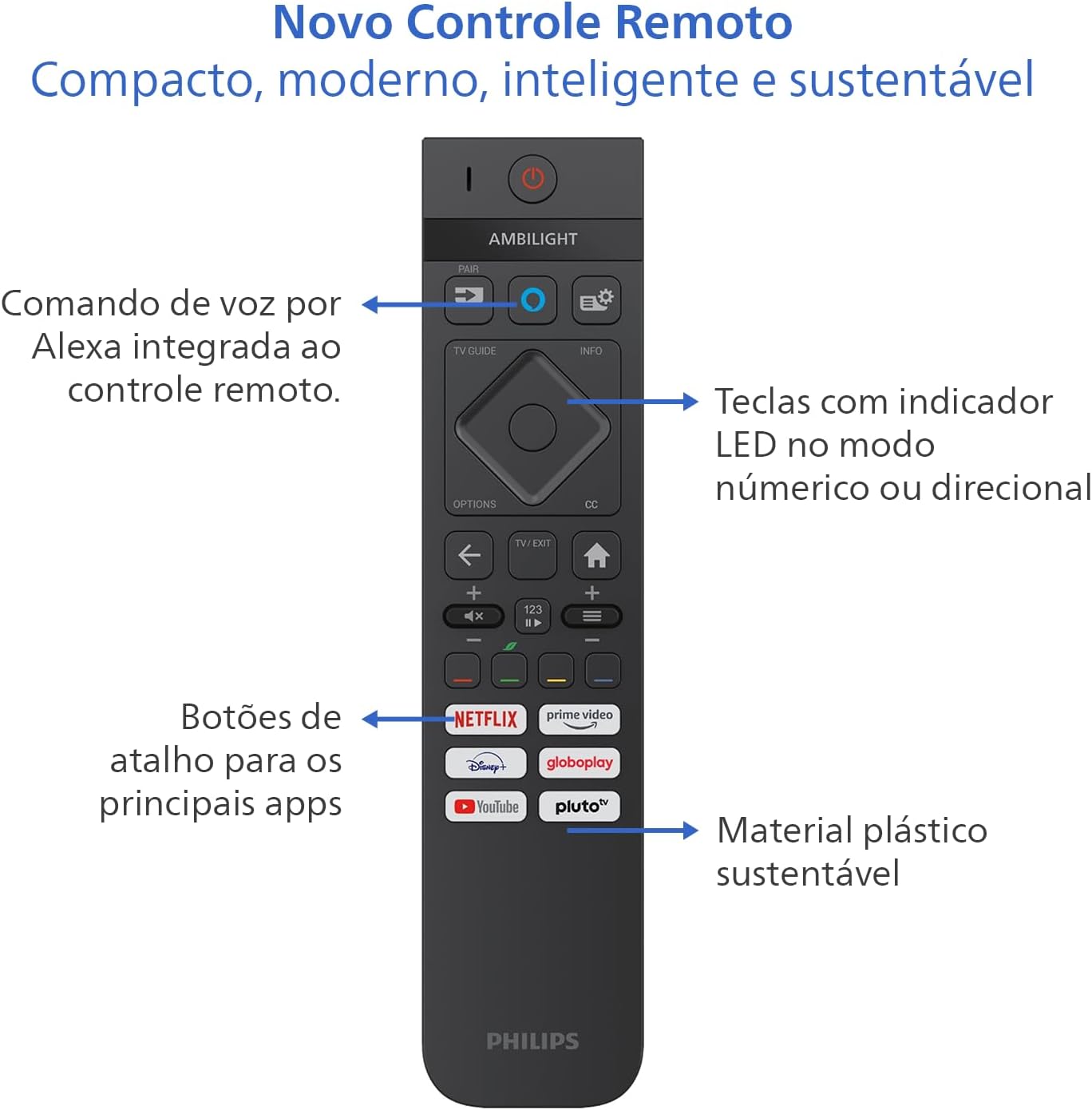
Image: Diagram showing the dimensions of the Philips 55 inch Smart TV with and without the stand, including VESA wall mount specifications (30cm).
3. Повезивање периферних уређаја
Connect your devices to the TV's ports. Refer to the back and side views for port locations.
- Снага: Connect the power cable to the TV and a suitable electrical outlet (110V/220V compatible).
- ДВИ: Use HDMI 2.1 ports for high-definition devices like gaming consoles, Blu-ray players, or set-top boxes. There are 4 HDMI ports available.
- УСБ: Connect USB drives for media playback or external devices. There are 2 USB ports.
- Antenna/RF: Connect your antenna cable for terrestrial TV reception.
- Етернет (РЈ-45): За жичану интернет везу.
- Audio L-R: Аналогни аудио улаз.
- SPDIF (оптички аудио): За дигитални аудио излаз на звучне панеле или кућне биоскопе.
- Излаз за слушалице: За повезивање слушалица.

Слика: Сајд професионалацfile of the Philips 55 inch Smart TV, highlighting the accessible USB ports and other side connections.

Слика: Позади view of the Philips 55 inch Smart TV, displaying the full array of input and output ports for various connections.
4. Почетно укључивање и подешавање мреже
After connecting the power cable, press the power button on the remote control. Follow the on-screen instructions to complete the initial setup, including language selection, country, and network connection (Wi-Fi or Ethernet). The TV supports Wi-Fi Dual Band and Bluetooth 5.2 for wireless connectivity.
Упутство за употребу
1. Функције даљинског управљача
The included remote control is designed for intuitive navigation and features voice command with integrated Alexa. Insert the two AAA batteries into the remote control before use.

Слика: Детаљна view of the Philips Smart TV remote control, highlighting the voice command button (Alexa), LED indicator keys, and dedicated shortcut buttons for popular streaming applications.
- Дугме за напајање: Укључује или искључује ТВ.
- Voice Command (Alexa): Press and hold to use voice commands for searching content, controlling smart home devices, and more.
- Навигациона табла: Use the directional buttons to navigate menus and select options.
- Дугмад за пречице: Direct access to popular streaming apps like Netflix, Prime Video, YouTube, and Pluto TV.
- Јачина звука/Канал: Подесите јачину звука и промените канале.
- LED Indicator Keys: Keys with LED indicators for numeric or directional mode.
2. Smart TV Features (Titan OS)
Your TV runs on Titan OS, offering a user-friendly interface and quick access to various applications. The home screen is customizable, allowing you to prioritize your favorite apps and content.

Image: The Philips Smart TV's home screen, showing a selection of streaming applications and a personalized content layout.
- Personalized Home Screen: Access your favorite content and applications with recommendations tailored to your preferences.
- Интуитивни интерфејс: Organize your home screen by prioritizing frequently used applications for easy daily access.
- Откривање садржаја: Easily find new content with agile navigation and smart search functions.
3. Ambilight Technology
Ambilight projects colors from the screen onto the surrounding wall, enhancing immersion. Your TV features three-sided Ambilight with 8 illumination modes.

Image: A Philips Ambilight TV displaying dynamic backlighting that extends the on-screen colors onto the wall, creating an immersive viewинг искуство.
- Природни: Softer colors and brightness for visual comfort.
- живописно: Stronger, more vibrant Ambilight colors to create a sense of expanded imagery.
- Lounge: Can be active even when the TV is off, creating a cozy ambient atmosphere.
- игра: Adapts lights to dark and dynamic scenes, enhancing gaming immersion.
- музика: Ambilight follows the rhythm of music, ideal for creating a festive home environment.
- AmbiWake Up: Simulates sunrise with soft Ambilight, gentle music, and weather forecast.
- Ambi-sleep: With the screen off, Ambilight emits an orange light and nature sounds to promote sleep.
- Аурора: Transforms the TV into a decorative piece, displaying continuous animations for a pleasant ambiance.

Image: Comparison of Ambilight's Natural mode (soft, comfortable lighting) and Vivid mode (strong, vibrant lighting for expanded imagery).

Image: Comparison of Ambilight's Lounge mode (ambient lighting when TV is off) and Game mode (dynamic lighting for gaming immersion).

Image: Comparison of Ambilight's Music mode (lights synchronize with music) and AmbiWake Up mode (simulates sunrise).

Image: Comparison of Ambilight's Ambi-sleep mode (orange light and nature sounds for sleep) and Aurora mode (decorative animations).
4. Квалитет слике и звука
The TV features a P5 processor, 4K resolution, Dolby Vision, and HDR10+ for exceptional image quality. The audio system includes 40W RMS, Dolby Atmos, and DTS Play-Fi for immersive sound.

Image: Explanation of the Philips P5 Perfect Picture Engine, illustrating how it optimizes colors, contrasts, and movements for realistic images.

Image: Visual comparison demonstrating the enhanced detail and richness of images with Dolby Vision and HDR compared to standard display.
- P5 Processor: Optimizes colors, contrasts, and movements in real-time for vivid and realistic images.
- Долби Вижн и ХДР10+: Provides cinematic visual experience with impressive brightness, contrast, and color detail in 4K resolution.
- 40W RMS Audio: Powerful sound output that fills the environment with clarity and intensity.
- Долби Атмос и ДТС:X Advanced audio technologies creating a three-dimensional sound effect for an immersive experience.
- Intellisound with AI: Automatic audio adjustment based on content, ensuring clear and balanced sound from subtle dialogues to intense soundtracks.
5. Функције за игре
Designed for gamers, this TV offers a fluid and responsive gaming experience.

Image: The Philips Smart TV's Game Bar interface, showing various settings for optimizing the gaming experience, including VRR, ALLM, and FreeSync Premium.
- 144Hz VRR: Variable Refresh Rate ensures ultra-fast, tear-free, and stutter-free motion.
- АМД ФрееСинц Премиум: Provides stable, fluid, and lag-free gaming.
- Трака са играма: Брзо приступите подешавањима специфичним за игре.
- АЛЛМ (Аутоматски режим ниске латенције): Automatically switches to low-latency mode for responsive gaming.
- Цлоуд Гаминг: Compatible with cloud gaming services like Blacknut.
Одржавање
1. Чишћење телевизора
- Екран: Нежно обришите екран меком крпом која не оставља влакна. За тврдокорне мрље, благо обришитеampОбришите крпу водом или специјализованим средством за чишћење екрана. Никада не прскајте течност директно на екран.
- Кабинет: Користите меку, суву крпу за чишћење кућишта телевизора. Избегавајте абразивна средства за чишћење или раствараче.
- даљински управљач: Обришите меком, сувом крпом.
2. Ажурирања софтвера
Periodically check for software updates to ensure optimal performance and access to the latest features. You can usually find this option in the TV's settings menu under "System" or "About TV". Ensure your TV is connected to the internet for updates.
Решавање проблема
If you encounter issues with your TV, refer to the following common troubleshooting steps before contacting support.
Но Повер
- Ensure the power cable is securely connected to both the TV and the electrical outlet.
- Проверите да ли утичница ради тако што ћете прикључити други уређај.
- Покушајте да притиснете дугме за напајање на самом телевизору, не само на даљинском управљачу.
Нема слике или лош квалитет слике
- Проверите да ли је изабран исправан улазни извор (нпр. HDMI 1, TV).
- Проверите све кабловске везе (HDMI, антена) да ли су лабаве или оштећене.
- Подесите подешавања слике (осветљеност, контраст, боју) у менију телевизора.
- If using an external device, try connecting it to a different HDMI port or another TV to rule out device issues.
Нема звука или је лош квалитет звука
- Уверите се да звук није искључен и да је појачан.
- Check audio settings in the TV menu, ensuring the correct audio output is selected (e.g., TV speakers, external audio system).
- If using external speakers or a soundbar, check their power and connections.
Даљински управљач не ради
- Замените батерије новим ААА батеријама.
- Уверите се да нема препрека између даљинског управљача и ИР сензора телевизора.
- If the remote uses Bluetooth, try re-pairing it with the TV (refer to the TV's settings for pairing instructions).
Network/Internet Connection Issues
- Проверите рутер и модем да бисте били сигурни да су укључени и да исправно раде.
- Рестартујте рутер и модем.
- If using Wi-Fi, ensure the TV is within range of your router. Try connecting via Ethernet cable if possible.
- Verify Wi-Fi password if prompted.
Спецификације
| Феатуре | Детаљ |
|---|---|
| Бранд | Пхилипс |
| Модел | 55PUG8929/78 |
| Величина екрана | 55 инча |
| Дисплаи Тецхнологи | 4K UHD, LED, IPS |
| Резолуција | 3840 x 2160 пиксела (4K) |
| Рефресх Рате | 144 Хз |
| Време одговора | 8 милисекунди |
| Viewинг Англе | 178 степени |
| Аспецт Ратио | 16:9 |
| Однос контраста | 1:200,000 |
| Оперативни систем | Титан ОС |
| Капацитет меморије | 8 ГБ |
| Посебне карактеристике | Dolby Atmos / DTS-X, HDR10+/HLG/HDR10, Titan OS, Ambilight |
| Аудио излазна снага | 40 вати (РМС) |
| Surround Sound Channels | 2.0 |
| Технологија повезивања | HDMI, USB, Wi-Fi, Bluetooth |
| ХДМИ портови | 4 (HDMI 2.1 compatible) |
| УСБ портови | 2 |
| Друге везе | 1 Audio L-R, 1 RF (Antenna), 1 SPDIF (Optical Audio), 1 Headphone Output, 1 Ethernet RJ-45 |
| Бежично повезивање | Bluetooth 5.2, Wi-Fi Dual Band |
| Волtage | 110 волти, 220 волти |
| Ознака енергетске ефикасности | A (ENCE) |
| Димензије производа (без постоља) | 123 к 8.1 к 72 цм (Ш к Д к В) |
| Product Weight (without stand) | 14.2 кг |
| Тежина производа (са постољем) | 14.6 кг |
| Боја | Црно |
| Цертифицатион | ИНМЕТРО |
| Година | 2025 |
Информације о гаранцији
Your Philips Smart TV model 55PUG8929/78 comes with a Двогодишња гаранција произвођача. This warranty covers defects in materials and workmanship under normal use. Please retain your proof of purchase for warranty claims. For detailed terms and conditions, refer to the legal and safety leaflet included in your package.
Корисничка подршка
For further assistance, technical support, or warranty claims, please contact Philips customer service. You can find contact information on the Philips official webсајту или у документацији коју сте добили уз телевизор.
Званични Филипс Webсајт: ввв.пхилипс.цом
Повезани документи - 55PUG8929/78
 |
Спецификације Philips 65PUS8919/12 "The One" 4K Ambilight телевизора Детаљне спецификације и карактеристике Philips 65PUS8919/12 „The One“ 4K Ambilight телевизора, укључујући P5 Perfect Picture Engine, Titan OS, Dolby Vision/Atmos, HDMI 2.1, VRR, FreeSync и компатибилност са DTS Play-Fi. |
 |
Пхилипс Кстра 55ПМЛ9019: 4К КД МиниЛЕД Амбилигхт ТВ - Преглед значајки и спецификација Детаљан преглед Пхилипс Кстра 55ПМЛ9019 4К КД МиниЛЕД Амбилигхт ТВ. Сазнајте о напредној слици, звуку, Амбилигхт технологији, ТИТАН ОС, гаминг значајкама, одрживости и повезивању. |
 |
Philips The One 75PUS8909/12 4K Ambilight телевизор - Спецификације и карактеристике Истражите Philips The One 75PUS8909/12 4K Ambilight телевизор. Откријте његову импресивну Ambilight технологију, запањујући P5 Perfect Picture Engine, Dolby Vision/Atmos звук, паметне функције Titan OS-а и напредне могућности за играње игара. |
 |
Пхилипс Телевизор Амбилигхт 4К - Тхе Оне (43ПУС8919/12): Опис и спецификације Дескопери Пхилипс Телевизор Амбилигхт 4К, модел Тхе Оне (43ПУС8919/12). О визуелном доживљају и изузетним сонорама са процесором П5, ТИТАН ОС, Долби Висион/Атмос и функцијама за играње игара. Афлати специфицатииле цомплете. |
 |
Пхилипс Тхе Оне 4К Амбилигхт ТВ 43ПУС9060/12 - Преглед и спецификације Откријте телевизор Пхилипс Тхе Оне 4К Амбилигхт ТВ (модел 43ПУС9060/12) са 4К КЛЕД, процесором П5, Долби Висион/Атмос и Титан ОС. Научите о функционисању игрица, звуку и коришћењу. |
 |
Пхилипс Кстра 4К КД МиниЛЕД Амбилигхт ТВ - סקירה ומפרט גלו את טלוויזיית Пхилипс Кстра 4К КД МиниЛЕД Амбилигхт, עם צבעים מרהיבים, פירוט יום וטכנולוגיית Амбилигхт סוחפת. הכירו את מנוע П5 Перфецт Пицтуре, מערכת ההפעלה ТИТАН ОС, Долби Висион/Атмос и |