1. Производ је готовview
The JOMAA 78 Keys Dual Mode Wireless Trackball Keyboard offers versatile connectivity and ergonomic design for enhanced productivity across multiple devices. Featuring both 2.4GHz wireless and Bluetooth 5.0, it allows seamless switching between up to three connected devices. The integrated 19mm optical trackball provides precise cursor control, eliminating the need for a separate mouse and saving valuable desk space. Its compact, lightweight, and energy-efficient design makes it ideal for various computing environments.

Image 1: JOMAA 78 Keys Dual Mode Wireless Trackball Keyboard
This image displays the sleek, silver-colored JOMAA 78 Keys Dual Mode Wireless Trackball Keyboard, highlighting its compact layout and integrated trackball. The image also shows icons indicating system-wide compatibility (Windows, Mac, iOS, Android), multi-device association (three devices), and dual wireless connectivity (Bluetooth/2.4G).
2. Садржај пакета
- JOMAA 78 Keys Dual Mode Wireless Trackball Keyboard
- 2.4GHz USB Receiver (stored inside the keyboard's battery compartment)
- УСБ кабл за пуњење
- Водич за брзи почетак
- 2 x AA Batteries (included, pre-installed in some models)
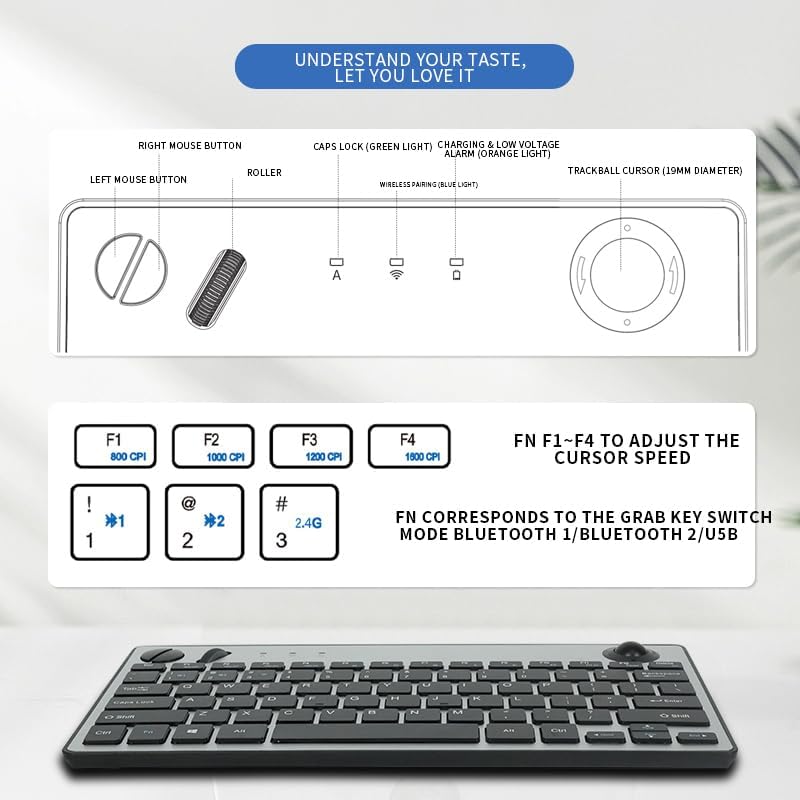
Image 2: JOMAA Keyboard Package Contents Diagram
This diagram illustrates the various components of the JOMAA keyboard, including the keyboard itself, the left and right mouse buttons, the roller, Caps Lock indicator, charging and low voltage alarm lights, and the 19mm trackball. It also details the DPI adjustment keys (F1-F4) and the function keys for switching between Bluetooth 1, Bluetooth 2, and USB modes.
3. Карактеристике производа
- Бежично повезивање у два режима: Supports stable 2.4GHz wireless (nano receiver included) and advanced Bluetooth 5.0 connection.
- Упаривање више уређаја: Easily pair with and switch between up to 3 devices (PC, tablet, phone) simultaneously.
- Широка компатибилност: Broadly compatible with Windows, macOS, iOS, and Android operating systems.
- Integrated Trackball Design: Features a built-in 19mm precision optical trackball for accurate and smooth cursor control, eliminating the need for a separate mouse.
- Енергетски ефикасан: Low power consumption (≤10mA working current) for long-lasting battery life with 2 AA batteries.
- Преносиви дизајн: Compact 78-key layout and lightweight (403g) for travel or clutter-free workspaces.
- Плуг-анд-Плаи: No drivers needed for 2.4G connection; quick Bluetooth pairing.
- Ергономија прилагођена кориснику: Thoughtful key layout and thumb-operated trackball designed to reduce arm movement and wrist strain.

Image 3: JOMAA Keyboard Multi-Device Compatibility
This image illustrates the keyboard's ability to connect to multiple devices, including a smartphone, tablet, and desktop computer, via Bluetooth (BT1, BT2) and a 2.4G USB receiver, allowing for seamless switching between them.
4. Упутства за подешавање
4.1. Инсталација батерије
- Пронађите одељак за батерију на доњој страни тастатуре.
- Отворите поклопац батерије.
- Уметните 2 АА батерије, водећи рачуна о исправном поларитету (+/-).
- Добро затворите поклопац батерије.
4.2. Бежична веза од 2.4 GHz
- Locate the 2.4GHz USB receiver, usually stored in the keyboard's battery compartment.
- Прикључите УСБ пријемник у слободан УСБ порт на рачунару или уређају.
- Slide the power switch on the keyboard to the 'ON' position.
- Press the 'FN' key + '3' key (labeled 2.4G) to select 2.4G mode. The indicator light will illuminate.
- Your device should automatically detect and connect to the keyboard.
4.3. Блуетоотх упаривање
Тастатура подржава два Bluetooth канала (BT1 и BT2).
- Slide the power switch on the keyboard to the 'ON' position.
- Press and hold the 'FN' key + '1' key (for BT1) or 'FN' key + '2' key (for BT2) for 3-5 seconds until the corresponding Bluetooth indicator light starts blinking rapidly. This indicates the keyboard is in pairing mode.
- На свом уређају (рачунару, таблету, паметном телефону) идите на подешавања Bluetooth-а.
- Тражи new devices and select "JOMAA Keyboard" (or similar name) from the list.
- Follow any on-screen prompts to complete the pairing process. The indicator light on the keyboard will stop blinking and remain solid once connected.
- To pair another device, repeat steps 2-5 using the other available Bluetooth channel.
Video 1: JOMAA Keyboard Unboxing and Setup
This video demonstrates the unboxing of the JOMAA keyboard, showing its sleek design and how to install the batteries and connect via the 2.4GHz USB receiver. It highlights the ease of setup and the keyboard's sturdy construction.
5. Упутство за употребу
5.1. Пребацивање између уређаја
Once paired, you can switch between connected devices by pressing the 'FN' key along with the corresponding channel key:
- ФН + 1: Пребаците се на Блуетоотх уређај 1
- ФН + 2: Пребаците се на Блуетоотх уређај 2
- ФН + 3: Switch to 2.4GHz USB Receiver Device
5.2. Trackball Usage
The integrated 19mm optical trackball is located on the right side of the keyboard. Use your thumb to control the cursor movement. The left and right mouse click buttons are positioned conveniently next to the trackball.

Image 4: JOMAA Keyboard Trackball and X-Structure
This image highlights the smooth trackball for accurate and precise cursor positioning. It also features a diagram illustrating the X-Structure of the keys, which provides a steady and great rebound feeling for comfortable typing.
5.3. Adjusting Trackball DPI (Cursor Speed)
You can adjust the trackball's DPI (dots per inch) to change cursor sensitivity:
- ФН + Ф1: 800 ЦПИ
- ФН + Ф2: 1000 ЦПИ
- ФН + Ф3: 1200 ЦПИ
- ФН + Ф4: 1600 ЦПИ
5.4. Media and Function Keys
The F1-F12 keys have secondary media functions. To activate these, press the 'FN' key simultaneously with the desired F-key.
- ФН + Ф5: Превиоус Трацк
- ФН + Ф6: Пусти/Паузирај
- ФН + Ф7: Нект Трацк
- ФН + Ф8: Муте
- ФН + Ф9: Утишавање звука
- ФН + Ф10: Волуме Уп
6. Информације о батерији и пуњење
The keyboard operates on 2 AA batteries. For optimal performance and battery life, use high-quality alkaline batteries. The low power consumption design ensures extended usage.
- Лов Волtagе Аларм: An orange indicator light will illuminate when the battery level is low, signaling that batteries need replacement.
- Пуњење: If your model supports rechargeable batteries, use the provided USB charging cable to connect the keyboard to a power source. The charging indicator light will show charging status.
7. Одржавање
- Чишћење: Користите меку, суву крпу за чишћење површине тастатуре. За тврдокорну прљавштину, благо обришитеampОбришите крпу водом или благим средством за чишћење. Избегавајте прекомерну влагу.
- Trackball Cleaning: Periodically remove the trackball (if removable) and clean its housing and the ball itself to ensure smooth operation.
- Складиштење: When not in use for extended periods, turn off the keyboard to conserve battery life. Store in a cool, dry place.
КСНУМКС. Решавање проблема
8.1. Проблеми са повезивањем
- Без конекције: Ensure the keyboard is powered on and the correct channel (BT1, BT2, or 2.4G) is selected.
- 2.4 ГХз: Verify the USB receiver is securely plugged into your device. Try a different USB port.
- Блуетоотх: Ensure Bluetooth is enabled on your device and the keyboard is in pairing mode (blinking indicator). Remove previous pairings on your device and try re-pairing.
- сметње: Приближите тастатуру свом уређају и даље од других бежичних уређаја који могу изазвати сметње.
8.2. Тастатура не реагује
- Провера батерије: Replace batteries if the low voltage indicator is on or if the keyboard is unresponsive.
- Циклус напајања: Turn the keyboard off, wait a few seconds, then turn it back on.
- Поново упарите: If issues persist, try re-pairing the keyboard with your device.
8.3. Trackball Not Working
- Clean Trackball: Dust or debris can affect trackball performance. Clean the trackball and its housing as described in the Maintenance section.
- ДПИ подешавање: Ensure the DPI setting is not too low (FN + F1). Adjust to a higher setting if needed.
9. Спецификације
| Модел | 78 Keys Dual Mode Wireless Trackball Keyboard |
| Технологија повезивања | Блутут 5.0, 2.4 GHz USB |
| Број кључева | 78 |
| Trackball Size | 19mm Optical |
| Компатибилност оперативног система | Виндовс, мацОС, иОС, Андроид |
| Оператинг Волtage | 3V |
| Воркинг Цуррент | ≤10мА |
| Трансмиссион Дистанце | 7-10 meters (33 feet) |
| Извор напајања | 2 к АА батерије |
| Тежина артикла | 1.14 pounds (403g without battery) |
| Димензије | 12.6 к 10.63 к 1.57 инча |

Image 5: JOMAA Keyboard Dimensions and Specifications
Ова слика пружа детаљан view of the keyboard's dimensions (28.6cm length, 14.9cm width, 3.1cm height) and lists key specifications such as transmission distance (7-10m), number of keys (78), compatible OS (Windows 7/10/11, Mac 10.6-15.2), operating current (≤10mA), trackball size (19mm), weight (403g without battery), and operating voltagе (3В).
10. Гаранција и подршка
For warranty information, technical support, or customer service inquiries, please refer to the official JOMAA webсајт или директно контактирајте њихову корисничку подршку. Сачувајте рачун о куповини за потребе рекламације у гаранцији.


