1. Увод
Welcome to the user manual for your new TCL 40T T608DL smartphone. This guide provides essential information on setting up, operating, maintaining, and troubleshooting your device. The TCL 40T T608DL runs on Android 13, featuring a 6.75-inch HD+ display, 32GB of internal storage, and 3GB of RAM, designed for a smooth and responsive user experience.
2. Шта је у кутији
Молимо вас да проверите садржај пакета како бисте били сигурни да су сви предмети присутни:
- TCL 40T T608DL Smartphone
- УСБ-Ц кабл
- Алат за избацивање СИМ картице
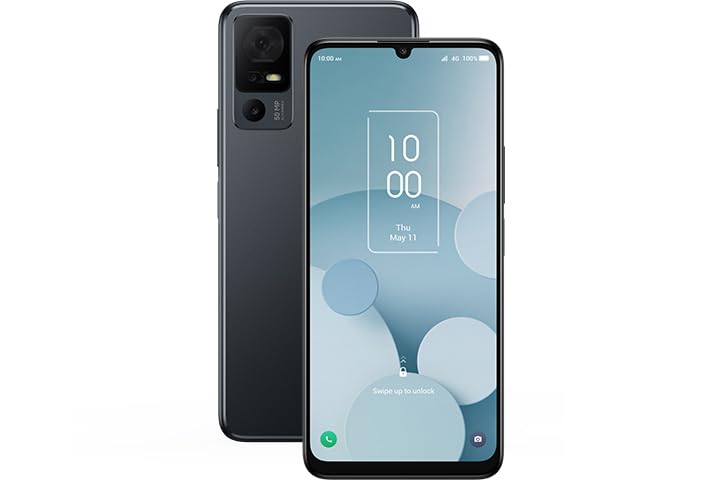
Image: The TCL 40T T608DL smartphone, showcasing its sleek black design and large display.
3. Подешавање
3.1. Уметање СИМ картице
- Пронађите лежиште за СИМ картицу са стране телефона.
- Уметните алат за избацивање СИМ картице у мали отвор поред лежишта и лагано притисните док лежиште не искочи.
- Ставите Nano-SIM картицу у лежиште са златним контактима окренутим надоле. Уверите се да је правилно оријентисана.
- Пажљиво вратите лежиште у телефон док не кликне на своје место.
3.2. Почетно укључивање и подешавање
- Press and hold the Power button until the TCL logo appears.
- Пратите упутства на екрану да бисте изабрали језик, повезали се са Wi-Fi мрежом и подесили свој Google налог.
- You will also be guided through setting up security features like a PIN, pattern, or fingerprint.
4. Управљање вашим уређајем
4.1. Основна навигација
The TCL 40T T608DL uses a touchscreen interface. Swipe up, down, left, or right to navigate through menus and home screens. Tap icons to open applications and use pinch-to-zoom gestures for images and web странице.
4.2. Функције Андроида 13
Your device runs on Android 13, offering enhanced privacy controls, improved notification management, and personalized themes. Explore the Settings menu to customize your experience.
4.3. Управљање апликацијама
Download new applications from the Google Play Store. To uninstall an app, press and hold its icon on the home screen or app drawer, then select "Uninstall" or drag it to the uninstall option.
5. Карактеристике камере
The TCL 40T T608DL is equipped with AI-enhanced cameras designed to capture sharp photos and facilitate clear video chats. Open the Camera app to access various modes, including Photo, Video, Portrait, and more. Utilize the AI features for automatic scene detection and optimal image settings.
6. Управљање батеријом
Your TCL 40T T608DL features a long-lasting 5000 mAh battery. To optimize battery life:
- Смањите осветљеност екрана.
- Искључите Ви-Фи, Блуетоотх и ГПС када се не користе.
- Затворите позадинске апликације.
- Enable Battery Saver mode from the Settings menu.
The device supports USB-C fast charging. Use the provided USB-C cable and a compatible power adapter for efficient charging.
7. Одржавање
7.1. Чишћење уређаја
Use a soft, lint-free cloth to clean the screen and body of your phone. Avoid using harsh chemicals or abrasive materials. Do not expose the device to excessive moisture.
7.2. Ажурирања софтвера
Редовно проверавајте да ли постоје ажурирања софтвера како бисте били сигурни да ваш уређај има најновије функције, безбедносне закрпе и побољшања перформанси. Идите на Подешавања > Систем > Ажурирање система да проверите доступна ажурирања.
КСНУМКС. Решавање проблема
8.1. Уређај не реагује
If your phone becomes unresponsive, press and hold the Power button for approximately 10-15 seconds to force a restart.
8.2. Проблеми са мрежном повезивањем
Ensure your SIM card is properly inserted. Try toggling Airplane Mode on and off. If issues persist, contact your service provider (Straight Talk).
8.3. Фацтори Ресет
A factory reset will erase all data from your phone and restore it to its original settings. Направите резервну копију података пре него што наставите. Иди на Подешавања > Систем > Опције ресетовања > Обриши све податке (ресетовање на фабричка подешавања).
9. Спецификације
| Назив модела | TCL 40T |
| Број модела | Т608ДЛ |
| Оперативни систем | Андроид 13.0 |
| Дисплаи | 6.75" HD+ |
| Интерна меморија | 32ГБ |
| РАМ | 3ГБ |
| Капацитет батерије | 5000 мАх |
| Вирелесс Царриер | Страигхт Талк |
| Целлулар Тецхнологи | 4G |
| Тип конектора | УСБ тип Ц |
10. Гаранција и подршка
For warranty information and technical support, please refer to the warranty card included with your product or visit the official TCL support webсајт. Тамо обично можете пронаћи ресурсе за подршку, често постављана питања и контакт информације за корисничку подршку.
TCL Official Webсајт: ввв.тцл.цом


