1. Увод
The APC Smart-UPS SMT750C is an Uninterruptible Power Supply (UPS) designed to provide reliable power and surge protection for critical electronic equipment. This unit offers 750VA/500W of line-interactive pure sine wave power, making it suitable for servers, storage systems, network closets, business VoIP setups, desktop computers, and retail POS systems. It features Automatic Voltage Regulation (AVR) to correct voltage fluctuations and a SmartConnect Ethernet Port for cloud-based remote monitoring. This manual provides essential information for the safe and efficient installation, operation, and maintenance of your SMT750C UPS.
2. Безбедносне информације
WARNING: Risk of electric shock. Refer to bottom of unit for warnings.
- Пажљиво прочитајте сва упутства пре инсталације и рада.
- This UPS contains internal batteries and may present a shock hazard even when disconnected from the AC power source.
- Do not open or disassemble the UPS. There are no user-serviceable parts inside except for the battery.
- Прикључите УПС само на уземљену утичницу.
- Do not use the UPS in direct sunlight, near heat sources, or in areas with excessive humidity.
- Ensure proper ventilation around the UPS. Do not block any ventilation openings.
3. Садржај пакета
Проверите да ли су сви предмети присутни приликом распакивања:
- APC Smart-UPS SMT750C Unit
- 16GB USB 3.0 Drive
- Кориснички приручник (овај документ)
- УСБ комуникациони кабл
- Повер Цорд

Image: Included 16GB USB 3.0 Drive. This USB drive provides additional storage or file преносне могућности.
4. Производ је готовview
Предња плоча
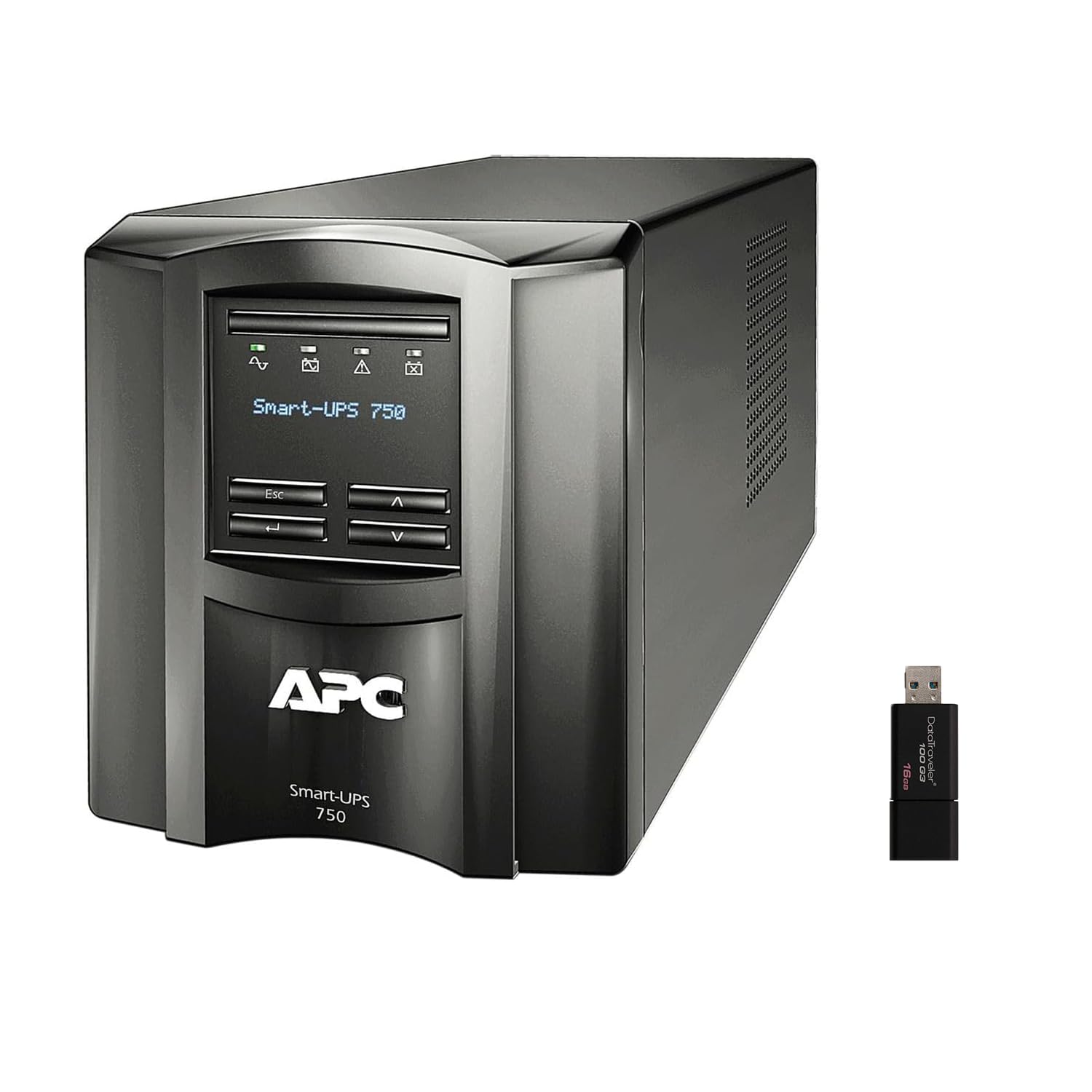
Слика: Предња и бочна страна view of the APC Smart-UPS SMT750C. This image displays the compact tower design of the UPS unit.
- Дугме за напајање: Controls the main power to the UPS.
- ЛЦД екран: Provides real-time status information, load levels, battery charge, and estimated runtime.
- Дугмад за навигацију: Used to scroll through display menus and adjust settings.
Реар Панел
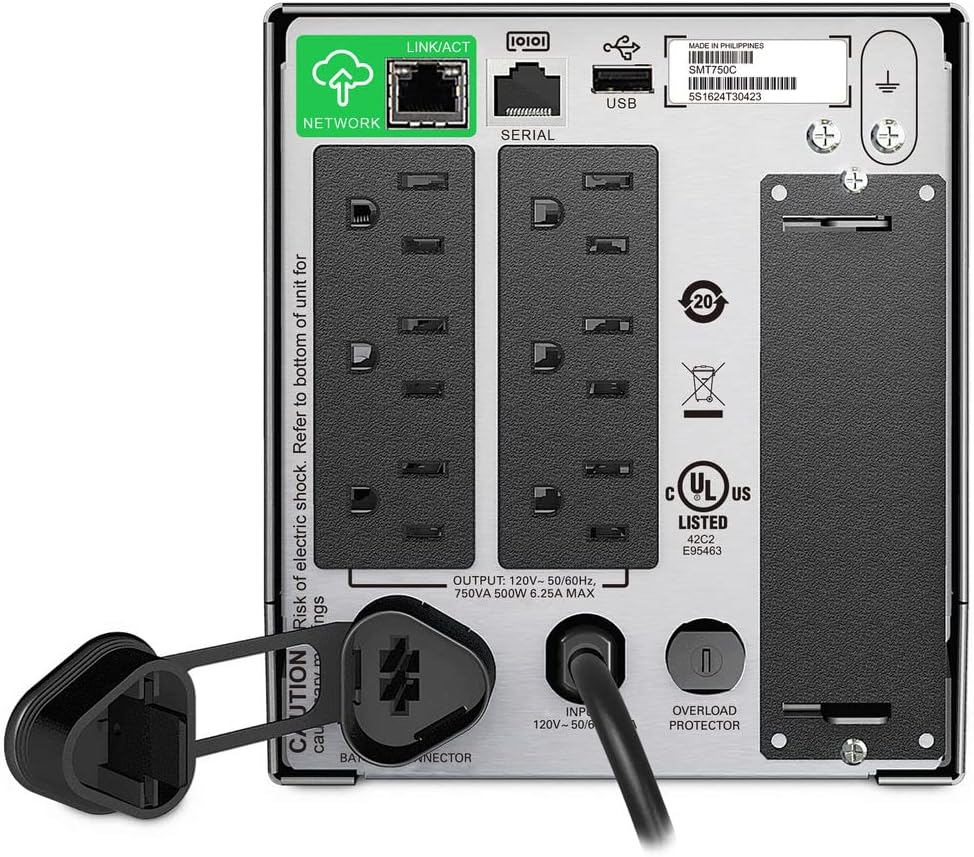
Image: Rear panel of the APC Smart-UPS SMT750C. This view highlights the various input/output ports, including NEMA 5-15R outlets, SmartConnect port, USB, and serial ports.
- NEMA 5-15R Outlets: Six outlets for connecting protected equipment.
- SmartConnect Ethernet Port: For cloud-based remote monitoring and management.
- УСБ порт: For communication with a computer for graceful shutdown via PowerChute Serial Shutdown software.
- Серијски порт: Alternative communication port for graceful shutdown.
- SmartSlot: For optional Network Management Card (sold separately).
- Улазни кабл за напајање: Connects the UPS to the utility power.
- Заштита од преоптерећења: Resettable circuit breaker.
5. Подешавање
5.1 Initial Battery Connection
Before initial use, the internal battery must be connected. The unit is shipped with the battery disconnected for safety during transit.
- Поставите UPS на стабилну површину.
- Locate the battery compartment cover, typically on the bottom or rear of the unit.
- Remove the cover to access the battery.
- Connect the red battery cable to the positive (+) terminal and the black battery cable to the negative (-) terminal. Ensure a secure connection.
- Вратите поклопац одељка за батерије.
5.2 Повезивање на електричну мрежу
- Plug the UPS power cord into a grounded 3-prong AC outlet.
- Оставите УПС да се пуни најмање 24 сата пре него што повежете критичну опрему како бисте осигурали пун капацитет батерије.
5.3 Повезивање опреме
- Connect your critical equipment (e.g., computer, monitor, network devices) to the NEMA 5-15R outlets on the rear panel.
- For graceful shutdown capabilities, connect the provided USB cable from the UPS to your computer and install the PowerChute Serial Shutdown software (available for download from APC's webсајт).
- For remote monitoring, connect an Ethernet cable to the SmartConnect port and follow the instructions for cloud-based setup.
6. Операција
6.1 Укључивање/искључивање
- To power on the UPS, press and hold the power button on the front panel until the unit beeps and the display illuminates.
- To power off the UPS, press and hold the power button until the unit beeps and the display turns off.
6.2 Аутоматиц Волtagе Регулација (АВР)
The SMT750C features AVR, which automatically corrects minor voltage fluctuations (sags and surges) without switching to battery power. This protects connected equipment from voltage irregularities and extends battery life.
6.3 Рад са резервном батеријом
Током снаге оуtage, the UPS will automatically switch to battery power, providing continuous power to connected equipment. The LCD display will show the estimated remaining runtime. When utility power returns, the UPS will automatically switch back to utility power and recharge its battery.
6.4 Remote Monitoring (SmartConnect)
The SmartConnect port allows for cloud-based remote monitoring of your UPS. This feature enables IT professionals and network administrators to:
- Monitor UPS status and performance.
- Извршите надоградње фирмвера.
- Conduct remote diagnostics.
- Receive proactive email notifications with recommended actions.
7. Одржавање
7.1 Замена батерије
The internal battery is a user-replaceable component. When the battery reaches the end of its service life, the UPS will indicate a battery fault. To replace the battery:
- Ensure the UPS is powered off and disconnected from utility power.
- Уклоните поклопац одељка за батерије.
- Disconnect the battery cables (red and black).
- Carefully slide out the old battery.
- Insert a genuine APC replacement battery (model RBC154, sold separately).
- Connect the battery cables, ensuring correct polarity (red to positive, black to negative).
- Вратите поклопац одељка за батерије.
- Recycle the old battery responsibly.
7.2 Чишћење
Периодично чистите спољашњост UPS-а меком, сувом крпом. Не користите течна или аеросолна средства за чишћење. Уверите се да су вентилациони отвори без прашине и остатака.
КСНУМКС. Решавање проблема
| Проблем | Могући узрок | Решење |
|---|---|---|
| УПС се не укључује | Battery not connected or low charge | Ensure battery cables are connected. Plug UPS into AC outlet and allow to charge. |
| UPS beeps continuously | Overload or on battery power | Reduce connected load. Check utility power. |
| Battery symbol blinking | Battery needs to be flipped (initial setup) or is failing | For new units, ensure battery is correctly oriented and connected. For older units, consider battery replacement. |
| Нема струје за утичнице | UPS is off, circuit breaker tripped, or utility power lost | Turn on UPS. Reset circuit breaker. Check utility power. |
9. Спецификације
- Модел: SMT750C
- Капацитет излазне снаге: 500 В / 750 ВА
- Излазне везе: 6 к НЕМА 5-15Р
- Улазне везе: НЕМА 5-15П
- Номинални улаз Волtage: 120В
- Номинални излаз Волtage: 120В
- Тип батерије: Оловна киселина
- Фактор форме: Торањ
- Димензије (В к Ш к Д): 6.34 ин (16.1 цм) к 5.43 ин (13.8 цм) к 14.53 ин (36.9 цм)
- Нето тежина: 27.56 лб (12.5 кг)
- Боја: Црно
- Материјал: Метал
- Укључена додатна опрема: 16GB USB 3.0 Drive
10. Гаранција и подршка
APC provides a standard warranty for this product. For specific warranty terms and conditions, please refer to the warranty card included with your product or visit the official APC website. For technical support, product registration, or to purchase replacement parts, please visit ввв.апц.цом or contact APC customer service.
Protection plans are available for extended coverage. For example, a 3-Year Protection Plan is available.


