1. Увод
This manual provides detailed instructions for the installation, operation, and maintenance of your FOSCAM V8EP 4K IP PoE Security Camera. The V8EP is an 8-megapixel outdoor camera designed for home and business surveillance, featuring 4K Ultra HD resolution, AI human and vehicle detection, color night vision, two-way audio, and Power over Ethernet (PoE) for simplified setup.

Image 1.1: FOSCAM V8EP Camera and App Interface
2. Производ је готовview
2.1 Садржај пакета
- 1x FOSCAM V8EP 8MP Outdoor IP Camera
- 1к Водич за брзо подешавање
- 1к Етхернет кабл
- 1x Знак за надзор
- 1x Водоотпорни поклопац
2.2 Кључне карактеристике
- 4K 8MP Ultra HD Resolution: Captures video at 3840x2160p with 6X digital zoom for clear details.
- Детекција људи и возила помоћу вештачке интелигенције: Advanced algorithms identify humans and vehicles, reducing false alarms.
- Ноћни вид у боји: Provides full-color video in low-light conditions up to 66 feet using built-in spotlights.
- Siren Alert & Spotlights: Deters intruders with an audible siren and bright spotlights upon detection.
- Двосмерни аудио: Уграђени микрофон и звучник омогућавају комуникацију у реалном времену.
- Напајање преко Етхернета (ПоЕ): Simplifies installation by delivering power and data through a single Ethernet cable.
- IP66 Отпоран на временске услове: Дизајниран да издржи различите временске услове на отвореном.

Image 2.1: 4K Ultra HD Clarity Comparison
3. Подешавање
3.1 PoE Installation
The FOSCAM V8EP camera utilizes Power over Ethernet (PoE) technology, requiring only one Ethernet cable for both power supply and data transmission. This simplifies wiring and installation.
- Монтирајте камеру: Securely mount the camera to a wall or desired surface using the provided mounting hardware. Ensure the camera is positioned to cover the desired surveillance area.
- Повежите Етернет кабл: Connect one end of the Ethernet cable to the camera's PoE port.
- Повезивање са PoE прекидачем/NVR-ом: Connect the other end of the Ethernet cable to a PoE switch, PoE injector, or a Foscam NVR. Ensure the PoE device is powered on.
- Мрежна конекција: Connect your PoE switch or NVR to your router for network access.

Image 3.1: PoE Installation Diagram
3.2 App Setup and Initial Connection
To access and manage your camera, download the Foscam app on your smartphone.
- Преузмите апликацију Foscam: Тражи "Foscam" in your device's app store (iOS or Android) and install the application.
- Креирајте налог: Open the app and follow the prompts to create a new Foscam account or log in if you already have one.
- Додај камеру: In the app, select the option to add a new camera. Follow the on-screen instructions, which typically involve scanning a QR code on the camera or manually entering its details.
- Конфигуришите подешавања: Once connected, you can configure various camera settings, including network preferences, recording schedules, and alert notifications.
4. Операција
4.1 AI Detection
The FOSCAM V8EP camera features intelligent AI detection capabilities to distinguish between different types of motion.
- Детекција човека: Identifies human figures, reducing alerts from non-human movements.
- Детекција возила: Recognizes vehicles, useful for monitoring driveways or parking areas.
- Custom Motion Zones: You can define specific areas within the camera's field of view where motion detection should be active, ignoring irrelevant areas to minimize false alarms.
- Подесива осетљивост: Sensitivity levels for detection can be adjusted via the Foscam app to suit your environment.

Image 4.1: AI Human and Vehicle Detection
4.2 Ноћни вид
The camera provides advanced night vision options for clear surveillance in low-light conditions.
- Color Starlight Night Vision: Utilizes a high-quality sensor and F/1.6 aperture to capture color video in very low ambient light, extending up to 66 feet.
- Integrated Spotlights: Built-in spotlights (4500K) can be activated manually or automatically upon motion detection to illuminate the area and enable full-color night vision.
- Инфрацрвени (ИЦ) ноћни вид: When spotlights are off, the camera automatically switches to infrared mode for black and white video in complete darkness.
- Schedule Spotlights: You can set schedules for when the spotlights should be active.

Image 4.2: Color Night Vision with Spotlights
4.3 Двосмерни аудио
Communicate directly through the camera using its integrated microphone and speaker.
- Real-time Communication: Speak to visitors or deter unwanted individuals from your smartphone via the Foscam app.
- Аудио надзор: Listen to audio from the camera's location.
Image 4.3: Two-Way Audio Functionality
4.4 Алармни систем
When abnormal activity is detected, the camera can trigger an alarm to deter intruders and notify you.
- Активација сирене: An audible siren can be triggered automatically or manually.
- Spotlight Activation: Spotlights can flash to draw attention and illuminate the scene.
- Тренутна упозорења: Receive push notifications, emails, or alerts on your device, allowing you to respond promptly.
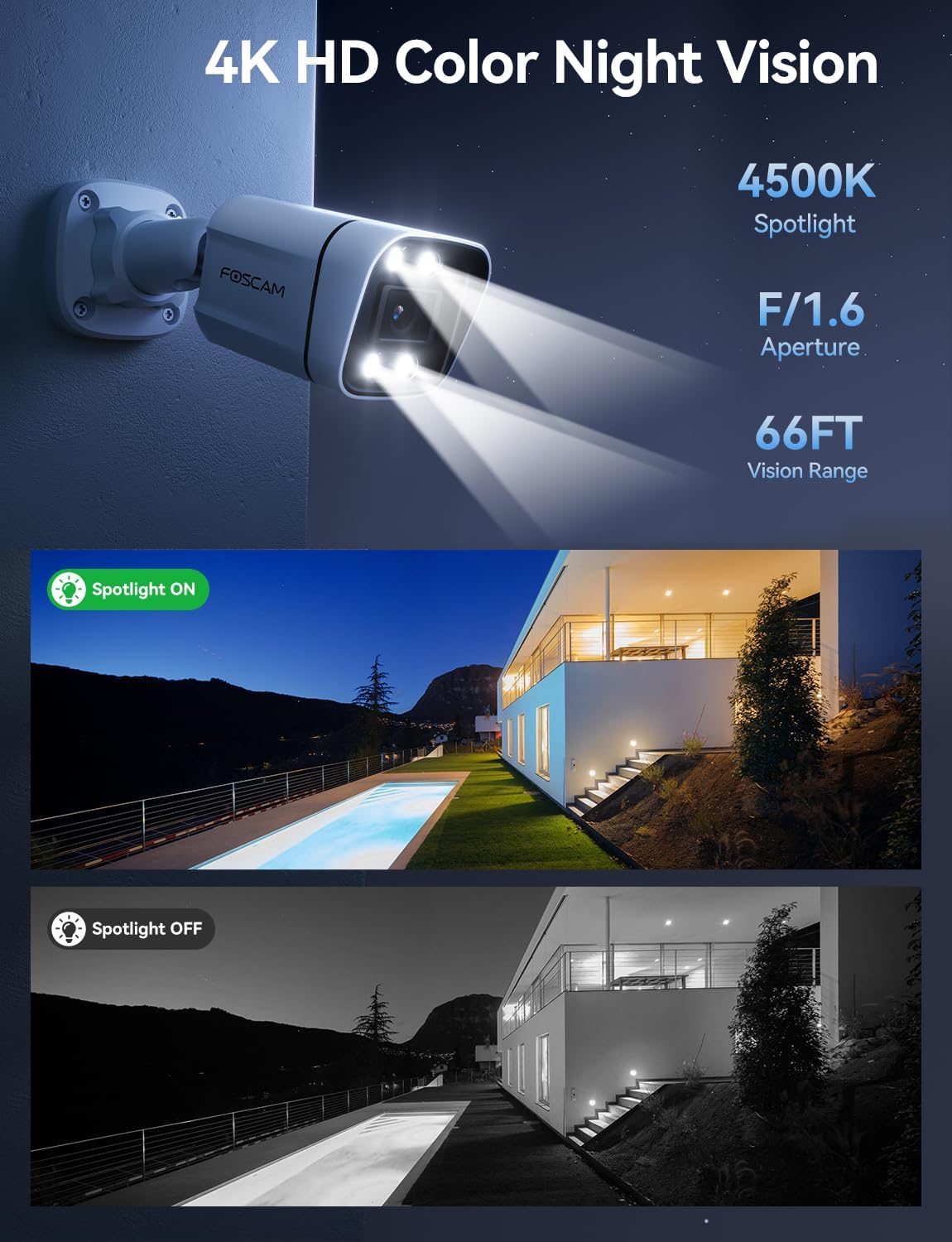
Image 4.4: Sound and Light Alarm System
4.5 Remote Access and Compatibility
Monitor your property from anywhere at any time.
- Foscam App/VMS: Приступите уживо view, recordings, and settings through the Foscam mobile app or Foscam VMS software on a computer.
- Интеграција паметне куће: Compatible with Alexa and Google Assistant for voice control and integration into smart home ecosystems.
- NVR/NAS Compatibility: Supports Blue Iris, Homey, Synology NAS, Qnap NAS, and ONVIF-enabled NVRs for local storage and advanced management.

Image 4.5: Remote Access Across Devices
5. Одржавање
5.1 Отпорност на временске услове
The FOSCAM V8EP camera features an IP66 weatherproof housing, ensuring reliable operation in various outdoor conditions, including rain, snow, and dust.

Image 5.1: IP66 Weatherproof Design
5.2 Општа нега
- Чишћење: Периодично чистите сочиво и кућиште камере меком крпомamp cloth to remove dirt and debris that may affect image quality. Do not use harsh chemicals.
- Инспекција каблова: Regularly inspect the Ethernet cable and connections for any signs of wear or damage.
- Ажурирања фирмвера: Keep the camera's firmware updated through the Foscam app to ensure optimal performance and access to new features.
КСНУМКС. Решавање проблема
- No Power/Connectivity: Ensure the Ethernet cable is securely connected to both the camera and a powered PoE device (switch/injector/NVR). Verify the PoE device is functioning correctly and connected to your network.
- Не могу да се повежем са апликацијом: Ensure your smartphone is connected to the same network as the camera during initial setup. Restart the camera and your router. Verify the Foscam app is updated to the latest version.
- Чести лажни аларми: Adjust the AI detection sensitivity settings in the Foscam app. Utilize custom motion zones to exclude areas with irrelevant movement (e.g., swaying trees, busy roads).
- Лош ноћни вид: Ensure the camera lens is clean. Check if the spotlights are enabled and functioning. Verify there are no obstructions blocking the camera's view.
- бр Web Интерфејс: Note that this camera model primarily uses the Foscam app for configuration and live viewing. A direct web interface may not be available for all settings.
7. Спецификације
| Феатуре | Спецификација |
|---|---|
| Назив модела | В8ЕП |
| Резолуција снимања видео записа | 4К (3840к2160п) |
| Ефективна резолуција мировања | 8 МП |
| Фраме Рате | 20 фпс |
| Поље View | 110 степени |
| Digital Zoom Ratio | 20Кс |
| Технологија повезивања | Жично (PoE) |
| Цоннецтивити Протоцол | Етхернет |
| Извор напајања | Corded Electric (via PoE) |
| Унутрашња/спољна употреба | У затвореном, на отвореном |
| Оцена међународне заштите | ИП66 |
| Ноћни вид | 66 Feet (Color Starlight) |
| Максимална подржана величина флеш меморије | 256 GB (Micro SD) |
| Димензије артикла (Д к Ш к В) | 4.3 к 3.94 к 7.6 инча |
| Тежина артикла | 1.34 фунти |
| Тип контролера | Alexa, Google Assistant, Blue Iris, Homey, Synology NAS, Qnap NAS, NVR |
8. Гаранција и подршка
FOSCAM is committed to providing reliable products and customer service.
- техничка подршка: FOSCAM offers 24/7 fast reply and lifetime technical support for its products.
- Гаранција квалитета: The product comes with a 180-day quality guarantee.
- враћа: Искористите 30-дневно бесплатно враћање робе.
- Замена: Free replacement and fast delivery are provided for eligible issues.
For further assistance, please visit the official FOSCAM webсајту или контактирајте њихову корисничку подршку.


