Увод
This manual provides detailed instructions for the installation, operation, and maintenance of your FOSCAM R4S 4MP WiFi IP Camera. Designed for home security and monitoring, this camera offers advanced features such as 4MP resolution, dual-band WiFi connectivity, AI human detection, two-way audio, and night vision. Please read this manual thoroughly before using the product to ensure proper setup and functionality.

Figure 1: FOSCAM R4S 4MP WiFi IP Camera
Садржај пакета
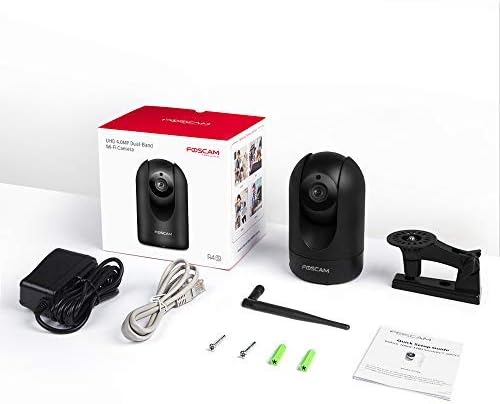
Verify that all items listed below are included in your package. If any items are missing or damaged, please contact FOSCAM support.
- FOSCAM R4S 4MP WiFi IP Camera
- Повер Адаптер
- Етхернет Цабле
- Носач
- Монтажни вијци и зидни типлови
- Водич за брзо подешавање
- ВиФи антена

Figure 2: FOSCAM R4S Package Contents
Производ је завршенview и карактеристике
The FOSCAM R4S camera is equipped with advanced technology to provide reliable surveillance and monitoring. Key features include:
- Резолуција 4MP/2K: Пружа јасан и детаљан видео снимакtage.
- Dual-Band WiFi (2.4/5GHz): Ensures stable and flexible wireless connectivity.
- АИ детекција људи: Reduces false alarms by distinguishing human shapes from other movements.
- Детекција звука: Упозорава вас на необичне звукове.
- 33ft Night Vision: Provides clear visibility in low-light conditions.
- Двосмерни аудио: Омогућава комуникацију у реалном времену путем камере.
- Функционалност панорамирања/нагињања: Offers a 360° horizontal and 100° vertical viewинг ранге.
- 20Кс дигитални зум: Enables closer inspection of details.
- Режим приватности: Temporarily disables recording and transmission for privacy.
- Компатибилност: Ради са Амазон Алека и Гоогле Ассистант-ом.
- Опције складиштења: Supports Micro SD card (up to 256GB, not included) and cloud storage services.
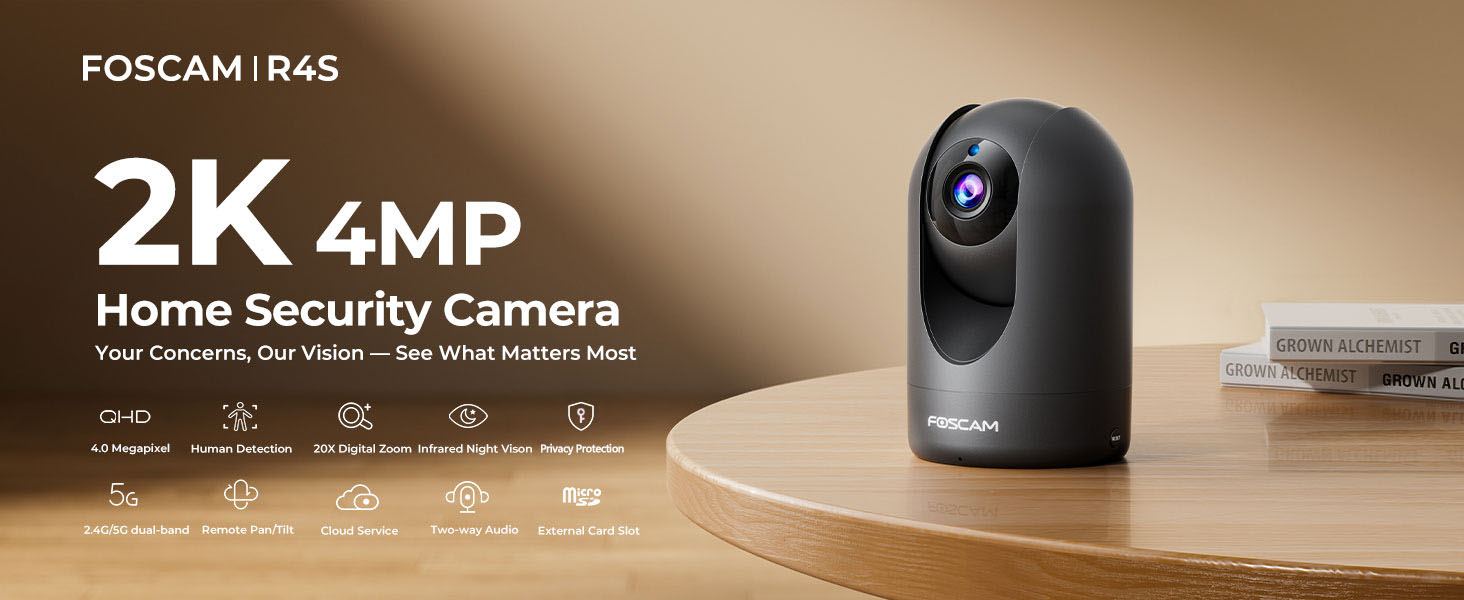
Figure 3: FOSCAM R4S Key Features
Водич за подешавање
1. Физичко смештање
The FOSCAM R4S camera can be placed on a flat surface or mounted to a wall or ceiling. Ensure the camera is positioned to cover the desired monitoring area.

Figure 4: Camera Placement Options
2. Прикључак за напајање
Connect the power adapter to the camera's power input and plug it into a standard electrical outlet. The camera will power on automatically.
3. Инсталација апликације и почетно подешавање
- Download the Foscam App from your mobile device's app store (iOS or Android).
- Open the Foscam App and create an account or log in.
- Tap the "+" icon to add a new camera.
- Follow the on-screen instructions to connect your camera to your Wi-Fi network using either the sound wave or QR code setup method. Ensure your mobile device is connected to the same Wi-Fi network (2.4GHz or 5GHz) you intend to use for the camera.
- Once connected, you can name your camera and set a password.

Figure 5: Dual-Band WiFi Connection
Упутство за употребу
1. Ливе View и контрола панорамирања/нагиба
From the Foscam App, select your camera to view the live feed. Use the on-screen controls to pan (horizontal movement) and tilt (vertical movement) the camera lens to adjust your viewугао уласка.

Figure 6: Pan/Tilt Camera Control
2. Двосмерни аудио
Tap the microphone icon in the app to enable two-way audio. You can speak through your phone, and your voice will be broadcast through the camera's speaker. Similarly, you can hear audio from the camera's environment.
Слика 7: Двосмерна аудио комуникација
3. Детекција покрета и звука
Configure detection settings in the app to receive alerts for human movement or unusual sounds. You can customize sensitivity and detection zones to minimize false alarms.

Figure 8: Intelligent Human and Pet Detection
4. Ноћни вид
The camera automatically switches to night vision mode in low-light conditions, providing clear black and white images up to 33 feet.

Figure 9: Night Vision Capability
5. Режим приватности
Activate Privacy Mode via the app to temporarily disable video recording and transmission, ensuring your privacy when needed. The camera lens will physically retract or turn away.

Figure 10: Activating Privacy Mode
6. Складиштење и репродукција
Recordings can be stored on a Micro SD card (up to 256GB, not included) or via FOSCAM's cloud service. Access and playback recorded footage through the Foscam App.

Figure 11: Storage Options
Одржавање
To ensure optimal performance and longevity of your FOSCAM R4S camera, follow these maintenance guidelines:
- Чишћење: Нежно обришите објектив и кућиште камере меком, сувом крпом. Избегавајте употребу јаких хемикалија или абразивних материјала.
- Ажурирања фирмвера: Regularly check for and install firmware updates through the Foscam App to ensure your camera has the latest features and security enhancements.
- Пласман: Ensure the camera is placed in a stable environment, away from direct sunlight, extreme temperatures, and excessive moisture.
- Напајање: Користите само оригинални адаптер за напајање који сте добили уз камеру.
Решавање проблема
If you encounter issues with your FOSCAM R4S camera, refer to the following common troubleshooting steps:
| Проблем | Могући узрок | Решење |
|---|---|---|
| Камера ван мреже | Нема струје, искључен Wi-Fi, проблем са рутером. | Check power connection. Restart camera and router. Verify Wi-Fi signal strength. |
| Лош квалитет видеа | Low bandwidth, dirty lens, insufficient lighting. | Ensure stable Wi-Fi. Clean the lens. Adjust camera position or add lighting. |
| Детекција покрета не ради | Incorrect settings, detection zone not configured. | Check motion detection settings in the app. Ensure detection zones are active. |
| Проблеми са двосмерним звуком | Microphone/speaker muted, app permissions. | Check volume settings in the app. Ensure app has microphone permissions. |
For further assistance, please refer to the FOSCAM support webсајту или контактирајте корисничку подршку.
Спецификације
| Феатуре | Детаљ |
|---|---|
| Резолуција | 4МП (2К) |
| Повезивање | 2.4GHz & 5GHz Dual-Band Wi-Fi |
| Ноћни вид | До 33 стопе (10 метара) |
| Viewинг Англе | 105 ° (дијагонала) |
| Опсег померања/нагиба | Хоризонтално: 360°, Вертикално: 100° |
| Дигитални зум | 20Кс |
| Аудио | Two-Way Audio with built-in mic and speaker |
| Детецтион | AI Human Detection, Sound Detection |
| Складиштење | Микро СД картица (до 256 ГБ), складиштење у облаку |
| Компатибилност | Амазон Алека, Гоогле помоћник |
| Повер Инпут | DC 5V/2A (via power adapter) |
| Димензије (Д к Ш к В) | 2.91 к 3.03 к 4.69 инча |
| Тежина | 1.15 фунти |
Гаранција и подршка
FOSCAM is committed to providing high-quality products and excellent customer service.
- Гаранција квалитета: 180-Day Quality Guarantee.
- враћа: Бесплатни повраћај у року од 30 дана.
- техничка подршка: 24/7 Fast Reply & Lifetime Tech Support.
- Контакт: For support, please visit the official FOSCAM webсајту или контактирајте њихов тим за корисничку подршку.


