Увод
Хвала вам на куповиниasing the Havit HV-MS991GT Wireless Mouse. This manual provides essential information for setting up, operating, maintaining, and troubleshooting your device. Please read it carefully before use to ensure optimal performance and longevity of your mouse.
Упутства за подешавање
- Распакујте миш: Carefully remove the mouse and the USB receiver from the packaging.
- Инсталирајте батерије:
Locate the battery compartment on the underside of the mouse. Open the cover and insert one AA battery (not included), ensuring correct polarity (+/-). Close the battery compartment cover.
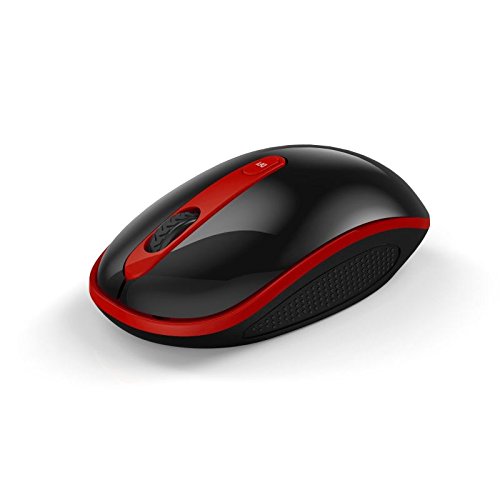
Image: The Havit HV-MS991GT Wireless Mouse, featuring a black body with red accents and a scroll wheel. This image illustrates the overall design of the mouse.
- Повежите УСБ рисивер: Plug the mini USB receiver into an available USB port on your computer. The system will automatically detect and install the necessary drivers.
- Укључивање миша: Locate the power switch on the underside of the mouse and slide it to the "ON" position. The mouse is now ready for use.
Упутство за употребу
The Havit HV-MS991GT Wireless Mouse is designed for intuitive use with standard mouse functions.
- Основне функције:
- Леви клик: Примарни избор и активација.
- Десни клик: Приступа контекстуалним менијима.
- Точак за померање: Скролује документе и web странице вертикално. Точкић за скроловање такође функционише као средњи клик.
- ДПИ подешавање: This mouse features adjustable DPI settings (1000-1600 DPI) for varying cursor speeds and precision. A dedicated DPI button, usually located near the scroll wheel, allows you to cycle through these settings. Press the button to switch between DPI levels.
- Домет бежичне мреже: The advanced 2.4GHz wireless technology provides an effective working distance of up to 15 meters (approximately 49 feet) from the USB receiver.
- Компатибилност система: This mouse is compatible with Windows 2000, Windows XP, Windows Vista, Windows 7, and Windows 8 operating systems.
Одржавање
- Чишћење: To clean the mouse, gently wipe its surface with a soft, dry cloth. For stubborn dirt, slightly dampen the cloth with water. Avoid using harsh chemicals or abrasive cleaners, as these can damage the mouse's finish.
- Замена батерије: When the mouse performance degrades or it stops responding, it is likely time to replace the battery. Follow the battery installation steps in the "Setup Instructions" section.
- Функција аутоматског спавања: The mouse features a built-in auto sleep function to conserve battery life. If the mouse is inactive for a period, it will enter a low-power sleep mode. To wake it up, simply move the mouse or click any button.
- Складиштење пријемника: The mini USB receiver can be stored inside the mouse's battery compartment when not in use, making it convenient for travel and preventing loss.
Решавање проблема
| Проблем | Решење |
|---|---|
| Миш не реагује. |
|
| Покрет курсора је неправилан или спор. |
|
| Wireless connection is unstable. |
|
Спецификације
| Феатуре | Детаљ |
|---|---|
| Бранд | Хавит |
| Број модела | HV-MS991GT |
| Технологија повезивања | КСНУМКСГХз Вирелесс |
| ДПИ подешавања | 1000-1600 ДПИ |
| Број дугмади | 4 |
| Кеи Лифе | 1,000,000 пута |
| Домет | До 15 метара |
| Подршка за оперативни систем | Виндовс 2000/КСП/Виста/7/8 |
| Просечно трајање батерије | 12 месеци |
| Батерије укључене | No (Requires 1x AA battery) |
| Тежина артикла | 120 г |
| Димензије пакета | 16.2 к 10.8 к 6 цм |
Гаранција и подршка
Specific warranty information for the Havit HV-MS991GT Wireless Mouse is not provided in this manual. Please refer to the product packaging or the manufacturer's official website for details regarding warranty coverage and customer support contact information.


