1. Увод
This manual provides essential instructions for the safe and efficient operation of your Hytera PD365LF Digital Portable Radio. Please read this manual thoroughly before using the product to ensure proper functionality and to prevent damage.
2. Садржај пакета
Upon unpacking, please verify that all items listed below are present and in good condition. If any item is missing or damaged, contact your dealer immediately.
- Hytera PD365LF Digital Portable Radio
- Литијум-јонска батерија
- Повер Адаптер
- Белт Цлип
- Страп
- Кориснички приручник (овај документ)
3. Производ је готовview
The Hytera PD365LF is a compact and robust digital portable radio designed for reliable communication. Familiarize yourself with the radio's components.
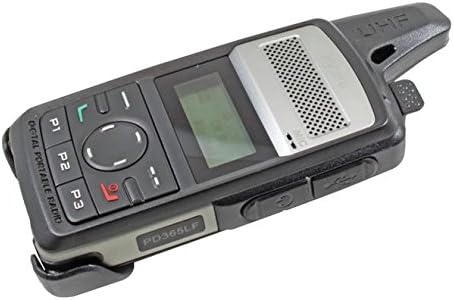
Figure 1: Hytera PD365LF Digital Portable Radio. This image displays the radio from an angled perspective, highlighting its compact form factor. Visible features include the speaker grille, LCD screen, navigation buttons (P1, P2, P3, and a central directional pad), and the UHF antenna. The model number "PD365LF" is clearly visible on the front casing.
Кључне компоненте:
- Антена: За слање и пријем сигнала.
- говорник: Излази звук.
- микрофон: Inputs audio.
- ЛЦД екран: Shows channel information, battery status, and menu options.
- Navigation Buttons (P1, P2, P3, Directional Pad): For menu navigation and quick access functions.
- Дугме за разговор (PTT): Активира пренос.
- Дугме за напајање/јачину: Укључује/искључује радио и подешава јачину звука.
- Порт за додатну опрему: For connecting audio accessories or programming cable.
4. Подешавање
4.1 Инсталација батерије
- Уверите се да је радио искључен.
- Поравнајте батерију са одељком за батерију на задњој страни радија.
- Пажљиво притисните батерију на место док не кликне чврсто.
- To remove, slide the battery release latch and lift the battery out.
4.2 Пуњење батерије
Before initial use, fully charge the battery. A fully discharged battery typically takes approximately 3-4 hours to charge.
- Повежите адаптер за струју у одговарајућу утичницу.
- Connect the charging cable to the radio's accessory port.
- The charging indicator on the radio will illuminate (e.g., red for charging, green for fully charged).
- Када се потпуно напуни, искључите пуњач.
5. Упутство за употребу
5.1 Укључивање/искључивање
- За укључивање: Rotate the Power/Volume knob clockwise until a click is heard and the display illuminates.
- За искључивање: Rotate the Power/Volume knob counter-clockwise until a click is heard and the display turns off.
5.2 Подешавање јачине звука
After powering on, rotate the Power/Volume knob clockwise to increase volume or counter-clockwise to decrease volume.
5.3 Избор канала
Use the navigation buttons (e.g., up/down arrows on the directional pad) to scroll through available channels. The selected channel will be displayed on the LCD screen.
5.4 Пренос и пријем
- За пренос: Press and hold the Push-to-Talk (PTT) button. Speak clearly into the microphone. Release the PTT button to stop transmitting.
- За пријем: Уверите се да дугме PTT није притиснуто. Радио ће аутоматски примати сигнале на изабраном каналу.
5.5 Programmable Buttons (P1, P2, P3)
The P1, P2, and P3 buttons can be programmed for various functions (e.g., zone switch, scan, emergency call) by your dealer or through programming software. Refer to your dealer for specific configurations.
6. Одржавање
6.1 Општа нега
- Држите радио сувим. Избегавајте излагање киши, влази или течностима.
- Не излажите радио екстремним температурама.
- Handle the radio with care. Avoid dropping or subjecting it to strong impacts.
6.2 Чишћење
Очистите површину радија меком крпомamp cloth. Do not use harsh chemicals, cleaning solvents, or strong detergents, as these may damage the casinг или унутрашње компоненте.
КСНУМКС. Решавање проблема
| Проблем | Могући узрок | Решење |
|---|---|---|
| Радио се не укључује. | Battery is discharged or improperly installed. | Напуните батерију или је поново правилно инсталирајте. |
| Не може се преносити или примати. | Изабран погрешан канал; ван домета; антена није правилно причвршћена. | Verify channel; move closer to other radios; ensure antenna is secure. |
| Лош квалитет звука. | Low battery; obstruction between radios; volume too low/high. | Charge battery; clear obstructions; adjust volume. |
If the problem persists after attempting these solutions, please contact your authorized Hytera dealer for assistance.
8. Спецификације
The following are general specifications for the Hytera PD365LF. Specific performance may vary based on environmental conditions and configuration.
- Модел: PD365LF
- Бренд: Хитера
- Димензије: Approximately 19 x 13.2 x 6.8 cm (Packaging)
- Тежина: Approximately 439.99 grams (Packaging)
- Тип батерије: Литијум-јонска (потребна је 1, укључена)
- Број канала: 32
- Отпорност на воду: Водоотпоран
9. Гаранција и подршка
Your Hytera PD365LF radio is covered by a limited warranty. For detailed warranty terms and conditions, please refer to the warranty card included with your product or contact your authorized Hytera dealer. For technical support, service, or spare parts, please contact your point of purchase or visit the official Hytera webсајту.
Note: Unauthorized repairs or modifications will void the product warranty.