1. Увод
This manual provides detailed instructions for the proper use and maintenance of your Hytera TC-320U-1 UHF Analog 2-Watt Radio. The TC-320 is a cost-effective business two-way radio designed for reliable communication. It features a robust design, long battery life, and user-friendly operation.
2. Шта је у кутији
Carefully unpack your radio and check that all items listed below are present and in good condition. If any item is missing or damaged, please contact your dealer.
- Antenna (AN0460H11)
- Li-ion Battery (1700mAh) (BL1715)
- Switching Power Adapter (PS0602)
- Belt Clip (BC16)
- Nylon Strap (RO01)

Image 2.1: Contents of the Hytera TC-320U-1 package, including the radio, antenna, battery, power adapter, belt clip, and nylon strap.
3. Производ је готовview
The Hytera TC-320U-1 radio is designed for ease of use and durability. Key features include 16 channel capacity, wide communication range, double injection molding for anti-skid design, and a long-lasting battery with an indicator. The radio also supports switchable high/low power output.
3.1 Radio Controls and Components

Слика 3.1: Предња страна view of the Hytera TC-320U-1 radio, showing the speaker grille and microphone area.

Слика 3.2: Бочна страна view of the Hytera TC-320U-1 radio, highlighting the orange Push-To-Talk (PTT) button.
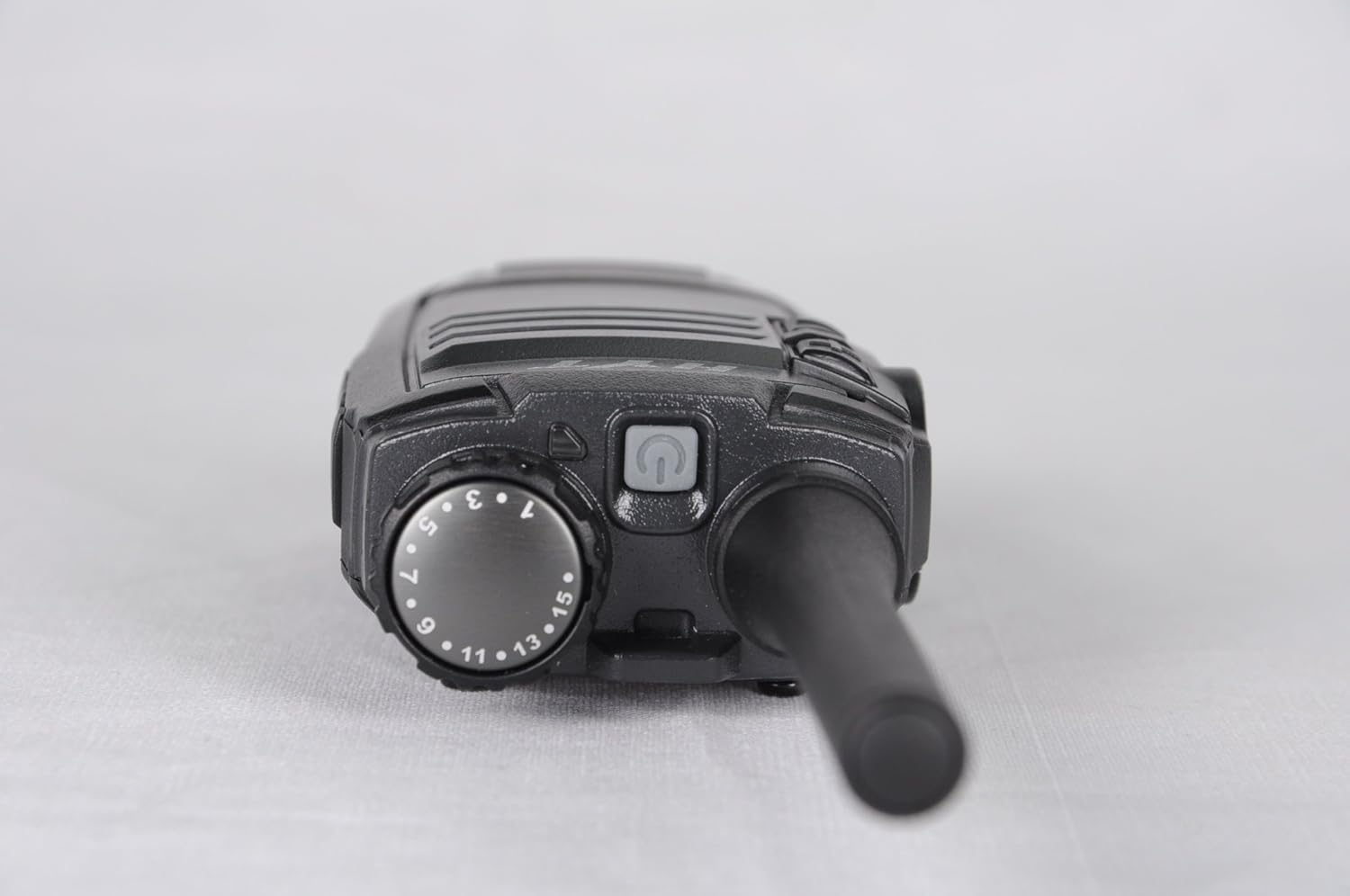
Слика 3.3: Врх view of the Hytera TC-320U-1 radio, showing the channel selector knob (numbered 1-16) and the power/volume knob.
4. Подешавање
4.1 Причвршћивање антене
- Поравнајте навојни крај антене са конектором антене на врху радија.
- Turn the antenna clockwise until it is securely fastened. Do not overtighten.
4.2 Инсталирање батерије
- Уверите се да је радио искључен.
- Поравнајте батерију са жлебовима на задњој страни радија.
- Померите батеријски пакет нагоре док не кликне на своје место.
- To remove, slide the battery latch (if present) and slide the battery downwards.
4.3 Пуњење батерије
Before initial use, fully charge the battery. Use only the provided Hytera switching power adapter (PS0602) and charging accessories.
- Повежите адаптер за напајање у утичницу наизменичне струје.
- Insert the charging cable into the radio's charging port or place the radio in its charging cradle.
- The charging indicator will typically show red during charging and green when fully charged.
4.4 Attaching the Belt Clip and Nylon Strap
- Align the belt clip with the screw holes on the back of the radio.
- Причврстите копчу за каиш приложеним завртњима.
- Thread the nylon strap through the designated loop on the radio for added security.
5. Упутство за употребу
5.1 Укључивање/искључивање и подешавање јачине звука
Rotate the power/volume knob (located on the top of the radio, see Image 3.3) clockwise to power on the radio. Continue rotating clockwise to increase the volume. Rotate counter-clockwise to decrease volume and fully counter-clockwise to power off the radio.
5.2 Избор канала
Rotate the channel selector knob (located on the top of the radio, see Image 3.3) to choose one of the 16 available channels. The selected channel number is indicated on the knob.
5.3 Пренос и пријем
- Примање: When the radio receives a signal, the LED indicator will illuminate, and you will hear the audio through the speaker.
- Пренос: To transmit, press and hold the Push-To-Talk (PTT) button on the side of the radio (see Image 3.2). Speak clearly into the microphone, holding the radio approximately 2.5 to 5 cm (1 to 2 inches) from your mouth. Release the PTT button to stop transmitting and return to receive mode.
5.4 High/Low Power Switch
The TC-320U-1 allows you to switch between high and low power output. Refer to your radio's specific controls for the location of this switch, typically a dedicated button or a programmable function. Using low power conserves battery life when communicating over short distances.
6. Одржавање
6.1 Општа нега
- Држите радио сувим. Избегавајте излагање киши, влази или корозивним течностима.
- Не излажите радио екстремним температурама.
- Очистите површину радија меком крпомamp тканина. Немојте користити јаке хемикалије или абразивна средства за чишћење.
- Уверите се да су контакти антене и батерије чисти и без прљавштине.
6.2 Одржавање батерије
- Always use genuine Hytera batteries and chargers.
- Немојте кратко спајати полове батерије.
- Не бацајте батерије у ватру.
- If the battery is not used for an extended period, store it in a cool, dry place after partially charging it.
КСНУМКС. Решавање проблема
Ако наиђете на проблеме са радиом, погледајте следеће уобичајене проблеме и решења:
| Проблем | Могући узрок | Решење |
|---|---|---|
| Радио се не укључује | Battery is depleted or not installed correctly | Напуните батерију или је поново безбедно инсталирајте. |
| Не може се преносити или примати | Incorrect channel selected; out of range; antenna loose | Проверите избор канала; приближите се другим радио-станицама; проверите везу антене. |
| Ниска јачина звука | Volume set too low; speaker obstructed | Increase volume; clear any obstructions from the speaker. |
| Кратак домет комуникације | Low power mode selected; environmental obstructions | Switch to high power mode; move to an open area. |
8. Спецификације
The following table outlines the technical specifications for the Hytera TC-320U-1 radio:
| Феатуре | Спецификација |
|---|---|
| Број модела | ТЦ-КСНУМКС |
| Фреквенцијски опсег | УХФ КСНУМКС-КСНУМКСМХз |
| Број канала | 16 |
| Цханнел Спацинг | 25/12.5 кХз |
| Излазна снага | 2 Ваттс |
| Тип батерије | 1 литијум-јонска (1700 mAh) |
| Волtage | 3.8 волти (ДЦ) |
| Димензије производа | 5.91 к 1.57 к 1.57 инча |
| Тежина артикла | 0.71 унци (20 грама) |
| Максимални домет говора | 2 миља (приближно, варира у зависности од терена) |
| Ниво отпорности на воду | Није водоотпоран |
9. Информације о гаранцији
The Hytera TC-320U-1 radio comes with a 2-годишња гаранција произвођача. Please retain your proof of purchase for warranty claims. For specific terms and conditions, refer to the warranty card included with your product or contact Hytera customer service.
10. Подршка
For further assistance, technical support, or service inquiries regarding your Hytera TC-320U-1 radio, please contact your authorized Hytera dealer or visit the official Hytera webсајт за контакт информације и ресурсе.


