1. Увод
This manual provides detailed instructions for the installation, configuration, operation, and maintenance of your D-Link DNS-320L Cloud Storage 2-Bay Network Attached Storage (NAS) device. Please read this manual thoroughly before using the device to ensure proper setup and optimal performance. The DNS-320L is designed to provide a centralized storage solution for your home or small office network, offering data redundancy, remote access, and media streaming capabilities.
2. Безбедносне информације
- Уверите се да је уређај постављен на стабилну, равну површину како бисте спречили случајне падове.
- Не излажите уређај води, влази или екстремним температурама.
- Use only the power adapter supplied with the device. Using an incorrect adapter may damage the device and void the warranty.
- Не отварајте уређај цasinг. Сва сервисирања препустите квалификованом особљу.
- Оставите вентилационе отворе слободним да спречите прегревање.
- Disconnect the power cable before cleaning or moving the device.
3. Садржај пакета
Проверите да ли ваш пакет садржи следеће ставке:
- D-Link DNS-320L Cloud Storage 2-Bay NAS Enclosure
- Повер Адаптер
- Етхернет Цабле
- Водич за брзу инсталацију
- Resource CD (may include software and full manual)
Ако било који предмет недостаје или је оштећен, обратите се продавцу или D-Link подршци.
4. Физички претекview
Familiarize yourself with the ports, buttons, and indicators on your DNS-320L device.
Слика 4.1: Предња страна View of D-Link DNS-320L. This image displays the front panel of the DNS-320L, typically showing LED indicators for power, network activity, and hard drive status. It may also feature a power button and a USB port for quick access.
4.1 Предња плоча
- ЛЕД за напајање: Означава статус напајања.
- HDD 1/2 LEDs: Indicate hard drive activity and status for each bay.
- УСБ порт: For connecting external USB storage devices or printers.
- Дугме за напајање: За укључивање/искључивање уређаја.
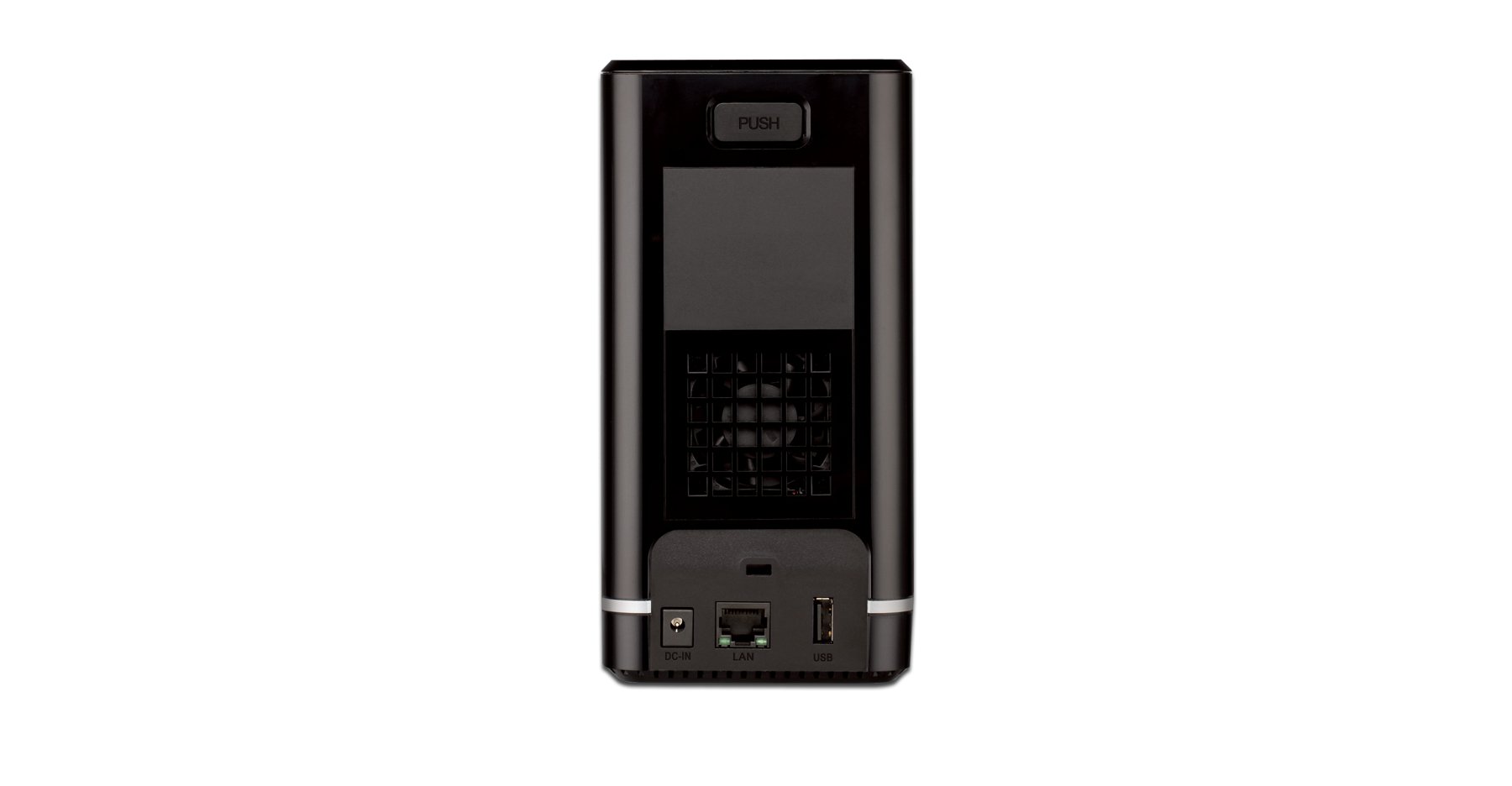
4.2 Задња плоча
- Гигабитни Етхернет порт: Connects the NAS to your network router or switch.
- Конектор за напајање: За повезивање адаптера за напајање.
- Дугме за ресетовање: Used to restore factory default settings (requires a paperclip or similar pointed object).
- Utor za Kensington Lock: За физичко обезбеђење.
5. Инсталација хардвера
This section guides you through installing hard drives and connecting the DNS-320L to your network.
5.1 Инсталирање чврстих дискова
The DNS-320L supports two 3.5-inch SATA hard drives. Ensure your drives are compatible and unformatted for initial setup.
- Ensure the DNS-320L is powered off and disconnected from the power outlet.
- Gently slide open the front cover of the NAS enclosure.
- Slide each hard drive into an available bay until it clicks into place, ensuring the SATA connectors align properly. No screws are typically required for tool-less installation.
- Добро затворите предњи поклопац.
Figure 5.1: Hard Drive Installation. This image illustrates the process of inserting a 3.5-inch SATA hard drive into one of the bays of the DNS-320L, highlighting the tool-less design.
5.2 Connecting the NAS to Your Network
- Connect one end of the Ethernet cable to the Gigabit Ethernet port on the rear of the DNS-320L.
- Повежите други крај Етхернет кабла са доступним ЛАН портом на рутеру или мрежном прекидачу.
- Connect the power adapter to the power connector on the rear of the DNS-320L, then plug the adapter into a power outlet.
- Press the Power button on the front panel to turn on the device. The Power LED will illuminate, and the HDD LEDs will flash during startup.
6. Почетно подешавање
After hardware installation, you will need to configure the DNS-320L using its web-басед интерфејс за управљање.
6.1 Приступ Web Интерфејс
- Ensure your computer is connected to the same network as the DNS-320L.
- Отвори а web прегледач (нпр. Chrome, Firefox, Edge).
- The DNS-320L typically obtains an IP address automatically via DHCP. You can use the D-Link ShareCenter Utility (if provided on the Resource CD or D-Link website) to discover its IP address. Alternatively, try accessing
http://dlinksharecenterorhttp://dlinksharecenter.local. - Унесите подразумевано корисничко име (обично
admin) and leave the password blank (oradmin) to log in for the first time. You will be prompted to change the password.
6.2 Running the Setup Wizard
Upon first login, a setup wizard will guide you through essential configurations:
- Disk Volume Creation: You will be prompted to create a disk volume. Options typically include:
- Стандардно: Each drive is treated as a separate volume.
- RAID 0 (Стрипинг): Combines drives for maximum capacity and performance, but offers no data redundancy. If one drive fails, all data is lost.
- РАИД 1 (пресликавање): Mirrors data across both drives, providing data redundancy. If one drive fails, data is preserved on the other. Capacity is limited to the size of one drive.
- JBOD (Само гомила дискова): Combines drives into a single large volume sequentially. No performance or redundancy benefits.
Choose RAID 1 for data protection. RAID 0 offers speed but no protection.
- User Account Creation: Create at least one user account with administrative privileges.
- Подешавања мреже: Confirm or adjust network settings (DHCP or static IP).
- временска зона: Подесите тачан датум и време.
7. Operating the DNS-320L
This section covers common operational tasks for your NAS.
7.1 Accessing Shared Folders
After setup, shared folders will be accessible from your network:
- Виндовс: Отвори File Explorer, type
\DNS-320L(or its IP address) in the address bar, and press Enter. - мацОС: In Finder, go to Идите> Повежи се са сервером, тип
smb://DNS-320L(or its IP address), and click Connect. - Линук: Користите своје file manager's network browsing feature or mount the share using SMB/CIFS.
7.2 User and Group Management
Manage who can access your NAS and what permissions they have:
- Пријавите се на web interface as an administrator.
- Дођите до Management > User Management or similar section.
- Create new users, assign passwords, and add them to groups.
- Configure folder permissions for users and groups (Read/Write, Read Only, No Access).
7.3 Cloud Access and Remote Management
The DNS-320L supports D-Link's Cloud features for remote access.
- Register your device with the D-Link Cloud service (if applicable, refer to D-Link's official documentation for specific steps).
- Use the D-Link mobile app (e.g., mydlink ShareCenter) to access files remotely from your smartphone or tablet.
- Configure port forwarding on your router if direct remote access to the web interface is desired (advanced users only, consult your router manual).
7.4 USB Device Functionality
The USB 2.0 port on the front panel can be used for:
- Екстерна меморија: Connect USB hard drives or flash drives to expand storage or for backup purposes. These devices will appear as shared folders.
- USB Printer: Connect a compatible USB printer to share it across your network.
8. Одржавање
Regular maintenance ensures the longevity and reliability of your DNS-320L.
8.1 Ажурирања фирмвера
Periodically check for and install firmware updates from the D-Link support website. Firmware updates can provide new features, performance improvements, and security patches.
- Преузмите најновији фирмвер file for your DNS-320L model from the official D-Link support site.
- Log in to the NAS web interface as an administrator.
- Дођите до Management > Firmware Upgrade or a similar section.
- Потражите преузети фирмвер file and initiate the upgrade process. Do not power off the device during the update.
8.2 Резервна копија података
While RAID 1 provides redundancy against a single drive failure, it is not a substitute for a comprehensive backup strategy. Regularly back up critical data from your NAS to an external drive or another storage location.
8.3 Чишћење
Keep the device clean to ensure proper airflow and prevent dust buildup.
- Искључите и искључите уређај пре чишћења.
- Користите меку, суву крпу за брисање спољашњости.
- Користите компримовани ваздух да бисте очистили прашину из вентилационих отвора.
КСНУМКС. Решавање проблема
This section addresses common issues you might encounter with your DNS-320L.
| Проблем | Могуће решење |
|---|---|
| Уређај се не укључује. | Уверите се да је адаптер за напајање безбедно повезан и са уређајем и са исправном утичницом. Тестирајте утичницу са другим уређајем. |
| Cannot access the NAS on the network. | Verify the Ethernet cable is properly connected. Check network settings on your computer and router. Ensure the NAS has an IP address (use the D-Link utility). Try restarting the NAS and your router. |
| Hard drive LED is red or flashing abnormally. | This may indicate a drive error or failure. Check the NAS web interface for drive status. If a drive has failed in a RAID 1 configuration, replace the faulty drive and rebuild the array. |
| Заборавили сте лозинку администратора. | Use the reset button on the rear panel to restore factory default settings. Warning: This will erase all configurations, but typically not data on the drives. You will need to reconfigure the NAS. |
| Споро file брзине преноса. | Ensure all network components (NAS, router, computer) support Gigabit Ethernet. Check for network congestion or faulty cables. |
10. Спецификације
Key technical specifications for the D-Link DNS-320L:
| Феатуре | Детаљ |
|---|---|
| Број модела | ДНС-320Л |
| Дриве Баис | 2 x 3.5-inch SATA I/II/III HDD |
| Подршка за РАИД | Standard, JBOD, RAID 0, RAID 1 |
| нетворк интерфаце | 1 x Gigabit Ethernet (10/100/1000 Mbps) |
| УСБ портови | 1 к УСБ 2.0 |
| Хардверска платформа | Мак, рачунар |
| Димензије (ДкШкВ) | 3.54 к 5.68 к 7.61 инча |
| Тежина артикла | 1.39 pounds (without drives) |
| Боја | Црно |
| Материјал | Метал |
| Компатибилни уређаји | CPU, Desktop, Laptop, Server |
11. Гаранција и подршка
For warranty information, please refer to the warranty card included with your product or visit the official D-Link website. D-Link provides technical support and resources to assist you with your DNS-320L.
- Подршка на мрежи: Посетите www.dlink.com/support for FAQs, troubleshooting guides, firmware downloads, and product documentation.
- техничка подршка: Contact D-Link technical support for assistance with installation, configuration, or troubleshooting issues that cannot be resolved using this manual or online resources. Contact details are available on the D-Link support webсајт за ваш регион.


