1. Увод
This manual provides comprehensive instructions for the Fotodiox Pro Lens Cap, specifically designed to protect the delicate lenses of compatible Rollei Twin Lens Reflex (TLR) cameras. Please read this manual carefully to ensure proper use and maintenance of your lens cap.
2. Производ је готовview
The Fotodiox Pro Lens Cap is a durable, hinged plastic cap with a matte finish, engineered to provide reliable protection against dust, scratches, and minor impacts for your camera lenses. Its design complements the classic aesthetic of Rollei cameras.
Кључне карактеристике укључују:
- Specifically designed for Rolleiflex TLRs with Bay II 75mm 3.5 C & E lenses.
- Premium quality plastic construction for lens protection.
- Hinged design maintains the classic look of Rolleiflex cameras.
- Matte finish for reduced reflections.
- Precision-designed fit for secure attachment.

Image 2.1: The Fotodiox Pro Lens Cap in its closed, protective state.
3. Компатибилност
This lens cap is specifically designed for Rolleiflex TLR cameras with Bay II (B2) mount, specifically models with 75mm 3.5 C & E (Planar, Xenotar) lenses. It is crucial to verify your camera's lens type and Bayonet mount size before installation.
Важна напомена: Not all Rollei Bay II mounts are identical. This cap is tailored for the 3.5E variant. Please ensure your camera's lens configuration matches the specified compatibility to avoid fitment issues.

Image 3.1: The lens cap indicating its 42mm diameter for Bay II 3.5E lenses.
4. Инсталација
To install the Fotodiox Pro Lens Cap:
- Ensure both your camera lenses and the lens cap are clean and free of dust or debris.
- Gently align the cap with the Bay II mount of your Rollei TLR camera's viewing and taking lenses.
- Press the cap firmly but carefully onto the lens mount until it sits securely. The hinged design allows it to cover both lenses simultaneously.

Image 4.1: The lens cap in a partially open position, demonstrating its hinged mechanism.
5. Операција
The Fotodiox Pro Lens Cap is designed for straightforward operation:
- То отворен the cap, gently lift the top half away from the bottom half. The hinge allows it to fold open, exposing both lenses.
- То затворити the cap, fold the top half back over the lenses until it securely clicks or rests flush with the bottom half, covering both lenses.
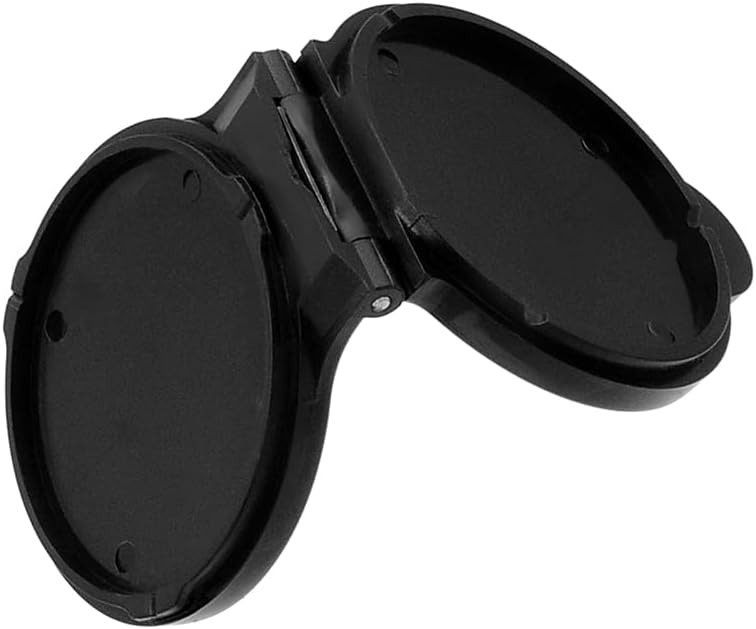
Image 5.1: The lens cap fully open, revealing the hinge mechanism.
6. Одржавање
To ensure the longevity and effectiveness of your lens cap:
- Clean the cap regularly with a soft, dry cloth to remove dust and fingerprints.
- За тврдокорну прљавштину, благо дamp може се користити крпа, након чега следи одмах сушење.
- Avoid using harsh chemicals or abrasive materials, as these can damage the plastic finish.
- Store the cap in a clean, dry environment when not in use.
КСНУМКС. Решавање проблема
| Иссуе | Могући узрок | Решење |
|---|---|---|
| Cap does not fit securely or falls off easily. | Incorrect camera model or lens type. | Verify that your camera is a Rolleiflex TLR with Bay II 75mm 3.5 C & E lenses. This cap is not universally compatible with all Bay II mounts. |
| Cap is difficult to open or close. | Dust or debris in the hinge mechanism. | Clean the hinge area with a soft brush or compressed air. Avoid forcing the cap. |
8. Спецификације
| Феатуре | Детаљ |
|---|---|
| Димензије производа | 1 к 1 к 1 инча |
| Тежина артикла | 1.6 унци |
| Број модела ставке | Cap-Rol-B2f35e-Pls |
| Произвођач | Fotodiox Inc. |
| Материјал | Пластика |
| Компатибилност | Rollei TLR with Bay II 75mm 3.5 C & E Lenses |
9. Гаранција и подршка
This Fotodiox Pro Lens Cap comes with a Ограничена петогодишња гаранција произвођача. For warranty claims, technical support, or additional product information, please visit the official Fotodiox store or contact their customer service directly.
За додатну помоћ, посетите Fotodiox Store on Amazon.