1. Увод и крајview
The Doro Secure 347 is a user-friendly corded telephone designed with assistance functions for enhanced safety and communication. It features amplified sound, direct memory buttons with photo slots, and two remote controls for convenient call management and emergency alerts.
This manual provides detailed instructions for setting up, operating, maintaining, and troubleshooting your Doro Secure 347 phone to ensure optimal performance and safety.
2. Подешавање
2.1 Распакивање кутије
Пре него што почнете, уверите се да су све компоненте присутне:
- Doro Secure 347 Telephone Unit
- Handset and Coiled Cord
- Кабл за телефонску линију
- Повер Адаптер
- 2 Remote Controls (one waterproof wrist/pendant, one pendant)
- Кориснички приручник (овај документ)
2.2 Повезивање телефона
- Повежите слушалицу: Plug one end of the coiled cord into the handset and the other end into the designated port on the side of the telephone base.
- Повежите телефонску линију: Plug one end of the telephone line cord into the wall socket and the other end into the 'LINE' port on the back of the telephone base.
- Прикључите напајање: Plug the power adapter into the 'POWER' port on the back of the telephone base, then plug the adapter into a wall outlet.
- Инсталирајте резервне батерије: For emergency functions and memory retention during power outages, install 4 x AA alkaline batteries (not included) into the battery compartment on the underside of the phone. Ensure correct polarity. Secure the battery compartment cover.

3. Упутство за употребу
3.1 Позивање и одговарање на позиве
- Да бисте упутили позив: Lift the handset or press the speakerphone button. Dial the desired number using the large keypad.
- Да одговорите на позив: Подигните слушалицу или притисните дугме за звучник када телефон зазвони.
- Да бисте прекинули позив: Спустите слушалицу или поново притисните дугме за звучник.
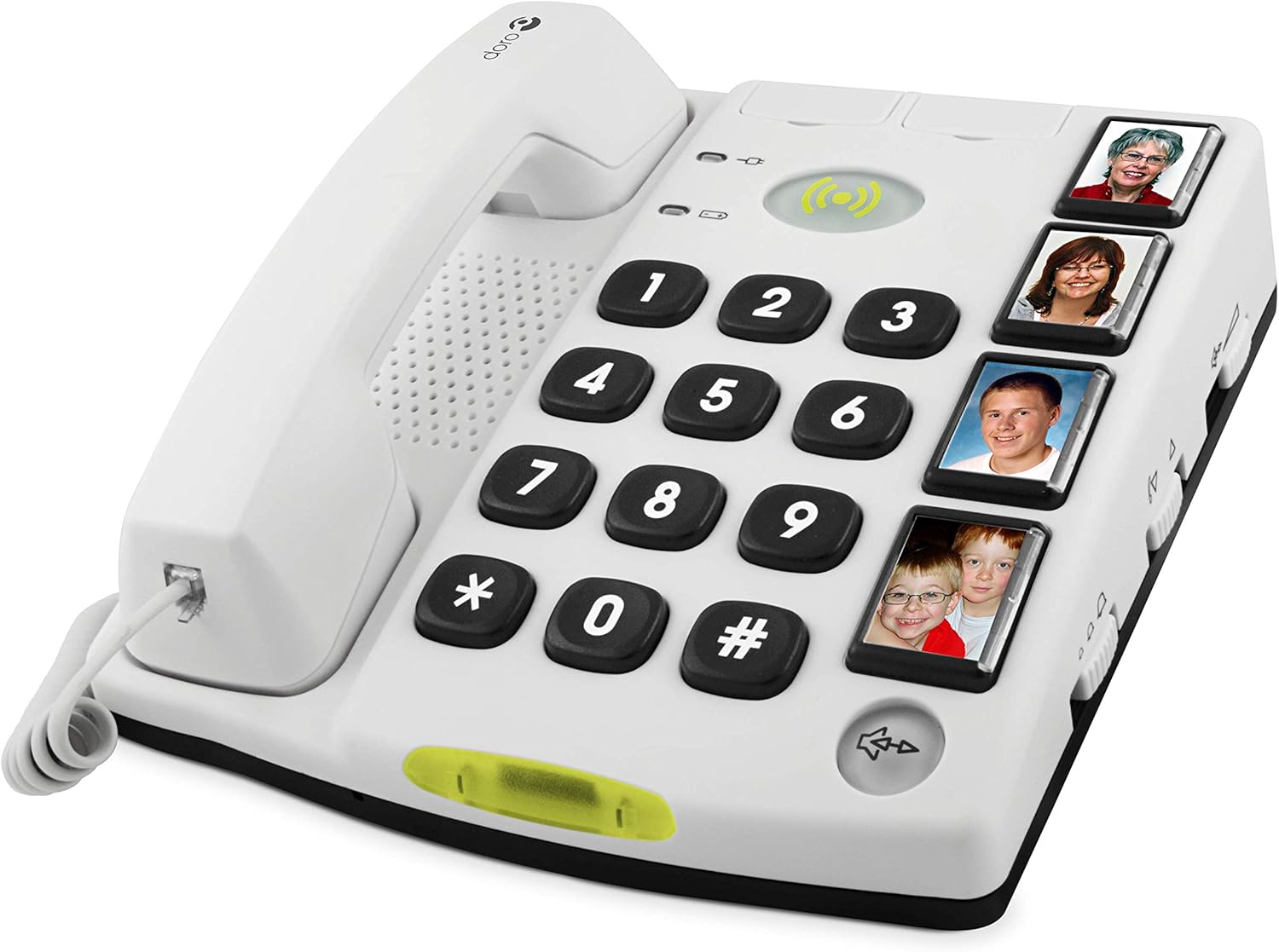
3.2 Using Direct Memory Buttons (with Photos)
The Doro Secure 347 features four direct memory buttons, allowing you to call frequently contacted numbers by simply pressing a single button. You can insert photos of your contacts into these buttons for easy identification.
- Програмирање: Refer to the detailed programming section in the full manual for steps on how to store numbers for each photo button.
- Позивање: Lift the handset or press the speakerphone button, then press the desired photo memory button. The phone will automatically dial the stored number.
3.3 Подешавање јачине звука
The phone offers amplified sound for both the handset and speakerphone. Use the volume control buttons, typically located on the side of the phone, to adjust the listening volume during a call.
3.4 Функција без употребе руку
Press the speakerphone button to activate the hands-free function, allowing you to talk without holding the handset. Press it again to deactivate.
4. Assistance Functions
The Doro Secure 347 is equipped with advanced assistance features to provide peace of mind and quick access to help when needed.
4.1 Функција хитног аларма
The phone features an alarm function with a pre-recorded voice message. When activated, the phone will sequentially dial pre-programmed emergency numbers and play a customizable alert message.
4.2 Даљински управљачи
Two remote controls are included: one designed to be worn as a wristband or pendant (waterproof), and another as a pendant. These remotes allow you to activate the emergency alarm function from a distance.
- Активирање аларма: Press the button on the remote control to initiate the emergency call sequence.
- Remote Call Answering/Hanging Up: The remote controls can also be used to answer or end a call remotely, providing flexibility and convenience.


4.3 Programming Emergency Numbers and Voice Message
To ensure the assistance function works correctly, you must program at least one emergency number and record an alert message. The remote controls are typically pre-registered at the factory. If you encounter issues with remote functionality, ensure emergency numbers and a voice message are properly set up, as this can affect their operation.
5. Одржавање
5.1 Чишћење
Wipe the phone and handset with a soft, damp cloth. Do not use harsh chemicals or abrasive cleaners. Ensure the phone is unplugged from the power source before cleaning.
5.2 Замена батерије
The 4 x AA backup batteries should be replaced periodically, especially if the phone is frequently without main power or if the low battery indicator appears. Always use new alkaline batteries of the specified type.
КСНУМКС. Решавање проблема
If you experience problems with your Doro Secure 347, please consult the following common issues and solutions:
- Нема тона за бирање:
- Check if the telephone line cord is securely connected to both the phone and the wall socket.
- Ensure the power adapter is correctly plugged in and receiving power.
- Remote Control Not Activating Alarm:
- Verify that at least one emergency number has been programmed into the phone.
- Confirm that an alert voice message has been recorded. The remote function may not work if these are not set up.
- Ensure the remote control's battery is not depleted.
- The remotes are typically pre-registered. Attempting to re-register them might not be necessary or possible.
- Лош квалитет звука:
- Подесите јачину звука помоћу наменских контрола јачине звука.
- Проверите да ли има сметњи од других електронских уређаја.
- Phone Not Ringing:
- Ensure the ringer volume is not set to minimum or off.
- Проверите везу телефонске линије.
For issues not covered here, please refer to the full Doro Secure 347 manual or contact Doro customer support.
7. Спецификације
| Феатуре | Детаљ |
|---|---|
| Бранд | Доро |
| Број модела | CAREPLUS |
| Тип | Кабловски телефон |
| Боја | Doro Secure - White |
| Димензије (Д к Ш к В) | 23 к 36 к 7 цм |
| Тежина | 1 килограма |
| Извор напајања | Mains Powered, Battery Powered (for backup) |
| Тип батерије | 4 x AA Alkaline (not included for backup) |
| Посебне карактеристике | Hands-Free Function, Senior Phone Features, 2 Assistance Remote Controls, Direct Memory with Photo, Amplified Sound (Max 108 dB(A)) |
| Компатибилни уређаји | Wireless alarm devices |
| Материјал | Пластика |
8. Гаранција и подршка
8.1 Информације о гаранцији
Doro provides a warranty for its products. Please refer to the warranty card included with your purchase for specific terms and conditions. Spare parts availability is guaranteed for 2 years from the date of purchase.
8.2 Корисничка подршка
If you require further assistance, have questions about your Doro Secure 347, or need to report a fault, please contact Doro customer support. Contact details can typically be found on the Doro webсајту или у материјалима за паковање.


