
UNIWA E1801
Manuali i Përdorimit të Telefonit Celular UNIWA E1801 për të Moshuarit
Modeli: E1801
1. Hyrje
The UNIWA E1801 is a user-friendly mobile phone designed with large buttons and a clear display, making it ideal for seniors. It features essential functions such as calling, messaging, FM radio, MP3/MP4 playback, and a built-in flashlight. This manual provides comprehensive instructions for setting up, operating, and maintaining your device.
2. Informacion mbi sigurinë
- Mos e çmontoni ose modifikoni pajisjen.
- Use only original or approved batteries and chargers.
- Shmangni ekspozimin e telefonit ndaj temperaturave ekstreme, rrezeve të diellit direkte ose lagështirës.
- Keep the phone away from medical devices to prevent interference.
- Dispose of the phone and battery responsibly according to local regulations.
3. Përmbajtja e paketës
Ju lutemi kontrolloni përmbajtjen e paketimit pasi ta hapni kutinë. Nëse ndonjë artikull mungon ose është dëmtuar, kontaktoni shitësin tuaj.
- UNIWA E1801 Mobile Phone
- BL-5C 800mAh Battery
- Ngarkues
- Manuali i Përdoruesit (ky dokument)
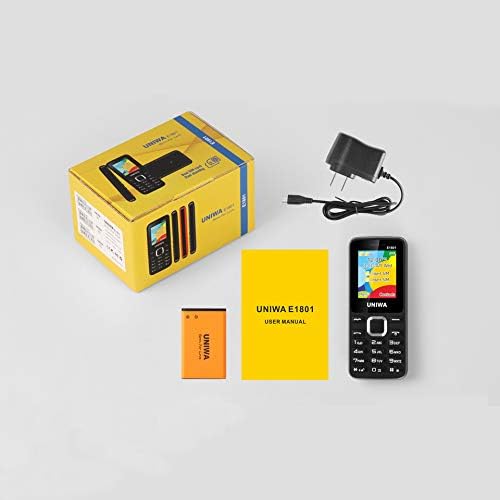
Image: Contents of the UNIWA E1801 package, showing the phone, battery, charger, and user manual neatly arranged next to the product box.
4. Produkti i Mbaruarview
Familiarize yourself with the physical components of your UNIWA E1801 phone.

Image: The UNIWA E1801 mobile phone held in a hand, showcasing its compact size, large keypad, and clear color display with the UNIWA logo.
- Shfaq: 1.77-inch QQVGA screen (160 x 128 pixels) for clear visibility.
- tastiera: Large, ergonomic buttons with clear numbering for easy dialing and navigation.
- Çelësat e navigimit: Plated navigation keys for intuitive menu control.
- Kamera e pasme: 0.08 MP camera for basic photo capture.
- Folësi: Integrated 2030 box speaker for loud and clear audio.
- Elektrik dore: Built-in LED flashlight for convenience.
- Non-slip Frame: Textured frame design for a secure grip.

Imazh: Një pamje nga afër view of the UNIWA E1801's keypad, highlighting the ergonomic design and the metallic finish of the central navigation keys.

Image: The UNIWA E1801 phone with an inset showing the detailed texture of its non-slip frame, designed for a secure grip.

Image: The rear of the UNIWA E1801 phone, with an overlay illustrating the powerful 2030 box speaker and its sound projection.
5. Konfigurimi
5.1. Installing SIM Cards
The UNIWA E1801 supports dual SIM cards, allowing you to use two different numbers simultaneously.
- Hiqni kapakun e pasmë të telefonit.
- Locate the SIM card slots.
- Carefully insert your SIM cards into the designated slots with the gold contacts facing down.
- Ensure the SIM cards are securely seated.

Image: The back of the UNIWA E1801 phone with the cover removed, clearly showing the two SIM card slots and an illustration of two SIM cards.
5.2. Instalimi i baterisë
- After inserting the SIM cards, place the BL-5C 800mAh battery into the battery compartment, aligning the gold contacts.
- Gently press down until the battery is securely in place.
- Vendosni përsëri kapakun e pasmë, duke u siguruar që të fiksohet në pozicionin e tij.
5.3. Ngarkimi i telefonit
Para përdorimit të parë, ngarkoni plotësisht baterinë e telefonit.
- Connect the charger to the charging port on the phone.
- Futeni karikuesin në një prizë elektrike.
- Treguesi i baterisë në ekran do të tregojë statusin e karikimit.
- Pasi të jetë ngarkuar plotësisht, shkëputeni karikuesin.
6. Udhëzimet e funksionimit
6.1. Ndez/Fik
- Për të ndezur: Shtypni dhe mbani shtypur butonin e Ndezjes/Mbarimit të Thirrjes derisa të ndriçohet ekrani.
- Për të fikur: Press and hold the Power/End Call button until the power off options appear, then select "Power off".
6.2. Kryerja e thirrjeve
- From the idle screen, enter the phone number using the keypad.
- Shtypni butonin e Gjelbër të Thirrjes për të filluar thirrjen.
- Për të përfunduar një telefonatë, shtypni butonin e kuq për të përfunduar thirrjen.
6.3. Dërgimi i mesazheve
- Shko te "Menuja" > "Mesazhet" > "Shkruaj mesazh".
- Shkruani mesazhin tuaj duke përdorur tastierën.
- Futni numrin e telefonit të marrësit ose zgjidhni nga kontaktet.
- Shtypni "Dërgo".
6.4. Përdorimi i Radios FM
The phone features a wireless FM radio.
- Go to "Menu" > "FM Radio".
- Select "Auto search" to find available stations.
- Përdorni tastet e navigimit për të kaluar midis stacioneve.

Image: The UNIWA E1801 phone displaying its FM radio interface, showing a frequency of 142.2 MHz, with musical notes and a classic radio in the background, indicating its wireless FM capability.
6.5. Përdorimi i elektrik dore
The built-in flashlight can be easily activated.
- Typically, a dedicated button or a long press on a specific key (refer to your phone's quick guide) activates the flashlight.
- Alternatively, access it via "Menu" > "Tools" > "Flashlight".

Image: The UNIWA E1801 phone with a bright beam of light emanating from its top, illustrating the built-in flashlight function.
6.6. Karakteristika të tjera
- MP3/MP4 Playback: Supports multimedia playback. Transfer files to a TF card (up to 16GB, not included) and access them via the "Multimedia" menu.
- Libri i telefonit: Ruani deri në 300 kontakte.
- Mjetet: Includes games, calendar, alarm clock, calculator, world clock, and recorder.
7. Mirëmbajtja
- Pastrimi: Use a soft, dry cloth to clean the phone's surface. Do not use liquid cleaners or aerosols.
- Magazinimi: Ruajeni telefonin në një vend të freskët dhe të thatë, larg rrezeve të diellit dhe temperaturave ekstreme.
- Kujdesi për baterinë: Avoid fully discharging the battery frequently. Charge it regularly to prolong its lifespan.
8. Troubleshooting
| Problem | Shkaku i mundshëm | Zgjidhje |
|---|---|---|
| Telefoni nuk ndizet. | Bateria është e ulët ose nuk është instaluar siç duhet. | Karikoni baterinë. Sigurohuni që bateria është futur siç duhet. |
| Nuk mund të kryejë ose të marrë thirrje. | Nuk ka kartë SIM, karta SIM nuk është futur siç duhet ose nuk ka sinjal rrjeti. | Ensure SIM card is inserted. Check network signal strength. Contact your service provider. |
| Cilësi e dobët audio. | Low volume, poor network signal, or speaker/microphone obstruction. | Adjust volume. Move to an area with better signal. Clean speaker/microphone openings. |
| Bateria zbrazet shpejt. | Frequent use, background applications, or old battery. | Ul ndriçimin e ekranit. Mbyll aplikacionet e papërdorura. Konsidero zëvendësimin e baterisë nëse është e vjetër. |
9. Specifikimet
| Veçori | Detaj |
|---|---|
| Numri i modelit | E1801 |
| Dimensionet | 108 x 45 x 14 mm |
| Pesha | 68 g |
| CPU | SC6531E |
| Rrjeti Band | 2G: GSM850/900/1800/1900 MHz, GPRS |
| Karta SIM | Dual SIM, Dual Standby |
| Kapaciteti i Librit të Telefonave | 300 hyrje |
| Ekrani | 1.77 inch QQVGA, 160 x 128 pixels |
| Kamera | 0.08 MP Rear Camera, 640 x 480 pixels |
| Multimedia | MP3, MP4 |
| Kujtesa | Supports TF card up to 16 GB (max) |
| Bluetooth | V2.1 |
| Bateria | BL-5C 800 mAh |
| Koha e bisedës | Deri në 240 minuta |
| Koha e gatishmërisë | Deri në 200 orë |
| Gjuhët | English, Russian, Hebrew, Arabic, French, Spanish, Polish, German, Italian, Portuguese, Chinese |
| Veçoritë | Games, Calendar, Alarm Clock, Calculator, World Clock, Flashlight, E-book, WAP, Recorder |
10. Garancia dhe Mbështetja
Your UNIWA E1801 mobile phone comes with a standard manufacturer's warranty. Please refer to the warranty card included in your package for specific terms and conditions.
For technical support, troubleshooting assistance, or warranty claims, please contact your point of purchase or the official UNIWA customer service. Keep your purchase receipt as proof of purchase.
For more information, visit the official UNIWA webfaqja e internetit ose kontaktoni kanalet e tyre të mbështetjes.