
1. Hyrje
This user manual provides comprehensive instructions for the UNIWA E1801 Senior Mobile Phone. Designed with large buttons and a clear display, this phone is ideal for users seeking simplicity and essential communication features. Please read this manual carefully before using your device to ensure proper operation and longevity.
2. Përmbajtja e paketës
Pasi ta hapni paketën, sigurohuni që të përfshihen të gjitha artikujt e mëposhtëm:
- 1 x UNIWA E1801 Mobile Phone
- 1 x BL-5C 800 mAh Battery
- 1 x karikues
- 1 x Manual Përdoruesi (ky dokument)
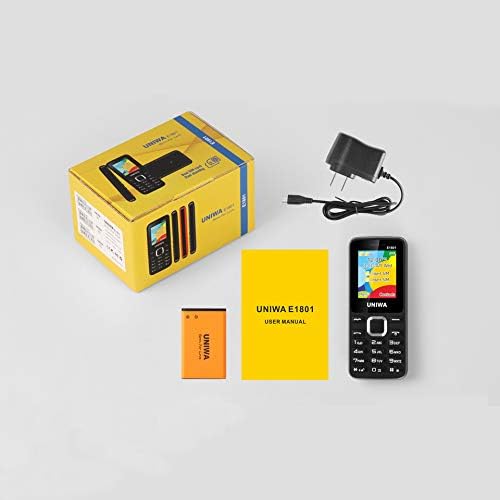
Image: Contents of the UNIWA E1801 package, including the phone, battery, charger, and user manual.
3. Pajisja Mbaroiview
The UNIWA E1801 features a user-friendly design with large, easy-to-press buttons and a non-slip frame for comfortable handling. It includes an ergonomic keypad with plating navigation keys for intuitive operation.
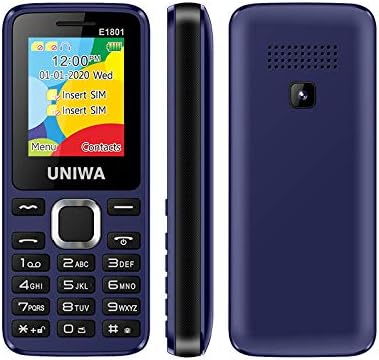
Imazh: Përpara, anësore dhe prapa views of the UNIWA E1801 phone, highlighting its compact design.

Image: Detail showing the non-slip frame of the UNIWA E1801, designed for secure grip.

Image: Close-up of the ergonomic keypad and plating navigation keys on the UNIWA E1801.
4. Konfigurimi
4.1. Instalimi i baterisë
- Hiqeni kapakun e pasmë të telefonit duke e hapur butësisht nga prerja.
- Align the gold contacts of the BL-5C 800 mAh battery with the contacts in the battery compartment.
- Shtypni butësisht baterinë poshtë derisa të fiksohet në vendin e saj.
- Replace the back cover, ensuring it snaps securely.
4.2. Instalimi i kartës SIM
The UNIWA E1801 supports Dual SIM cards, allowing for two active phone numbers simultaneously.
- With the back cover removed and battery out (if necessary), locate the SIM card slots.
- Insert your SIM card(s) into the designated slot(s) with the gold contacts facing down and the cut corner aligned correctly.
- Gently push the SIM card until it is fully seated.
- Vendosni përsëri baterinë dhe mbulesën e pasme.

Image: The dual SIM card slots of the UNIWA E1801, illustrating how SIM cards are inserted.
4.3. Ngarkimi i pajisjes
Para përdorimit të parë, ngarkoni plotësisht baterinë e telefonit.
- Connect the charger cable to the charging port on the phone.
- Futeni karikuesin në një prizë standarde në mur.
- Treguesi i baterisë në ekran do të tregojë statusin e karikimit.
- Pasi të jetë ngarkuar plotësisht, shkëputeni karikuesin.
5. Udhëzimet e funksionimit
5.1. Ndez/Fik
- Për të ndezur: Shtypni dhe mbani shtypur butonin e Ndezjes/Mbarimit të Thirrjes derisa të ndriçohet ekrani.
- Për të fikur: Press and hold the Power/End Call button until the power-off options appear, then confirm.
5.2. Kryerja e thirrjeve
- From the idle screen, enter the phone number using the keypad.
- Press the Call button (usually green) to initiate the call.
- To end a call, press the End Call button (usually red).
5.3. Dërgimi i mesazheve
- Shko te menyja 'Mesazhet' nga ekrani kryesor.
- Select 'Write Message' or 'New SMS'.
- Shkruani mesazhin tuaj duke përdorur tastierën.
- Fut numrin e marrësit ose zgjidh nga kontaktet.
- Dërgo mesazhin.
5.4. Kontaktet
Libri i telefonit mund të ruajë deri në 300 kontakte.
- Shtimi i një kontakti: Go to 'Contacts' > 'Add New Contact', then enter the name and number.
- Duke kërkuar për një kontakt: From the 'Contacts' menu, use the navigation keys to scroll or search by name.
5.5. Radio FM
The UNIWA E1801 features a wireless FM radio, allowing you to listen to your favorite stations without needing headphones as an antenna.
- Shko te aplikacioni 'Radio FM' nga menyja kryesore.
- Use the navigation keys to scan for available stations or manually tune to a frequency.
- Adjust the volume using the side keys (if available) or navigation keys.

Image: The UNIWA E1801 showcasing its wireless FM radio feature.
5.6. Multimedia (MP3/MP4)
The phone supports MP3 audio and MP4 video playback.
- Ensure you have a TF card (up to 16GB) inserted with your media files.
- Navigate to the 'Multimedia' or 'File Manager' menu.
- Select 'MP3 Player' or 'Video Player' to browse and play your files.

Image: Illustration of the 2030 Box Speaker on the UNIWA E1801, indicating its audio capabilities.
5.7. Kamera
The phone is equipped with a 0.08 MP rear camera.
- Nga menyja kryesore, zgjidhni 'Kamera'.
- Vendosni në kadran foton tuaj duke përdorur ekranin si një viewgjetësi
- Press the designated button (usually the center navigation key) to take a photo.
5.8. Elektrik dore
The built-in flashlight can be useful in low-light conditions.
- Refer to your phone's specific shortcut key or menu option to activate/deactivate the flashlight. This is often a long press on a specific number key or a dedicated button.

Image: The UNIWA E1801 demonstrating its integrated flashlight function.
5.9. Funksione të tjera
The UNIWA E1801 includes several utility functions:
- Lojëra: Simple pre-installed games.
- Kalendari: Për të mbajtur gjurmët e datave dhe ngjarjeve.
- Ora me zile: Vendosni alarme të shumta.
- Calculator: Funksionet themelore aritmetike.
- Ora botërore: View time in different time zones.
- Libri elektronik: Basic text file lexues.
- WAP: Basic internet browsing (requires GPRS data plan).
- Recorder: Voice recording function.
6. Mirëmbajtja
- Pastrimi: Use a soft, dry cloth to clean the phone's surface. Avoid liquid cleaners or abrasive materials.
- Kujdesi për baterinë: To prolong battery life, avoid extreme temperatures. Do not leave the phone charging for excessively long periods after it is full.
- Magazinimi: If storing the phone for an extended period, ensure the battery is partially charged (around 50%) and store it in a cool, dry place.
7. Troubleshooting
| Problem | Shkaku/zgjidhja e mundshme |
|---|---|
| Telefoni nuk ndizet. | Battery is depleted. Charge the phone for at least 30 minutes. Ensure battery is correctly installed. |
| Nuk mund të kryejë ose të marrë thirrje. | No network signal. Move to an area with better reception. SIM card not properly inserted. Reinsert SIM card. |
| Bateria zbrazet shpejt. | Background applications running. Close unused applications. Battery may be old and require replacement. |
| Nuk mund ta dëgjoj telefonuesin / Telefonuesi nuk mund të më dëgjojë mua. | Volume too low. Adjust call volume. Microphone/speaker blocked. Ensure no obstructions. |
Nëse problemi vazhdon pasi të provoni këto zgjidhje, ju lutemi kontaktoni mbështetjen e klientit.
8. Specifikimet
| Veçori | Detaj |
|---|---|
| Numri i modelit | ECON E1801 |
| Dimensionet | 108 x 45 x 14 mm |
| Pesha | 68 g |
| CPU | SC6531E |
| Rrjeti Band | 2G: GSM850/900/1800/1900 MHz, GPRS |
| Karta SIM | Dual-SIM, Dual-Standby |
| Kapaciteti i Librit të Telefonave | 300 numra |
| Zile | 64 chords, supports MP3, Midi ringtones |
| Folësi | 2030 Altoparlant |
| Radio FM | Radio FM pa tel |
| Ekrani | 1.77 inch QQVGA Display, 160 x 128 pixels |
| Kamera | 0.08 MP Rear Camera, 640 x 480 pixels |
| Multimedia | MP3, MP4 |
| Kujtesa | Supports TF cards up to 16 GB max |
| Bluetooth | V2.1 |
| Vibrator | po |
| Koha e bisedës | Deri në 240 minuta |
| Koha e gatishmërisë | Deri në 200 orë |
| Gjuhët | English, Russian, Hebrew, Arabic, French, Spanish, Polish, German, Italian, Portuguese, Chinese |
9. Garancia dhe Mbështetja
For warranty information and technical support, please refer to the warranty card included with your product or contact the retailer where you purchased the UNIWA E1801. You may also visit the official UNIWA website for further assistance and updated support information.