
1. Hyrje
This manual provides instructions for the OEM RMT-B119A remote control, designed as a replacement or secondary remote for various Sony Blu-ray player models. This remote offers full functionality for controlling your Blu-ray player's features.
Compatible Sony Blu-ray Player Models:
- BDP-BX59
- BDP-S390
- BDP-S590
- BDP-BX110
- BDP-S1100
- BDP-S3100
- BDP-BX310
2. Konfigurimi
2.1 Instalimi i baterisë
The remote control requires two (2) AAA batteries (not included). Follow these steps to install the batteries:
- Gjeni kapakun e ndarjes së baterisë në pjesën e pasme të telekomandës.
- Shtypni poshtë mbi skedën dhe rrëshqitni kapakun poshtë për të hapur ndarjen.
- Vendosni dy bateri AAA, duke u siguruar që terminalet pozitive (+) dhe negative (-) të jenë në përputhje të saktë me shenjat brenda ndarjes.
- Rrëshqisni kapakun e ndarjes së baterisë përsëri në vendin e tij derisa të klikojë mirë.
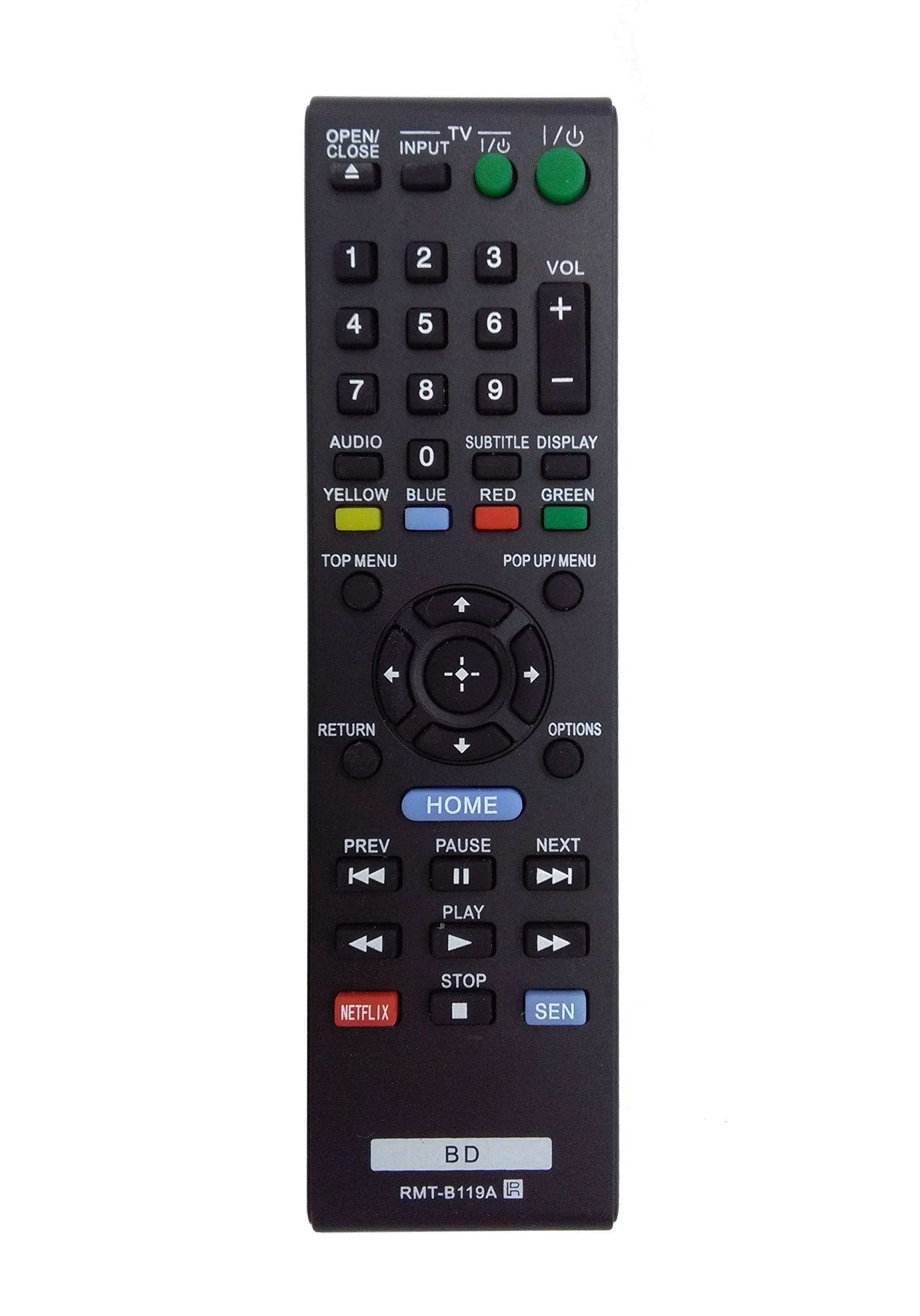
Image: The OEM RMT-B119A remote control, showing the full button layout on the front and a partial view of the open battery compartment on the back, revealing the battery terminals.
3. Udhëzimet e funksionimit
3.1 Remote Control Layout and Button Functions
Familiarize yourself with the buttons on your RMT-B119A remote control. Below is a description of each button's primary function.
Image: The OEM RMT-B119A remote control, displaying all buttons and their labels.
- Energjia (I/O): Turns the Blu-ray player on or off.
- OPEN/CLOSE (▲): Hap ose mbyll sirtarin e diskut.
- HYRJA: Switches the input source on the connected TV (if programmed).
- TV: Switches the remote to TV control mode (if programmed).
- Tastiera numerike (0-9): Used for direct track selection, chapter selection, or entering numerical data.
- VOL (+/-): Adjusts the volume level (typically for the connected TV, if programmed).
- AUDIO: Changes the audio track or language during playback.
- SUBTITLE DISPLAY: Toggles subtitle display on or off, or cycles through available subtitle languages.
- YELLOW, BLUE, RED, GREEN: Color-coded function buttons, typically used for specific features within menus or interactive content. Their function varies depending on the disc or menu.
- MENU TOP: Accesses the main menu of the Blu-ray disc.
- POP UP/MENU: Displays the pop-up menu during disc playback.
- Directional Pad (↑↓←→): Lundron nëpër meny dhe opsione.
- Center Button (Enter/Select): Konfirmon një përzgjedhje ose hyn në një artikull të menusë.
- KTHIMI: Kthehet në ekranin ose menynë e mëparshme.
- OPTIONS: Displays context-sensitive options or settings.
- SHTPIA: Accesses the Blu-ray player's home menu.
- MË PARË (◀◀): Skips to the beginning of the current track/chapter or the previous track/chapter.
- PAUSE (▌▌): Ndalon luajtjen.
- TJETËR (▶▶): Kalon te kënga ose kapitulli tjetër.
- LUAJ (▶): Fillon ose rifillon riprodhimin.
- NDALO (■): Ndalon riprodhimin.
- NETFLIX: Direct access button for the Netflix streaming service.
- SEN: Direct access button for the Sony Entertainment Network (now PlayStation Video/Music).
- BD: Likely a dedicated button for Blu-ray Disc functions or to switch to Blu-ray mode.
4. Mirëmbajtja
To ensure the longevity and proper functioning of your remote control, follow these maintenance guidelines:
- Pastrimi: Fshijeni telekomandën me një leckë të butë dhe të thatë. Për papastërti kokëfortë, fshijeni pak.ampLani leckën me ujë ose me një pastrues të butë dhe jo-gërryes. Shmangni përdorimin e kimikateve ose tretësve të ashpër.
- Ndërrimi i baterisë: Replace batteries when the remote's response becomes sluggish or it stops functioning. Always replace both batteries at the same time with new ones of the same type.
- Magazinimi: Ruajeni telekomandën në një vend të freskët dhe të thatë, larg rrezeve të diellit, temperaturave ekstreme dhe lagështisë së lartë. Nëse telekomanda nuk do të përdoret për një periudhë të gjatë kohore, hiqni bateritë për të parandaluar rrjedhjet.
- Shmangni pikat: Mbrojeni telekomandën nga goditjet fizike, pasi rëniet mund të dëmtojnë pjesët e brendshme.
5. Troubleshooting
If you experience issues with your remote control, refer to the following table for common problems and solutions:
| Problem | Shkaku i mundshëm | Zgjidhje |
|---|---|---|
| Telekomanda nuk funksionon. | Bateri të vdekura ose të futura gabimisht. | Zëvendësoni bateritë me të reja, duke u siguruar që polariteti i saktë (+/-). |
| Telekomanda funksionon me ndërprerje. | Low battery power or obstruction. | Replace batteries. Ensure no objects are blocking the remote's signal path to the Blu-ray player. |
| Telekomanda nuk e kontrollon televizorin. | Remote not programmed for TV or TV mode not selected. | This remote is primarily for Blu-ray players. TV control functionality may require specific programming not covered by this manual, or may not be supported by this OEM model. |
| Butonat nuk reagojnë ose ngjiten. | Papastërti ose mbeturina nën butona. | Clean the remote control surface. Avoid spilling liquids on the remote. |
6. Specifikimet
- Marka: OEM
- Numri i modelit: RMT-B119A
- Teknologjia e lidhjes: Infra të kuqe (IR)
- Pajisjet e përputhshme: Sony Blu-ray Players (specific models listed in Introduction)
- Burimi i energjisë: 2 x bateri AAA (nuk përfshihen)
- Gama maksimale: Përafërsisht 10 metra (33 këmbë)
- Karakteristikë e veçantë: Dizajn ergonomik
7. Garancia dhe Mbështetja
This OEM RMT-B119A remote control comes with a Garanci 30 ditore nga data e blerjes, duke mbuluar defektet e prodhimit. Ju lutemi ruani provën e blerjes për kërkesat e garancisë.
For technical support or warranty inquiries, please contact the retailer or manufacturer directly. Refer to your purchase documentation for specific contact information.