1. Nhanganyaya
The ATOMSTACK P1 Dual Laser Engraver, bundled with the D3 Air Purifier, is a versatile and user-friendly system designed for precision engraving and cutting across a wide range of materials. This manual provides essential information for setting up, operating, maintaining, and troubleshooting your device to ensure safe and efficient use.
Key features of your ATOMSTACK P1 system include:
- Professional Precision & Cutting Capability: Integrates a 5W diode laser for cutting materials like 3mm basswood plywood and acrylic, and a 1.2W infrared laser for engraving metals and plastics.
- Wide Material Compatibility: Supports over 300+ materials including wood, leather, bamboo, coated ceramic, stainless steel, and various plastics.
- Effortless Operation & Free Software: Features plug-and-play functionality with the ATOMSTACK Software (including a 1,000+ material library and automatic accessory recognition) and compatibility with LightBurn and LaserGRBL.
- Environmental Protection: The D3 Air Purifier ensures a clean and safe workspace by filtering pollutant gases and particles.
- Exceptional Safety Features: Class 1 laser certification, fully enclosed design, USB safety interlock, secure enclosure detection, and gyro-based tilt detection.
2. Safety Information
Your ATOMSTACK P1 is designed with multiple safety features to ensure a secure operating environment. Always adhere to the following guidelines:
- Class 1 Laser Safety: The P1 is a Class 1 laser product, meaning the laser radiation is contained within the enclosure during normal operation.
- Fully Enclosed Design: The machine features a 720° fully enclosed structure with a visual window, preventing direct exposure to the laser.
- USB Safety Interlock: Insert the dedicated USB key to unlock processing and related functions. The machine will not operate without it.
- Secure Enclosure Detection: The laser automatically stops instantly if the door is opened during operation, preventing accidental exposure.
- Gyro-Based Tilt Detection: A built-in gyroscope stops operation if excessive tilting is detected, ensuring safety in case of accidental movement.
- Kufefetedza Always use the D3 Air Purifier or ensure adequate ventilation to manage fumes and particles generated during engraving and cutting.
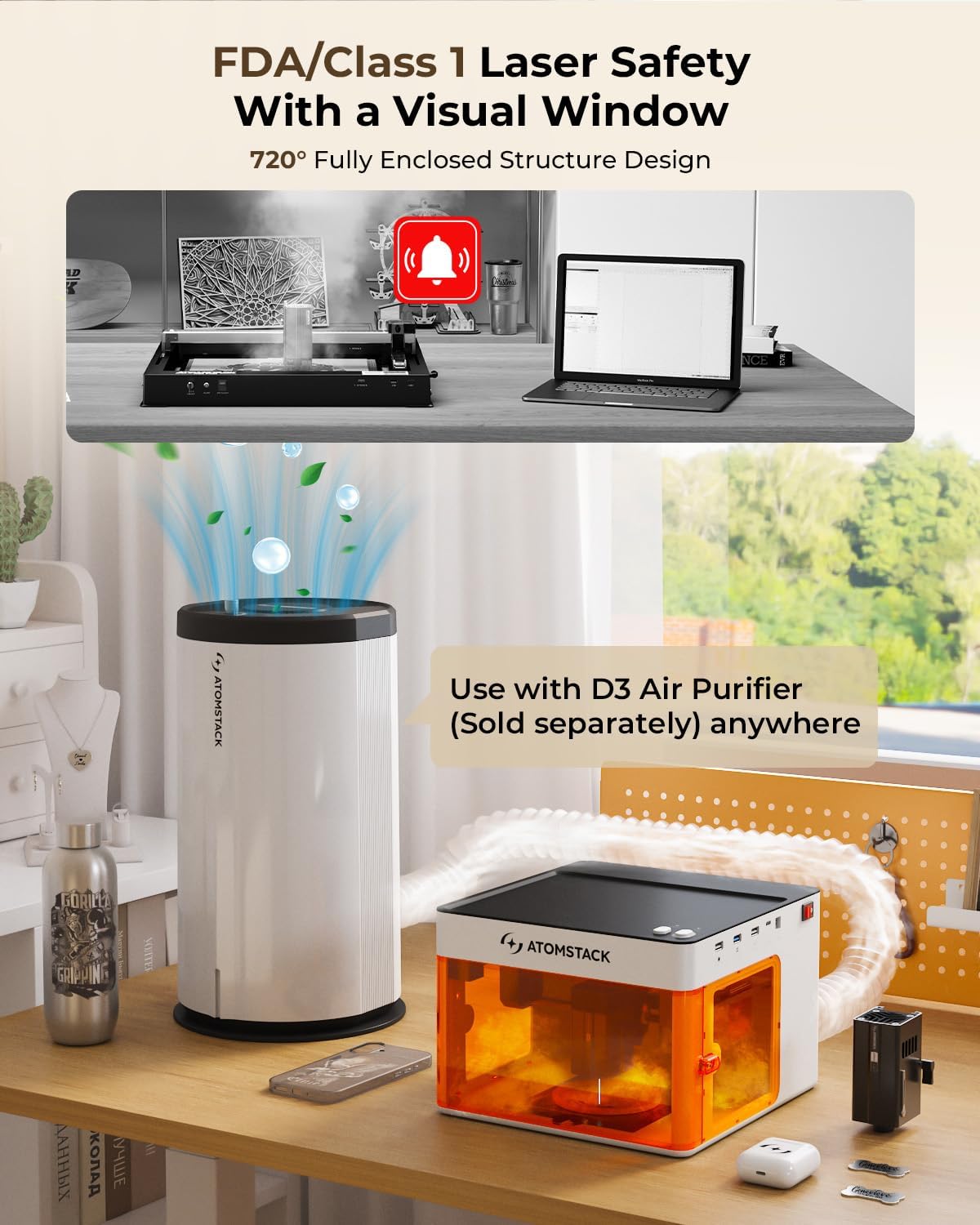
The ATOMSTACK P1 features a fully enclosed design with an orange safety enclosure to protect users from laser exposure.

The machine's design emphasizes FDA/Class 1 laser safety, incorporating a visual window for monitoring while maintaining enclosure integrity.

Detailed view of the Class 1 Laser Certification and integrated safety mechanisms like the USB safety interlock, secure enclosure detection, quick focus adjustment, and gyro-based tilt detection.
This video demonstrates the safety features of the Atomstack P1, including the USB safety interlock and secure enclosure detection, ensuring safe operation.
3. Setup
3.1 Unpacking and Initial Setup
The ATOMSTACK P1 is designed for quick and easy setup, offering a 'plug and play' experience.
- Nyatsobvisa zvese zvikamu kubva pakurongedza.
- Place the ATOMSTACK P1 on a stable, level surface.
- Batanidza adapta yemagetsi kumuchina uye nzvimbo yekubuditsa magetsi yakakodzera.
- Insert the provided USB key into the designated USB Safety Interlock port to enable functionality.
- If using the D3 Air Purifier, connect it to the engraver as per its separate instructions to ensure proper fume extraction.

The ATOMSTACK P1 and D3 Air Purifier components ready for setup.
Vhidhiyo iyi inopa mhinduro pfupiview of setting up the AtomStack P1 and preparing it for engraving, including placing materials and using the mobile application.
4. Operating Instructions
4.1 Software Pamusoroview
The ATOMSTACK P1 offers flexible software options for design and control:
- AtomStack APP (Mobile): A beginner-friendly application for Android and iOS, allowing easy design uploads and control from your phone. Includes a 1,000+ material library and automatic accessory recognition.
- AtomStack Studio (PC): Free software for Windows and macOS, providing comprehensive design and control capabilities for your PC.
- LightBurn & LaserGRBL: Compatible with popular third-party software (sold separately) for advanced users.

The AtomStack software offers user-friendly interfaces for both mobile and PC, simplifying the engraving process for all skill levels.
4.2 Material Compatibility and Laser Modules
The ATOMSTACK P1 features dual laser modules for diverse applications:
- 5W Diode Laser (455±5nm): Ideal for cutting and engraving materials such as wood, bamboo, paper, leather, cardboard, cork, rock, felt, fabric, MDF, coated metal, and some dark opaque acrylic. Capable of cutting 3mm basswood plywood and acrylic in a single pass.
- 1.2W Infrared Laser (1064±1nm): Specialized for engraving metals (stainless steel, aluminum, brass, iron, gold, silver, platinum, titanium), black acrylic, and plastic.

This chart illustrates the extensive material compatibility of both the 5W Diode Laser and the 1.2W Infrared Laser, covering over 300 materials.
This video highlights the capabilities of the ATOMSTACK 1.2W Infrared Laser, demonstrating its precision engraving on various metal and plastic surfaces.
4.3 Precision and Speed
The ATOMSTACK P1 utilizes a CoreXY design with dual motor drive for efficient and stable operation, ensuring high precision and speed:
- Motion Accuracy: Achieves 0.1mm motion accuracy for detailed engravings.
- Max Working Speed: Up to 10,000mm/min, allowing for quick processing of designs.
- Spot size: 5W Diode Laser has a spot size of 0.08 x 0.06mm, and the 1.2W IR Laser has an ultra-fine spot size of 0.03 x 0.03mm for superior detail.

The CoreXY design ensures structural stability and high motion accuracy for precise engraving results.
4.4 Accessory Kubatanidzwa
Expand your creative possibilities with compatible accessories:
- D3 Air Purifier: (Sold separately) Connects to the P1 to effectively filter smoke and odors, maintaining a clean and safe working environment.
- Rotary Tools (R8 Rotary Chuck, R6 Rotary Roller): (Sold separately) Essential for engraving cylindrical or irregularly shaped objects like mugs, bottles, rings, and bracelets.
- Extension & Heightening Accessories: Allows for expanding the engraving area up to 3 times and accommodating taller objects.

The ATOMSTACK P1 paired with the D3 Air Purifier for a complete and clean engraving setup.

The D3 Air Purifier can be used anywhere to ensure clean air during engraving operations.

The engraving area can be expanded and adapted with rotary chucks and rollers for various object shapes.
5. Kuchengeta
Regular maintenance ensures the longevity and optimal performance of your ATOMSTACK P1 and D3 Air Purifier.
- Kuchenesa: Regularly clean the interior of the engraver, especially the laser lens and the engraving platform, to prevent debris buildup. Use a soft, lint-free cloth.
- Laser Lens Care: The laser lens is a critical component. Refer to the detailed instructions in the full product manual for specific cleaning procedures to avoid damage.
- Air Purifier Filter Replacement: The D3 Air Purifier's multi-layer filter (Activated Carbon + HEPA) should be replaced periodically based on usage to maintain effective air purification. Consult the D3 manual for replacement intervals.
- Mechanical Zvikamu: Periodically check the belts and rails for any signs of wear or looseness. Ensure they are clean and free of obstructions.
6. Kugadzirisa matambudziko
If you encounter any issues with your ATOMSTACK P1 or D3 Air Purifier, please refer to the following general troubleshooting steps:
- Mudziyo Haubatiki. Check power connections, ensure the power adapter is securely plugged in, and verify the power outlet is functional.
- Laser Not Firing/Engraving: Ensure the USB safety interlock key is fully inserted. Check that the enclosure door is securely closed. Verify laser module connection.
- Matambudziko ekubatana kweSoftware: Restart the software and the engraver. Check USB cable connections. Ensure drivers are correctly installed if using PC software.
- Hunhu Hwakashata hwekunyora: Verify material settings in the software match the material being used. Ensure the laser focus is correctly adjusted. Clean the laser lens.
- Utsi/Munhuwi Wakawandisa: Check that the D3 Air Purifier is properly connected and powered on. Ensure its filters are not clogged and are replaced as needed.
For persistent issues or specific error codes, please consult the detailed troubleshooting section in the full product manual or contact ATOMSTACK customer support.
7. Zvinotsanangurwa
| Tsanangudzo | Detail |
|---|---|
| Brand | ATOMSTACK |
| Model Number | P1 |
| Laser Type | Dual Laser (5W Diode, 1.2W Infrared) |
| Wattage | 5000 Milliwatts (5W) |
| Operation Mode | Manual |
| Color | Nhema |
| Item ASIN | B0F5WXJM1F |
8. Warranty uye Tsigiro
ATOMSTACK is committed to providing excellent customer service and support for your laser engraving machine.
- Warranty: Your ATOMSTACK P1 comes with a 365-day warranty.
- Mabatiro evatengi: Professional technical and support teams are available 24/7 to answer any questions you may have.
- Contact: If you encounter any problems or require assistance, please contact the ATOMSTACK team directly through the Amazon platform for a prompt solution.


