1. Nhanganyaya
The NZXT Internal USB Hub 3 is designed to expand your system's internal USB 2.0 connectivity. This hub allows for the connection of additional USB 2.0 devices, such as all-in-one liquid coolers, fan controllers, and lighting accessories, within your computer case. Its compact design, magnetic body, and included 3M dual lock tapes facilitate quick and discreet installation.
2. Zvigadzirwa zveChigadzirwa
- Kuenderana Kwakawedzerwa: Provides 4 internal USB 2.0 ports and 1 port for connection to the motherboard.
- Compact Design: Optimized for placement within any PC case, designed to be easily concealed.
- Stable Power: Utilizes a SATA power connection to ensure a consistent and reliable power source for connected devices.
- Kuisa Nyore: Features a magnetic body and includes 3M dual lock tapes for user-friendly mounting.
3. Package Zviri mukati
Ona kuti zvinhu zvese zviripo mupasuru yako:
- NZXT Internal USB Hub 3 (1 unit)
- Internal USB 2.0 Motherboard Cable (1 unit)
- SATA Power Cable (1 unit)
- 3M Dual Lock Tapes (for mounting)

Figure 3.1: NZXT Internal USB Hub 3, showing the five internal USB 2.0 headers.
4. Setup uye Kuiswa
Follow these steps to install your NZXT Internal USB Hub 3:
- Gadzirira PC yako: Power off your computer and disconnect it from the power source. Open your computer case to access the motherboard and internal components.
- Locate a USB 2.0 Header: Identify an available 9-pin USB 2.0 header on your motherboard.
- Connect the Motherboard Cable: Connect one end of the included internal USB 2.0 motherboard cable to the designated motherboard port on the NZXT Internal USB Hub 3 (often marked 'MB' or similar). Connect the other end to the available USB 2.0 header on your motherboard.
- Batanidza Simba reSATA: Connect the included SATA power cable to the SATA power input on the hub. Connect the other end of the SATA power cable to an available SATA power connector from your power supply unit (PSU). This provides stable power to the hub and connected devices.
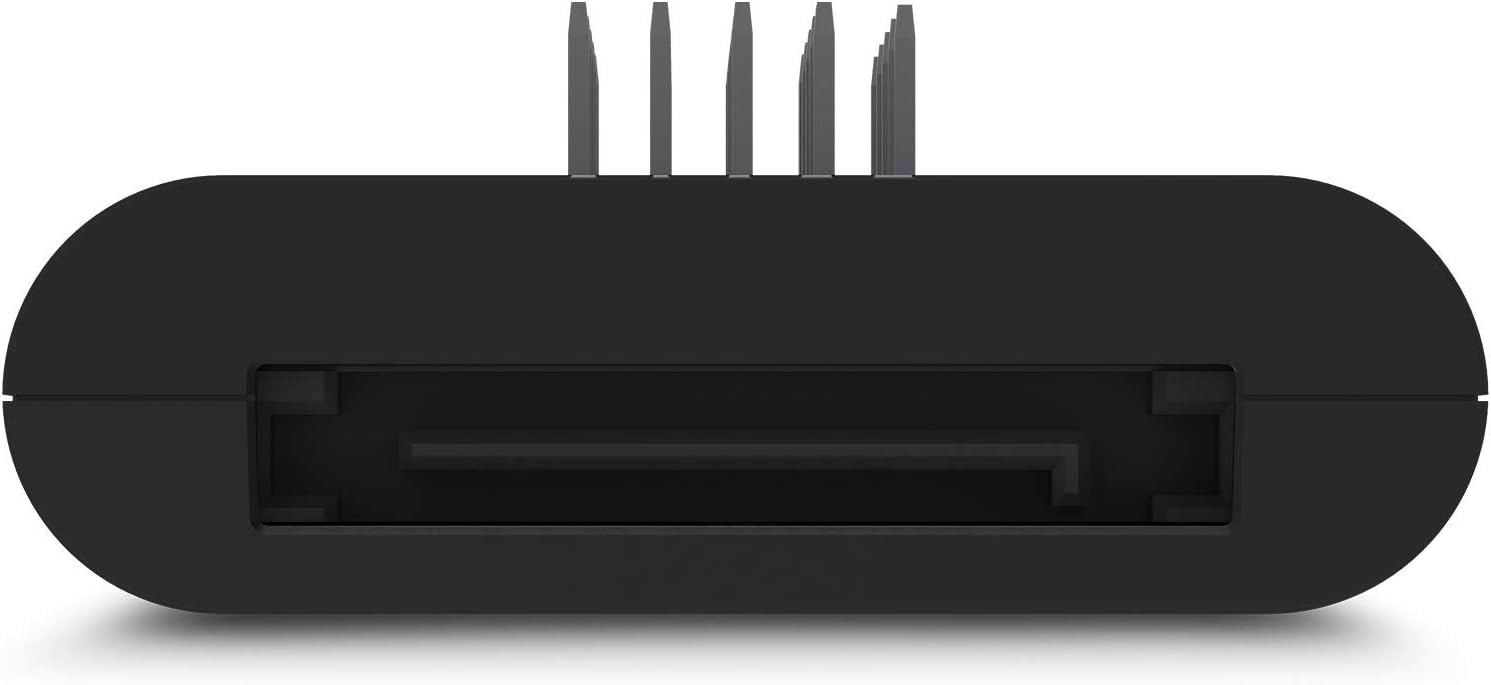
Mufananidzo 4.1: Rutivi view of the hub, highlighting the SATA power connection port.
- Mount the Hub: The hub features a magnetic body for easy attachment to any steel surface within your PC case. Alternatively, use the provided 3M dual lock tapes for secure mounting on non-magnetic surfaces. Choose a location that allows for tidy cable management and does not obstruct airflow.

Figure 4.2: The hub mounted inside a PC case, demonstrating its compact and discreet placement.
- Connect USB 2.0 Devices: Plug your internal USB 2.0 devices (e.g., AIO coolers, RGB controllers, fan controllers) into the available USB 2.0 ports on the hub.
- Vhara Nyaya uye Power On: Once all connections are secure and cables are managed, close your PC case, reconnect the power, and power on your computer. The hub is plug-and-play and should be recognized automatically by your system.
Kuisa Vhidhiyo Guide
Vhidhiyo 4.1: Chigadzirwa Pamusoroview and Installation Guide for the NZXT Internal USB Hub 3. This video demonstrates the unboxing, key features, and basic installation steps of the hub, including connecting the SATA power and motherboard USB cable.
Product Kuratidza Vhidhiyo
Video 4.2: A demonstration of the NZXT Internal USB Hub 3 in use. This video showcases the hub's functionality and how it integrates into a PC build to expand USB 2.0 connectivity.
5. Operating Instructions
The NZXT Internal USB Hub 3 operates as a plug-and-play device. Once correctly installed and powered, it automatically provides additional USB 2.0 ports for your internal components. No additional drivers or software are typically required for basic functionality.
- Ensure all devices connected to the hub are properly seated in their respective ports.
- The SATA power connection ensures sufficient power delivery to all connected devices, preventing power-related issues.
6. Kuchengeta
To ensure optimal performance and longevity of your NZXT Internal USB Hub 3:
- Keep the hub and its connections free from dust and debris. Use compressed air to gently clean the ports periodically.
- Ensure cables are not excessively bent or strained, which could lead to damage.
- Dzivisa kuisa hub pakupisa kwakanyanya kana hunyoro.
7. Kugadzirisa matambudziko
If you encounter issues with your NZXT Internal USB Hub 3, consider the following:
- Mudziyo Hauzivikanwe:
- Verify that the hub's motherboard cable is securely connected to both the hub and an active USB 2.0 header on your motherboard.
- Ensure the SATA power cable is firmly connected to both the hub and your PSU. Lack of sufficient power is a common cause for devices not being recognized.
- Try connecting the problematic device directly to a motherboard USB 2.0 header to rule out the device itself as the source of the issue.
- Tangazve komputa yako.
- Kubatana Kwenguva:
- Tarisa zvese zvakabatanidzwa netambo kuti hazvina kusimba.
- Ensure the SATA power connection is stable. The hub relies on this for consistent performance.
- Avoid overloading the hub with too many high-power draw devices, although the SATA power connection is designed to mitigate this.
- Kukuvadza Pamuviri:
- Inspect the hub and cables for any visible signs of damage.
8. Zvinotsanangurwa
| Brand | NZXT |
| Model Number | AC-IUSBH-M3 |
| Item Weight | 3.84 ounces |
| Product Dimensions | 5.04 x 4.37 x 1.02 inches |
| Material | Plastiki |
| Color | Nhema |
| Hardware inowanikwa | USB, USB 2.0 |
| Special Feature | Yakavakwa-mukati magineti |
| Inowirirana Devices | Desktops |
9. Warranty uye Tsigiro
Kuti uwane ruzivo rwewarandi uye rutsigiro rwehunyanzvi, ndapota tarisa NZXT yepamutemo website or contact NZXT customer service directly. Keep your proof of purchase for warranty claims.
NZXT is committed to providing quality products and support. If you experience any issues not covered in this manual, please reach out to their support team for assistance.


