1. Folasaga
This manual provides essential information for the safe and efficient operation of your Philips Evnia 24M2N3200L 24-inch Gaming Monitor. Please read this manual thoroughly before using the product and retain it for future reference.
2. Fa'amatalaga Saogalemu
Mata'ituina le puipuiga o le saogalemu nei e puipuia ai le faaleagaina o le mata'itu ma mautinoa le saogalemu o tagata faaaoga:
- Aua le tu'uina atu le mata'itū i timuga po'o susu.
- Aua le tatalaina le mata iasing; fa'asino uma auaunaga i tagata faigaluega agavaa.
- Ia mautinoa le sa'o o le ea fa'ata'amilo i le mata'itū.
- Fa'aaoga na'o le fa'aoga eletise o lo'o tu'uina atu ma le mata'itū.
- Aloese mai le tuuina o mea mamafa i luga o le uaea eletise.
- Clean the screen with a soft, lint-free cloth. Do not use liquid cleaners directly on the screen.
3. Mea i totonu o le afifi
Fa'amautinoa o lo'o iai mea uma i totonu o le afifi:
- Philips Evnia 24M2N3200L Monitor
- Mata'itū Tu'u (Fa'avae ma Ua)
- Uaea Malosi
- Uaea HDMI
- Uaea DisplayPort
- Tusi Lesona a le Tagata (lenei pepa)

Image: The retail packaging box for the Philips Evnia 24M2N3200L monitor, showing the product name and design awards.
4. Seti
4.1. Tulai Fono
- Fa'asaga i lalo le mata'itusi i luga o se mea vaivai ma mama e puipuia ai le maosi.
- Attach the stand neck to the monitor's VESA mounting area. Secure with screws if provided.
- Attach the stand base to the bottom of the stand neck. Tighten the thumb screw or screws until secure.

Ata: Tua view of the monitor showing the attached stand and the VESA mounting area.
4.2. Feso'ota'i i se komepiuta
The monitor supports HDMI and DisplayPort connections.
- So'oga Malosi: Fa'afeso'ota'i le uaea eletise i le mea e tu'i ai le paoa o le mata'itū ona soso'o ai lea i se so'o eletise.
- Feso'ota'iga Vitio:
- For HDMI: Connect one end of the HDMI cable to the monitor's HDMI port and the other end to your computer's HDMI output.
- For DisplayPort: Connect one end of the DisplayPort cable to the monitor's DisplayPort and the other end to your computer's DisplayPort output.
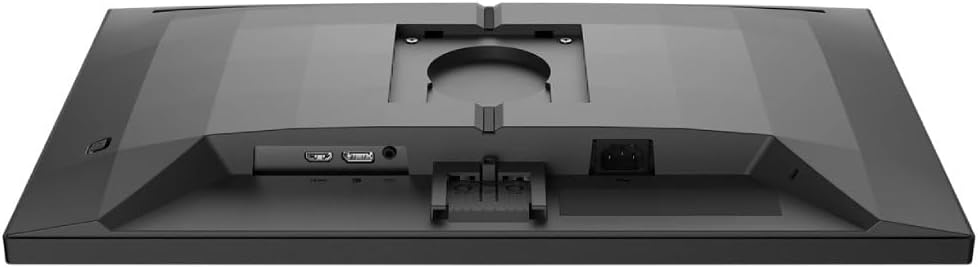
Ata: Auiliili view of the monitor's rear panel, showing the HDMI, DisplayPort, and power input ports.
5. Fa'agaoioia le Mataitu
5.1. Malosi / Malosi
Press the power button, usually located on the bottom right or rear of the monitor, to turn it on or off. The power LED will indicate the monitor's status.
5.2. Fa'aaliga Fa'aaliga (OSD).
The OSD menu allows you to adjust various monitor settings. Use the joystick or buttons (refer to your monitor's specific layout) to navigate and select options.
- Ata: Fetuuna'i le pupula, fa'atusatusaga, ma'ai, ma le gamma.
- Lanu: Filifili le vevela o le lanu, le sRGB mode, po'o tulaga lanu ua fa'atulagaina e le tagata fa'aoga.
- Leo: Control volume if the monitor has built-in speakers or an audio output.
- Ulufale: Manually select the input source (HDMI, DisplayPort).
- Taaloga: Access specific gaming features like SmartImage Game, Low Input Lag, and Adaptive Sync settings.
- Fa'atonuga OSD: Fetuuna'i le gagana OSD, le manino, ma le taimi e muta ai.

Image: The Philips Evnia 24M2N3200L monitor showcasing a high-quality image from a video game, highlighting its display capabilities.
6. Tausiga
6.1. Fa'amamāina o le Mata'itū
- Aveese i taimi uma le mata'itū a'o le'i fa'amamā.
- Use a soft, clean, lint-free cloth to gently wipe the screen.
- Mo fa'ailoga ma'a'a, fa'amama le oampen the cloth with water or a mild, non-abrasive screen cleaner. Do not spray liquids directly onto the screen.
- Clean the monitor casing fa'atasi ai ma se ie vaivai ma mago.
6.2. Teuina
Afai e teuina le mata'itu mo se vaitaimi umi, ia momotu uma uaea ma teu i lona uluai afifiina e puipuia ai mai le pefu ma le faaleagaina o le tino. Teu i se nofoaga malulu ma mago.
7. Faʻafitauli
Afai e te feagai ma fa'afitauli i lau mata'itū, va'ai i fa'afitauli masani nei ma fofo:
| Fa'afitauli | Mafuaaga e ono tupu | Fofo |
|---|---|---|
| Leai se ata i luga ole lau | Power cable disconnected, video cable loose, incorrect input source. | Check power and video cable connections. Select correct input source via OSD. |
| E emo ata | Loose video cable, graphics card issue, refresh rate mismatch. | Ensure video cable is secure. Update graphics drivers. Adjust refresh rate in OS settings. |
| E le sa'o lanu | Incorrect color settings, faulty cable. | Reset color settings in OSD. Try a different video cable. |
| E le ki le mata'itu | No power, faulty power adapter. | Check power outlet and cable. Ensure power adapter is functioning. |
8. Fa'amatalaga
| Fa'aaliga | Fa'amatalaga |
|---|---|
| Numera Fa'ata'ita'i | 24M2N3200L |
| Tele lau | 24 inisi |
| Ituaiga Panel | IPS |
| I'ugafono | 1920 x 1080 (Atoatoa HD) |
| Ituaiga Fa'atatau | 16:9 |
| Fua Fa'afouina | 180Hz |
| Taimi Tali | 0.5ms (MPRT) |
| Feso'ota'i | 1x HDMI, 1x DisplayPort |
| Punavai Malosi | Malosiaga Faaeletise |
| Fua o Mea (fa'atasi ai ma tulaga) | 19.5 x 54 x 43.3 cm (Loloto x Lautele x Maualuluga) |
| Oloa mamafa (faatasi ai ma tulaga) | 4.96 kilokalama |
| Tufuga | Philips |
9. Fa'amaonia ma Lagolago
Mo fa'amatalaga fa'amaonia ma lagolago fa'apitoa, fa'amolemole fa'afeso'ota'i le pepa fa'amaonia o lo'o i totonu o lau afifi pe asiasi i le lagolago aloaia a Philips webnofoaga. Taofi lau lisiti fa'atau e fai ma fa'amaoniga o le fa'atauga mo tagi fa'amaonia.
Lagolago i luga ole laiga: www.philips.com/support


