1. Uvod
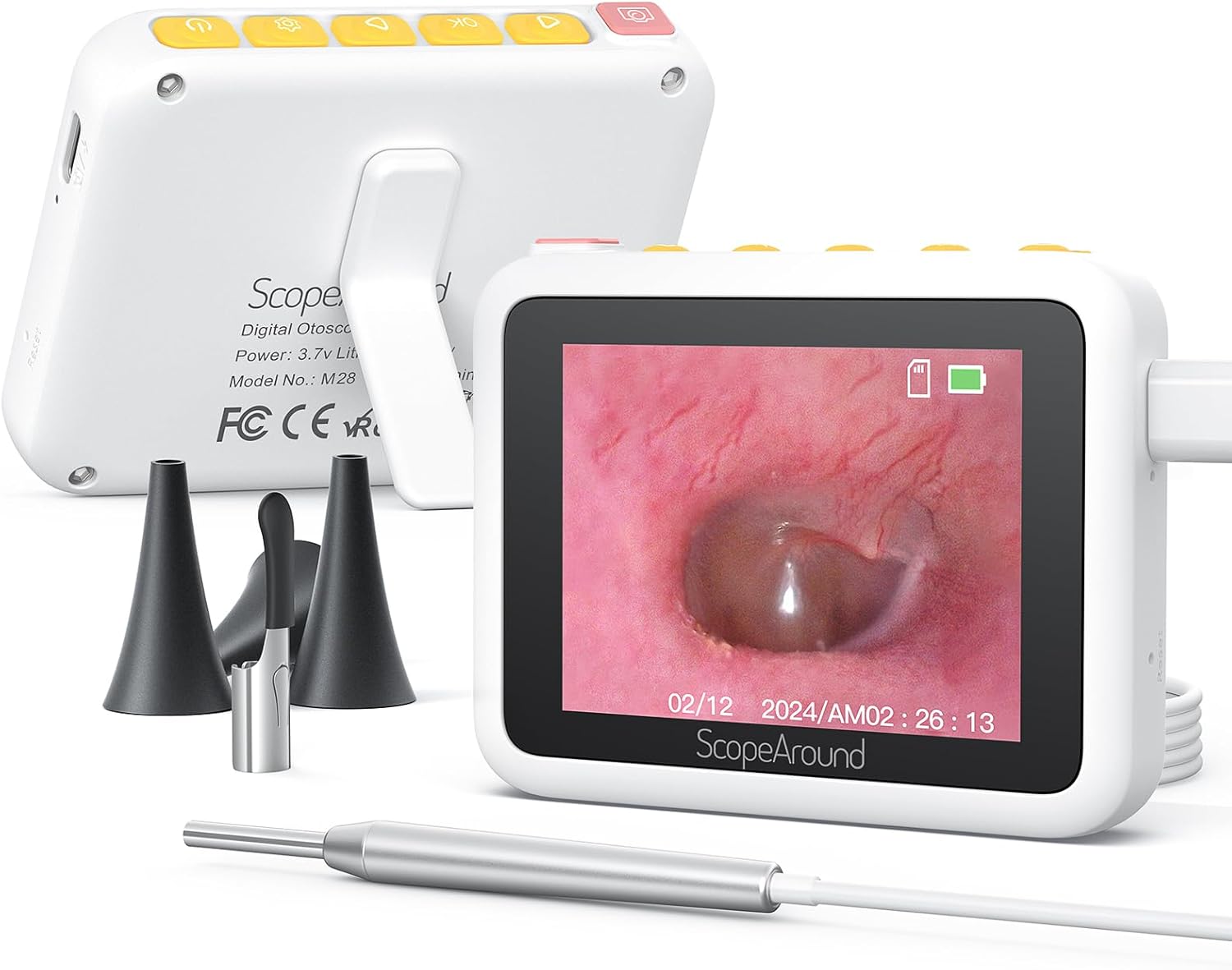
Thank you for choosing the ScopeAround M28 Digital Otoscope. This device is designed to provide a clear visual inspection of the ear canal, teeth, mouth, and other small areas. It features a 3.9mm ultra-thin HD camera with LED lights and a 2.8-inch IPS LCD screen for direct viewing. This manual provides essential information for safe and effective use, setup, operation, and maintenance of your otoscope.
2. Pomembne varnostne informacije
WARNING: Read all safety warnings and instructions before use. Failure to follow warnings and instructions may result in electrical shock, fire, and/or serious injury. Save all warnings and instructions for future reference.
- This device is intended for personal visual inspection and earwax removal. Consult a medical professional for diagnosis or treatment of ear conditions.
- Do not insert the otoscope too deeply into the ear canal. Use the included speculums to prevent excessive insertion and avoid injury.
- Always clean the camera lens and accessories with alcohol prep pads before and after each use to maintain hygiene and prevent cross-contamination.
- Keep the device out of reach of children. Adult supervision is required when used by children.
- Naprave ne uporabljajte, če je poškodovana ali ne deluje pravilno.
- Naprave ne izpostavljajte ekstremnim temperaturam ali neposredni sončni svetlobi.
- Za optimalno delovanje se pred uporabo prepričajte, da je naprava popolnoma napolnjena.
3. Vsebina paketa
Preverite, ali so v paketu vsi elementi:
- Otoscope Device (Main unit with 2.8" IPS LCD screen)
- Camera Cable with 3.9mm Ultra-Thin HD Camera Lens
- Ear Spoon attachment
- Specula (3 pieces)
- USB polnilni kabel tipa C
- Magnetno stojalo
- Paket vatiranih konic
- Blazinice za pripravo alkohola
- Uporabniški priročnik
- Safety Warnings Card

4. Izdelek je končanview
The ScopeAround M28 Digital Otoscope is a compact and user-friendly device designed for visual inspection. Key features include:
- 3.9mm Ultra-Thin Camera Lens: Allows easy entry into narrow ear canals.
- 720P HD Camera with 6 LED Lights: Provides clear, bright images and videos of the inspection area.
- 2.8" IPS LCD Screen: Offers direct, real-time viewing without external apps or devices.
- Zasnova Plug & Play: Simple operation, no Wi-Fi or app required.
- Magnetno stojalo: Enables hands-free operation for convenience.
- 1200mAh polnilna baterija: Provides 2-3 hours of continuous use.
- Fixed Focal Length: Optimized for sharp images at 0.4 to 0.8 inches.


5. Navodila za nastavitev
Follow these steps to set up your ScopeAround M28 Digital Otoscope:
- Napolnite napravo: Before first use, fully charge the otoscope device using the provided USB Type-C charging cable. Connect the cable to the charging port on the device and a compatible USB power source. The battery indicator on the screen will show charging status.
- Pritrdite sondo kamere: Plug the camera probe cable into the designated port on the otoscope device.
- Izberite in pritrdite dodatno opremo: Depending on your intended use, attach either an ear spoon or a speculum to the tip of the camera probe. Ensure it is securely fitted.
- Vklop: Long press the power button (usually located on the top right) to turn on the device. The screen will display the ScopeAround logo and then the live camera feed.
- Attach Magnetic Stand (Optional): Za prostoročno telefoniranje viewing, attach the magnetic stand to the back of the main unit. It can be positioned to prop up the screen at a comfortable viewvhodni kot.


6. Navodila za uporabo
Once the device is set up, you can begin your inspection:
- V živo View: The 2.8" IPS LCD screen will display a real-time view iz fotoaparata.
- Fotografirati: Press the Photo/Video button (usually the leftmost button with a camera icon) to capture a still image.
- Snemanje videoposnetkov: Hold down the Photo/Video button to start recording a video. Press it again to stop recording.
- Funkcija povečave: Use the Left/Zoom buttons to adjust the magnification of the image on the screen (up to 1.5X zoom).
- Vrtenje slike: Use the Right/Image Rotate buttons to rotate the image 180 degrees for better viewing kotov.
- Dostop do nastavitev: Press the Setting button to enter the device menu. Here you can adjust resolution, language, date/time, and other parameters.
- Reviewing Media: Navigate to the Playback option in the settings menu to view posnetih fotografij in video posnetkov.
- Prenašanje Files: Connect the device to a computer using the USB Type-C cable to transfer captured images and videos.


7. Vzdrževanje in nega
Proper maintenance ensures the longevity and hygiene of your otoscope:
- Čiščenje leče: Use the provided alcohol prep pads or Q-tips to gently clean the camera lens before and after each use. Ensure no residue remains.
- Pripomočki za čiščenje: The ear spoon and speculums should also be cleaned with alcohol prep pads after each use.
- Shranjevanje: Napravo in njeno dodatno opremo shranjujte na čistem in suhem mestu, stran od neposredne sončne svetlobe in ekstremnih temperatur.
- Vzdrževanje baterije: Charge the device regularly, even if not in frequent use, to maintain battery health. Avoid fully depleting the battery for extended periods.

8. Odpravljanje težav
If you encounter issues with your ScopeAround M28 Digital Otoscope, try the following:
- Brez napajanja: Prepričajte se, da je naprava popolnoma napolnjena. Priključite jo na vir napajanja in počakajte nekaj minut, preden jo poskusite znova vklopiti.
- Ni slike na zaslonu: Verify that the camera probe is securely plugged into the device. If the issue persists, try unplugging and re-plugging the camera probe.
- Zamegljena slika: Ensure the camera lens is clean. The device has a fixed focal length, so adjust the distance between the camera tip and the object for optimal clarity (0.4-0.8 inches).
- Naprava se ne odziva: Use a thin pin to press the reset button (located near the charging port) to restart the device.
- Prenos ni mogoč Files: Ensure the device is properly connected to your computer via the USB Type-C cable. Check your computer's file explorer for the device.
9. Specifikacije
| Funkcija | Specifikacija |
|---|---|
| Dimenzije izdelka | 3.94 x 3.94 x 3.94 palcev |
| Teža predmeta | 8.8 unč |
| Premer objektiva kamere | 3.9 mm |
| Zaslon zaslona | 2.8-palčni IPS LCD-zaslon |
| Video ločljivost | 1280 x 720 pixels (720P HD) |
| Kapaciteta baterije | 1200 mAh litij polimer |
| Delovni čas | 2-3 hours (continuous usage) |
| Shranjevanje | Internal (8GB, not expandable) |
| Povezljivost | USB Type-C (for charging and data transfer) |
| Proizvajalec | ScopeAround |
10. Garancija in podpora
ScopeAround is committed to customer satisfaction. This product comes with a standard warranty as per the retailer's policy. For any questions, technical support, or warranty claims, please contact our US-based after-sales support team. Contact information can typically be found on our official webspletnega mesta ali prek vaše nakupovalne platforme.
We are dedicated to providing high-quality technology and support for your health and wellness needs.