1. Uvod
This manual provides detailed instructions for the Cellularline HUSH Bluetooth In-Ear Earbuds. These earbuds feature an interactive touch display, Active Noise Cancelling (ANC), Noise-Free Calls technology, and customizable sound with 5 EQ modes. Please read this manual carefully to ensure proper use and optimal performance of your device.
2. Kaj je v škatli
- Cellularline HUSH Earbuds
- etui za polnjenje
- Uporabniški priročnik
3. Izdelek je končanview
The Cellularline HUSH earbuds are designed for an advanced and personalized audio experience. The compact charging case features an interactive touch display for easy control.

Image 1: Cellularline HUSH Earbuds in their charging case, showcasing the sleek design and in-ear fit.
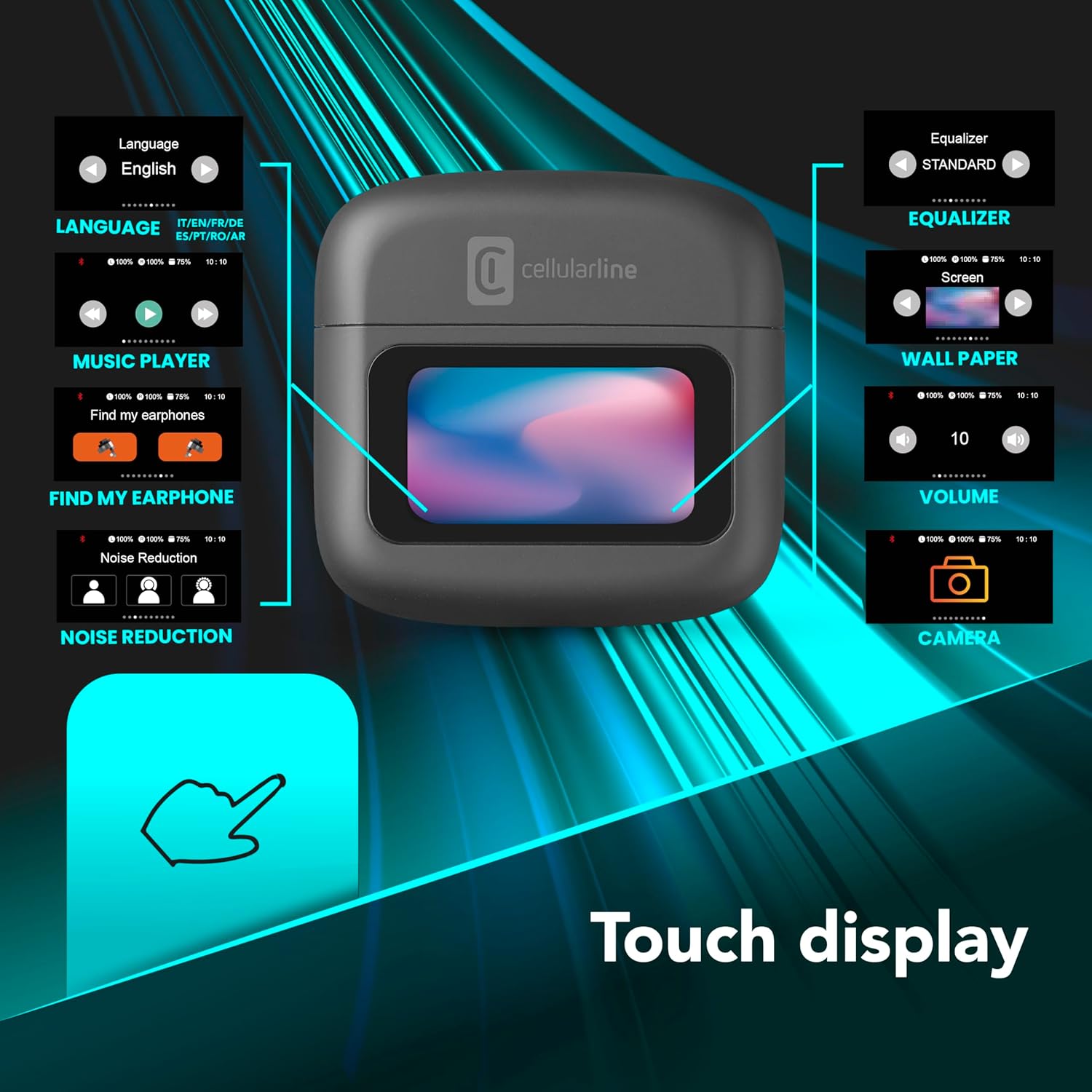
Image 2: An illustration highlighting the various functions accessible via the touch display on the charging case, including language, music player, 'Find My Earphone', noise reduction, equalizer, wallpaper, volume, and camera control.
4. Nastavitev
4.1 Polnjenje
Before first use, fully charge the earbuds and the charging case. Place the earbuds into the charging case. The magnetic closure ensures proper placement for charging. The case and earbuds offer up to 42 hours of total play time.

Image 3: Graphic indicating 42 hours of total play time and 6 hours of charger time for the Cellularline HUSH earbuds.
4.2 Seznanjanje
The earbuds feature an Autopairing function. When removed from the charging case, they will automatically enter pairing mode or reconnect to the last paired device. To pair with a new device, ensure Bluetooth is enabled on your device and select 'Cellularline HUSH' from the list of available devices.
5. Navodila za uporabo
5.1 Touch Display Controls
The interactive touch display on the charging case allows for easy management of various functions. You can control music playback, manage calls, adjust noise reduction modes, and select EQ settings directly from the display.
5.2 Aktivno odpravljanje šumov (ANC)
Activate Active Noise Cancelling to reduce ambient low-frequency noise, providing an immersive listening experience. This feature can be controlled via the touch display.
5.3 Noise-Free Calls
The integrated microphones utilize Noise-Free Calls technology to eliminate background noise, ensuring clear and crisp voice transmission during calls.

Image 4: The charging case display showing an incoming call with options to answer or decline, next to a smartphone displaying a similar call interface.
5.4 Načini izenačevalnika (EQ)
Customize your audio experience by selecting one of the 5 available EQ modes through the touch display. This allows you to tailor the sound profile po vaših željah.
5.5 Načini zmanjševanja šuma
Switch between different noise reduction modes, including Active Noise Cancelling, Normal Mode, and Transparency Mode, to suit your environment. These modes are accessible via the touch display.

Image 5: The charging case display showing options for Noise Reduction, including Active Noise Cancelling, Normal Mode, and Transparency Mode.
6. Vzdrževanje
To ensure the longevity and optimal performance of your Cellularline HUSH earbuds:
- Slušalke in polnilno ohišje naj bodo čisti in suhi.
- Naprave ne izpostavljajte ekstremnim temperaturam ali vlagi.
- Clean the ear tips regularly with a soft, dry cloth.
- Slušalke shranite v polnilno škatlico, ko jih ne uporabljate.
7. Odpravljanje težav
If you encounter issues with your Cellularline HUSH earbuds, refer to the following common solutions:
- Ni zvoka:
- Prepričajte se, da so slušalke napolnjene.
- Preverite povezavo Bluetooth z vašo napravo.
- Prilagodite glasnost na obeh slušalkah in priključeni napravi.
- Ni mogoče seznaniti:
- Prepričajte se, da so slušalke v načinu seznanjanja (običajno to označuje utripajoča lučka).
- Izklopite in vklopite Bluetooth na svoji napravi.
- Pozabite napravo v nastavitvah Bluetooth v telefonu in poskusite znova seznaniti napravo.
- ANC ne deluje:
- Ensure ANC is activated via the touch display.
- Check for proper fit of the earbuds in your ears.
- Težave s polnjenjem:
- Prepričajte se, da je polnilni kabel dobro priključen.
- Verify the charging case has power.
- Očistite polnilne kontakte na slušalkah in ohišju.
8. Specifikacije
| Funkcija | Podrobnost |
|---|---|
| Znamka | celična linija |
| Model | BTHUSHTWSK |
| Združljive naprave | Naprave Bluetooth |
| Nadzorna metoda | Dotik |
| Dodatne funkcije | Active Noise Cancellation and Noise-Free Calls |
| Povprečna življenjska doba baterije | 42 ur |
| Teža predmeta | 126 g |
| barva | Nero |
| Namestitev ušesa | V ušesu |
| Faktor oblike | V ušesu |
| Nadzor hrupa | Aktivno odpravljanje hrupa |
| Priključek za slušalke | Jack-less |
| Tehnologija povezljivosti | Brezžično |
| Brezžična komunikacijska tehnologija | Bluetooth |
9. Garancija in podpora
For warranty information and customer support, please refer to the documentation included with your product or visit the official Cellularline webspletnega mesta. Shranite dokazilo o nakupu za uveljavljanje garancije.


