1. Uvod
Thank you for choosing the HTW PC-041P31 Portable Air Conditioner. This manual provides essential information for the safe and efficient operation, installation, and maintenance of your appliance. Please read this manual thoroughly before using the product and retain it for future reference.
The HTW PC-041P31 is a cooling-only portable air conditioner designed for rooms up to 30 square meters, offering 3,500 frig/h (4.1 kW) of cooling capacity with a low noise level of 53 dB.
2. Varnostne informacije
Please observe the following safety precautions to reduce the risk of electric shock, fire, or injury.
- Prepričajte se, da napajalnik ustreza voltage naveden na nalepki z ocenami.
- Ne uporabljajte enote s poškodovanim napajalnim kablom ali vtičem.
- Pred čiščenjem ali servisiranjem enoto vedno izključite iz električnega omrežja.
- Ne blokirajte dovodnih ali odvodnih odprtin za zrak. Vzdržujte minimalno razdaljo 20 cm od sten ali drugih predmetov.
- Ne vstavljajte prstov ali predmetov v rešetko za izstop zraka.
- Keep the unit on a flat, stable surface to prevent tipping.
- Ta naprava ni namenjena uporabi s strani oseb (vključno z otroki) z zmanjšanimi fizičnimi, senzoričnimi ali duševnimi sposobnostmi ali s pomanjkanjem izkušenj in znanja, razen če jih oseba, ki je odgovorna za njihovo varnost, nadzoruje ali jim daje navodila glede uporabe naprave.
- Naprave ne uporabljajte v vlažnih okoljih, kot so kopalnice ali pralnice.
- Za čiščenje enote ne uporabljajte kemičnih topil.
3. Izdelek je končanview
Familiarize yourself with the components of your HTW PC-041P31 Portable Air Conditioner.
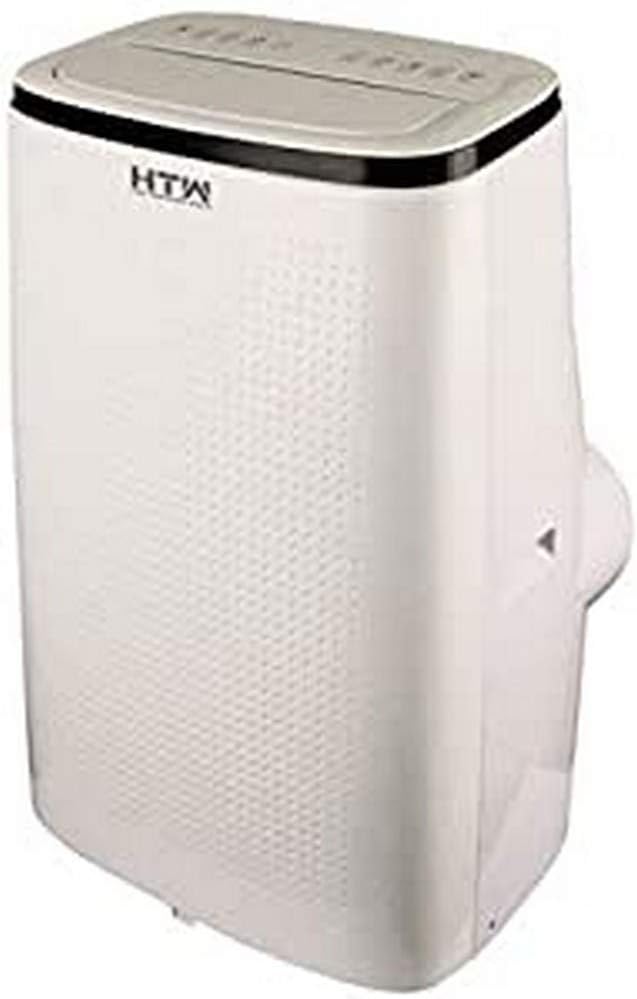
Slika 3.1: Sprednji in stranski view of the HTW PC-041P31 Portable Air Conditioner. This image shows the main body of the unit, including the control panel on top and the air outlet louvers.

Slika 3.2: stran view of the HTW PC-041P31 Portable Air Conditioner. This image highlights the compact design and the handle for easy portability.

Slika 3.3: Zadaj view of the HTW PC-041P31 Portable Air Conditioner. This view displays the air intake grille, exhaust air outlet, and drainage port.
Sestavine:
- Nadzorna plošča
- Rešetke za izpust zraka
- Air Filter (behind intake grille)
- Odvod izpušnega zraka
- Drenažna vrata
- Napajalni kabel
- Kolesa
- Daljinski upravljalnik
- Window Kit (Exhaust hose, window slider kit, adapters)
4. Nastavitev in namestitev
4.1 Razpakiranje
- Klimatsko napravo previdno vzemite iz embalaže.
- Odstranite ves embalažni material in se prepričajte, da ne manjka nobenih komponent.
- Embalažo shranite za kasnejše shranjevanje ali prevoz.
4.2 Namestitev
- Napravo postavite na trdno, ravno površino v želenem prostoru.
- Za zagotovitev ustreznega pretoka zraka zagotovite vsaj 20 cm prostora okoli enote.
- Za namestitev izpušne cevi enoto postavite blizu okna ali vrat.
4.3 Namestitev okenskega kompleta
The included window kit is essential for exhausting hot air outside, ensuring efficient cooling.
- Attach the exhaust hose to the exhaust air outlet on the back of the unit. Twist clockwise until secure.
- Drugi konec izpušne cevi priključite na adapter kompleta drsnika okna.
- Prilagodite komplet drsnika okna, da se prilega vaši okenski odprtini. Pritrdite ga na svoje mesto.
- Insert the window slider kit adapter into the opening of the window slider kit.
- Ensure the window is sealed around the kit to prevent hot air from re-entering the room.
5. Navodila za uporabo
The HTW PC-041P31 features a user-friendly control panel and a remote control for convenient operation.
5.1 Nadzorna plošča
The control panel is located on the top of the unit. It typically includes buttons for Power, Mode, Fan Speed, Timer, and Temperature Adjustment.
5.2 Daljinski upravljalnik
The remote control allows you to operate the unit from a distance. Ensure batteries are correctly inserted.
5.3 Osnovna operacija
- Vklop/izklop: Pritisnite MOČ gumb za vklop ali izklop enote.
- Izbira načina: Pritisnite NAČIN button to cycle through available modes. This model is cooling-only, so the primary mode will be Cooling. Other modes may include Fan-only and Dehumidify (Dry).
- Prilagoditev temperature: V načinu hlajenja uporabite UP in DOL puščice za nastavitev želene temperature.
- Hitrost ventilatorja: Pritisnite HITROST VENTILATORJA za izbiro med nizko, srednjo in visoko hitrostjo ventilatorja.
- Funkcija časovnika: Uporabite ČASOVNIK button to set a delay for the unit to turn on or off. Refer to the remote control section for detailed timer settings.
This unit features an auto-restart system, which means it will automatically resume operation with the previous settings after a power outage.
6. Vzdrževanje
Redno vzdrževanje zagotavlja optimalno delovanje in podaljšuje življenjsko dobo vaše klimatske naprave.
6.1 Čiščenje zračnega filtra
Zračni filter je treba čistiti vsaka dva tedna ali pogosteje, odvisno od uporabe in kakovosti zraka.
- Izključite klimatsko napravo iz električne vtičnice.
- Locate the air filter, typically behind the intake grille on the rear of the unit.
- Previdno odstranite filter.
- Filter operite z mlačno vodo in blagim detergentom. Temeljito sperite.
- Pred ponovno namestitvijo pustite, da se filter popolnoma posuši na zraku. Ne izpostavljajte ga neposredni sončni svetlobi.
6.2 Odvajanje nakopičene vode
The unit collects condensation during operation. When the internal water tank is full, the unit will stop operating and display an indicator. You will need to drain the water.
- Odklopite klimatsko napravo.
- Position a shallow pan or container under the drainage port at the bottom rear of the unit.
- Odstranite izpustni čep. Voda bo začela iztekati.
- Ko vsa voda odteče, varno namestite odtočni čep.
For continuous drainage in Dehumidify (Dry) mode, you can connect a drain hose (not included) to the drainage port.
6.3 Čiščenje zunanjosti enote
- Obrišite zunanjost z mehko damp krpo.
- Do not use harsh chemicals, abrasives, or solvents, as these can damage the surface.
7. Odpravljanje težav
Preden se obrnete na podporo strankam, si oglejte naslednji vodnik za odpravljanje pogostih težav.
| Težava | Možen vzrok | rešitev |
|---|---|---|
| Enota se ne vklopi. | No power, power cord loose, water tank full. | Check power connection, plug firmly, drain water tank. |
| Enota se ne hladi dovolj dobro. | Window kit not properly sealed, room too large, air filter dirty, air intake/outlet blocked. | Ensure window kit is sealed, clean air filter, clear obstructions, verify room size is within unit capacity. |
| Enota je hrupna. | Enota ni na ravni površini, hitrost ventilatorja je previsoka. | Place on a level surface, select a lower fan speed. |
| Voda pušča iz enote. | Drain plug loose, unit tilted. | Ensure drain plug is secure, place unit on a level surface. |
8. Specifikacije
Technical specifications for the HTW PC-041P31 Portable Air Conditioner.
| Funkcija | Specifikacija |
|---|---|
| Številka modela | HTW-PC-041P31 |
| Hladilna zmogljivost | 3,500 frig/h (4.1 kW) |
| Priporočena velikost sobe | Do 30 m² |
| Nivo hrupa | 53 dB |
| Število hitrosti ventilatorjev | 3 |
| Razred energijske učinkovitosti | A |
| voltage | 220 V |
| Dimenzije (Š x G x V) | 47 x 38.2 x 75.2 cm |
| Teža | 28.5 kg |
| Posebne lastnosti | Programmable, Auto Restart, Water Tank Full Indicator |
9. Garancija in podpora
HTW products are manufactured to high-quality standards. For warranty information and customer support, please refer to the warranty card included with your purchase or contact your local HTW dealer or service center. Keep your purchase receipt as proof of purchase.
For technical assistance or inquiries, please visit the official HTW webali se obrnite na njihov oddelek za pomoč uporabnikom.


