Uvod
Welcome to the user manual for the TPC Ultrasonic Cleaner UC1000. This manual provides essential information for the safe and efficient operation, maintenance, and troubleshooting of your ultrasonic cleaner. Please read this manual thoroughly before operating the device to ensure proper use and to prevent injury or damage.
Pomembne varnostne informacije
Always follow these safety precautions to prevent injury or damage to the unit:
- Glavne enote ne potapljajte v vodo.
- Ensure the unit is placed on a stable, level, and dry surface.
- Use only recommended cleaning solutions appropriate for ultrasonic cleaning.
- Do not operate the unit without liquid in the tank.
- Hraniti izven dosega otrok in hišnih ljubljenčkov.
- Pred čiščenjem ali kakršnim koli vzdrževanjem izklopite napajanje.
- Avoid touching the tank or solution during operation, as it may become warm.
Vsebina paketa
Preverite, ali so v paketu prisotni vsi elementi:
- TPC Ultrasonic Cleaner Unit
- Košara iz nerjavečega jekla
- Pokrov iz nerjavečega jekla
- Odtočni komplet
- Integrated Timer Input
Konec izdelkaview
The TPC Ultrasonic Cleaner UC1000 is designed for efficient and thorough cleaning using high-frequency ultrasonic waves. It features a durable 302 stainless steel tank and an intuitive LCD display for precise timer control, making it suitable for various professional and industrial applications.
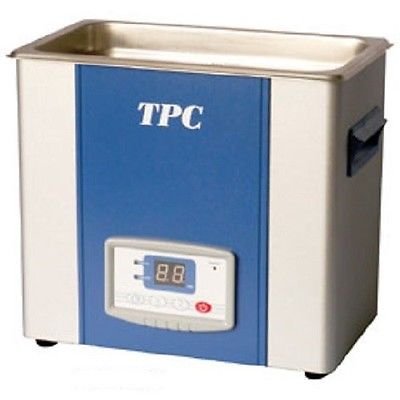
Slika: spredaj view of the TPC Ultrasonic Cleaner UC1000, showing the stainless steel tank, blue and white casing, and the digital control panel with an LCD display.
Nastavitev
- Unpack the ultrasonic cleaner and all included accessories from the packaging.
- Place the unit on a firm, level, and dry surface, ensuring adequate ventilation around the device.
- Ensure the drain valve (if applicable) is securely closed before proceeding to fill the tank.
- Fill the stainless steel tank with the appropriate cleaning solution. Do not exceed the maximum fill line indicated inside the tank.
- Connect the power cord to a grounded electrical outlet. The unit operates on 115V / 230V at 50/60 Hz.
Navodila za uporabo
Polnjenje rezervoarja
Fill the stainless steel tank with the desired cleaning solution. Ensure the liquid level is between the MIN and MAX marks to ensure optimal performance and safety.
Placing Items
Place items to be cleaned into the stainless steel basket. Carefully lower the basket into the tank, ensuring that the items are fully submerged in the cleaning solution but do not touch the bottom of the tank directly.
Nastavitev časovnika
The unit features an LCD display timer. Use the control buttons on the panel to set the desired cleaning time. The timer can be set from 1 to 99 minutes, allowing for flexible cleaning cycles.
Zagon cikla čiščenja
Press the START button on the control panel to begin the ultrasonic cleaning cycle. The LCD display will show the remaining time, counting down until the cycle is complete.
Ending the Cycle
The unit will automatically stop when the set timer reaches zero. You can also press the STOP button at any time to manually end the cleaning cycle.
Izpraznitev rezervoarja
After cleaning, always disconnect the power cord from the electrical outlet. Use the integrated drain kit to safely empty the tank of the used cleaning solution.
Vzdrževanje in nega
Čiščenje rezervoarja
After each use, drain the tank completely and rinse it thoroughly with clean water. Wipe the interior and exterior surfaces of the unit with a soft, damp cloth. Do not use abrasive cleaners, solvents, or harsh chemicals, as these can damage the unit's finish or internal components.
Shranjevanje
When the unit is not in use, ensure it is clean, dry, and disconnected from power. Store the ultrasonic cleaner in a cool, dry place, away from direct sunlight and extreme temperatures.
Odpravljanje težav
| Težava | Možen vzrok | rešitev |
|---|---|---|
| Enota se ne vklopi | No power supply; Power cord not connected securely; Power switch off | Check power outlet; Ensure power cord is securely plugged into both the unit and the outlet; Turn on the power switch. |
| No ultrasonic sound/action | Insufficient liquid in tank; Tank overloaded; Unit malfunction | Ensure tank is filled to appropriate level; Reduce the number of items in the tank; Contact customer support if problem persists. |
| Slabi rezultati čiščenja | Incorrect cleaning solution; Tank overloaded; Too short cleaning time; Items not properly submerged | Use appropriate cleaning solution for the items; Do not overload the tank; Increase cleaning time; Ensure items are fully submerged. |
| Enota se nepričakovano ustavi | Overheating; Power interruption | Allow unit to cool down; Check power connection. |
Specifikacije
- Model: UC1000
- Vnos: 115V / 230V
- Pogostost: 50/60 Hz
- Tank Internal Dimensions: 11.8 cm D x 9.5 cm Š x 5.9 cm V
- Skupne dimenzije: 14.2 cm D x 10.6 cm Š x 12.2 cm V
- Teža pošiljke: 21 lbs
- Kapaciteta rezervoarja: 10.6 Qts. / 2.65 Gal. / 10 Liter
- Časovnik: LCD Display, 1-99 minutes
- Material posode: 302 nerjaveče jeklo
- Proizvajalec: TPC
- ASIN: B00MPVEWN8
- Prvič na voljo: 14. avgust 2014
- Teža artikla: 0.01 unč
Garancija in podpora
For specific warranty information, technical support, or service inquiries, please contact your authorized TPC dealer or visit the official TPC website. It is recommended to keep your purchase receipt and product serial number for any warranty claims or support requests.
Proizvajalec: TPC
Model: UC1000
ASIN: B00MPVEWN8


