1. Úvod
This manual provides detailed instructions for the setup, operation, and maintenance of your Nitho Hexagon Wireless Gaming Controller. Please read this manual thoroughly before using the product to ensure optimal performance and longevity.
Kľúčové vlastnosti:
- Kompatibilita s viacerými platformami: Supports Nintendo Switch, Switch Lite, Switch OLED, Windows PC, Android, and iOS devices.
- Accurate Motion Control: Integrated 6-axis gyroscope for responsive motion sensing.
- Nastaviteľné RGB osvetlenie: Features 8 selectable colors and 4 lighting modes with adjustable brightness.
- Vymeniteľné komponenty: Includes replaceable mini joysticks and D-Pads for personalized control.
- Dlhá výdrž batérie: Built-in rechargeable battery provides up to 9 hours of playtime.
- Detachable Phone Clamp: For mobile gaming convenience.
- Programovateľné tlačidlá späť: M1 and M2 buttons for custom functions or macros.
2. Obsah balenia
Overte si, či sú vo vašom balení všetky nižšie uvedené položky:
- Nitho Hexagon Wireless Gaming Controller
- USB nabíjací kábel
- 2x Detachable Trigger Extensions
- 2x Interchangeable D-Pads
- 6x Interchangeable Mini-Stick Caps (3 pairs of different heights/shapes)
- Detachable Phone Clamp

Image: Nitho Hexagon Wireless Gaming Controller with all included accessories, such as the phone clamp, interchangeable D-pads, and joystick caps.
3. Rozloženie ovládača
Familiarize yourself with the buttons and features of your Nitho Hexagon controller.

Obrázok: Predná strana view of the Nitho Hexagon Wireless Gaming Controller, showing the joysticks, D-pad, action buttons (A, B, X, Y), N button, Turbo, Options, Share, and Capture buttons.

Image: Diagram highlighting key features of the controller, including the Phone Holder (1), M1 & M2 Back Programmable Buttons (2), RGB LED Lights (3), and USB Port (4).
4. Nabíjanie ovládača
Before first use, fully charge the controller. A full charge provides up to 9 hours of gameplay.
- Connect the supplied USB charging cable to the controller's USB port.
- Druhý koniec kábla pripojte k zdroju napájania USB (napr. k počítaču, nástennému adaptéru USB).
- The LED indicators on the controller will show charging status. They will typically stop blinking or change color when fully charged.

Image: A Nitho Hexagon controller with a phone attached, displaying a battery indicator showing high capacity and 9 hours of battery life.
5. Nastavenie a pripojenie
The Nitho Hexagon controller supports multiple connection modes. The specific pairing method depends on the platform you are connecting to.
General Pairing Instructions:
To enter pairing mode, typically press and hold a combination of buttons (e.g., 'N' button + 'X' for Xbox/PC, 'N' button + 'A' for Switch, 'N' button + 'B' for Android, 'N' button + 'Y' for iOS) until the indicator lights begin to flash rapidly. Then, search for the controller on your device's Bluetooth settings and select it to pair.
Platform-Specific Connection:
- Nintendo Switch: Navigate to 'Controllers' > 'Change Grip/Order' on your Switch console. Press and hold the designated pairing button combination on the controller until it connects.
- Windows PC: For wired connection, simply plug the USB cable into your PC. For Bluetooth, ensure your PC has Bluetooth enabled. The controller may register as an Xbox controller (XInput) or a DualShock controller (DInput) depending on the pairing mode. Some users report that for Bluetooth connectivity on Windows 11, installing and running DS4Windows may be necessary to ensure proper functionality, especially if it detects as a DualShock controller.
- Android/iOS: Enable Bluetooth on your mobile device. Press and hold the appropriate pairing button combination on the controller. Select the controller from the list of available Bluetooth devices to connect.

Image: The Nitho Hexagon controller with icons indicating its multi-standard compatibility across PC, iOS, Android, and Nintendo Switch platforms.
Video: An official Nitho video demonstrating the Hexagon Controller's features and compatibility with Switch, Switch Lite, OLED, and PC.
6. Prispôsobenie
The Nitho Hexagon controller offers several customization options to enhance your gaming experience.
Vymeniteľné komponenty:
The controller comes with 3 replaceable mini joysticks and 2 D-Pads. To change them, gently pull the existing component upwards to remove it, then align and push down the desired component until it clicks into place.

Image: An exploded diagram illustrating the various customizable components of the Nitho Hexagon controller, including different joystick caps, D-pads, and trigger extensions.
Detachable Phone Clamp:
Pripojte telefón clamp to the designated slot on the controller to securely hold your smartphone for mobile gaming. Ensure the clamp is firmly attached before placing your device.
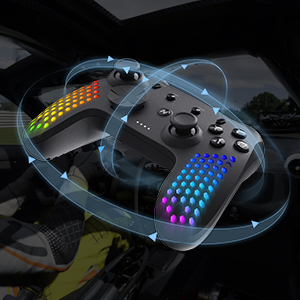
Image: A close-up of the detachable phone holder accessory, designed to integrate with the Nitho Hexagon controller for mobile gaming.
7. Pokročilé funkcie
Nastaviteľné RGB osvetlenie:
The controller features RGB LED lights with 8 selectable colors and 4 lighting modes. Use the dedicated button (refer to controller layout) to cycle through colors and modes. Brightness can also be adjusted to suit your preference.

Image: Three Nitho Hexagon controllers showcasing various RGB lighting effects on their grips, illustrating the multiple light options.
6-Axis Motion Sensor:
The built-in 6-axis gyroscope and accelerometer detect motion, tilt, and rotation, providing responsive motion control for compatible games.

Image: A Nitho Hexagon controller depicted with circular arrows, symbolizing its 6-axis motion sensor capabilities for detecting movement and orientation.
Vibration Module:
The ultra-lightweight HD vibrating motors deliver realistic in-game feedback, enhancing immersion.

Image: A Nitho Hexagon controller with visual effects suggesting vibration, indicating the presence of a vibration module for haptic feedback.
Programmable Back Buttons (M1 & M2):
The M1 and M2 buttons on the back of the controller can be programmed for various functions, including rudimentary macro recording. This allows for simultaneous or sequential inputs, though joystick movements and time modulations may not be precisely recorded.
Turbo funkcionalita:
The controller supports two turbo modes: on-press turbo (button rapidly repeats while held) and autoclicker turbo (button rapidly repeats without needing to be held). Consult the full online manual for specific button combinations to activate and configure these modes.
8. Údržba a starostlivosť
To ensure the longevity of your Nitho Hexagon controller, follow these care guidelines:
- Čistenie: Na čistenie ovládača použite mäkkú, suchú handričku. Na odolné nečistoty použite mierneamp Môžete použiť handričku, ale dbajte na to, aby sa do otvorov nedostala vlhkosť. Nepoužívajte agresívne chemikálie ani abrazívne čistiace prostriedky.
- Ukladací priestor: Ovládač skladujte na chladnom a suchom mieste mimo dosahu priameho slnečného žiarenia a extrémnych teplôt.
- Starostlivosť o batérie: Do not expose the battery to high temperatures or attempt to disassemble it. Charge the controller regularly, even if not in use, to maintain battery health.
- Vyhnite sa kvapkám: Chráňte ovládač pred pádmi a nárazmi, ktoré môžu poškodiť vnútorné komponenty.
9. Riešenie problémov
If you encounter issues with your Nitho Hexagon controller, refer to the following common solutions:
- Controller Not Turning On: Ensure the controller is sufficiently charged. Connect it to a power source using the USB cable and allow it to charge for at least 30 minutes before attempting to power it on again.
- Problémy s pripojením:
- Verify that the correct pairing mode is selected for your device (PC, Switch, Android, iOS).
- Ensure Bluetooth is enabled on your device and the controller is within range.
- Remove any previous pairings of the controller from your device's Bluetooth list and attempt to pair again.
- For PC Bluetooth connectivity, especially on Windows 11, if the controller is detected as a DualShock, consider installing and running DS4Windows to ensure proper driver recognition.
- If wireless connection fails, try connecting the controller via USB cable to confirm basic functionality.
- Tlačidlá/joysticky nereagujú:
- Uistite sa, že ovládač je správne pripojený a nabitý.
- Otestujte ovládač na inom zariadení alebo v inej hre, aby ste zistili, či sa problém týka len jedného nastavenia.
- Perform a factory reset if available (consult the full online manual for specific instructions).
- RGB svetlá nefungujú: Check if the lighting feature is enabled and adjust brightness settings. Ensure the controller is charged.
If problems persist, please contact Nitho customer support or refer to the official Nitho webpre ďalšiu pomoc.
10. Špecifikácie
| Funkcia | Špecifikácia |
|---|---|
| Číslo modelu | MLT-EXPC-K |
| Rozmery | 167 x 62 x 116 mm (6.57 x 2.44 x 4.57 palca) |
| Hmotnosť | ~165g (~0.463lb) / 10.2 ounces |
| Kapacita batérie | 900 mAh lítium-iónová batéria (súčasťou balenia) |
| Prevádzková teplota | 5°C – 35°C |
| Prenosový výkon | ≤20dBm (EIRP) |
| Prúd a svtage | DC 5V-350mA |
| Výrobca | NiTHO |
| Prvý dostupný dátum | 30. apríla 2024 |

Image: A visual representation of the Nitho Hexagon controller's dimensions and a table summarizing its key specifications.
11. Záruka a podpora
The Nitho Hexagon Wireless Gaming Controller is covered by a manufacturer's warranty. For specific warranty terms, duration, and to register your product, please refer to the official Nitho webstránku alebo kontaktujte priamo ich zákaznícku podporu.
Pre ďalšiu pomoc, registráciu produktu alebo view the most up-to-date information, please visit the official Nitho webmiesto: Nitho Official Store


