1. හැඳින්වීම
The Amazfit Active Max Smart Watch is designed to assist with fitness tracking, health monitoring, and smart notifications. This manual provides essential information for setting up, operating, and maintaining your device.
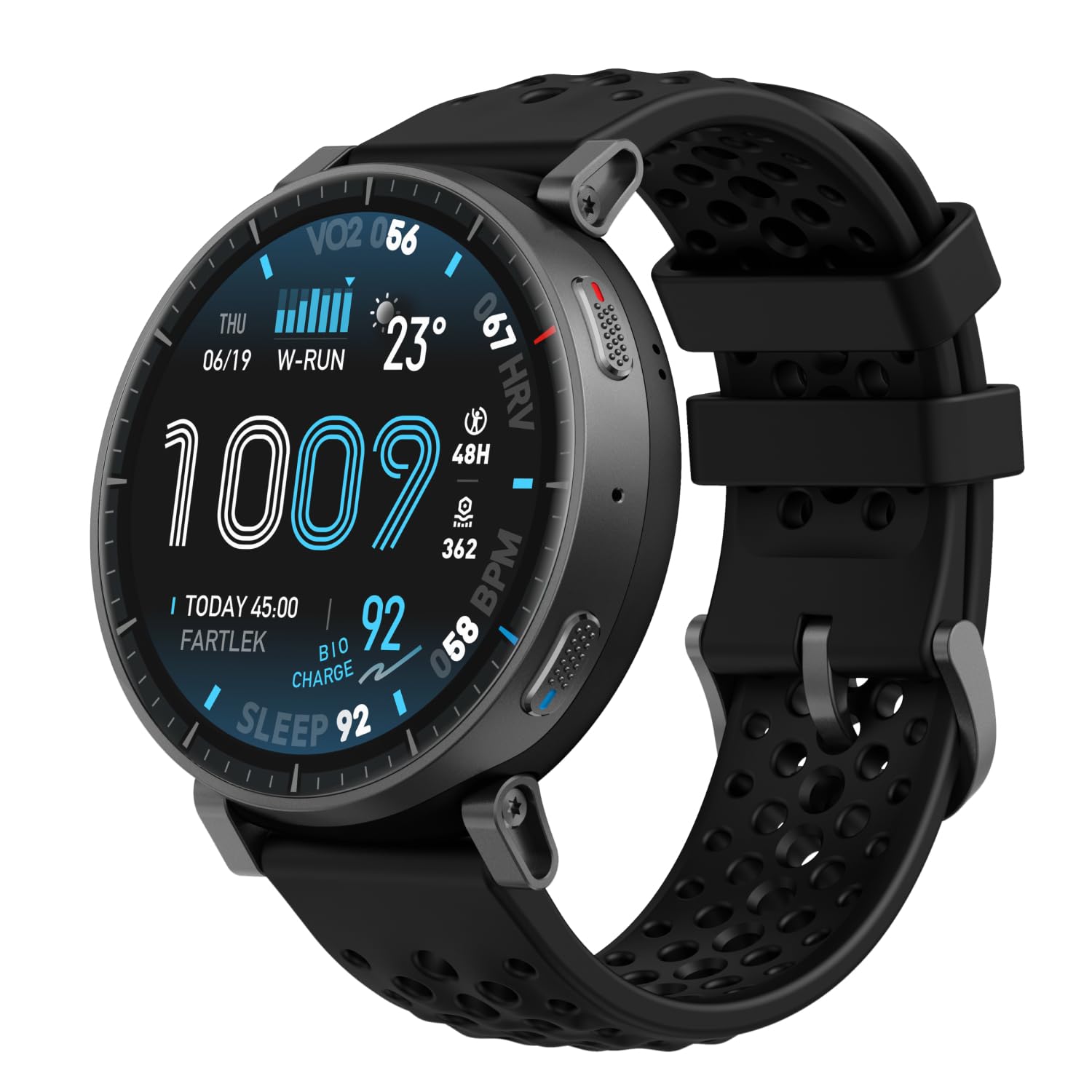
Image: Amazfit Active Max Smart Watch with its vibrant AMOLED display showing various data points.
2. සැකසුම් මාර්ගෝපදේශය
2.1 පෙට්ටියේ ඇති දේ
- Amazfit Active Max Smart Watch
- චුම්භක ආරෝපණ පදනම (USB වර්ගය-C කේබලය ඇතුළත් නොවේ)
- පරිශීලක අත්පොත
2.2 උපාංගය ආරෝපණය කිරීම
Before first use, fully charge your Amazfit Active Max. Connect the magnetic charging base to a USB power source (e.g., a computer USB port or a USB wall adapter). Place the watch onto the charging base, ensuring the magnetic pins align correctly. The watch display will indicate charging status.

Image: The Amazfit Active Max Smart Watch connected to its magnetic charging base, indicating a full charge.
2.3 ඔබගේ ස්මාර්ට් ජංගම දුරකථනය සමඟ යුගල කිරීම
- බාගත කරන්න සෙප් ඇප් ඔබගේ ස්මාර්ට් ජංගම දුරකථනයේ යෙදුම් ගබඩාවෙන් (Android සහ iPhone සඳහා ලබා ගත හැකිය).
- Zepp යෙදුම විවෘත කර ගිණුමක් සාදන්න හෝ ලොග් වන්න.
- Follow the on-screen instructions in the app to pair your Amazfit Active Max. This typically involves scanning a QR code displayed on the watch or selecting the device from a list.
- යුගල කිරීමේ ක්රියාවලියේදී ඔබගේ ස්මාර්ට් ජංගම දුරකතනයේ බ්ලූටූත් සක්රීය කර ඇති බවට වග බලා ගන්න.

Image: A smartphone screen showing the Zepp App interface, which is used to manage the Amazfit Active Max.
3. ඔරලෝසුව ක්රියාත්මක කිරීම
3.1 සංදර්ශකය සහ සංචාලනය
The Amazfit Active Max features a 1.5-inch ultra-bright AMOLED display with up to 3,000 nits peak brightness for clear visibility in various lighting conditions. Navigate the watch interface using touch gestures (swipe, tap) and the physical buttons on the side.

රූපය: සවිස්තරාත්මක view of the Amazfit Active Max's vivid AMOLED display, showcasing various health and activity metrics.
3.2 ඔරලෝසු මුහුණු අභිරුචිකරණය කිරීම
You can change the watch face directly on the device or through the Zepp App. The app offers a wider selection of watch faces, including free and paid options, to personalize your watch's appearance.
4. සෞඛ්ය සහ යෝග්යතා ලුහුබැඳීම
4.1 ව්යායාම ක්රම සහ GPS
The watch supports over 170 workout modes. It features built-in GPS with five satellite systems for accurate outdoor activity tracking. You can download terrain and ski maps directly to the watch for offline navigation, eliminating the need for a phone signal.

Image: A person engaged in outdoor running, demonstrating the watch's use during physical activity and highlighting its workout modes.
4.2 සෞඛ්ය නිරීක්ෂණ
The Amazfit Active Max provides 24/7 monitoring of key health metrics:
- හෘද ස්පන්දන වේගය: අඛණ්ඩ හෘද ස්පන්දන වේගය නිරීක්ෂණය කිරීම.
- රුධිර ඔක්සිජන් (SpO2): On-demand and continuous blood oxygen level measurement.
- නින්ද ලුහුබැඳීම: නින්ද නිරීක්ෂණය කරන්නන්tages, duration, and quality.
- ආතති මට්ටම්: Tracks stress and provides breathing exercises.
- BioCharge Energy Monitoring: Assesses your body's recovery and energy levels based on activity and stress.

Image: A person running while wearing the Amazfit Active Max, with the watch display showing a real-time heart rate graph.
4.3 Zepp Coach and Training Plans
Utilize Zepp Coach for personalized AI-driven workout plans that adapt to your performance and recovery. Choose from various training programs, including specific running plans for 3K, 5K, 10K, half, and full marathons.

Image: An individual running, symbolizing the use of Zepp Coach for guided training and performance improvement.
4.4 Onboard Storage for Music and Maps
The watch includes 4GB of onboard storage, allowing you to store music and downloaded maps directly on the device. This enables phone-free workouts with music playback and offline navigation.

Image: A person using the Amazfit Active Max to view maps and listen to music via connected earbuds, highlighting the onboard storage feature.
5. ස්මාර්ට් විශේෂාංග
5.1 Bluetooth Calls and Message Replies
When connected to your smartphone, the Amazfit Active Max allows you to take Bluetooth calls directly from your wrist. For Android users, Zepp Flow enables hands-free message replies using a QWERTY keyboard or speech-to-text.

Image: The Amazfit Active Max displaying a message notification and options for replying, demonstrating its communication features.
5.2 Bluetooth Peripheral Connectivity
The watch can connect to various Bluetooth peripherals, including heart rate belts, cadence meters, power meters, and speedometers, to enhance your workout data collection.

Image: An individual cycling indoors, with the Amazfit Active Max on their wrist, illustrating its capability to connect with external Bluetooth sensors.
6. නඩත්තු කිරීම
6.1 ජල ප්රතිරෝධය
The Amazfit Active Max is 5 ATM water-resistant, meaning it can withstand pressures equivalent to a depth of 50 meters. It is suitable for swimming and showering but not for high-speed water sports or diving.
6.2 පිරිසිදු කිරීම සහ රැකවරණය
- ඔරලෝසුව සහ පටිය නිතිපතා මෘදු, d පිරිසිදු කරන්නෙකු භාවිතයෙන් පිරිසිදු කරන්න.amp රෙදි.
- දරුණු රසායනික ද්රව්ය හෝ උල්ෙල්ඛ ද්රව්ය භාවිතා කිරීමෙන් වළකින්න.
- ආරෝපණය කිරීමට පෙර ඔරලෝසුවේ පිටුපස ඇති ආරෝපණ සම්බන්ධතා පිරිසිදු හා වියලි බව සහතික කර ගන්න.
6.3 බැටරි ආයු කාලය
The watch offers extended battery life:
- සාමාන්ය භාවිතය: දින 25 දක්වා
- දැඩි භාවිතය: දින 13 දක්වා
- Continuous GPS Usage: පැය 64 දක්වා
භාවිත රටා සහ සැකසුම් මත පදනම්ව සැබෑ බැටරි ආයු කාලය වෙනස් විය හැකිය.
7. දෝශ නිරාකරණය
7.1 පොදු ගැටළු සහ විසඳුම්
- ඔරලෝසුව ක්රියාත්මක නොවීම: ඔරලෝසුව සම්පූර්ණයෙන්ම ආරෝපණය වී ඇති බවට වග බලා ගන්න.
- දුරකථනය සමඟ යුගල කළ නොහැක: Check if Bluetooth is enabled on your phone and the watch is in pairing mode. Restart both devices and try again.
- සාවද්ය දත්ත: Ensure the watch is worn snugly on your wrist. For GPS, ensure a clear view අහසින්.
- දැනුම්දීම් නොපෙන්වයි: Check notification settings in the Zepp App and your phone's system settings.
For further assistance, refer to the Zepp App's help section or contact Amazfit customer support.
8. පිරිවිතර
| විශේෂාංගය | විස්තර |
|---|---|
| ආදර්ශ අංකය | A2557 |
| ප්රදර්ශනය කරන්න | 1.5" AMOLED |
| ගබඩා කිරීම | 4GB |
| ජල ප්රතිරෝධය | 5 ATM |
| බැටරි ආයු කාලය (සාමාන්ය) | දින 25 දක්වා |
| GPS | 5 Satellite Systems |
| අයිතමයේ බර | අවුන්ස 1.97 කි |
| නිෂ්පාදකයා | ඇමස්ෆිට් |
9. වගකීම් සහ සහාය
වගකීම් තොරතුරු සහ පාරිභෝගික සහාය සඳහා, කරුණාකර නිල Amazfit වෙත යොමු වන්න. website or contact your local Amazfit service center. Keep your purchase receipt for warranty claims.


