නිෂ්පාදනය අවසන්view
The Barbie Large Cash Register is an interactive toy designed for pretend play, featuring realistic sounds, lights, and various accessories. This manual provides instructions for setting up, operating, and maintaining your cash register toy.
ප්රධාන ලක්ෂණ:
- Working calculator for totaling purchases.
- Realistic register sounds and fun Barbie phrases.
- Pop-out cash drawer for play money.
- Portable cell phone with built-in play scanner and credit card reader.
ඇතුළත් සංරචක:
- One Barbie Cash Register with sounds and phrases
- One cell phone with built-in scanner
- One play bottle of sunscreen
- One play water bottle
- One play credit card
- Play cash and coins
වැදගත් ආරක්ෂක තොරතුරු
අවවාදයයි: කුඩා කැබලි අඩංගු විය හැක. හුස්ම හිරවීමේ අවදානමක් ඇති බැවින් අවුරුදු 3 ට අඩු දරුවන්ට සුදුසු නොවේ. සෙල්ලම් කරන අතරතුර වැඩිහිටියන්ගේ අධීක්ෂණය නිර්දේශ කෙරේ.
සැකසුම සහ බැටරි ස්ථාපනය
Before first use, install the required batteries into the cash register unit.
- Locate the battery compartment on the underside of the cash register.
- පිලිප්ස් හිස් ඉස්කුරුප්පු නියනක් (ඇතුළත් කර නැත) භාවිතා කරමින්, බැටරි මැදිරි කවරය ගලවන්න.
- Insert two (2) AA batteries (not included), ensuring correct polarity (+/-) as indicated inside the compartment.
- බැටරි මැදිරි කවරය ප්රතිස්ථාපනය කර එය ඉස්කුරුප්පු ඇණ සමඟ සවි කරන්න.

Image: The Barbie Large Cash Register and its accessories as they appear in the product packaging, ready for unboxing and setup.
Once batteries are installed, the cash register is ready for play.
මෙහෙයුම් උපදෙස්
Using the Cash Register
The main cash register unit offers several interactive features:
- කැල්කියුලේටරය: Press the number buttons on the keypad to input prices. The display will show the entered numbers. Press the "TOTAL" button to simulate a transaction total.
- Sounds and Phrases: Press various buttons on the keypad or the dedicated sound buttons to activate realistic register sounds and fun Barbie phrases.
- Cash Drawer: Press the designated button (often labeled "OPEN" or located near the drawer) to make the cash drawer pop out, allowing for pretend money transactions.
Using the Portable Scanner and Credit Card Reader
The included cell phone accessory functions as a portable scanner and credit card reader for on-the-go transactions:
- ස්කෑනරය: Point the top of the cell phone (where the scanner is located) at pretend product barcodes to simulate scanning items.
- Credit Card Reader: Insert the play credit card into the slot on the side of the cell phone to simulate a card payment.

Image: Two children engaged in pretend play with the Barbie Large Cash Register, demonstrating its interactive features during use.
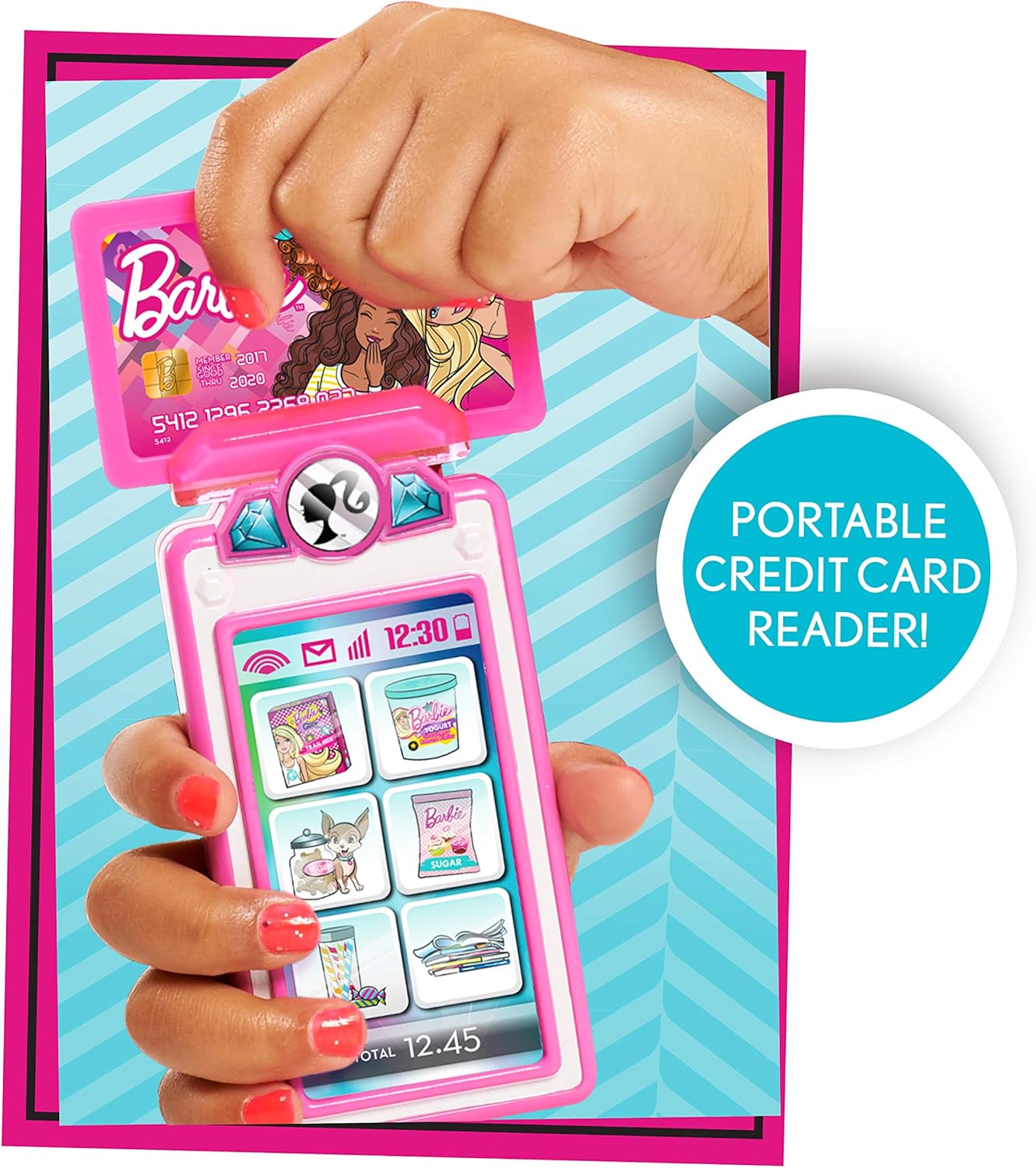
රූපය: සවිස්තරාත්මක view of the portable credit card reader accessory, showing how the play credit card is inserted for simulated transactions.
නඩත්තු කිරීම
පිරිසිදු කිරීම
To clean the Barbie Large Cash Register and its accessories, wipe surfaces with a soft, damp cloth. Do not immerse the unit in water or use harsh cleaning agents, as this may damage the electronic components.
බැටරි සත්කාර
To prolong battery life and prevent damage:
- සෙල්ලම් බඩු දිගු කාලයක් භාවිතා නොකරන්නේ නම් බැටරි ඉවත් කරන්න.
- පැරණි සහ නව බැටරි, හෝ විවිධ වර්ගයේ බැටරි මිශ්ර නොකරන්න.
- භාවිතා කරන ලද බැටරි දේශීය රෙගුලාසිවලට අනුව වගකීමෙන් යුතුව බැහැර කරන්න.
දෝෂගවේෂණය
- No Power/Sounds: Ensure batteries are correctly installed with proper polarity. Replace old batteries with new ones. Check that the power switch (if present) is in the "ON" position.
- Cash Drawer Stuck: If the cash drawer does not open smoothly, check for any obstructions inside the drawer mechanism. Avoid forcing the drawer open. If play money frequently gets stuck, ensure it is inserted and removed carefully.
- ප්රතිචාර නොදක්වන බොත්තම්: If certain buttons do not respond, try replacing the batteries. If the issue persists, ensure no debris is lodged around the buttons.
නිෂ්පාදන පිරිවිතර
| පිරිවිතර | විස්තර |
|---|---|
| නිෂ්පාදන මානයන් | අඟල් 13 x 5.75 x 12.75 |
| අයිතමයේ බර | රාත්තල් 2.29 කි |
| අයිතම ආදර්ශ අංකය | 62976 |
| නිෂ්පාදකයා නිර්දේශිත වයස | මාස 36 - අවුරුදු 8 |
| අවශ්ය බැටරි | 2 AA බැටරි (ඇතුළත් කර නැත) |
| නිෂ්පාදකයා | යන්තම් සෙල්ලම් කරන්න |
| නිකුත් කරන දිනය | 1 ජනවාරි 2020 |
වගකීම් සහ සහාය
Information regarding product warranty and customer support contact details is not provided within this instruction manual. Please refer to the product packaging or the manufacturer's official website for warranty claims and support inquiries.


