1. تعارف
This user manual provides essential information for the setup, operation, and maintenance of your HP 24-inch FHD IPS Monitor. Designed for clarity and user comfort, this monitor features a 1920x1080 resolution, 5ms response time, anti-glare coating, flicker-free technology, and a low blue light mode to reduce eye strain. It includes HDMI and VGA connectivity options and integrated 2W speakers.
2. حفاظت جي ڄاڻ
- پڪ ڪريو ته مانيٽر هڪ مستحڪم، هموار مٿاڇري تي رکيل آهي ته جيئن حادثاتي طور تي گرڻ کان بچي سگهجي.
- وينٽيليشن جي سوراخن کي نه روڪيو. وڌيڪ گرم ٿيڻ کان بچڻ لاءِ مناسب هوا جي وهڪري ضروري آهي.
- Use only the power adapter and cables provided or approved by HP.
- Avoid exposing the monitor to moisture, rain, or extreme temperatures.
- Disconnect the power cable from the outlet before cleaning or if the monitor will be unused for an extended period.
- پاڻ مانيٽر جي سروس ڪرڻ جي ڪوشش نه ڪريو. سڀني سروسنگ کي قابل سروس اهلڪارن جي حوالي ڪريو.
3. پيڪيج مواد
پڪ ڪريو ته سڀئي شيون پيڪيج ۾ موجود آهن:
- HP 24-inch FHD IPS Monitor
- مانيٽر اسٽينڊ (بنياد ۽ گردن)
- پاور ڪيبل
- HDMI ڪيبل
- ويگا ڪيبل
- Docztorm USB Port Expander (Special Edition Portable Docztorm Data Hub)
- دستاويز (جلدي سيٽ اپ گائيڊ، وارنٽي جي معلومات)
4. پراڊڪٽ ختمview
4.1 محاذ View
The front of the monitor features the 24-inch IPS display with a sleek, thin-and-light profile and a 3-sided borderless design.

شڪل 1: سامهون view of the HP 24-inch FHD IPS Monitor, showcasing ان جي ڊسپلي ۽ پتلي بيزل.
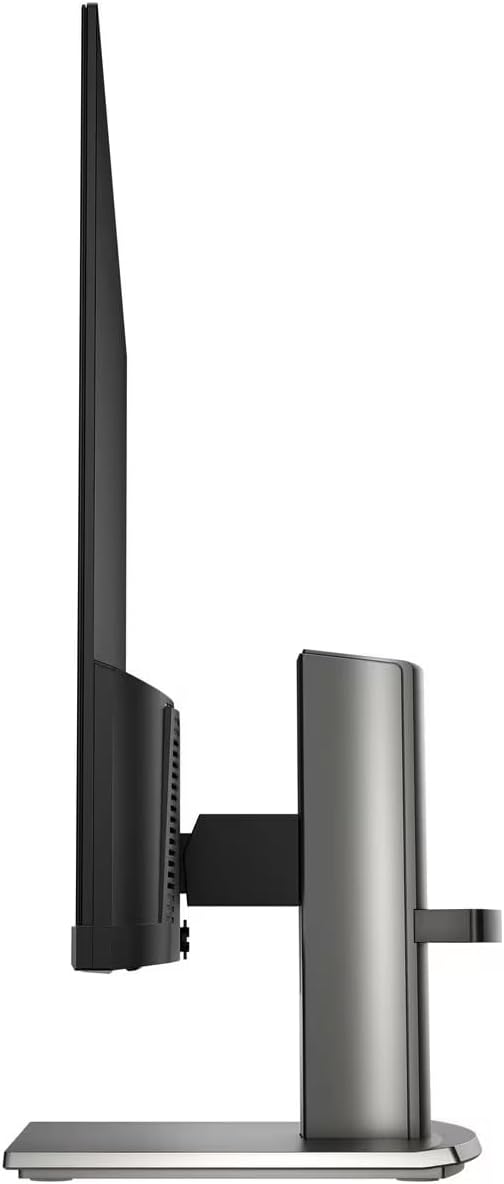
4.2 طرف View
پاسو view highlights the monitor's slim design and the adjustable stand.

شڪل 2: پاسي view of the HP 24-inch FHD IPS Monitor, illustrating its thin profile ۽ بيٺو.
4.3 پوئتي View ۽ بندرگاهن
The rear of the monitor provides access to various input and output ports for connectivity.
شڪل 3: پوئتي view of the HP 24-inch FHD IPS Monitor, displaying the HDMI, VGA, and audio ports.
دستياب بندرگاهن ۾ شامل آهن:
- 1 X HDMI پورٽ
- 1 x VGA پورٽ
- Input/Output Audio Jack ports
- پاور ان پٽ
5. سيٽ اپ جون هدايتون
5.1 اسٽينڊ کي گڏ ڪرڻ
- پيڪنگ مان مانيٽر ۽ اسٽينڊ جي حصن کي احتياط سان هٽايو.
- اسٽينڊ نيڪ کي مانيٽر پينل سان ڳنڍيو، ٽيب کي ترتيب ڏيندي ۽ دٻايو جيستائين اهو جاءِ تي ڪلڪ نه ڪري.
- Attach the stand base to the stand neck, securing it with the captive screw at the bottom of the base.
- Place the assembled monitor on a stable, level surface.

Figure 4: The HP 24-inch monitor fully assembled on its stand.
5.2 ڳنڍيندڙ ڪيبل
- پاور ڪنيڪشن: پاور ڪيبل کي مانيٽر جي پاور ان پٽ سان ۽ پوءِ وال آئوٽليٽ سان ڳنڍيو.
- وڊيو ڪنيڪشن:
- HDMI لاءِ: HDMI ڪيبل جي هڪ ڇيڙي کي مانيٽر جي HDMI پورٽ سان ۽ ٻئي ڇيڙي کي پنهنجي ڪمپيوٽر جي HDMI آئوٽ پُٽ سان ڳنڍيو.
- For VGA: Connect one end of the VGA cable to the monitor's VGA port and the other end to your computer's VGA output.
- آڊيو ڪنيڪشن: If using external speakers or headphones, connect them to the monitor's audio output jack.
- Docztorm USB Port Expander: Connect the Docztorm USB Port Expander to an available USB port on your computer for additional connectivity.
6. آپريٽنگ هدايتون
6.1 پاور آن/آف
مانيٽر کي آن يا آف ڪرڻ لاءِ ان جي ساڄي پاسي واري پاور بٽڻ کي دٻايو. جڏهن مانيٽر فعال هوندو ته پاور انڊيڪيٽر لائيٽ روشن ٿيندي.
6.2 مانيٽر سيٽنگون ترتيب ڏيڻ
Use the OSD (On-Screen Display) menu buttons, typically located on the bottom bezel, to navigate and adjust settings such as:
- چمڪ ۽ برعڪس: انهن کي پنهنجي مرضي مطابق ترتيب ڏيو viewماحول.
- رنگ سيٽنگون: Select from various viewing modes or customize color temperature and saturation.
- ان پٽ چونڊ: Manually switch between HDMI and VGA inputs if auto-switch is off.
- HP Eye Ease (Low Blue Light): This monitor features an always-on low blue light filter that reduces blue light emission without impacting color accuracy, promoting eye comfort.
- فلڪر-آزاد ٽيڪنالاجي: The monitor is designed to eliminate screen flickering, further reducing eye strain during prolonged use.

Figure 5: Illustration of the HP Eye Ease feature, demonstrating reduced blue light for eye comfort.
6.3 Adjusting Monitor Position
مانيٽر اسٽينڊ ergonomic ترتيبن جي اجازت ڏئي ٿو:
- جھلڻ جي ترتيب: The screen can be tilted from -5 to +25 degrees to find your optimal viewزاويه.
- اونچائي جي ترتيب: The stand offers 3.9 inches of height adjustment for personalized comfort.
7. سار سنڀال
7.1 مانيٽر جي صفائي
- صاف ڪرڻ کان اڳ هميشه مانيٽر کي بند ڪريو ۽ پاور ڪنڊ کي ان پلگ ڪريو.
- استعمال ڪريو نرم، lint-آزاد ڪپڙو روشنيءَ سان ڊيampپاڻي يا غير رگڙيندڙ اسڪرين ڪلينر سان صاف ڪيو وڃي.
- صاف ڪندڙ کي سڌو سنئون اسڪرين تي نه اسپري ڪريو.
- سخت ڪيميڪلز، محلولن، يا رگڙيندڙ مواد استعمال ڪرڻ کان پاسو ڪريو، ڇاڪاڻ ته اهي اسڪرين يا سي کي نقصان پهچائي سگهن ٿا.asing.
7.2 عام سنڀال
- مانيٽر کي سڌي سج جي روشني ۽ گرمي جي ذريعن کان پري رکو.
- مانيٽر جي چوڌاري مناسب هوا جي وهڪري کي يقيني بڻايو وڃي.
- Manage cables to prevent tangles and damage.
8. مسئلا حل ڪرڻ
| مسئلو | ممڪن سبب | حل |
|---|---|---|
| اسڪرين تي ڪوبه تصوير نه آهي |
|
|
| خراب تصوير جي معيار (ڌمڪي، مسخ ٿيل) |
|
|
| .الهائيندڙن مان آواز ڪونهي |
|
|
9. وضاحتون
| خاصيت | تفصيل |
|---|---|
| پيداوار جي ماپ | 7.9 x 21.09 x 18.1 انچ |
| شيءِ جو وزن | 7.7 پائونڊ |
| ٺاهيندڙ | HP |
| شيون ماڊل نمبر | HP 24" FHD Monitor |
| اسٽينڊنگ اسڪرين ڊسپلي سائيز | 24 انچ |
| اسپيڪٽ ريشو | 16:9 |
| قرارداد | 1920 x 1080 پڪسل (FHD 1080p) |
| تصوير جي روشني | 300 نائيٽ |
| اسڪرين جي مٿاڇري جي وضاحت | مٽي |
| جوابي وقت | 5ms |
| رابطي | 1 x HDMI, 1 x VGA, Audio Jack |
| Adjustable جھٽڪو | -5 کان +25 درجا |
| خاص خاصيتون | Anti Glare, Flicker Free, Low Blue Light, Built-in 2W Speakers |
10. وارنٽي ۽ سپورٽ
Your HP 24-inch FHD IPS Monitor is covered by a standard manufacturer's warranty. For detailed warranty terms and conditions, please refer to the warranty documentation included in your product package or visit the official HP support webسائيٽ.
For technical assistance, troubleshooting, or to contact customer support, please visit the HP support portal or contact your local HP service center. Ensure you have your monitor's model number and serial number ready when seeking support.