1. تعارف
The Audiolab 9000A is a high-performance integrated amplifier designed to be the central component of any advanced audio system. It combines a powerful amplifier, a high-resolution Digital-to-Analog Converter (DAC), and a dedicated phono preamplifier, offering extensive connectivity and advanced features for audiophiles.
This manual provides essential information for setting up, operating, and maintaining your Audiolab 9000A to ensure optimal performance and longevity.
2. حفاظت جي ڄاڻ
مھرباني ڪري يونٽ هلائڻ کان اڳ سڀ حفاظتي ھدايتون احتياط سان پڙھو. مستقبل جي حوالي لاءِ ھي دستوري رکو.
- بجلي جي فراهمي: Connect the unit only to a power supply of the type marked on the rear panel.
- وينٽيليشن: مناسب هوا جي وهڪري کي يقيني بڻايو. هوا جي وهڪري جي سوراخن کي بند نه ڪريو.
- پاڻي ۽ نمي: يونٽ کي مينهن يا نمي جي سامهون نه رکو. يونٽ تي مائع سان ڀريل شيون نه رکو.
- گرمي: يونٽ کي گرمي جي ذريعن جهڙوڪ ريڊيئيٽر، گرمي رجسٽر، اسٽو، يا ٻيون شيون جيڪي گرمي پيدا ڪن ٿيون، جي ويجهو نه رکو.
- صفائي: صرف سڪل ڪپڙي سان صاف ڪريو. مائع صاف ڪندڙ يا ايروسول صاف ڪندڙ استعمال نه ڪريو.
- خدمت ڪرڻ: هن يونٽ جي پاڻ خدمت ڪرڻ جي ڪوشش نه ڪريو. سڀني خدمتن کي قابل خدمت اهلڪارن جي حوالي ڪريو.
3. دٻي ۾ ڇا آهي
Carefully unpack the contents of the box. You should find the following items:
- Audiolab 9000A Integrated Ampزندگي گذاريندڙ
- پاور ڪنڊ
- ريموٽ ڪنٽرول
- استعمال ڪندڙ جو دستياب (ھي دستاويز)
- Antennas (for Bluetooth connectivity)
4. پراڊڪٽ ختمview
سامهون پينل
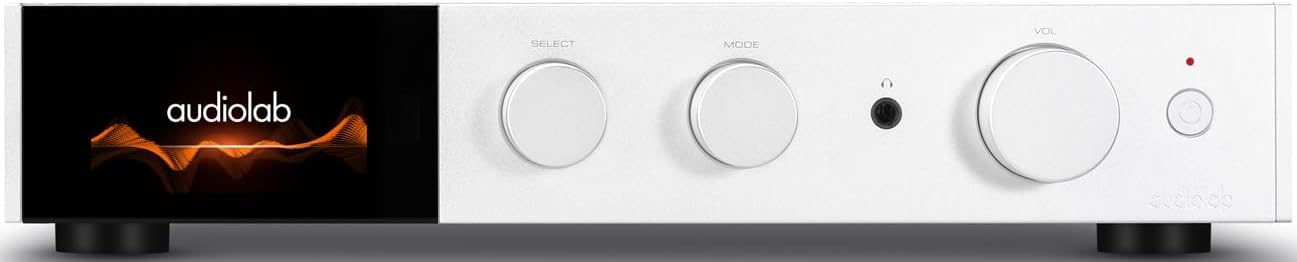
شڪل 4.1: سامهون view of the Audiolab 9000A, displaying the Audiolab logo on its full-color IPS LCD screen. The front panel features three rotary controls for Select, Mode, and Volume, along with a headphone jack and power button.

شڪل 4.2: سامهون view of the Audiolab 9000A, showcasing the full-color IPS LCD screen displaying VU meters. This visual option provides real-time audio level feedback.
The 9000A features a 4.3-inch (800 x 480mm) full-color IPS LCD screen, providing clear and informative playback, source, and file information. It also offers various display options, including two VU meter styles, allowing for visual feedback or a discreet appearance.
ريئر پينل ڪنيڪشن

Figure 4.3: Rear panel of the Audiolab 9000A, showing a comprehensive array of input and output connections. These include analog, XLR, phono (MM), power amplifier input, SPDIF (coaxial and optical), PC USB, Bluetooth antenna, pre-amplifier output, stereo speaker terminals, and 12V trigger connections.
The rear panel provides a wide range of connectivity options, including multiple analog and digital inputs, a dedicated phono input, balanced XLR input, and various outputs for speakers and external components. Bluetooth antennas are also located here for wireless streaming.
اهم خاصيتون
- Ampificationنڻ: Discrete Class AB power amplifier delivering 100W per channel into 8 ohms (160W into 4 ohms). Features Audiolab's CFB (Complementary Feedback) topology for superior linearity.
- Digital-to-Analog Converter (DAC): Equipped with the ESS 9038PRO flagship 32-bit DAC chip, supporting PCM up to 32-bit/768kHz and DSD up to DSD512.
- MQA ڊيڪوڊنگ: Full MQA decoding capability for high-resolution streaming.
- فونو ايسtage: Dedicated high-performance, low-noise Moving Magnet (MM) phono stage with JFET-based circuitry and precise RIAA equalization.
- هيڊ فون Ampزنده: وقف موجوده راءِ وارو هيڊفون amplifier with wide bandwidth and high slew rate.
- رابطي: Multiple analog inputs (3 x AUX, 1 x XLR), digital inputs (2 x Coaxial, 2 x Optical, 1 x PC USB), Bluetooth 5.1 with aptX HD/AAC/LDAC support.
- آپريٽنگ موڊس: Integrated, Pre-Power, and Pre Only modes for versatile system integration.
5. سيٽ اپ
5.1 لڳائڻ
Place the Audiolab 9000A on a stable, level surface away from direct sunlight, heat sources, and excessive moisture. Ensure there is adequate space around the unit for ventilation.
5.2 ڳنڍڻ وارا اسپيڪر
- Ensure the 9000A is powered off and unplugged from the mains.
- Connect your loudspeakers to the speaker terminals on the rear panel (refer to Figure 4.3). Ensure correct polarity: red (+) to red (+) and black (-) to black (-).
- Tighten the binding posts securely, but do not overtighten.
5.3 آڊيو ذريعن کي ڳنڍڻ
The 9000A offers a variety of input options:
- Analog Inputs (AUX1, AUX2, AUX3): Use RCA cables to connect analog sources like CD players, tuners, or tape decks.
- متوازن XLR ان پٽ: For high-quality analog sources with XLR outputs.
- فونو (ايم ايم) ان پٽ: Connect your turntable directly to this input. Ensure your turntable has a Moving Magnet (MM) cartridge.
- Digital Inputs (COAX1, COAX2, OPT1, OPT2): Connect digital sources such as CD transports, media streamers, or TVs using coaxial or optical cables.
- PC USB (USB B): Connect your computer for high-resolution audio playback.
- بلوٽوٿ: Attach the supplied antennas to the rear panel for optimal Bluetooth signal reception.
5.4 پاور ڪنيڪشن
Once all audio connections are made, connect the supplied power cord to the IEC inlet on the rear panel and then to a suitable mains power outlet.
6. آپريٽنگ هدايتون
6.1 پاور آن/آف
Press the power button on the front panel or the remote control to switch the unit on or off. The display will illuminate upon power-on.
6.2 ماخذ جي چونڊ
Use the "SELECT" rotary control on the front panel or the source buttons on the remote control to cycle through the available input sources (AUX1, AUX2, AUX3, XLR, Phono, COAX1, COAX2, OPT1, OPT2, PC USB, Bluetooth).
6.3 حجم ڪنٽرول
Adjust the listening volume using the "VOL" rotary control on the front panel or the Volume Up/Down buttons on the remote control.
6.4 آپريٽنگ موڊس
The 9000A offers three distinct operating modes, selectable via the menu:
- Integrated Mode: This is the default mode, where the pre-ampلفٽ ۽ طاقت ampوierيڪ جيtages are combined. Use this for connecting digital and analog sources directly to the 9000A and driving a pair of speakers.
- Pre-Power Mode: This mode disconnects the pre-ampلفٽ ۽ طاقت ampوierيڪ جيtages. The 9000A can then be used solely as a power amplifier (e.g., connected to an AV processor) or to insert external signal processing between the pre-out and power-in connections.
- Pre Only Mode: In this mode, the 9000A functions solely as a pre-amplifier, outputting the processed signal via its pre-amplifier outputs to an external power ampوierيڪ زنده
6.5 ڊجيٽل فلٽر
For digital inputs, the 9000A provides user-selectable digital filters to optimize the response to suit the source file and partnering equipment. Access these options through the unit's menu system.
6.6 بلوٽوٿ ڪنيڪشن
- Ensure the Bluetooth antennas are connected to the rear panel.
- Select "Bluetooth" as the input source on the 9000A.
- پنهنجي موبائل ڊوائس (اسمارٽ فون، ٽيبليٽ، ليپ ٽاپ) تي، بلوٽوٿ کي فعال ڪريو ۽ موجود ڊوائيسز جي ڳولا ڪريو.
- Select "Audiolab 9000A" from the list to pair. Once paired, audio from your device will stream wirelessly to the ampوierيڪ زنده
- The 9000A supports aptX HD, AAC, and LDAC protocols for high-quality wireless audio.
6.7 هيڊ فون آئوٽ
Connect your headphones to the 6.35mm (1/4 inch) headphone jack on the front panel. Connecting headphones will automatically mute the main speaker outputs.
7. سار سنڀال
- صفائي: Use a soft, dry, lint-free cloth to clean the unit. Do not use abrasive cleaners, waxes, or solvents.
- وينٽيليشن: وقتاً فوقتاً چيڪ ڪريو ته وينٽيليشن جا سوراخ مٽي ۽ ملبي کان صاف آهن.
- ڪنيڪشن: Ensure all cables are securely connected. Loose connections can affect sound quality.
- اسٽوريج: جيڪڏهن يونٽ کي گهڻي عرصي تائين ذخيرو ڪري رهيا آهيو، ته ان کي بجلي جي فراهمي کان ڌار ڪريو ۽ ان کي ٿڌي، سڪل جاءِ تي ذخيرو ڪريو.
8. مسئلا حل ڪرڻ
| مسئلو | ممڪن سبب | حل |
|---|---|---|
| طاقت نه آهي | Power cord not connected; Power outlet faulty; Unit in standby mode. | Check power cord connection; Try a different outlet; Press power button on unit or remote. |
| .الهائيندڙن مان آواز ڪونهي | Incorrect input selected; Speaker cables loose or incorrectly connected; Volume too low; Mute function active; Headphone connected. | Select correct input; Check speaker connections and polarity; Increase volume; Deactivate mute; Disconnect headphones. |
| هڪ چينل مان ڪو آواز ناهي | Speaker cable loose or faulty; Source cable faulty; Speaker faulty. | Check speaker and source cable connections; Test with another speaker or source. |
| گونجڻ يا ڀُڻ ڀُڻ جو آواز | Ground loop; Nearby electrical interference; Faulty cable. | Ensure all components are properly grounded; Move unit away from other electronics; Try different cables. |
| بلوٽوٿ جوڙڻ جا مسئلا | Antennas not connected; Device too far; Device already paired with another unit. | Connect Bluetooth antennas; Move device closer; Disconnect from other devices and try pairing again. |
9. وضاحتون
| زمرو | تفصيل |
|---|---|
| عام وضاحت | ضم ٿيل Ampزندگي گذاريندڙ |
| رٿا پاور آئوٽ | 2 x 100W (8 ohms, THD<1%); 2 x 160W (4 ohms, THD<1%) Class AB |
| ڊي سي چپ | ES9038Pro 32-bit DAC |
| ڏيکاريو | 4.3" (800 x 480mm) Full View IPS LCD |
| MQA ڊيڪوڊنگ | Built-in Certified MQA Full Decoder (PC USB, Coax/Optical) |
| بلوٽوٿ | Bluetooth 5.1 (aptX/aptX HD/AAC/LDAC) Support |
| فونو ايسtage | Dedicated High-performance, Low-noise MM Phono Stage |
| هيڊ فون AMP | وقف ڪيل موجوده راءِ وارو هيڊ فون AMP |
| آپريٽنگ موڊس | Integrated / PRE-POWER / PRE Only Modes |
| USB Upgrade Support | ها |
| داخلائون | 3 x Analogue, 1 x XLR, 1 x Phono (MM), 1 x Power Amplifier, 2 x SPDIF (Coax), 2 x SPDIF (Optical), 1 x PC USB (USB B), 1 x Bluetooth, 1 x 12V Trigger |
| ٻاھر ڪڍڻ | 1 x اڳ Ampلائفائر، 1 x اسٽيريو اسپيڪر، 1 x هيڊ فون، 1 x 12V ٽرگر |
| Sampling Frequency (Optical/Coaxial) | 44.1kHz-192kHz |
| Sampling Frequency (PC USB) | 44.1kHz-768kHz (PCM) / DSD64, DSD128, DSD256, DSD512 |
| اڳيamplifier Gain (max.) | +6dB (Line), +53dB (Phono MM) |
| اڳيamplifier THD | <0.0004% (1kHz @ 2V, Volume = 0dB) |
| DAC THD | <0.001% (1kHz @ 0dBFS) |
| طاقت Amplifier THD | <0.002% (1kHz @ 50W / 8 ohms) |
| هيڊ فون Amplifier THD | <0.01% (1kHz, 50mW) |
| خالص وزن | 9.4 ڪلو |
| طول و عرض (W x H x D) | 444 x 342 x 89 ملي ميٽر |
| ختم ڪرڻ جا اختيار | ڪارو / چاندي |
| بجلي جي گهرج | 100-120V ~ 50/60Hz |
10. وارنٽي ۽ سپورٽ
Audiolab products are manufactured to the highest standards and undergo rigorous quality control. This product is covered by a manufacturer's warranty, the terms of which may vary by region. Please refer to the warranty card included with your product or visit the official Audiolab webتفصيلي وارنٽي معلومات لاءِ سائيٽ.
For technical support, service, or inquiries regarding your Audiolab 9000A, please contact your authorized Audiolab dealer or distributor. You can also find support resources, FAQs, and contact information on the official Audiolab webسائيٽ: www.audiolab.co.uk


