تعارف
This manual provides essential information for setting up, operating, and maintaining your Thunderobot Zero 18 Pro 5090 Gaming Laptop. Designed for high-performance gaming and demanding creative tasks, this laptop features an Intel Core Ultra 9 275HX processor, NVIDIA GeForce RTX 5090 graphics, and an 18-inch QHD+ 240Hz display. Please read this manual thoroughly to ensure optimal performance and longevity of your device.
دٻي ۾ ڇا آهي
- THUNDEROBOT Zero 18 Laptop
- پاور اڊاپٽر (270W)
- استعمال ڪندڙ جو دستياب (ھي دستاويز)
سيٽ اپ ڪريو
شروعاتي پاور اپ
Before first use, connect the provided 270W power adapter to the laptop's power input port and a wall outlet. Press the power button to start the laptop. The system will guide you through the initial Windows 11 Home setup process.
ڳنڍيندڙ پردي
Utilize the various ports for external devices:
- USB قسم-A: For mice, keyboards, and other USB accessories.
- USB ٽائپ-سي (ٿنڊربولٽ 5): For high-speed data transfer, external displays, and power delivery.
- HDMI: ٻاهرين مانيٽر يا ٽي وي سان ڳنڍيو.
- RJ-45: وائرڊ انٽرنيٽ ڪنيڪشن لاءِ.
- آڊيو پورٽ: هيڊفونز يا ٻاهرين اسپيڪرن لاءِ.
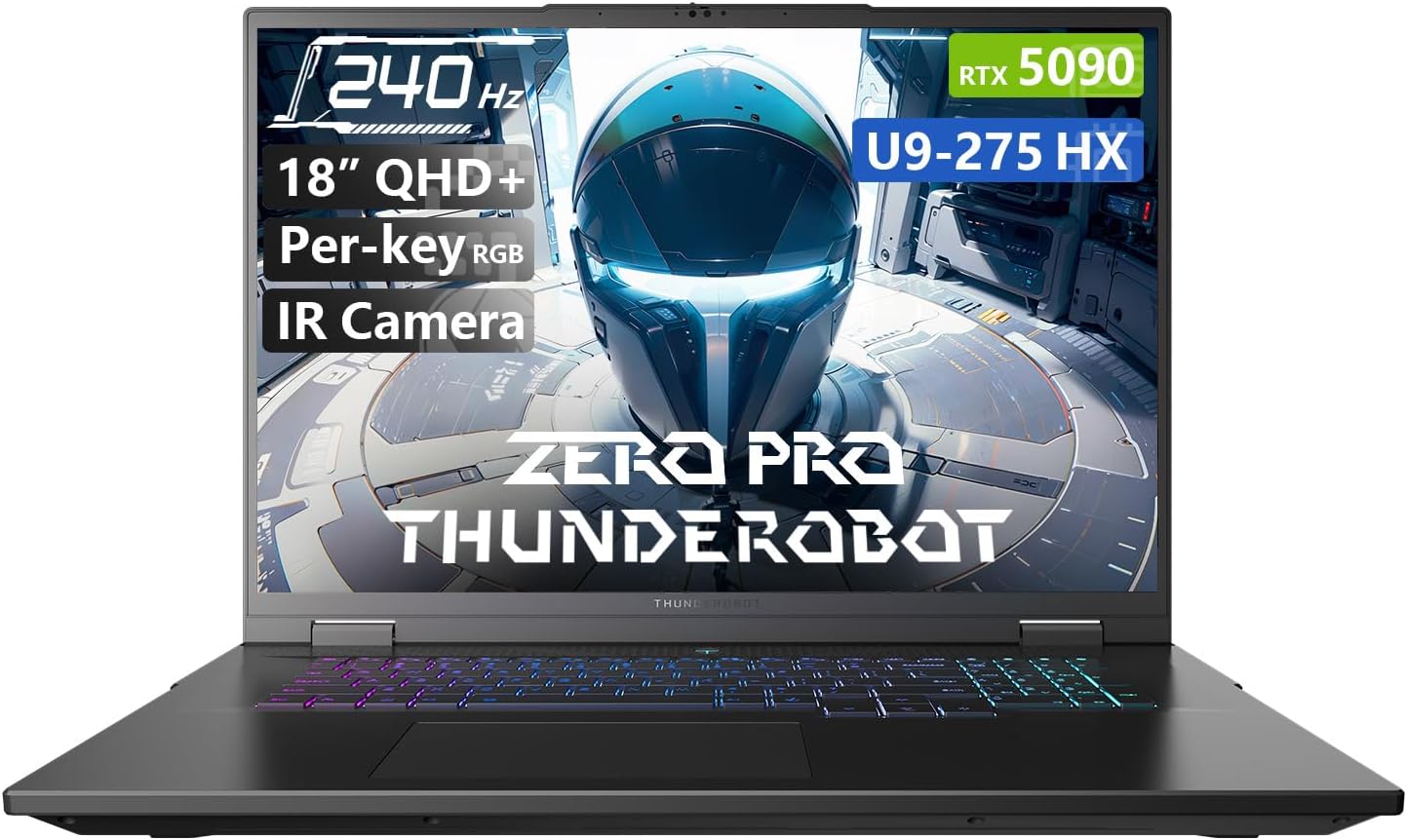
Figure 1: Thunderobot Zero 18 Pro 5090 Gaming Laptop. The image shows the laptop open, revealing the screen with product highlights and the RGB backlit keyboard.
خاصيتون ختمview
ڊسپلي ٽيڪنالاجي
The laptop features an 18-inch QHD+ (2560x1600 pixels) Bionic Hummingbird Eye-Care display with a 240Hz refresh rate and 4ms response time. This display offers a wide color gamut, enhanced contrast, and anti-glare/anti-reflection properties for visual clarity and reduced eye strain.
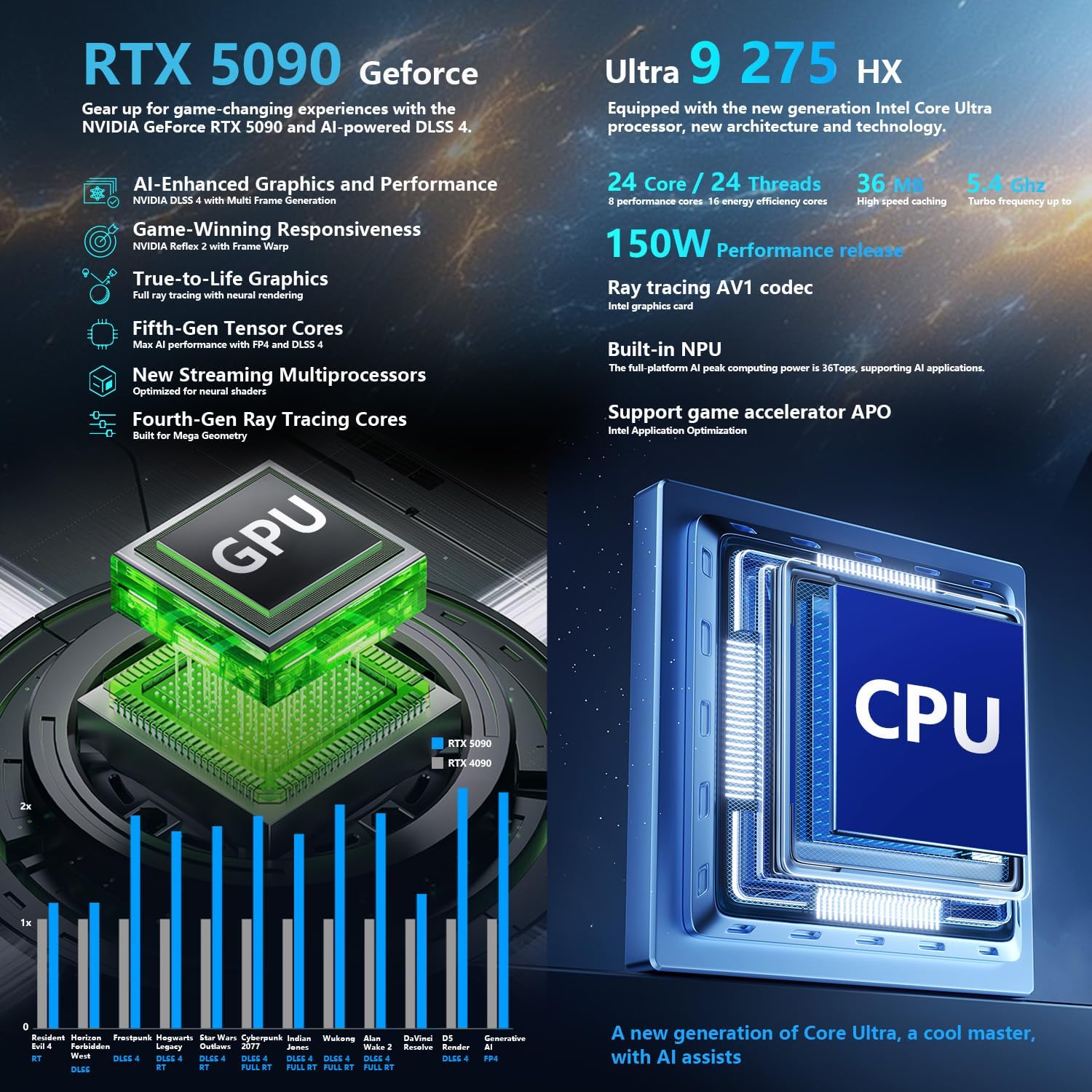
Figure 2: The 18-inch QHD+ Bionic Hummingbird Eye-Care Display, highlighting its 240Hz refresh rate and 2560x1600 resolution.
Core Performance
Equipped with an Intel Core Ultra 9 275HX processor (24 Cores, 24 Threads, up to 5.40GHz) and an NVIDIA GeForce RTX 5090 Laptop GPU, the Zero 18 Pro delivers high-end processing and graphics capabilities. It includes 32GB of DDR5 RAM and a 1TB PCIe M.2 SSD for rapid data access and storage.

Figure 3: Visual representation of the laptop's powerful Intel Core Ultra 9 275HX CPU and NVIDIA GeForce RTX 5090 GPU.
ترقي يافته کولنگ سسٽم
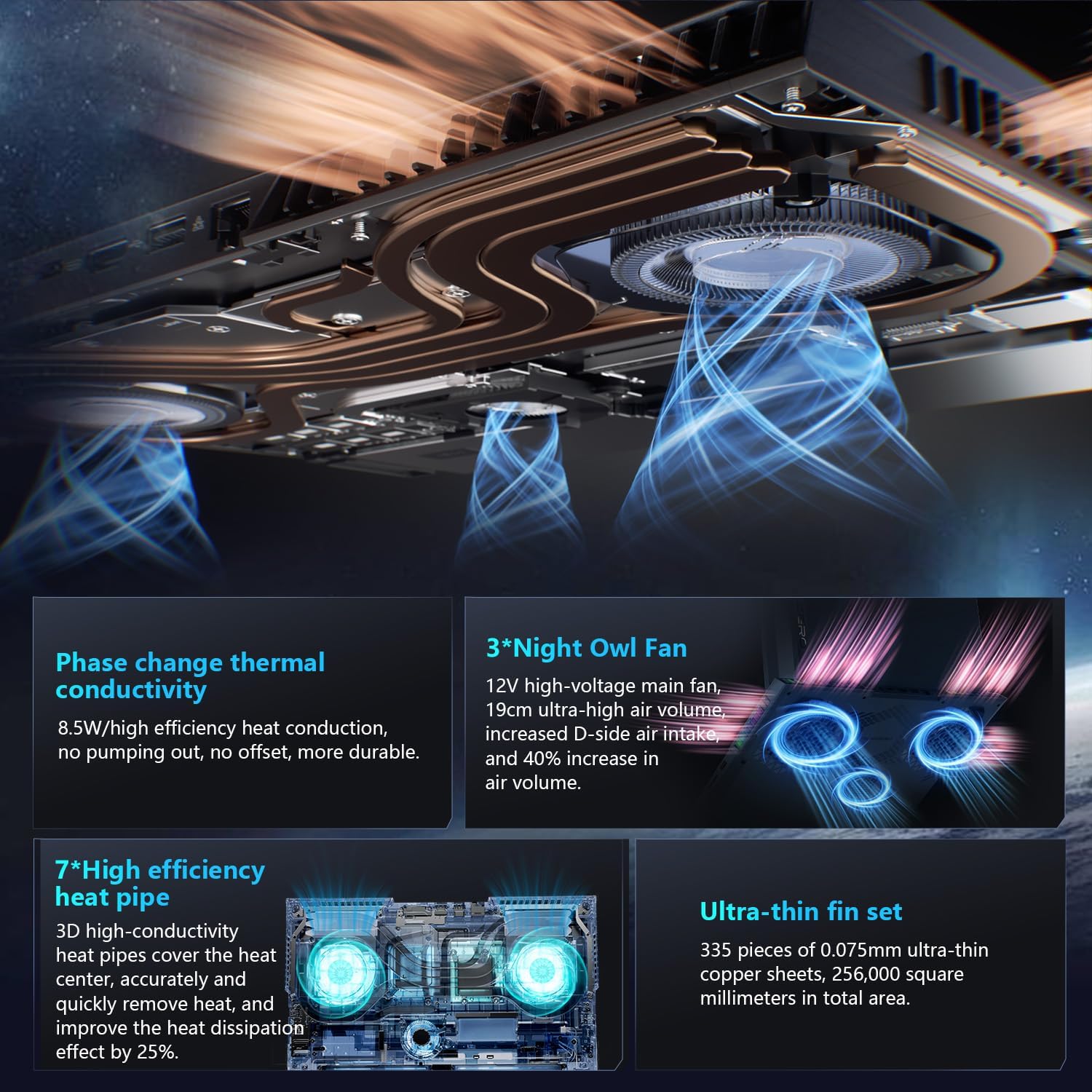
The laptop incorporates a robust 270W thermal design with 3x Night Owl fans and 7x high-efficiency heat pipes, featuring 338 pieces of 0.075mm ultra-thin copper fins. This architecture is designed for efficient heat dissipation during intensive use.

Figure 4: Illustration of the advanced heat dissipation system, including Night Owl fans and high-efficiency heat pipes.
رابطي ۽ بندرگاهن
The Zero 18 Pro offers comprehensive connectivity options:
- 3 x Superspeed USB Type-A ports
- 2 x Superspeed USB Type-C ports (including Thunderbolt 5)
- 1 x HDMI 2.1 پورٽ
- 1 x RJ-45 Ethernet port
- 1 x آڊيو پورٽ (3.5 ايم ايم)
- Wi-Fi 6E and Bluetooth for wireless connectivity
شڪل 5: ختمview of the laptop's rich interfaces and ports for easy expansion and connectivity.
Keyboard and Camera
The laptop features a Per-Key RGB backlit keyboard with an independent numeric keypad. An FHD IR Camera is integrated for secure login and video communication.
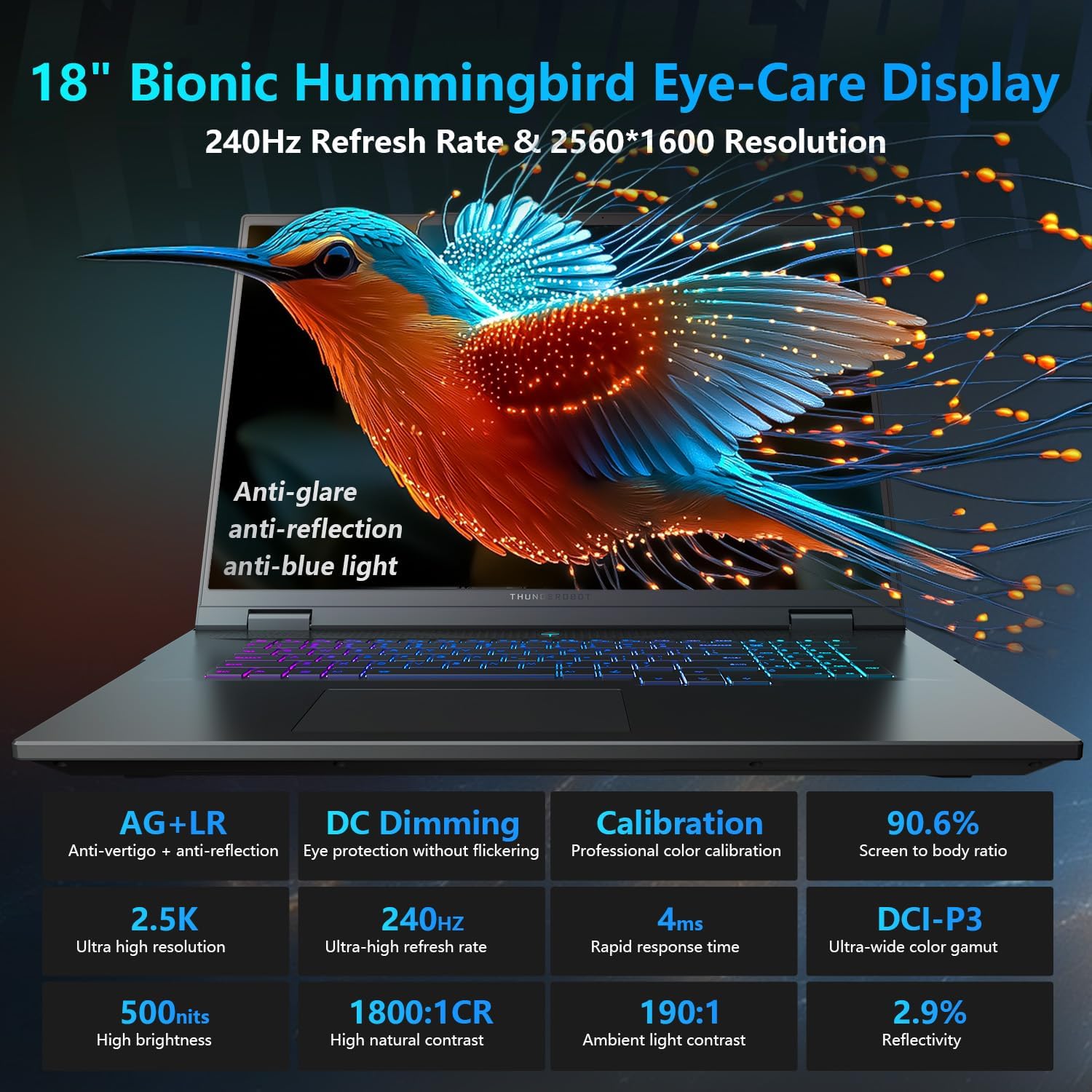
Figure 6: The Per-Key RGB backlit keyboard with dedicated keys for performance and cooling mode switching.
ليپ ٽاپ هلائڻ
ڪارڪردگي جا طريقا
The Thunderobot Control Center software allows you to switch between various performance modes: Quiet Mode, Balance Mode, and Turbo Mode. These modes adjust CPU/GPU frequencies and fan speeds to optimize for quiet operation, power saving, or maximum performance. Access these settings via the dedicated shortcut key (Fn+Space) or the Control Center application.

Figure 7: The AI Intelligent Control Center provides performance tuning, intelligent lighting adjustment, and comprehensive system customization.
ڊسپلي ۽ آڊيو سيٽنگون
Adjust display settings such as resolution, refresh rate, and color calibration through Windows display settings or the NVIDIA Control Panel. The integrated 4-speaker system with Smart AMP and Nahimic technology provides high-quality audio. Adjust audio settings via the Windows Sound settings or the Nahimic audio software.
ڪيبورڊ حسب ضرورت
The Per-Key RGB keyboard lighting can be customized using the Thunderobot Control Center. You can select various lighting effects and colors to personalize your experience.
Video 1: Demonstration of the Thunderobot RGB lighting features on the keyboard and chassis.
سار سنڀال
صفائي
Regularly clean the screen with a soft, lint-free cloth and a screen-safe cleaning solution. Use compressed air to clear dust from the keyboard and ventilation grilles. Avoid using harsh chemicals or abrasive materials.
سافٽ ويئر اپڊيٽس
Keep your Windows operating system, drivers, and firmware updated to ensure optimal performance and security. Check the Thunderobot support website for the latest driver releases.
Storage and RAM Upgrades
The laptop is designed for easy access to internal components for potential upgrades. However, please note that upgrading RAM or adding a second SSD may void the product warranty. Consult with Thunderobot customer service before performing any internal upgrades.
مشڪلاتون
- طاقت ناهي: پڪ ڪريو ته پاور اڊاپٽر ليپ ٽاپ ۽ ڪم ڪندڙ پاور آئوٽليٽ ٻنهي سان محفوظ طور تي ڳنڍيل آهي.
- ڊسپلي مسئلا: If the screen is blank or flickering, try connecting an external monitor to verify if the issue is with the laptop's display or graphics card. Update graphics drivers.
- گهڻو گرم ٿيڻ: Ensure ventilation grilles are clear of obstructions. Use the Control Center to activate Turbo Mode for maximum cooling during intense tasks.
- ڪارڪردگي ۾ دير: Close unnecessary applications, check for background processes, and ensure drivers are up to date. Adjust performance modes in the Control Center.
وضاحتون
| خاصيت | تفصيل |
|---|---|
| ماڊل نالو | ZERO 18 Pro |
| اسڪرين جي ماپ | 18 انچ |
| اسڪرين جي قرارداد | 2560 x 1600 پڪسل (QHD+) |
| وڌ ۾ وڌ اسڪرين ريزوليوشن | 2560x1600 پڪسلز |
| پروسيسر | Intel Core Ultra 9 275HX (up to 5.4 GHz, 24 Cores) |
| رام | 32 جي بي ڊي ڊي آر 5 (4800 ميگا هرٽز) |
| هارڊ ڊرائيو | 1 TB SSD (PCIE x 4) |
| گرافڪس ڪوپروسيسر | GeForce RTX 5090 |
| آپريٽنگ سسٽم | ونڊوز 11 گهر |
| وائرليس جو قسم | 802.11ax (وائي فائي 6E) |
| شيءِ جو وزن | 15 پائونڊ |
| پيداوار جي ماپ | 16.04 x 11.78 x 1.41 انچ |
وارنٽي ۽ سپورٽ
Every Thunderobot laptop includes a 12-month warranty, offering expert support, thorough diagnostics, and genuine parts if a repair is needed. A 90-day warranty is also provided on all warranty replacement parts, ensuring hassle-free repairs. Your complete satisfaction is our commitment.
Figure 8: Thunderobot's commitment to warranty and service for their laptops.


