تعارف
This manual provides comprehensive instructions for the assembly, operation, and maintenance of your Perlegear Dual Monitor Stand with Integrated Power Strip, model PGTVS41B. This freestanding monitor stand is designed to support two monitors, enhancing your workspace ergonomics and organization. Please read this manual thoroughly before installation and use to ensure proper setup and safe operation.
حفاظت جي ڄاڻ
- اسيمبليءَ کان اڳ پڪ ڪريو ته سڀئي حصا موجود آهن ۽ انهن کي نقصان نه پهتو آهي. جيڪڏهن ڪو به پرزو غائب يا خراب آهي ته استعمال نه ڪريو.
- Verify that your monitors' weight and VESA patterns are within the specified limits (up to 22 lbs per arm, VESA 75x75mm or 100x100mm).
- Do not overtighten screws during assembly to prevent damage to components.
- اسيمبلي دوران ٻارن ۽ پالتو جانورن کي پري رکو. ننڍا حصا دم گھڙڻ جو خطرو پيدا ڪري سگھن ٿا.
- ٽپڻ کان بچڻ لاءِ اسٽينڊ کي هڪ مستحڪم، سطحي سطح تي رکو.
- Do not exceed the electrical ratings of the integrated power strip.
پيڪيج مواد
مھرباني ڪري چيڪ ڪريو ته ھيٺ ڏنل سڀ جزا توھان جي پيڪيج ۾ شامل آھن:
- شيشي جو بنياد
- Main Support Pole with Integrated Power Strip
- ٻٽي مانيٽر هٿيار
- VESA Plates (x2)
- Hardware Kit (screws, washers, spacers, Allen wrenches)
- پاور ڪيبل (6.5 فوٽ)
- ڪيبل مينيجمينٽ ڪلپس
سيٽ اپ جون هدايتون
Follow these steps to assemble your Perlegear Dual Monitor Stand:
- Step 1: Assemble the Base and Pole
Attach the main support pole to the glass base using the provided screws and Allen wrench. Ensure it is securely fastened and stable.

Image: Fully assembled Perlegear Dual Monitor Stand, showing the main pole, monitor arms, and glass base.
- Step 2: Attach Monitor Arms
Slide the dual monitor arms onto the main support pole. Adjust their height to your preference and secure them with the locking mechanism.
- قدم 3: VESA پليٽس کي مانيٽر سان ڳنڍيو
Carefully attach the VESA plates to the back of your monitors using the appropriate screws, washers, and spacers from the hardware kit. Ensure the VESA pattern (75x75mm or 100x100mm) matches your monitor.

Image: Diagram illustrating VESA compatibility (75x75mm, 100x100mm) and supported monitor sizes (13-32 inches) and weight (22 lbs per arm).
- Step 4: Mount Monitors
With assistance if needed, carefully slide the monitors (with attached VESA plates) onto the monitor arms. Ensure they click into place securely.
- قدم 5: پاور اسٽرپ کي ڳنڍيو
Plug the provided 6.5ft power cable into the integrated power strip on the main pole, then connect it to a wall outlet. The power strip includes 1 USB-A port (5V/2.1A), 1 USB-C port (5V/2.1A), and 3 AC outlets (120V/12A).
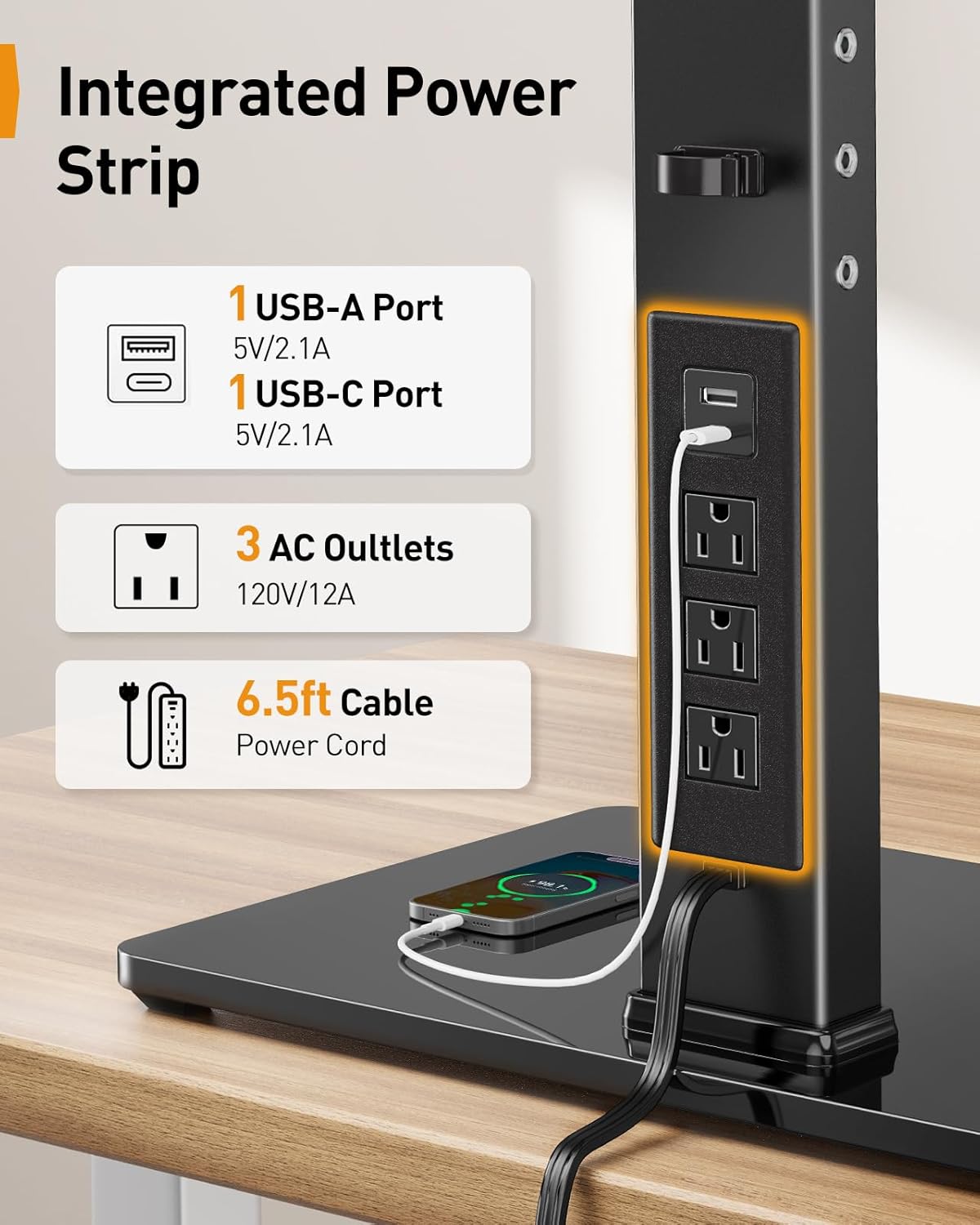
تصوير: ويجهو تصوير view of the integrated power strip, detailing the USB-A, USB-C, and three AC outlets, along with the 6.5ft power cable.
- قدم 6: ڪيبل انتظام
Route monitor cables and power cords through the integrated cable management clips on the pole and arms to maintain a tidy workspace.

تصوير: هڪ سابقample of a streamlined workspace utilizing the monitor stand's cable management features, showing monitors, keyboard, and other peripherals.
آپريٽنگ هدايتون
The Perlegear Dual Monitor Stand offers various adjustments for optimal viewآرام ۾.
- اونچائي جي ترتيب: The monitor stand has four height settings, allowing you to adjust the screen height from 10.79 inches to 14.92 inches. This helps achieve an ergonomic viewing angle, reducing neck and eye strain.
- جھلڻ جي ترتيب: Each monitor can be tilted ±45° to reduce glare and find your preferred viewزاويه.
- گھمڻ واري ترتيب: Monitors can swivel ±90° horizontally, allowing for easy screen sharing or multi-user setups.
- گردش جي ترتيب: Rotate your monitors 360° to switch between landscape and portrait orientation effortlessly.
- لچڪدار بازو پوزيشن: The monitor arms feature multiple joints that allow for flexible positioning, including ±105° articulation at the main arm joints and ±90° swivel at the monitor attachment point.
- پاور اسٽرپ استعمال ڪندي: Plug your devices into the USB-A, USB-C, or AC outlets on the integrated power strip for convenient desktop power access.
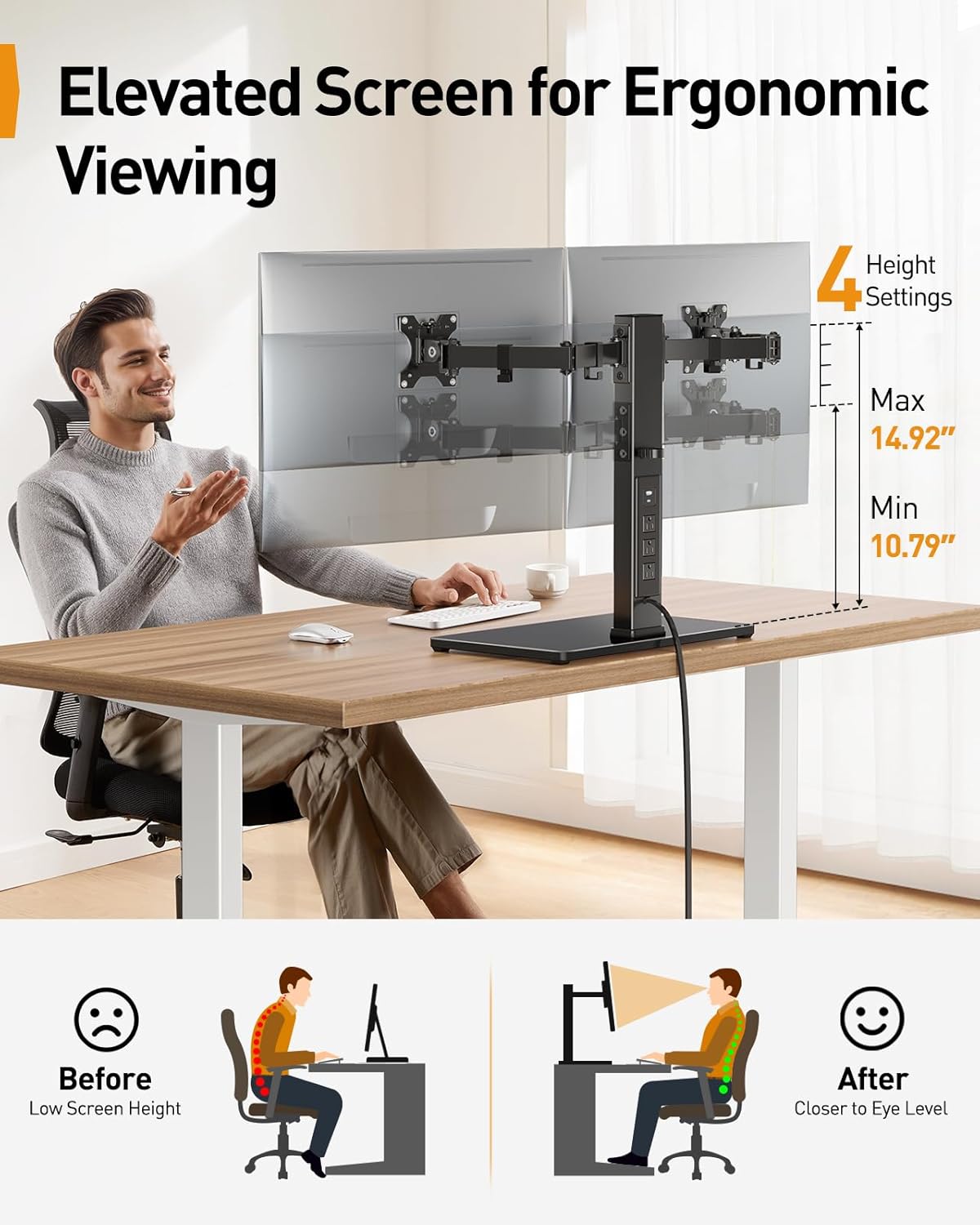
Image: Illustration demonstrating the ergonomic benefits of adjustable screen height, showing a user with correct posture and the stand's height range (10.79" to 14.92").

Image: Diagrams illustrating the ±45° tilt, ±90° swivel, and 360° rotation capabilities of the monitor mounts.

تصوير: اوور هيڊ view demonstrating the flexible articulation of the monitor arms, showing ±105° movement at various joints and ±90° swivel for screen positioning.
سار سنڀال
To ensure the longevity and proper function of your monitor stand:
- صفائي: Wipe the stand and base with a soft, dry cloth. For stubborn marks, a slightly damp ڪپڙو استعمال ڪري سگھجي ٿو، ۽ پوءِ سڪائي سگھجي ٿو. رگڙيندڙ صاف ڪندڙ يا محلولن کان پاسو ڪريو.
- وقتي چڪاس: Periodically check all screws and connections to ensure they remain tight and secure. Retighten if necessary.
- ڪيبل جو انتظام: پڪ ڪريو ته ڪيبل پنچ ٿيل نه آهن يا تمام گهڻو تنگ نه آهن. ضرورت مطابق ڪيبل روٽنگ کي ترتيب ڏيو.
مشڪلاتون
If you encounter issues with your monitor stand, refer to the following common solutions:
- اسٽينڊ لڏپلاڻ وارو آهي: Ensure the base is on a flat, stable surface. Check all assembly screws, especially those connecting the pole to the base and the arms to the pole, are securely tightened.
- مانيٽر ليول نه آهن: Adjust the tilt and height of individual monitor arms to align them. Ensure VESA plates are securely attached to monitors.
- Power strip not working: Verify the main power cable is securely plugged into both the stand and a functional wall outlet. Check if the wall outlet is receiving power. Ensure devices are properly plugged into the power strip.
- Difficulty adjusting monitor position: Loosen the adjustment screws slightly, make the adjustment, then retighten to secure the position. Do not force adjustments.
وضاحتون
| ماڊل | PGTVS41B |
| مانيٽر مطابقت | 13" - 32" Flat or Curved Screens |
| وزن جي گنجائش | هر هٿ تي 22 پائونڊ (10 ڪلوگرام) تائين |
| VESA Patterns | 75x75mm، 100x100mm |
| اونچائي جي ترتيب جي حد | 10.79" - 14.92" (27.4 سينٽي ميٽر - 37.9 سينٽي ميٽر) |
| جھڪندڙ زاويه | ±45° |
| گھمڻ وارو زاويو | ±90° |
| گردش | 360° |
| انٽيگريٽيڊ پاور اسٽريپ | 1x USB-A (5V/2.1A), 1x USB-C (5V/2.1A), 3x AC Outlets (120V/12A) |
| پاور ڪيبل ڊگھائي | 6.5 فوٽ (2 ميٽر) |
| مواد | Carbon Steel, Tempered Glass |
| رنگ | ڪارو |
وارنٽي ۽ سپورٽ
Perlegear products are designed for durability and performance. For warranty information or technical support, please refer to the contact details provided with your purchase or visit the official Perlegear webسائيٽ. اسان جي ڪسٽمر سروس ٽيم توهان جي پراڊڪٽ بابت ڪنهن به سوال يا خدشن ۾ مدد ڪرڻ لاءِ موجود آهي.


