1. پراڊڪٽ ختمview
The Grandstream WP816 is a compact, portable Wi-Fi phone designed for clear communication. It features dual-band Wi-Fi 6 for reliable connectivity, supports two SIP accounts and two lines, and delivers HD voice quality with dual microphones, Acoustic Echo Cancellation (AEC), and Noise Shield Technology. The phone includes integrated Bluetooth for headset connectivity, a long-lasting 1500mAh rechargeable battery providing 6 hours of talk time and 120 hours of standby time, and a configurable push-to-talk button. It is equipped with a Type C USB port for fast charging and a 3.5mm headset jack. Additional features include an accelerometer and an emergency button.
اهم خاصيتون:
- Dual-band Wi-Fi 6 with efficient antenna design and advanced roaming support.
- Supports 2 SIP accounts and 2 lines.
- HD voice with dual MIC design, AEC, and Noise Shield Technology.
- Integrated Bluetooth for headset connection.
- Rechargeable 1500mAh battery: 6 hours talk time, 120 hours standby.
- Configurable button for push-to-talk functionality.
- Type C USB port (supports fast charging) and 3.5mm headset jack.
- Built-in accelerometer and emergency button.
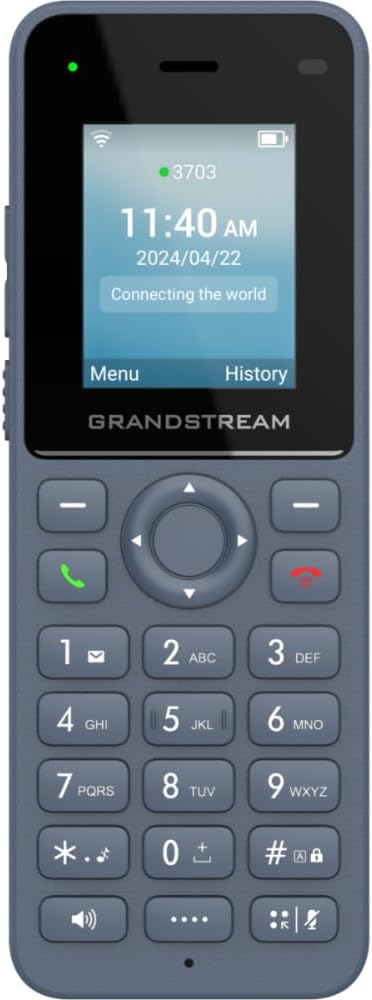
شڪل 1: سامهون view of the Grandstream WP816 Wi-Fi Phone, displaying its screen, keypad, and branding.
2. سيٽ اپ
2.1. دٻي ۾ ڇا آهي:
- Grandstream WP816 Wi-Fi Phone
- (Additional accessories such as power adapter, charging cradle, and battery are typically included but not explicitly detailed in the provided 'whats_in_the_box' field, which only states "Phone". Assuming standard phone accessories.)
2.2. فون چارج ڪرڻ:
- Connect the power adapter to the charging cradle and a power outlet.
- Place the WP816 phone into the charging cradle. Ensure the phone is seated correctly and the charging indicator illuminates.
- Allow the phone to charge fully before initial use. This typically takes several hours. The Type C USB port also supports fast charging.
2.3. شروعاتي سيٽ اپ:
- پاور آن: پاور/ڪال ختم ڪريو بٽڻ کي دٻايو ۽ رکو جيستائين اسڪرين روشن نه ٿئي.
- وائي فائي ڪنيڪشن: Navigate to the "Settings" menu, then "Wi-Fi". Select your desired Wi-Fi network and enter the password if prompted. The phone supports dual-band Wi-Fi 6.
- SIP اڪائونٽ جي ترتيب: Access the "Settings" menu to configure your SIP accounts. The phone supports 2 SIP accounts. Refer to your VoIP service provider for specific SIP settings (SIP server, User ID, Password).
- تاريخ ۽ وقت: Ensure the date and time are correctly set, either manually or via network synchronization.
3. آپريٽنگ هدايتون
3.1. ڪال ڪرڻ:
- ڊائلنگ: ڪي پيڊ استعمال ڪندي فون نمبر داخل ڪريو.
- ڪال شروع ڪريو: Press the Green Call button to place the call.
- ڪال ختم ڪريو: Press the Red End Call button to terminate the conversation.
3.2. Receiving Calls:
- When the phone rings, press the Green Call button to answer.
- To reject an incoming call, press the Red End Call button.
3.3. Speakerphone Function:
- During a call, press the Speaker button (often indicated by a speaker icon) to activate the speakerphone.
- Press the Speaker button again to switch back to the earpiece.
3.4. Push-to-Talk (PTT):
- The WP816 features a configurable button for Push-to-Talk functionality.
- Consult your system administrator or service provider for configuration details and usage of the PTT feature.
3.5. Bluetooth Headset Connectivity:
- Ensure your Bluetooth headset is in pairing mode.
- On the WP816, navigate to "Settings" > "Bluetooth".
- Turn Bluetooth on and scan for available devices.
- Select your headset from the list and follow any on-screen prompts to complete pairing.
4. سار سنڀال
4.1. بيٽري جي سنڀال:
- بيٽري جي زندگي کي وڌائڻ لاءِ، انتهائي گرمي پد کان پاسو ڪريو.
- Charge the phone regularly. Do not let the battery completely drain for extended periods.
- If the phone will not be used for a long time, charge it to about 50% and store it in a cool, dry place.
4.2. صفائي:
- Use a soft, dry cloth to clean the phone's exterior.
- سخت ڪيميائي استعمال ڪرڻ کان پاسو ڪريو، صفائي جي سولوينٽس، يا مضبوط صابن.
5. مسئلا حل ڪرڻ
5.1. No Power:
- پڪ ڪريو ته بيٽري صحيح طور تي داخل ڪئي وئي ۽ چارج ڪئي وئي.
- Verify the charging cradle is properly connected to a power source.
5.2. Cannot Connect to Wi-Fi:
- Check if the Wi-Fi network is active and within range.
- Confirm the Wi-Fi password is entered correctly.
- Restart the phone and the Wi-Fi router.
5.3. Poor Call Quality:
- Ensure you are within good Wi-Fi signal range.
- پنهنجي انٽرنيٽ ڪنيڪشن جي رفتار ۽ استحڪام چيڪ ڪريو.
- Verify SIP account settings with your service provider.
5.4. Phone Not Responding:
- Perform a soft reset by removing and reinserting the battery.
- If the issue persists, a factory reset might be necessary (refer to advanced settings, note this will erase all data).
6. وضاحتون
| خاصيت | تفصيل |
|---|---|
| ماڊل | WP816 |
| برانڊ | گرانڊ اسٽريم |
| پيداوار جي ماپ | 7 x 5 x 4 انچ |
| شيءِ جو وزن | 13.8 آونس (390 گرام) |
| بيٽريون | 1 غير معياري بيٽري گهربل |
| رابطي | Dual-band Wi-Fi 6, Integrated Bluetooth |
| SIP اڪائونٽس | 2 SIP accounts, 2 lines |
| آواز جون خاصيتون | HD voice, Dual MIC design with AEC and Noise Shield Technology |
| بيٽري جي گنجائش | 1500mAh |
| ڳالهائڻ جو وقت | 6 ڪلاڪ |
| اسٽينڊ بائي ٽائيم | 120 ڪلاڪ |
| بندرگاهن | Type C USB (fast charging support), 3.5mm headset jack |
| اضافي خاصيتون | Accelerometer, Emergency button, Configurable Push-to-Talk button |
| رنگ | ڀورو |
| مواد | پلاسٽڪ |
| ٽيليفون جو قسم | بي تار |
| ڊائلر جو قسم | ٽون ڊائلنگ |
| ملٽي لائن آپريشن | ملٽي لائين آپريشن |
7. وارنٽي ۽ سپورٽ
For warranty information and technical support, please refer to the documentation provided with your purchase or visit the official Grandstream webسائيٽ. وارنٽي دعوائن لاءِ خريداري جو ثبوت رکو.


