1. تعارف
This manual provides detailed instructions for the safe and proper installation, operation, and maintenance of your Perlegear Long Arm Full Motion TV Wall Mount, Model PGXLF02. Please read all instructions carefully before beginning installation and keep this manual for future reference.

Image 1: Perlegear Long Arm Full Motion TV Wall Mount, Model PGXLF02.
2. حفاظت جي ڄاڻ
- وزن جي گنجائش: وڌ ۾ وڌ وزن جي گنجائش 150 پائونڊ (68 ڪلوگرام) کان وڌيڪ نه ڪريو.
- ٽي وي سائيز: هي مائونٽ 42 ۽ 90 انچ جي ٽي وي لاءِ ٺهيل آهي.
- ڀت جو قسم: Install only on wood studs (8"/12"/16"/24" spacing), solid concrete, or brick walls. صرف ڊرائي وال تي انسٽال نه ڪريو.
- پيشه ورانه مدد: جيڪڏهن توهان کي انسٽاليشن جي عمل يا ڀت جي قسم بابت پڪ ناهي، ته ڪنهن قابل پيشه ور سان صلاح ڪريو.
- اوزار: Handle all tools with care to prevent injury.
- اسيمبلي: محفوظ تنصيب لاءِ ٻن ماڻهن جي سفارش ڪئي وئي آهي، خاص طور تي جڏهن ٽي وي کڻڻ وقت.
3. سيٽ اپ ۽ انسٽاليشن
3.1. اوزار گهربل
The following tools are required for installation. Some are included, others are not.
- شامل نه آهي: Electric Drill, Pencil, Phillips Screwdriver, Tape Measure, 1/2" (13mm) Socket Wrench.
- ڪاٺ جي ڀتين لاءِ: Stud Finder, Awl, 7/32" (5.5mm) Wood Drill Bit.
- For Solid Concrete/Brick: Hammer, 3/8" (10mm) Concrete Drill Bit.
- شامل: Bubble Level, Allen Key.
3.2. TV and Wall Compatibility
Ensure your TV and wall are compatible with this mount before proceeding.
- ٽي وي سائيز: Compatible with most flat or curved 42"–90" TVs.
- وزن جي گنجائش: 150 پائونڊ (68 ڪلوگرام) تائين ٽي وي کي سپورٽ ڪري ٿو.
- ويسا جا نمونا: Supports VESA patterns from 200x100mm to 800x400mm.
- ڀت جا قسم: Suitable for 8"/12"/16"/24" wood studs, solid concrete, or brick walls. صرف ڊرائي وال تي انسٽال نه ڪريو.

Image 2: Compatibility details for wall types, TV sizes, and VESA patterns.

Image 3: Visual guide for checking TV and wall compatibility, including VESA patterns and wall plate dimensions.
3.3. مرحليوار انسٽاليشن
The Perlegear TV mount features a pre-assembled design for easier installation. Follow these general steps:
- Attach TV Brackets to the TV: Select the appropriate bolts and spacers for your TV type (flat back, curved back, or TVs with mounting restrictions). Secure the TV brackets to the back of your TV.
- Mount Arm Assembly / Wall Plate on the Wall: Locate your wall studs (for wood stud installation) or mark drill points (for solid concrete/brick). Use the provided drilling template and bubble level to ensure accurate placement. Drill pilot holes and securely fasten the wall plate to the wall using the appropriate lag bolts and washers. Verify the wall plate is securely attached by pulling down on it.
- ٽي وي رکو: Carefully lift the TV with the attached brackets and hook them onto the wall plate. Secure the TV to the mount using the safety locks.

تصوير 4: مٿيview of the 3-step installation process: attach TV brackets, mount wall plate, and hang TV.
3.4. انسٽاليشن وڊيو گائيڊ
For a visual guide on the installation process, please refer to the official video below:
Video 1: Perlegear Long Arm Full Motion TV Mount Installation Guide. This video demonstrates the complete installation process for the PGXLF02 series TV mount, including tool gathering, attaching TV brackets, mounting the wall plate, and securing the TV.
4. Operation & Adjustments
Your Perlegear TV mount offers various adjustments for optimal viewآرام ۾.
4.1. واڌ ۽ واپسي
The long arm extends up to 40 inches (101.6 cm) for closer viewing and retracts to 3.55 inches (9 cm) to save space. This allows for flexible positioning and multi-zone viewing.

Image 5: Demonstrates the mount's extension capability, bringing the TV closer for viewing or retracting it to save space.
4.2. گھمڻ واري ترتيب
The mount allows for a ±90° swivel, enabling you to adjust the TV's angle for viewing from different positions in a room, including corner installations.
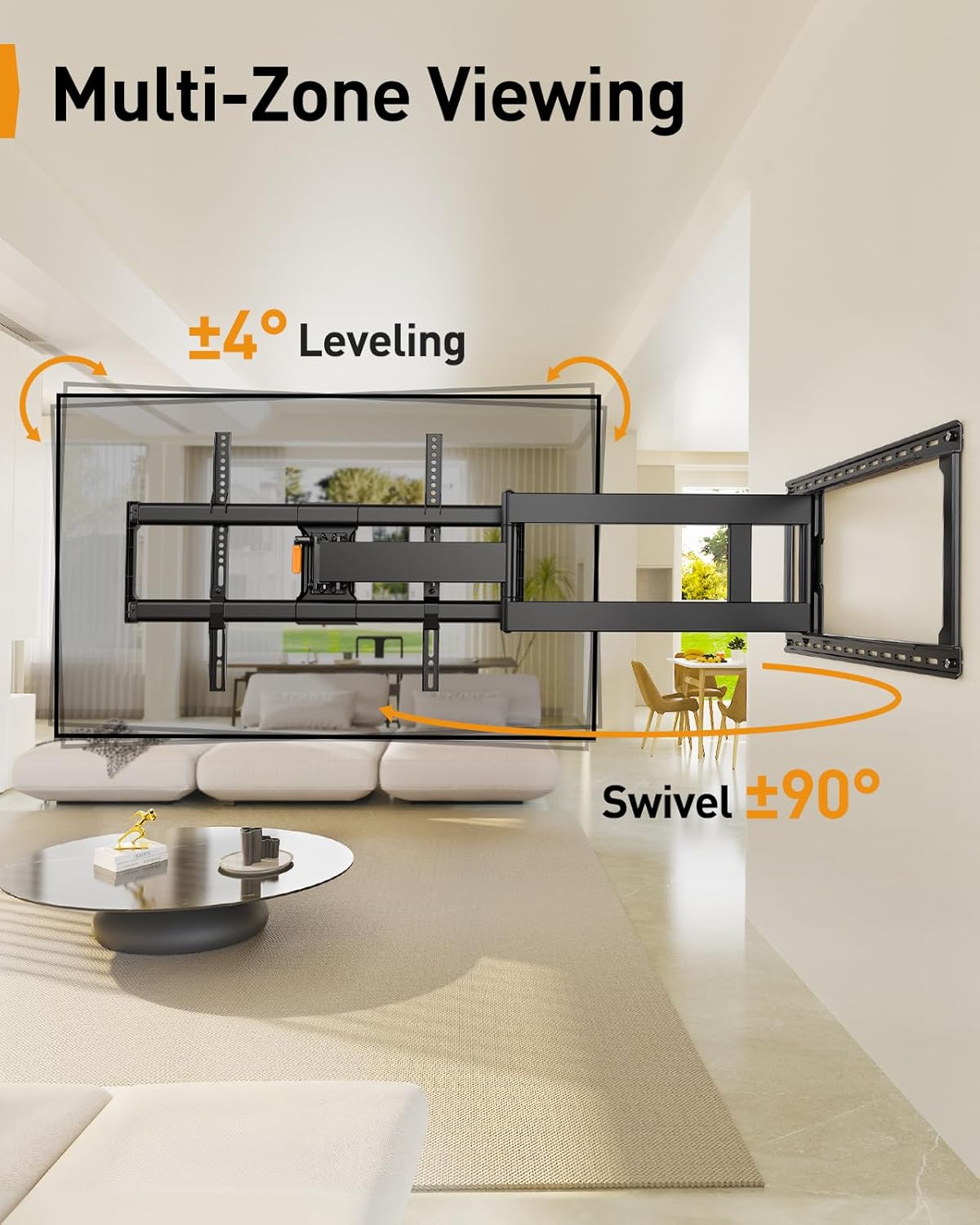
Image 6: Illustrates the multi-zone viewing capability with swivel and leveling adjustments.

Image 7: Shows the mount's suitability for corner installations, allowing for wide swivel angles.
4.3. ٽائل ترتيب ڏيڻ
Adjust the TV tilt from +5° to -12° to reduce glare and achieve your preferred viewing angle. The mount features a tool-free tilt adjustment mechanism.

Image 8: Highlights the tool-free tilt adjustment feature for quick and easy angle changes.
4.4. ليولنگ ايڊجسٽمينٽ
After installation, you can make a ±3° leveling adjustment to ensure your TV is perfectly horizontal.
4.5. ڪيبل جو انتظام
Route your cables along the mount arms and secure them with the provided cable ties to maintain a neat and organized appearance.
4.6. Motion Demonstration Video
Observe the full range of motion and adjustment capabilities of the mount in the video below:
Video 2: Long Arm TV Mount for Cross-Zone Viewing Experience. This video showcases the mount's long extension, swivel, and tilt features, demonstrating how it enables flexible viewing from various angles and locations.
5. سار سنڀال
Regular maintenance helps ensure the longevity and safe operation of your TV mount.
- صفائي: Wipe the mount with a soft, dry cloth to remove dust. Avoid abrasive cleaners or solvents.
- وقتي چڪاس: وقت بوقت سڀني اسڪرو ۽ بولٽن کي چيڪ ڪريو ته جيئن پڪ ڪري سگهجي ته اهي تنگ رهن. جيڪڏهن ضروري هجي ته ٻيهر سخت ڪريو.
- حرڪت وارا حصا: The articulating arms are designed for smooth movement. If movement becomes stiff, ensure no cables are snagged and check for any obstructions. Do not apply lubricants unless specifically recommended by the manufacturer.
6. مسئلا حل ڪرڻ
If you encounter issues with your TV mount, refer to these common solutions:
- ٽي وي سطح نه: Use the ±3° leveling adjustment feature. If still not level, slightly loosen the bolts on the leveling mechanism, adjust, and then retighten.
- جهڪڻ ۾ ڏکيائي: If the tilt is too stiff or won't hold, slightly loosen the bolt on one side of the tilt mechanism, adjust, and then retighten both bolts. If it won't hold, fully tighten the bolt on the other side.
- جبل ڍلو محسوس ٿئي ٿو: Re-check all wall plate lag bolts and TV bracket screws to ensure they are securely tightened.
- محدود حرڪت: Ensure no cables are obstructing the articulating arms. Check for any physical obstructions around the mount.
7. وضاحتون
| خاصيت | تفصيل |
|---|---|
| برانڊ | پروليئر |
| ماڊل | PGXLF02 |
| ٽي وي سائز مطابقت | 42-90 انچ |
| وڌ ۾ وڌ لوڊ گنجائش | 150 پائونڊ (68 ڪلوگرام) |
| VESA مطابقت | 200x100mm کان 800x400mm تائين |
| وال پليٽ طول و عرض | 14.6 انچ (ويڪر) x 28.07 انچ (ڊيگهه) |
| Wall Stud Spacing | 8"/12"/16"/24" |
| ڀت کان واڌ | 3.55 انچ (واپس ڪڍيو ويو) کان 40 انچ (وڌايل) |
| گھمڻ وارو زاويو | ±90° |
| جھڪندڙ زاويه | +5° / -12° |
| ليولنگ ايڊجسٽمينٽ | ±3° |
| مواد | مصر جو اسٽيل |
| رنگ | ڪارو |
| شيءِ جو وزن | 29.3 پائونڊ |

تصوير 9: تفصيلي view of the mount's construction, highlighting features for maximum stability and flexibility, such as thicker arms and an arm reinforcement bar.
8. وارنٽي ۽ سپورٽ
This product is designed for durability and reliability. While specific warranty details are not provided in this manual, Perlegear typically offers product support for its customers.
For any questions, technical assistance, or to inquire about warranty information, please contact the Perlegear support team directly.
سپورٽ اي ميل: support@perlegear.com


