تعارف
This manual provides essential information for setting up, operating, and maintaining your HP Essential 17t Laptop TPN-I139. Please read these instructions carefully to ensure proper use and to maximize the lifespan of your device.
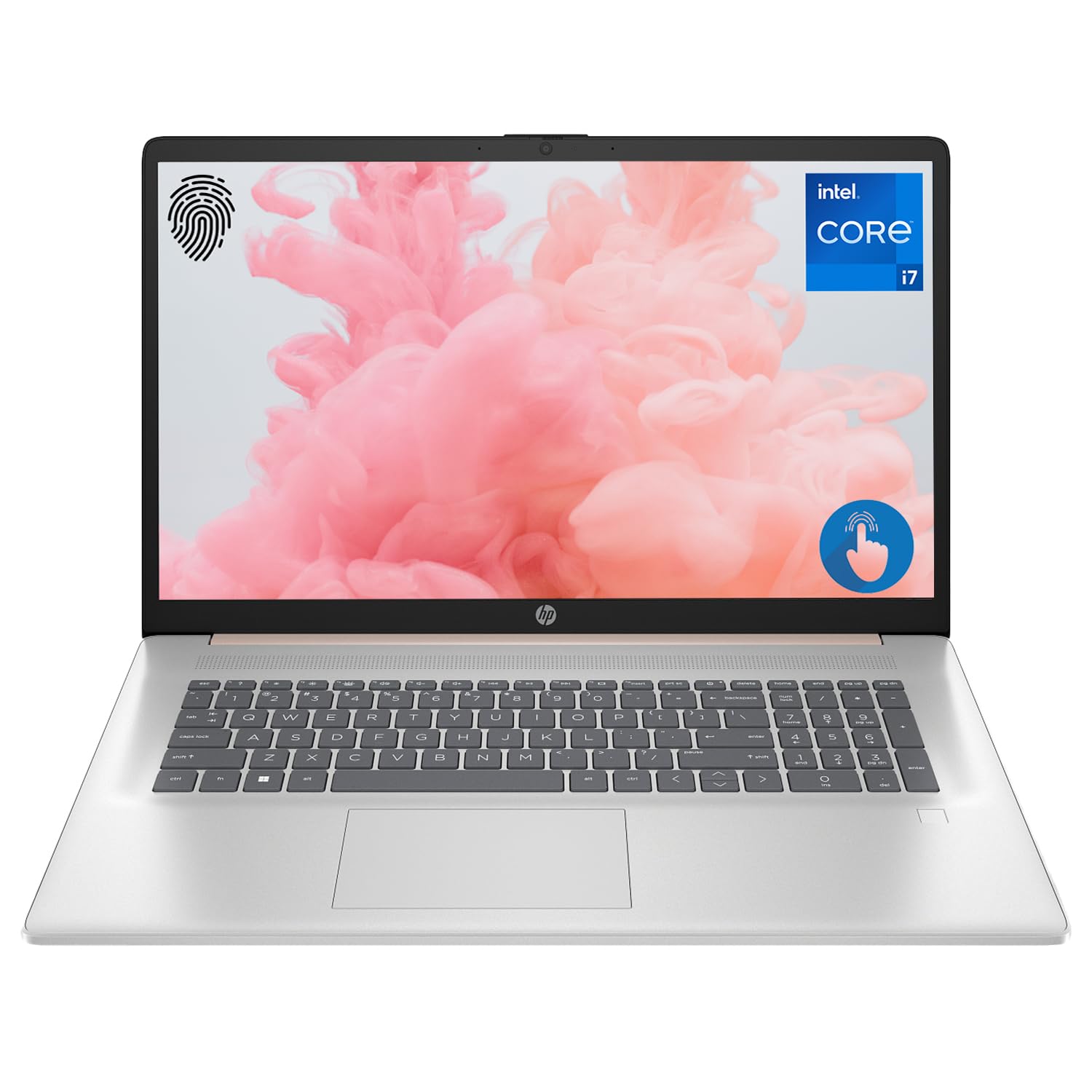
Figure 1: HP Essential 17t Laptop
The HP Essential 17t Laptop is designed for productivity and everyday use, featuring a 17.3-inch HD+ touchscreen, an Intel Core i7-1355U processor, 64GB of RAM, and a 2TB SSD. It comes pre-installed with Windows 11 Home.
شروع ٿيڻ
1. دٻي ۾ ڇا آهي
- HP Essential Touchscreen Laptop
- اي سي پاور ايڊاپٽر
- جلدي شروع ڪرڻ جي ھدايت (جيڪڏهن شامل هجي)
2. شروعاتي پاور آن ۽ سيٽ اپ
- اي سي پاور اڊاپٽر کي ليپ ٽاپ ۽ پاور آئوٽليٽ سان ڳنڍيو.
- ليپ ٽاپ جو ڍڪ کوليو ۽ پاور بٽڻ دٻايو، جيڪو عام طور تي ڪيبورڊ ڊيڪ تي هوندو آهي.
- Follow the on-screen instructions to complete the Windows 11 Home setup. This includes selecting your region, connecting to a Wi-Fi network, creating a user account, and accepting the license agreement.

Figure 2: Windows 11 Home Interface
هارڊويئر ختمview
بندرگاهن ۽ ڪنيڪٽر
Familiarize yourself with the various ports on your laptop for connecting external devices.

Figure 3: Laptop Ports and Connectors
- SuperSpeed USB Type-A (5Gbps signaling rate): USB ڊوائيسز جهڙوڪ چوٿون، ڪي بورڊ، يا ٻاهرين ڊرائيو کي ڳنڍڻ لاءِ.
- HDMI 1.4b: ٻاهرين ڊسپلي يا پروجيڪٽرن سان ڳنڍڻ لاءِ.
- SuperSpeed USB Type-C (5Gbps signaling rate): ڊيٽا جي منتقلي ۽ مطابقت رکندڙ ڊوائيسز کي ڳنڍڻ لاءِ هڪ ورسٽائل پورٽ.
- هيڊ فون/مائڪروفون ڪمبو جڪ (3.5 ايم ايم): هيڊفون، ٻاهرين اسپيڪر، يا مائڪروفون سان هيڊ سيٽ ڳنڍڻ لاءِ.
ڪي بورڊ ۽ ٽچ پيڊ
The laptop features a full-size backlit keyboard for comfortable typing in various lighting conditions and a responsive touchpad for navigation.
ڏيکاريو
Your HP Essential 17t Laptop is equipped with a 17.3-inch HD+ (1600 x 900) touchscreen display, offering intuitive interaction with Windows 11.

Figure 4: 17.3" HD+ Touchscreen Display
توهان جي ليپ ٽاپ کي هلائڻ
پاور انتظام
- پاور آن / آف: Press the power button to turn the laptop on. To shut down, click the Start button, then Power > Shut down.
- سمهڻ جو طريقو: Close the lid or click the Start button, then Power > Sleep to put the laptop into a low-power state.
- بيٽري جي سنڀال: The laptop supports battery fast charge, reaching approximately 50% charge in 45 minutes. For optimal battery health, avoid consistently draining the battery to 0% or keeping it at 100% for extended periods.
ٽچ اسڪرين استعمال ڪندي
Interact with your laptop directly on the screen using touch gestures. Common gestures include tapping to select, pinching to zoom, and swiping to scroll.
فنگر پرنٽ ريڊر استعمال ڪندي
The integrated fingerprint reader allows for secure and quick login. Set up your fingerprints through Windows Hello in the Windows Settings app (Accounts > Sign-in options).
وائي فائي سان ڳنڍڻ
To connect to a wireless network, click the Wi-Fi icon in the taskbar, select your desired network, and enter the password if prompted. The laptop supports Wi-Fi 6 for fast and reliable wireless connectivity.
پيداوار جون خاصيتون
This laptop integrates Copilot + AI capabilities to enhance productivity. These features can assist with scheduling, drafting emails, summarizing documents, and more, streamlining your workflow.

Figure 5: Copilot + AI for Enhanced Productivity
سار سنڀال ۽ سنڀال
حصو 1 جو 2: پنهنجي ليپ ٽاپ کي صاف ڪرڻ
- نرم، لِنٽ کان خالي ڪپڙو استعمال ڪريو ٿورڙو ڊيampڊسپلي کي صاف ڪرڻ لاءِ پاڻي يا اسڪرين ڪلينر سان ٻوڙيو وڃي.
- ڪيبورڊ ۽ چيسس لاءِ، نرم، سڪل ڪپڙو استعمال ڪريو. سخت ڪيميڪلز يا رگڙيندڙ مواد کان پاسو ڪريو.
- صفائي ڪرڻ کان اڳ پڪ ڪريو ته ليپ ٽاپ بند آهي ۽ ان پلگ ٿيل آهي.
سافٽ ويئر اپڊيٽس
باقاعدي طور تي ونڊوز اپڊيٽس جي جانچ ڪريو ۽ انسٽال ڪريو ته جيئن پڪ ڪري سگهجي ته توهان جي سسٽم ۾ جديد سيڪيورٽي پيچ ۽ ڪارڪردگي بهتري آهي. سيٽنگون > ونڊوز اپڊيٽ ڏانهن وڃو.
مشڪلاتون
جيڪڏهن توهان کي پنهنجي ليپ ٽاپ سان مسئلا درپيش اچن ٿا، ته هيٺ ڏنل بنيادي مسئلا حل ڪرڻ جا قدم آزمايو:
- طاقت ناهي: پڪ ڪريو ته AC اڊاپٽر ليپ ٽاپ ۽ ڪم ڪندڙ پاور آئوٽليٽ ٻنهي سان محفوظ طور تي ڳنڍيل آهي. هڪ مختلف آئوٽليٽ آزمايو.
- ڊسپلي مسئلا: If the screen is blank, try connecting an external monitor to check if the issue is with the laptop's display.
- وائي فائي ڪنيڪشن: Restart your router and modem. Ensure Wi-Fi is enabled on your laptop.
- سست ڪارڪردگي: Close unnecessary applications. Check for available Windows updates.
وڌيڪ پيچيده مسئلن لاءِ، HP سپورٽ جو حوالو ڏيو webسائيٽ يا HP ڪسٽمر سروس سان رابطو ڪريو.
وضاحتون
Below are the key technical specifications for the HP Essential 17t Laptop TPN-I139:

Figure 6: Intel Core i7-1355U Processor
| خاصيت | تفصيل |
|---|---|
| ماڊل نالو | TPN-I139 |
| پروسيسر | 13th Gen Intel Core i7-1355U (10 Cores, 12 Threads, up to 5.0 GHz) |
| رام | 64 جي بي ڊي ڊي آر 4 ايس ڊي آر اي ايم (3200 ميگا هرٽز) |
| ذخيرو | 2 ٽي بي PCIe NVMe M.2 SSD |
| ڏيکاريو | 17.3" HD+ (1600 x 900) Touchscreen, BrightView، 250 نِٽَ |
| گرافڪس | Intel Iris Xe گرافڪس |
| آپريٽنگ سسٽم | ونڊوز 11 گهر |
| وائرليس ڪنيڪشن | وائي فائي 6 (802.11ax) |
| بندرگاهن | 1x SuperSpeed USB Type-C (5Gbps), 2x SuperSpeed USB Type-A (5Gbps), 1x HDMI 1.4b, 1x Headphone/Microphone Combo |
| خاص خاصيتون | بيڪ لِٽ ڪي بورڊ، فنگر پرنٽ ريڊر |
| طول و عرض (LxWxH) | 15.78 x 10.15 x 0.78 انچ |
| وزن | 5.25 پائونڊ |

Figure 7: Intel Iris Xe Graphics
وارنٽي ۽ سپورٽ
Your HP Essential 17t Laptop comes with a standard manufacturer's warranty. For detailed warranty terms and conditions, please refer to the documentation included with your product or visit the official HP support website. For technical assistance, driver downloads, or service requests, please contact HP customer support directly.
پيداوار ختمview وڊيو
بصري جائزو لاءِ هي وڊيو ڏسوview of the HP Essential 17t Laptop's features and capabilities.
Video 1: HP Essential 17 Touchscreen 13th Gen i7 Laptop Overview by PCOnline US. This video highlights key features and design aspects of the laptop.