1. تعارف
This manual provides essential instructions for the safe and efficient operation of your Motorola Six-Pocket Multi-Unit Charger. This charger is designed to simultaneously charge up to six compatible Motorola radios or batteries, ensuring your communication devices are always ready for use. Please read this manual thoroughly before using the charger.
2. حفاظت جي ڄاڻ
Always observe the following safety precautions to prevent injury or damage to the charger or connected devices:
- Use only the power supply provided with the charger.
- چارجر کي مينهن يا نمي جي سامهون نه ڪريو.
- چارجر کي هلائڻ نه ڏيو جيڪڏهن اهو ڪنهن به طريقي سان خراب ٿي ويو آهي.
- آپريشن دوران چارجر جي چوڌاري مناسب وائيٽليشن کي يقيني بڻائي.
- چارجر کي ڌار ڪرڻ يا تبديل ڪرڻ جي ڪوشش نه ڪريو.
- ٻارن جي پهچ کان پري رکو.
3. پيڪيج مواد
تصديق ڪريو ته توھان جي پيڪيج ۾ ھيٺيون شيون شامل آھن:
- Motorola Six-Pocket Multi-Unit Charger (PMLN7101A / PMLN7101 / PMLN8569)
- US/NA Power Supply
4. سيٽ اپ
- Place the multi-unit charger on a flat, stable surface in a well-ventilated area.
- Connect the provided US/NA power supply to the charger's power input port.
- Plug the power supply into a standard electrical outlet. The charger is now ready for use.
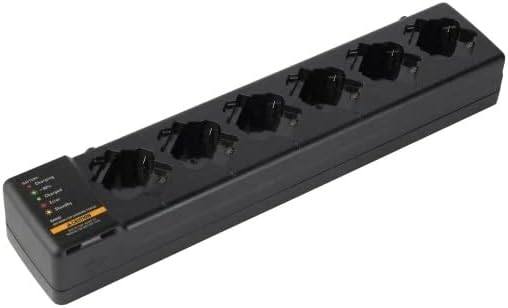
شڪل 4.1: هڪ اوور هيڊ view of the Motorola Six-Pocket Multi-Unit Charger, showing six charging pockets and an indicator panel on the left side.
5. آپريٽنگ هدايتون
The charger is designed for use with compatible Motorola radios and batteries, including models SL300, TLK100, SL500, SL500E, and SLN1000.
5.1 Charging Radios or Batteries
- پڪ ڪريو ته چارجر آن آهي.
- Insert a compatible radio or battery into one of the six charging pockets. Ensure it is seated correctly.
- Observe the LED indicator for the corresponding pocket to determine the charging status.
5.2 LED اشاري جي حالت
Each charging pocket features an LED indicator to provide real-time status:
- ڳاڙهو (سڪل): بيٽري چارج ٿي رهي آهي.
- سائو (مضبوط): بيٽري مڪمل طور تي چارج ٿيل آهي.
- Amber (Solid): Battery is charging to 90% capacity.
- ڳاڙهو (چمڪندڙ): Error condition (e.g., battery fault, temperature issue). Remove the battery and reinsert. If the error persists, refer to the Troubleshooting section.
- روشني ناهي: Standby mode or no battery/radio inserted.
The indicator panel on the left side of the charger provides a legend for these LED statuses.
6. سار سنڀال
To ensure optimal performance and longevity of your charger:
- چارجر کي صاف ۽ مٽي ۽ ملبي کان پاڪ رکو. صفائي لاءِ نرم، سڪل ڪپڙو استعمال ڪريو.
- استعمال نه ڪريو سخت ڪيميائي يا rasرندڙ صاف ڪندڙ.
- جڏهن استعمال ۾ نه هجي ته چارجر کي ٿڌي، سڪل جاءِ تي رکو.
- ڪنهن به نقصان جي نشانين لاء باقاعدي طور تي بجلي جي تار جو معائنو ڪريو.
7. مسئلا حل ڪرڻ
| مسئلو | ممڪن سبب | حل |
|---|---|---|
| چارجر آن نه ٿي رهيو آهي. | No power to the outlet; power supply not connected; faulty power supply. | Check outlet with another device; ensure power supply is securely connected; try a different power supply if available. |
| LED indicator flashing red. | Battery fault; incorrect battery type; temperature outside operating range. | Remove and reinsert the battery; ensure battery is compatible; move charger to a room temperature environment. |
| بيٽري چارج نه ٿي. | Battery not properly seated; dirty contacts; faulty battery. | Ensure battery is fully inserted; clean battery and charger contacts; try a different battery. |
8. وضاحتون
| خاصيت | تفصيل |
|---|---|
| ماڊل نمبر | PMLN7101A, PMLN7101, PMLN8569 |
| برانڊ | موٽرولا حل |
| پيداوار جي ماپ | 3 x 4 x 15 انچ (7.62 x 10.16 x 38.1 سينٽي) |
| شيءِ جو وزن | 3.29 پائونڊ (1.49 ڪلوگرام) |
| رنگ | ڪارو |
| انٽ واليمtage | 240 وولٽ |
| اوٽ وولٽtage | 7.4 وولٽ |
| مطابقت رکندڙ ريڊيوز | SL300, TLK100, SL500, SL500E, SLN1000 |
9. وارنٽي ۽ سپورٽ
Specific warranty information for this product was not provided in the available data. For detailed warranty terms and conditions, please refer to the documentation included with your purchase or visit the official Motorola Solutions website. For technical support or service inquiries, please contact Motorola Solutions customer service.


