1. پراڊڪٽ ختمview
The Point Wired Mini Keyboard Pt-350 is a compact and versatile keyboard designed for both gaming and general typing. It features a high-quality build and a modern design, adhering to industry standards for reliable performance. This keyboard is an ideal choice for users seeking a durable and efficient input device.
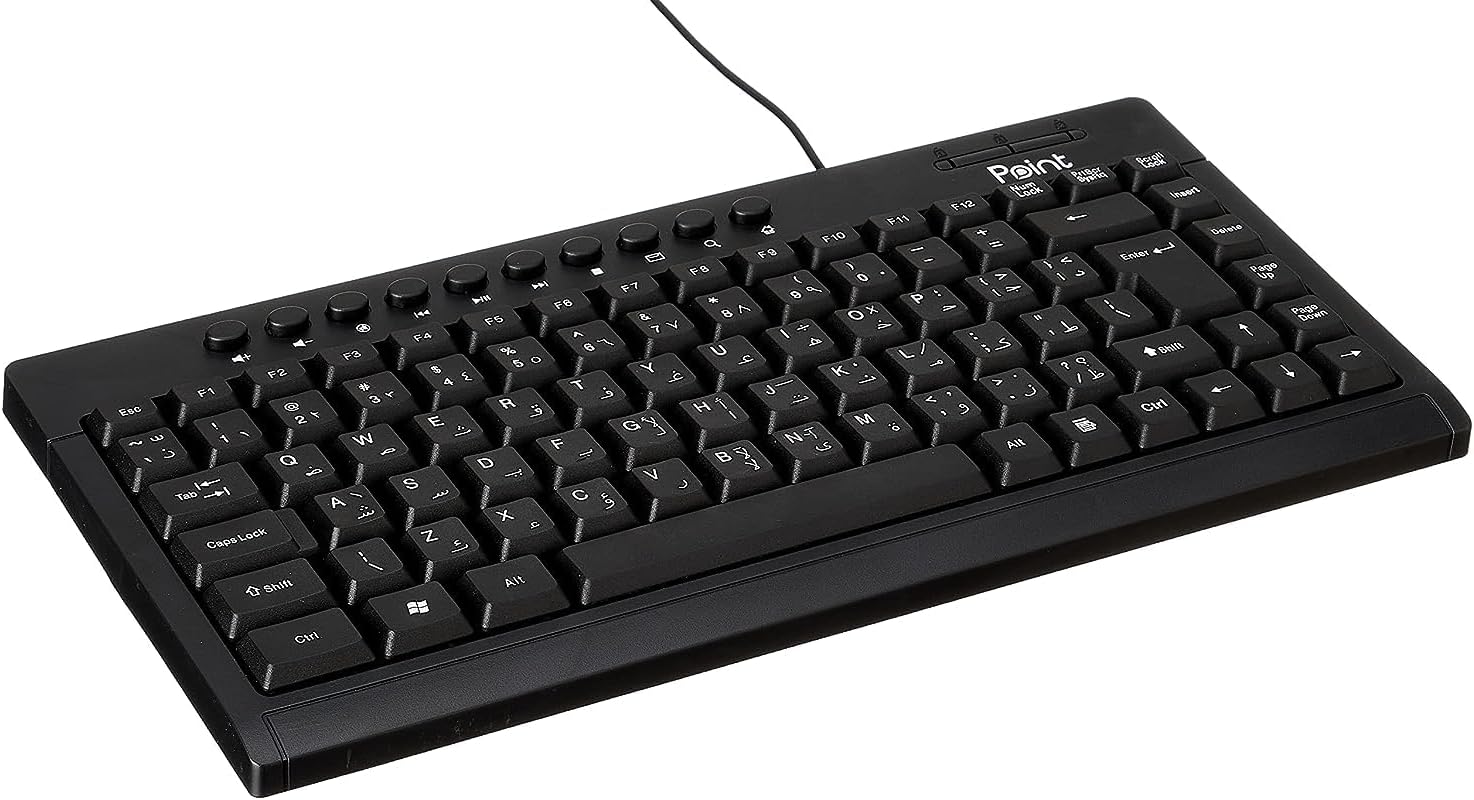
شڪل 1.1: زاويه view of the Point Wired Mini Keyboard Pt-350, showcasing its compact design and key layout.
اهم خاصيتون:
- Wired connectivity for stable performance.
- Compact design suitable for various setups.
- Durable construction from high-quality plastic materials.
- Designed for both gaming and typing applications.
2. پيڪيج مواد
مھرباني ڪري پيڪيج کي احتياط سان چيڪ ڪريو ته جيئن پڪ ڪري سگھجي ته سڀ شيون موجود آھن:
- Point Wired Mini Keyboard Pt-350
- استعمال ڪندڙ جو دستياب (ھي دستاويز)
3. سيٽ اپ
Follow these steps to set up your Point Wired Mini Keyboard Pt-350:
- ڪي بورڊ کوليو: احتياط سان ڪيبورڊ کي ان جي پيڪنگ مان هٽايو.
- Identify the USB Connector: The keyboard comes with an integrated USB cable.
- پنهنجي ڪمپيوٽر سان ڳنڍيو: Locate an available USB port on your computer (desktop PC, laptop, etc.). Insert the keyboard's USB connector firmly into the USB port.
- Driver Installation (Plug & Play): The keyboard is plug-and-play compatible. Your operating system (Windows, macOS, Linux) should automatically detect and install the necessary drivers. This process usually takes a few seconds.
- ڪارڪردگي جي تصديق ڪريو: Once connected, open a text editor or any application that accepts text input and test the keys to ensure proper operation.

شڪل 3.1: مٿي کان هيٺ view of the keyboard, illustrating the key layout and integrated cable for connection.
4. آپريٽنگ هدايتون
The Point Wired Mini Keyboard Pt-350 operates like a standard computer keyboard. Below are general instructions and tips for use:
Basic Typing:
- Simply press the desired keys to input characters, numbers, and symbols into your active application.
- استعمال ڪريو شفٽ key for uppercase letters and alternative symbols on keys.
- جي ڪيپس لاڪ key toggles permanent uppercase typing.
- جي پٺاڻ key deletes characters to the left of the cursor.
- جي داخل ڪريو key confirms input or moves to the next line.
فنڪشن ڪيز (F1-F12):
The function keys (F1 through F12) perform various tasks depending on the active program or operating system. Some common uses include:
- F1: Often opens help for the active program.
- F2: Renames a selected item.
- F5: ريفريش ڪري ٿو a web page or document.
- F11: Toggles full-screen mode in many browsers.
ملٽي ميڊيا ڪيز:
The keyboard may include dedicated multimedia keys or secondary functions on the F-keys (accessed via the Fn key, if present). These typically control:
- Volume control (Mute, Volume Up, Volume Down)
- Media playback (Play/Pause, Stop, Previous Track, Next Track)
5. سار سنڀال
مناسب سار سنڀال توهان جي ڪيبورڊ جي ڊگهي عمر ۽ بهترين ڪارڪردگي کي يقيني بڻائي ٿي:
- صفائي: Regularly clean the keyboard to prevent dust and debris buildup. Use a soft, lint-free cloth slightly dampپاڻي يا نرم صفائي واري محلول سان صاف ڪريو. سخت ڪيميڪلز يا رگڙيندڙ مواد کان پاسو ڪريو.
- مٽي هٽائڻ: Use compressed air to blow out dust and crumbs from between the keys.
- ڦڦڙن کان بچڻ: Keep liquids away from the keyboard to prevent damage to internal components. In case of a spill, immediately disconnect the keyboard and allow it to dry completely before reconnecting.
- اسٽوريج: When not in use, store the keyboard in a clean, dry environment away from extreme temperatures.
6. مسئلا حل ڪرڻ
If you encounter issues with your Point Wired Mini Keyboard Pt-350, refer to the following common problems and solutions:
ڪي بورڊ جواب نه ڏئي رهيو آهي:
- USB ڪنيڪشن چيڪ ڪريو: پڪ ڪريو ته USB ڪيبل توهان جي ڪمپيوٽر تي ڪم ڪندڙ USB پورٽ ۾ محفوظ طور تي لڳل آهي. هڪ مختلف USB پورٽ آزمايو.
- ڪمپيوٽر کي ٻيهر شروع ڪريو: هڪ سادي ٻيهر شروع ڪرڻ اڪثر ڪري ڪنيڪشن جي مسئلن کي حل ڪري سگهي ٿو.
- ٻئي ڪمپيوٽر تي ٽيسٽ: Connect the keyboard to another computer to determine if the issue is with the keyboard or your computer's setup.
- ڊيوائس مئنيجر (ونڊوز) چيڪ ڪريو: In Windows, go to Device Manager and check if the keyboard is listed under 'Keyboards' and if there are any error symbols. You might need to update or reinstall the driver.
Keys Not Working or Sticky:
- صاف چاٻيون: Dust, crumbs, or liquid residue can cause keys to stick or malfunction. Refer to the Maintenance section for cleaning instructions.
- جسماني نقصان: Inspect the keys for any visible physical damage.
Incorrect Character Output:
- Check Language Settings: Ensure your operating system's keyboard language settings match the physical layout of your keyboard.
- Driver Issue: Reinstalling the keyboard driver might resolve this.
جيڪڏهن انهن قدمن کي آزمائڻ کان پوءِ به مسئلو برقرار رهي ٿو، ته مهرباني ڪري ڪسٽمر سپورٽ سان رابطو ڪريو.
7. وضاحتون
Technical specifications for the Point Wired Mini Keyboard Pt-350:

شڪل 7.1: پاسي view of the keyboard, highlighting its profile and compact form factor.
| خاصيت | تفصيل |
|---|---|
| برانڊ جو نالو | نقطو |
| ماڊل | پي ٽي-350 |
| رابطي ٽيڪنالاجي | وائرڊ |
| مطابقت رکندڙ ڊوائيسز | ڪمپيوٽر |
| ڪي بورڊ جي وضاحت | گھڻائي |
| تجويز ڪيل استعمال | پي سي گيمنگ |
| خاص خاصيتون | گيمنگ |
| رنگ | ڪارو |
| انداز | جديد |
| مواد | پلاسٽڪ |
| شپنگ جي ماپ | 34.5 x 26.4 x 3 سينٽي |
| وزن | 800 گرام |
| پهرين دستياب تاريخ | سيپٽمبر 4، 2022 |
| ASIN | B0BD2DM9ZJ |
8. وارنٽي ۽ سپورٽ
This product is covered by a standard manufacturer's warranty. Please refer to the warranty card included with your purchase for specific terms and conditions, including the warranty period and coverage details.
For technical support, troubleshooting assistance, or warranty claims, please contact Point customer service through the contact information provided on the product packaging or the official Point website. When contacting support, please have your product model (Pt-350) and purchase details ready.


