تعارف
خريد ڪرڻ لاءِ مهربانيasing the Crown 32-inch HD Ready Smart TV. This manual provides essential information for setting up, operating, maintaining, and troubleshooting your new television. Please read this manual thoroughly before using the product and retain it for future reference.
This television features HD Ready resolution, a 178-degree viewing angle, and an Android operating system for smart functionalities. It includes Dolby Audio for an enhanced sound experience.
پيڪيج مواد
پڪ ڪريو ته هيٺ ڏنل سڀئي شيون توهان جي پيڪيج ۾ شامل آهن:
- 1 ايل اي ڊي ٽي وي يونٽ
- 1 Table Stand Pair
- 1 ريموٽ ڪنٽرول
- 1 وارنٽي ڪارڊ
- 1 استعمال ڪندڙ دستورالعمل (هي دستاويز)
سيٽ اپ جون هدايتون
1. Unpacking ۽ لڳائڻ
Carefully remove the TV from its packaging. Place the TV on a stable, flat surface or prepare for wall mounting. Ensure adequate ventilation around the TV.
2. ٽيبل اسٽينڊ لڳائڻ
- Place the TV face down on a soft, clean cloth to prevent screen damage.
- Align the table stand pair with the corresponding holes on the bottom of the TV.
- مهيا ڪيل اسڪرو استعمال ڪندي اسٽينڊ کي محفوظ ڪريو. وڌيڪ تنگ نه ڪريو.
Note: If wall mounting, refer to the wall mount kit instructions. The TV supports VESA standard wall mounts.
3. ڳنڍڻ واري طاقت
Plug the power cord into the TV's power input, then into a standard electrical outlet. Ensure the power outlet is easily accessible.
4. ٻاهرين ڊوائيسز کي ڳنڍڻ
ٽي وي مختلف ڪنيڪٽوٽي آپشن پيش ڪري ٿو:
- HDMI پورٽس (x2): Connect set-top boxes, Blu-ray players, gaming consoles.
- USB پورٽس (x2): Connect USB drives for media playback, or other USB devices.
- وي جي اي پورٽ (x1): Connect a laptop or PC.
- آڊيو ان پٽ: For external audio sources.
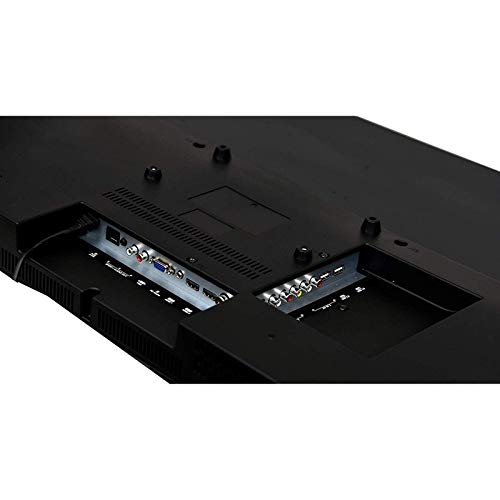
Image: Rear panel of the TV displaying HDMI, USB, and VGA ports for connecting external devices.
آپريٽنگ هدايتون
1. First Time Setup and Initial Power On
- کي دٻايو طاقت ريموٽ ڪنٽرول يا ٽي وي تي بٽڻ.
- Follow the on-screen instructions to select your language, country, and connect to a Wi-Fi network.
- Complete the initial Android TV setup, including signing in with your Google account for full smart TV functionality.

Image: The TV displaying its smart interface with various application shortcuts.
2. بنيادي ٽي وي فنڪشن
- پاور آن / آف: ريموٽ يا ٽي وي تي پاور بٽڻ استعمال ڪريو.
- حجم ڪنٽرول: استعمال ڪريو ويل +/- ريموٽ تي بٽڻ.
- چينل چونڊ: استعمال ڪريو چوڌري +/- buttons or number pad on the remote.
- ان پٽ جو ذريعو: کي دٻايو ذريعو or ان پٽ button on the remote to switch between HDMI, USB, VGA, and TV inputs.
- مينيو نيويگيشن: تير واري بٽڻ استعمال ڪريو ۽ OK مينيو کي نيويگيٽ ڪرڻ لاءِ بٽڻ.
3. Smart TV Features (Android OS)
Your Crown Smart TV runs on the Android operating system, providing access to a wide range of applications and features:
- ايپ رسائي: Navigate to the home screen to access pre-installed apps like YouTube, or download new apps from the Google Play Store.
- انٽرنيٽ ڪنيڪشن: Connect to your home Wi-Fi network for online streaming and browsing.
- بلوٽوٿ: The TV supports Bluetooth technology for connecting compatible wireless devices.
سار سنڀال ۽ سنڀال
- اسڪرين جي صفائي: نرم، لِنٽ کان پاڪ ڪپڙي سان اسڪرين کي نرميءَ سان صاف ڪريو. ضدي نشانن لاءِ، ٿورو ڊيampڪپڙي کي پاڻي يا خاص اسڪرين ڪلينر سان ڌوئڻ ڏيو. اسڪرين تي سڌو سنئون مائع نه اسپري ڪريو.
- ڪابينا جي صفائي: ٽي وي ڪيبنٽ کي صاف ڪرڻ لاءِ نرم، سڪل ڪپڙو استعمال ڪريو. رگڙيندڙ ڪلينر يا محلول استعمال ڪرڻ کان پاسو ڪريو.
- وينٽيليشن: پڪ ڪريو ته ٽي وي تي وينٽيليشن جا دروازا بند نه آهن ته جيئن وڌيڪ گرم ٿيڻ کان بچي سگهجي.
- پاور ڪنڊ: ڪنهن به نقصان لاءِ بجلي جي تار کي باقاعدي چيڪ ڪريو. جيڪڏهن خراب ٿئي ته، متبادل لاءِ ڪسٽمر سپورٽ سان رابطو ڪريو.
- ڪڍڻ: بجلي جي طوفانن دوران يا جڏهن اهو ڊگهي عرصي تائين استعمال ۾ نه هوندو ته ٽي وي کي پاور آئوٽليٽ مان ڪڍو.
مسئلا حل ڪرڻ واري گائيٽ
| مسئلو | ممڪن سبب | حل |
|---|---|---|
| طاقت نه آهي | بجلي جي تار ڳنڍيل نه آهي؛ بجلي جو آئوٽليٽ ڪم نه ڪري رهيو آهي | پڪ ڪريو ته پاور ڪنڊ محفوظ طور تي پلگ ان ٿيل آهي؛ آئوٽليٽ کي ٻئي ڊوائيس سان جانچيو. |
| تصوير ناهي، پر آواز موجود آهي. | Incorrect input source selected; External device not connected properly | کي دٻايو ذريعو button to select the correct input; Check HDMI/VGA cable connections. |
| آواز ڪونهي، پر تصوير موجود آهي. | Volume is muted or too low; Audio cables not connected; External audio system issue | Increase volume; Check if mute is active; Ensure audio cables are connected correctly; If using external audio, check its settings. |
| ريموٽ ڪنٽرول ڪم نه ڪري رهيو آهي | Batteries are dead or incorrectly inserted; Obstruction between remote and TV | Replace batteries; Ensure correct polarity; Remove any obstructions; Point remote directly at the TV's IR sensor. |
| Smart TV apps not loading or slow | Poor Wi-Fi connection; App cache issues; Outdated software | Check Wi-Fi signal strength; Restart router; Clear app cache in TV settings; Check for system software updates. |
If the problem persists after trying these solutions, please contact Crown customer support.
ٽيڪنيڪل وضاحتون
| برانڊ | Crown (Generic) |
| ماڊل نالو | 24 ڊي جي |
| ماڊل نمبر | Crown-SmartTv-32-inch |
| اسڪرين جي ماپ | 32 انچ |
| ڊسپلي ٽيڪنالاجي | ايل اي ڊي |
| قرارداد | HD تيار (1366 x 768 پکسلز) |
| ريفريش جي شرح | 60 هز |
| Viewزاويه | 178 درجا |
| آپريٽنگ سسٽم | Android |
| آڊيو آئوٽ | 150 واٽ |
| سپورٽ ٿيل آڊيو فارميٽ | MP3, WAV, MKA |
| رابطي | 2 HDMI, 2 USB, 1 VGA |
| بلوٽوٽ سپورٽ | ها |
| پيداوار جي ماپ (LxWxH) | 7 x 55.5 x 33 سينٽي ميٽر |
| شيءِ جو وزن | 4 ڪلو |
| چڙهڻ جو قسم | Wall Mount, Table Stand |
| خاص خاصيتون | Flat Panel, Dolby Audio, 178-degree viewing angle, dot noise reduction, A+ grade panel, reduced motion blur, enhanced skin tone, real colors, moisture resistant and dust resistant. |
وارنٽي ۽ سپورٽ
Your Crown 32-inch HD Ready Smart TV comes with a 1 سال وارنٽي from the date of purchase. Please refer to the included Warranty Card for detailed terms and conditions.
For technical assistance, troubleshooting beyond this manual, or warranty claims, please contact Crown customer support. Keep your purchase receipt and warranty card handy when contacting support.
Contact information for support is typically found on the warranty card or the manufacturer's official webسائيٽ.


