1. تعارف
1.1 پيداوار ختمview
This manual provides comprehensive instructions for the installation, operation, and maintenance of your KMC 55 Inch LED Standard TV, Model K16M55260. This television features a 55-inch Full HD LED display with a resolution of 1920x1080, offering a clear and vibrant viewing experience. It includes various input options such as USB, Component, AV, and PC/VGA for versatile connectivity.
1.2 حفاظتي ڄاڻ
مهرباني ڪري هن پراڊڪٽ کي استعمال ڪرڻ کان اڳ سڀ حفاظتي ڊيڄاريندڙ ۽ هدايتون احتياط سان پڙهو ته جيئن زخم يا نقصان کان بچي سگهجي. مستقبل جي حوالي لاءِ هي دستورالعمل رکو.
- ٽي وي کي مينهن يا نمي کي بي نقاب نه ڪريو.
- وينٽيليشن جي افتتاح کي نه روڪيو.
- مناسب بجلي جي فراهمي کي يقيني بڻائيtage.
- ٽي وي کي غير مستحڪم سطحن تي رکڻ کان پاسو ڪريو.
- بجلي جي طوفان دوران يا ڊگهي عرصي تائين استعمال نه ٿيڻ تي ٽي وي کي ان پلگ ڪريو.
- سڀني خدمتن جو حوالو ڏيو قابل خدمت اهلڪارن ڏانهن.
2. سيٽ اپ
2.1 کولڻ
پيڪنگ مان ٽي وي ۽ سڀئي لوازمات احتياط سان هٽايو. پيڪنگنگ مواد کي مستقبل جي ٽرانسپورٽ يا اسٽوريج لاءِ رکو.
- KMC 55 Inch LED Standard TV
- ريموٽ ڪنٽرول
- ريموٽ ڪنٽرول لاءِ بيٽريون
- ٽي وي اسٽينڊ جا حصا
- استعمال ڪندڙ جو دستياب (ھي دستاويز)
2.2 اسٽينڊ اسيمبلي
To assemble the table stand, align the stand components with the designated slots at the bottom of the TV. Secure them using the provided screws. Ensure the stand is firmly attached before placing the TV on a flat, stable surface.
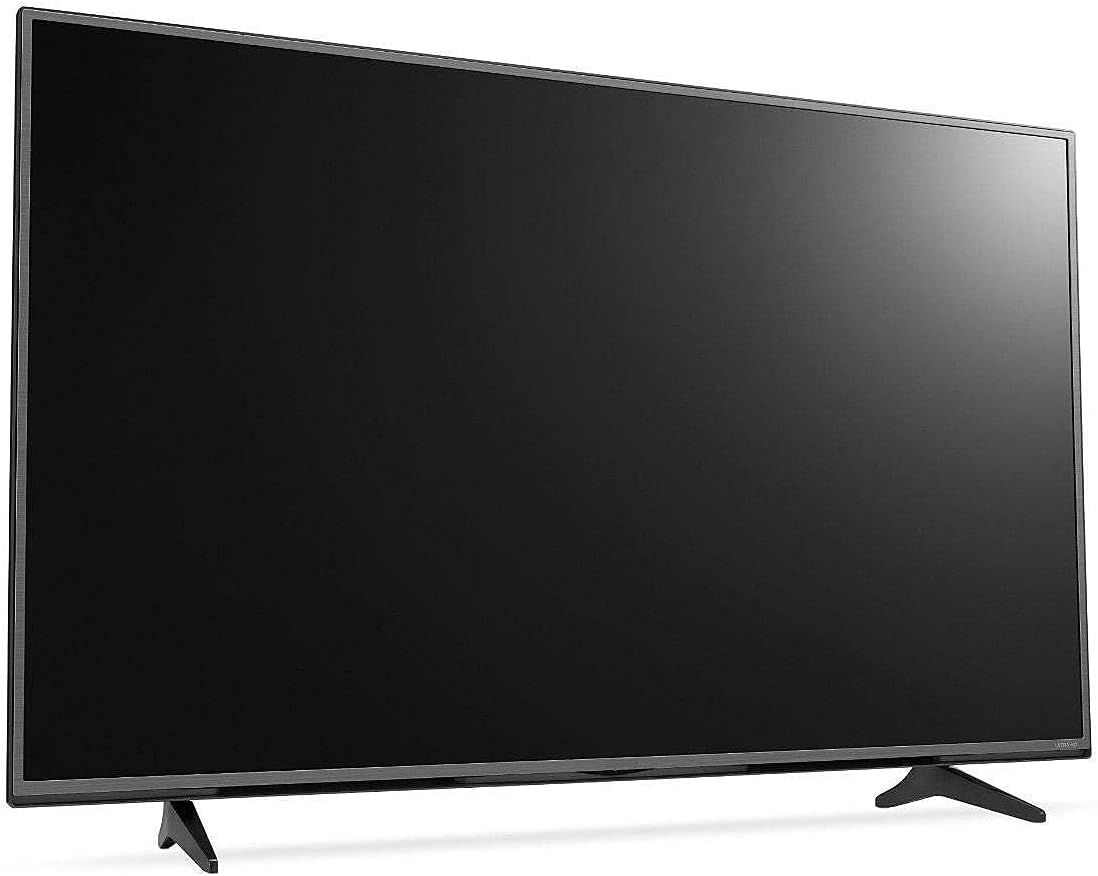
شڪل 2.1: سامهون view of the KMC 55 Inch LED Standard TV with its table stand assembled. The screen is black, and the slim bezels are visible.
2.3 ڪنيڪشن
Connect your external devices to the appropriate ports on the rear of the TV. The KMC K16M55260 supports USB, Component, AV, and PC/VGA inputs.
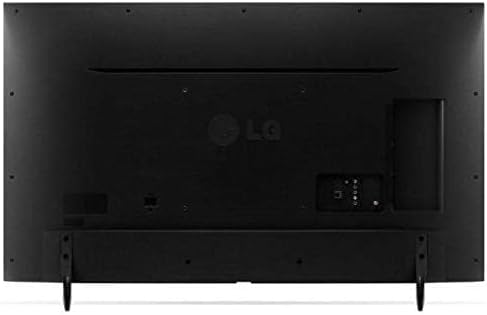
شڪل 2.2: پوئتي view of the KMC 55 Inch LED Standard TV, displaying the various input ports including USB, Component, AV, and PC/VGA connections.
- پاور ڪنيڪشن: پاور ڪنڊ کي ٽي وي سان ڳنڍيو ۽ پوءِ ڀت جي آئوٽليٽ سان.
- USB ان پٽ ميڊيا هلائڻ لاءِ USB اسٽوريج ڊوائيسز کي ڳنڍڻ لاءِ.
- Component Input: For high-quality analog video and audio connections.
- AV ان پٽ: For standard definition video and stereo audio connections.
- PC/VGA Input: For connecting a computer or laptop.
3. آپريٽنگ
3.1 بنيادي آپريشن
After connecting the TV to power, press the Power button on the remote control or on the TV itself to turn it on. The initial setup wizard may guide you through language selection and channel scanning.
3.2 ريموٽ ڪنٽرول
The included remote control allows you to access all TV functions. Insert the provided batteries into the remote control, ensuring correct polarity.
- پاور بٽڻ: ٽي وي کي آن يا بند ڪري ٿو.
- ان پٽ/ذريعو: ان پٽ سورس (HDMI، AV، USB، وغيره) چونڊيندو آهي.
- حجم مٿي / ھيٺ: آواز جي سطح کي ترتيب ڏئي ٿو.
- چينل مٿي / هيٺ: ٽي وي چينلز بدلائي ٿو.
- مينيو: Opens the main menu for settings adjustments.
- نيويگيشن بٽڻ (مٿي/هيٺ/کاٻي/ساڄي): مينيو آپشنز ذريعي نيويگيٽ ڪري ٿو.
- ٺيڪ/داخل ڪريو: چونڊ جي تصديق ڪري ٿي.
- Exit/Back: Returns to the previous screen or exits the menu.
3.3 مينيو نيويگيشن
کي دٻايو مينيو button on the remote control to access the TV's settings. Use the navigation buttons to move between categories such as Picture, Sound, Channel, Time, and Setup. Press OK to enter a sub-menu or confirm a setting. Press نڪرڻ مينيو کي بند ڪرڻ لاء.
4. سار سنڀال
4.1 صفائي
To clean the TV screen, gently wipe it with a soft, lint-free cloth. For stubborn marks, slightly dampen the cloth with water or a specialized screen cleaner. Do not spray cleaner directly onto the screen. For the TV casing، نرم، سڪل ڪپڙو استعمال ڪريو.
- صفائي ڪرڻ کان اڳ هميشه ٽي وي کي ان پلگ ڪريو.
- گھڻائي صاف ڪندڙ يا محلول استعمال ڪرڻ کان پاسو ڪريو.
- Do not apply excessive pressure to the screen.
4.2 اسٽوريج
If you need to store the TV for an extended period, ensure it is unplugged and stored in a cool, dry place, away from direct sunlight and extreme temperatures. It is recommended to use the original packaging for protection during storage or transport.
5. مسئلا حل ڪرڻ
This section provides solutions to common issues you might encounter with your KMC TV. If the problem persists, please contact customer support.
| مسئلو | ممڪن سبب | حل |
|---|---|---|
| طاقت نه آهي | بجلي جي تار ڳنڍيل نه آهي؛ بجلي جو آئوٽليٽ ڪم نه ڪري رهيو آهي. | پڪ ڪريو ته پاور ڪنڊ محفوظ طور تي پلگ ان ٿيل آهي؛ ٻئي ڊوائيس سان آئوٽليٽ جي جانچ ڪريو. |
| تصوير ناهي، پر آواز موجود آهي. | Incorrect input source selected; Backlight issue. | کي دٻايو ان پٽ/ذريعو button to select the correct input; Contact support if backlight is suspected. |
| آواز ڪونهي، پر تصوير موجود آهي. | Volume is muted or too low; Audio cables not connected properly. | Unmute volume or increase level; Check audio cable connections. |
| ريموٽ ڪنٽرول ڪم نه ڪري رهيو آهي | بيٽريون ختم ٿي ويون آهن يا غلط طور تي لڳايون ويون آهن؛ ريموٽ ۽ ٽي وي جي وچ ۾ رڪاوٽ. | Replace batteries; Ensure clear line of sight to TV's IR sensor. |
6. وضاحتون
Technical specifications for the KMC 55 Inch LED Standard TV, Model K16M55260.
- برانڊ: ڪي ايم سي
- ماڊل نمبر: K16M55260
- اسڪرين جي ماپ: 55 انچ (140 سينٽي ميٽر نظر ايندڙ ڊاگونل)
- ڊسپلي ٽيڪنالاجي: ايل اي ڊي
- قرارداد: 1920x1080 (Full HD, 1080p)
- رنگ: ڪارو
- خاص خاصيتون: Flat Display
- رابطي ٽيڪنالاجي: USB, VGA, Component, AV
- شامل اجزاء: TV, Remote Control, Batteries, Stand
- چڙهڻ جو قسم: ٽيبل جبل
- پيڪيج جي ماپ: 129 x 77 x 13 سينٽي
- پيڪيج وزن: 16 ڪلو
7. وارنٽي ۽ سپورٽ
For warranty information or technical support, please contact KMC customer service. Details regarding warranty coverage and service procedures are typically provided with your purchase documentation or can be found on the official KMC webسائيٽ.
When contacting support, please have your TV's model number (K16M55260) and serial number ready.


