1. تعارف
The Audiolab 8300XP is a high-performance stereo power amplifier designed to deliver exceptional audio fidelity and power. It can operate in stereo mode, providing 280 Watts per channel, or be bridged to deliver 480 Watts as a monoblock amplifier. This manual provides essential information for the safe and optimal use of your 8300XP ampوierيڪ زنده

Figure 1.1: Audiolab 8300XP Power Amplifier, front angled view. This image shows the sleek black chassis with the power button and Audiolab logo visible on the front panel.
2. حفاظت جي ڄاڻ
Please read all safety instructions carefully before operating the ampجاندار. مستقبل جي حوالي لاءِ هي دستياب رکو.
- طاقت جو ذريعو: Connect the unit only to an AC power source of the type marked on the rear panel. Ensure the voltage توهان جي مقامي پاور سپلائي سان ملندو آهي.
- وينٽيليشن: ڪنهن به وينٽيليشن جي سوراخن کي نه روڪيو. يونٽ جي چوڌاري مناسب هوا جي وهڪري کي يقيني بڻايو وڃي ته جيئن وڌيڪ گرم ٿيڻ کان بچي سگهجي.
- پاڻي ۽ نمي: يونٽ کي مينهن يا نمي جي سامهون نه رکو. يونٽ تي مائع سان ڀريل شيون، جهڙوڪ گلدان، نه رکو.
- گرمي: يونٽ کي گرمي جي ذريعن جهڙوڪ ريڊيئيٽر، گرمي رجسٽر، اسٽو، يا ٻيو سامان (بشمول ampلائفائرز) جيڪي گرمي پيدا ڪن ٿا.
- خدمت ڪرڻ: ھن پراڊڪٽ کي پنھنجي خدمت ڪرڻ جي ڪوشش نه ڪريو. س servني خدمتن جو حوالو ڏيو قابل سروس اهلڪارن کي.
- گرائونڊنگ: Ensure the power cord is properly grounded to prevent electric shock.
3. پيڪنگ ۽ مواد
احتياط سان پيڪ ڪريو amplifier. Retain the packing materials for future transport. Inside the box, you should find:
- Audiolab 8300XP Power Ampزندگي گذاريندڙ
- اي سي پاور ڪارڊ
- استعمال ڪندڙ جو دستياب (ھي دستاويز)
If any items are missing or damaged, contact your dealer immediately.
4. ڪنيڪشن
4.1 فرنٽ پينل

Figure 4.1: Audiolab 8300XP Power Ampلفٽ ڪندڙ ، اڳيان view. This image highlights the minimalist front panel design, featuring only the power button on the right and the Audiolab logo on the bottom right.
The front panel of the 8300XP is designed for simplicity and elegance. It features:
- پاور بٽڻ: Located on the right side, used to turn the ampوierيڪ زنده يا بند.
- پاور اشارو LED: A small LED (typically red) indicates the power status of the unit.
4.2 ريئر پينل
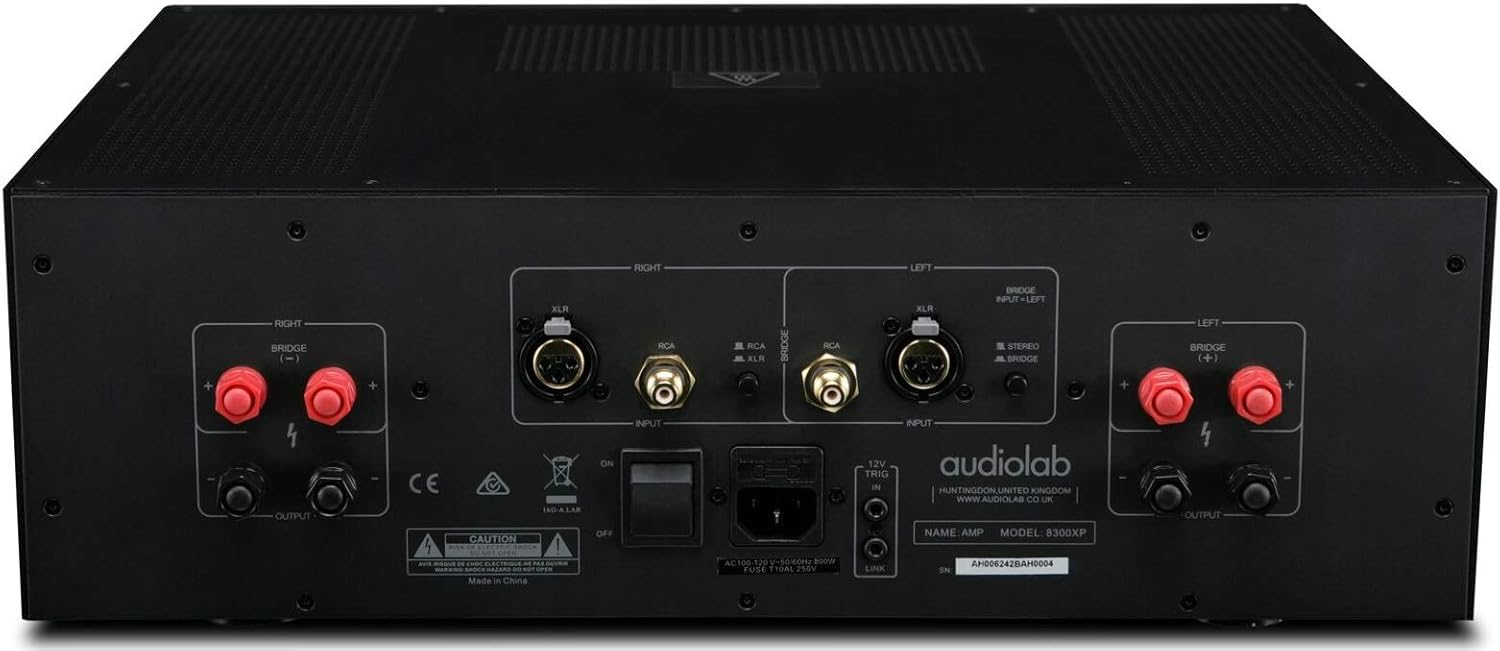
Figure 4.2: Audiolab 8300XP Power Amplifier, rear panel. This detailed view shows all input and output terminals, including XLR and RCA inputs, speaker terminals, and the power inlet.
The rear panel provides all necessary connections for integrating the 8300XP into your audio system:
- Balanced XLR Inputs (Left/Right): For connecting sources with balanced outputs, offering superior noise rejection.
- Unbalanced RCA Inputs (Left/Right): For connecting sources with unbalanced outputs.
- Speaker Outputs (Left/Right): High-quality binding posts for connecting your loudspeakers. Ensure correct polarity (+ to + and - to -).
- Bridge Mode Switch: A switch to select between Stereo and Bridged (Mono) operation. When in bridged mode, only use the designated input and speaker terminals.
- 12V ٽرگر اندر/آئوٽ: Allows for remote power control with other compatible components.
- اي سي پاور انليٽ: For connecting the supplied AC power cord.
5. سيٽ اپ
5.1 لڳائڻ
Place the 8300XP on a stable, level surface away from direct sunlight, heat sources, and excessive moisture. Ensure there is adequate space around the unit for ventilation, especially above and behind it.
5.2 ڳنڍڻ وارا اسپيڪر
- کي يقيني بڻايو amplifier is turned off and unplugged from the mains power.
- Connect your loudspeakers to the corresponding speaker output terminals on the rear panel.
- For stereo operation, connect the left speaker to the 'LEFT' terminals and the right speaker to the 'RIGHT' terminals. Ensure the positive (+) terminal on the amplifier connects to the positive (+) terminal on the speaker, and similarly for the negative (-) terminals.
- For bridged (mono) operation, set the 'BRIDGE' switch to 'ON'. Connect your single speaker to the designated bridged output terminals (refer to the markings on the rear panel).
5.3 آڊيو ذريعن کي ڳنڍڻ
- Connect your pre-amplifier or audio source to either the Balanced XLR Inputs or Unbalanced RCA Inputs. Do not use both simultaneously for the same channel.
- If using balanced connections, ensure the XLR cables are securely connected.
- If using unbalanced connections, ensure the RCA cables are securely connected.
5.4 پاور ڪنيڪشن
- Once all audio and speaker connections are made, connect the supplied AC power cord to the AC inlet on the rear panel of the ampوierيڪ زنده
- Plug the other end of the power cord into a suitable mains power outlet.
6. آپريٽنگ هدايتون
6.1 پاور آن/آف
- تي طاقت ڪرڻ amplifier, press the Power button on the front panel. The power indicator LED will illuminate.
- بجلي بند ڪرڻ لاءِ amplifier, press the Power button again. The power indicator LED will turn off.
6.2 Stereo vs. Bridged Mode
The 8300XP can operate as a two-channel stereo amplifier or a single-channel monoblock amplifier (bridged mode).
- اسٽيريو موڊ: For typical two-channel audio systems. Ensure the 'BRIDGE' switch on the rear panel is set to 'OFF'.
- برج موڊ: For higher power output to a single speaker. Ensure the 'BRIDGE' switch on the rear panel is set to 'ON'. When in bridged mode, use only the designated input (typically the Left channel) and the specified bridged speaker terminals. Consult the rear panel markings for precise connections.
Caution: Ensure the amplifier is powered off before changing the Stereo/Bridge mode switch to prevent damage to the ampلائفائر يا ڳالهائيندڙ.
7. سار سنڀال
- صفائي: صاف ڪرڻ لاء نرم، سڪل ڪپڙو استعمال ڪريو amplifier's exterior. Do not use abrasive cleaners, waxes, or solvents.
- وينٽيليشن: وقتاً فوقتاً چيڪ ڪريو ته وينٽيليشن جا سوراخ مٽي ۽ ملبي کان صاف آهن.
- پاور ڪنڊ: Inspect the power cord regularly for any signs of damage. If damaged, replace it with an approved cord of the same type.
8. مسئلا حل ڪرڻ
If you experience issues with your Audiolab 8300XP, please consult the following table before contacting service personnel.
| مسئلو | ممڪن سبب | حل |
|---|---|---|
| طاقت نه آهي | Power cord not connected; Power outlet faulty; Internal fuse blown | Check power cord connection; Try a different outlet; Contact service for fuse replacement |
| آواز ڪونهي | Input cables loose/incorrect; Speaker cables loose/incorrect; Source component off/faulty; Amplifier in standby mode | Check all cable connections; Ensure source is active; Press power button to exit standby |
| بگڙيل آواز | Input signal too high; Speaker impedance mismatch; Faulty cables | Reduce source volume; Check speaker impedance (should be 4-16 ohms); Replace cables |
| گهڻو گرم ٿيڻ | Insufficient ventilation; Blocked vents | Ensure adequate space around amplifier; Clear any obstructions from vents |
9. وضاحتون
Key technical specifications for the Audiolab 8300XP Power Ampزنده:
- شئي ماڊل نمبر: 8300XP
- ٺاهيندڙ: آڊيو ليب
- جلدtage: 100 Volts, 12 Volts (Trigger)
- چڙهڻ جو قسم: مٿاڇري جبل
- چينلن جو تعداد: 2 (اسٽيريو)
- Power Output (Stereo): 280 واٽ في چينل
- Power Output (Bridged Mono): 480 واٽ
10. وارنٽي ۽ سپورٽ
Your Audiolab 8300XP amplifier is covered by a manufacturer's warranty. Please refer to the warranty card included with your product or visit the official Audiolab webتوهان جي علائقي لاءِ مخصوص تفصيلي وارنٽي شرطن ۽ ضابطن لاءِ سائيٽ.
For technical support, service, or further inquiries, please contact your authorized Audiolab dealer or distributor. You can also find support information on the official Audiolab webسائيٽ: www.audiolab.co.uk


