تعارف
This manual provides essential instructions for the safe operation, setup, and maintenance of your Protocol Director HD Foldable Drone. Please read this manual thoroughly before operating the drone to ensure proper function and to prevent damage or injury.
The Protocol Director HD is a foldable drone equipped with a live streaming HD camera, designed for capturing aerial video and photos. It features an intuitive 2.4 GHz remote control, an altitude sensor for stable flight, and a free downloadable app for enhanced camera control and flight path drawing.
حفاظتي احتياط
- Always operate the drone in open, unobstructed areas, away from people, animals, and obstacles.
- Do not operate near airports, restricted airspace, or sensitive facilities.
- Maintain a safe distance from power lines, trees, and water bodies.
- Ensure all propellers are securely attached and undamaged before each flight.
- تيز هوائن يا خراب موسمي حالتن ۾ نه اڏامو.
- آڱريون ۽ وارن کي گھمندڙ پروپيلرن کان پري رکو.
- Adult supervision is recommended for users under 18 years of age. Recommended age for operation is 14 years and up.
- Only use original Protocol replacement parts and accessories.
- ڊرون يا ان جي حصن کي تبديل ڪرڻ جي ڪوشش نه ڪريو.
- Turn off the drone and remote control when not in use.
پيڪيج مواد
پڪ ڪريو ته سڀئي شيون پيڪيج ۾ موجود آهن:
- Protocol Director HD Foldable Drone with Camera
- Remote Control with Phone Mount
- USB چارجنگ ڪيبل
- 2 x Drone Batteries
- سفري بيگ
- هدايت نامو (هي دستاويز)
- Spare Parts: Blades, Screwdriver

Image: The Protocol Director HD Foldable Drone, showcasing its compact design with propellers extended and camera visible at the front.
سيٽ اپ ڪريو
1. Charging the Drone Battery
- Insert one of the drone batteries into the USB charging cable.
- Connect the USB charging cable to a USB power source (e.g., computer USB port, USB wall adapter).
- The charging indicator light on the USB cable will illuminate during charging and turn off when fully charged.
- Charging typically takes approximately 60-90 minutes. Do not overcharge.
2. ريموٽ ڪنٽرول بيٽرين کي انسٽال ڪرڻ
- ريموٽ ڪنٽرول جي پٺي تي بيٽري جو دٻو کوليو.
- Insert 4 AA batteries (not included), ensuring correct polarity (+/-).
- بيٽري جي ڪمري کي محفوظ طور تي بند ڪريو.

Image: The drone's remote control with a smartphone securely mounted, displaying a live feed from the drone's camera.
3. ڊرون کي کولڻ
- Gently unfold each of the four rotor arms until they click into place.
- Ensure all arms are fully extended and locked before flight.
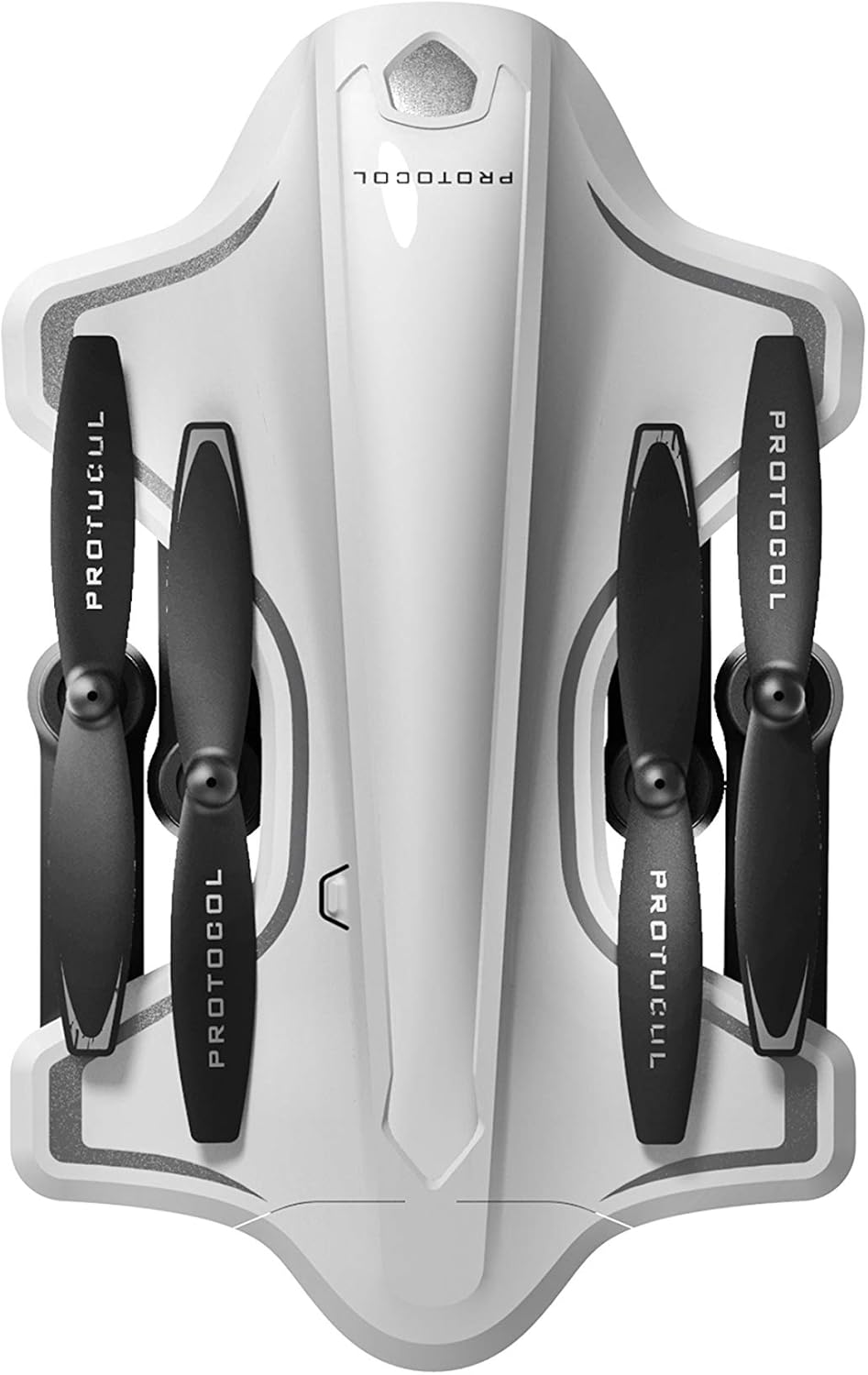
Image: The Protocol Director HD Foldable Drone in its compact, folded configuration, ready for transport.
4. Installing the Drone Battery
- ڊرون تي بيٽري جي خاني کي ڳوليو.
- Insert the fully charged drone battery, ensuring it is securely seated.
- بيٽري جي ڪمري واري ڍڪ کي بند ڪريو.
5. Downloading the App (Optional for Camera Features)
- ڳولھيو the "Protocol Director HD" app in your smartphone's app store (iOS or Android).
- Download and install the free application.
- Mount your smartphone onto the remote control's phone mount.
آپريٽنگ هدايتون
1. پاورنگ آن ۽ پيئرنگ
- ڊرون کي فليٽ، سطح جي مٿاڇري تي رکو.
- Turn on the drone by pressing the power button. The drone's lights will flash.
- ريموٽ ڪنٽرول کوليو.
- Push the left joystick (throttle) all the way up, then all the way down. The drone's lights will become solid, indicating successful pairing.
2. Calibrating the Gyroscope
After pairing, it is recommended to calibrate the gyroscope for stable flight:
- With the drone on a flat surface, push both joysticks down and to the right simultaneously for a few seconds.
- The drone's lights will flash rapidly and then become solid, indicating calibration is complete.
3. بنيادي پرواز ڪنٽرول
The Protocol Director HD features auto launch, hover, and land functions due to its altitude sensor.
- Auto Launch: Press the dedicated auto launch button on the remote. The drone will ascend to a stable hovering altitude.
- ٿروٽل (کاٻي جوائس اسٽڪ):
- Push up: Increase altitude
- Push down: Decrease altitude
- Push left/right: Rotate drone left/right (yaw)
- هدايتي ڪنٽرول (ساڄي جوائس اسٽڪ):
- پُش اپ: اڳتي وڌو
- Push down: Fly backward
- کاٻي پاسي ڌڪو: کاٻي پاسي اڏام (اسٽريف)
- ساڄي پاسي ڌڪو: ساڄي طرف اڏام (اسٽريف)
- Auto Land: Press the dedicated auto land button. The drone will slowly descend and land.
- رفتار جي چونڊ: Use the speed button on the remote to cycle through three selectable speeds (low, medium, high).
4. Camera and App Features
Connect your smartphone to the drone's Wi-Fi network (usually named "Protocol_Drone_XXXXXX") to access live streaming and advanced camera functions via the app.
- لائيو اسٽريمنگ: View the drone's camera feed in real-time on your smartphone.
- وڊيو رڪارڊنگ: Initiate and stop video recording (480p resolution) through the app.
- فوٽو ڪيپچر: Take still images through the app.
- Multiple Camera Angles: The app supports three different camera angles (Aerial, POV, Selfie) for varied content creation.
- آڊيو رڪارڊنگ: The app allows for audio recording alongside video.
- Draw Your Own Flight Path: Utilize the app's feature to draw a flight path on your screen, and the drone will follow it.
- VR Capability: The app is VR capable; VR goggles are sold separately.
سار سنڀال
- پروپيلر جي چڪاس: Regularly check propellers for cracks, bends, or damage. Replace any damaged propellers using the provided spare parts and screwdriver.
- صفائي: Use a soft, dry cloth to clean the drone and remote control. Avoid using liquids or harsh chemicals.
- بيٽري جي سنڀال:
- بيٽرين کي اوور چارج نه ڪريو.
- بيٽرين کي ٿڌي، سڪل جاءِ ۾ ذخيرو ڪريو.
- Remove batteries from the drone and remote control during long periods of non-use.
- اسٽوريج: Fold the drone arms for compact storage in the provided travel bag when not in use. Store in a cool, dry environment.
مشڪلاتون
| مسئلو | ممڪن سبب | حل |
|---|---|---|
| ڊرون پاور آن نٿو ٿئي. | بيٽري چارج نه ڪئي وئي يا غلط نصب ٿيل. | پڪ ڪريو ته بيٽري مڪمل طور تي چارج ٿيل آهي ۽ صحيح طرح سان داخل ٿيل آهي. |
| Remote control does not power on. | AA batteries are dead or incorrectly installed. | Replace AA batteries, checking polarity. |
| Drone and remote do not pair. | Pairing sequence not followed correctly. | Ensure drone is on, then remote. Push left joystick up then down completely. |
| ڊرون اڏام دوران اڏامي ٿو. | Gyroscope needs calibration; uneven surface at launch. | Land the drone, place on a flat surface, and recalibrate the gyroscope (both joysticks down and right). |
| One propeller does not spin. | Propeller damaged or motor issue. | Check for obstructions. Replace damaged propeller. If issue persists, contact support. |
| No live video feed on smartphone. | Not connected to drone's Wi-Fi; app not open. | Ensure smartphone is connected to the drone's Wi-Fi network and the app is running. |
وضاحتون
| برانڊ | پروٽوڪول |
| ماڊل نالو | Director HD |
| ماڊل نمبر | 6182-7RCHA |
| پاسا (فيل ٿيل) | Approximately 4.75 inches (length) |
| طول و عرض (وڌايل) | Approximately 9 inches (length, including blades) |
| وزن | 0.94 ڪلوگرام (940 گرام) |
| ڪئميرا قرارداد | 480p (Video Capture) |
| رابطي | Wi-Fi (for app control and live streaming), 2.4 GHz (for remote control) |
| استحڪام | 6-axis motion-sensitive auto stabilizers, Altitude sensor |
| اسپيڊ موڊس | Three selectable speeds |
| ڊرون بيٽري | Rechargeable (2 included) |
| ريموٽ ڪنٽرول بيٽري | 4 x AA بيٽريون (شامل نه آھن) |
| مواد | Plastic (Crash-resistant) |
| سفارش ٿيل عمر | 14 سال ۽ مٿي |
وارنٽي ۽ سپورٽ
For warranty information, technical support, or to purchase replacement parts, please visit the official Protocol webسائيٽ تي وڃو يا انهن جي ڪسٽمر سروس ڊپارٽمينٽ سان رابطو ڪريو. خريداري جي ثبوت طور پنهنجي خريداري جي رسيد رکو.
Webسائيٽ: www.protocolny.com (مثالampلي لنڪ، اصل لنڪ مختلف ٿي سگهي ٿو)
رابطو: Refer to the Protocol website for contact details, including phone numbers or email support.


