1. تعارف ۽ اوورview
This manual provides essential instructions for the safe and efficient use of your Samsung EC-SH100 Wi-Fi Digital Camera. The EC-SH100 is a 14.2-megapixel digital camera featuring a 5x optical zoom, a 3-inch touchscreen, and integrated Wi-Fi capabilities for easy sharing and connectivity.
اهم خاصيتون شامل آهن:
- Wi-Fi technology for direct photo and video uploads to social media (Facebook, YouTube) or email.
- Intuitive 3-inch LCD touchscreen with drag-and-scroll functionality.
- 14.2-megapixel resolution and 5x optical zoom for high-quality images.
- Face, smile, and blink detection for optimal portrait shots.
- Wireless, automatic file backup to your personal computer.

شڪل 1.1: سامهون view of the Samsung EC-SH100 Wi-Fi Digital Camera, showcasinلينس ۽ فليش کي دٻايو.
2. دٻي ۾ ڇا آهي
مھرباني ڪري چيڪ ڪريو ته ھيٺ ڏنل سڀ شيون توھان جي پراڊڪٽ پيڪيج ۾ شامل آھن:
- Samsung EC-SH100 Digital Camera
- AC Adapter/USB Cable
- Rechargeable Lithium-Ion بيٽري
- پٽي
- ٽچ قلم
- User Manual CD-ROM
- تڪڙو شروعات دستياب
3. سيٽ اپ
3.1. بيٽري کي چارج ڪرڻ
- Insert the rechargeable lithium-ion battery into the camera's battery compartment.
- Connect the camera to the AC adapter using the provided USB cable.
- Plug the AC adapter into a power outlet. The charging indicator will illuminate.
- پهرين استعمال کان اڳ بيٽري کي مڪمل چارج ٿيڻ ڏيو.
3.2. ميموري ڪارڊ داخل ڪرڻ
The camera requires a microSD card (up to 8 GB supported) to store photos and videos. A memory card is not included in the box and must be purchased separately.
- ميموري ڪارڊ سلاٽ کا احاطو کوليو.
- مائڪرو ايس ڊي ڪارڊ داخل ڪريو سون جي رابطن کي هيٺئين طرف رکي جيستائين اهو جاءِ تي ڪلڪ نه ڪري.
- ميموري ڪارڊ سلاٽ جو ڍڪ محفوظ طور تي بند ڪريو.
3.3. پاور آن/آف
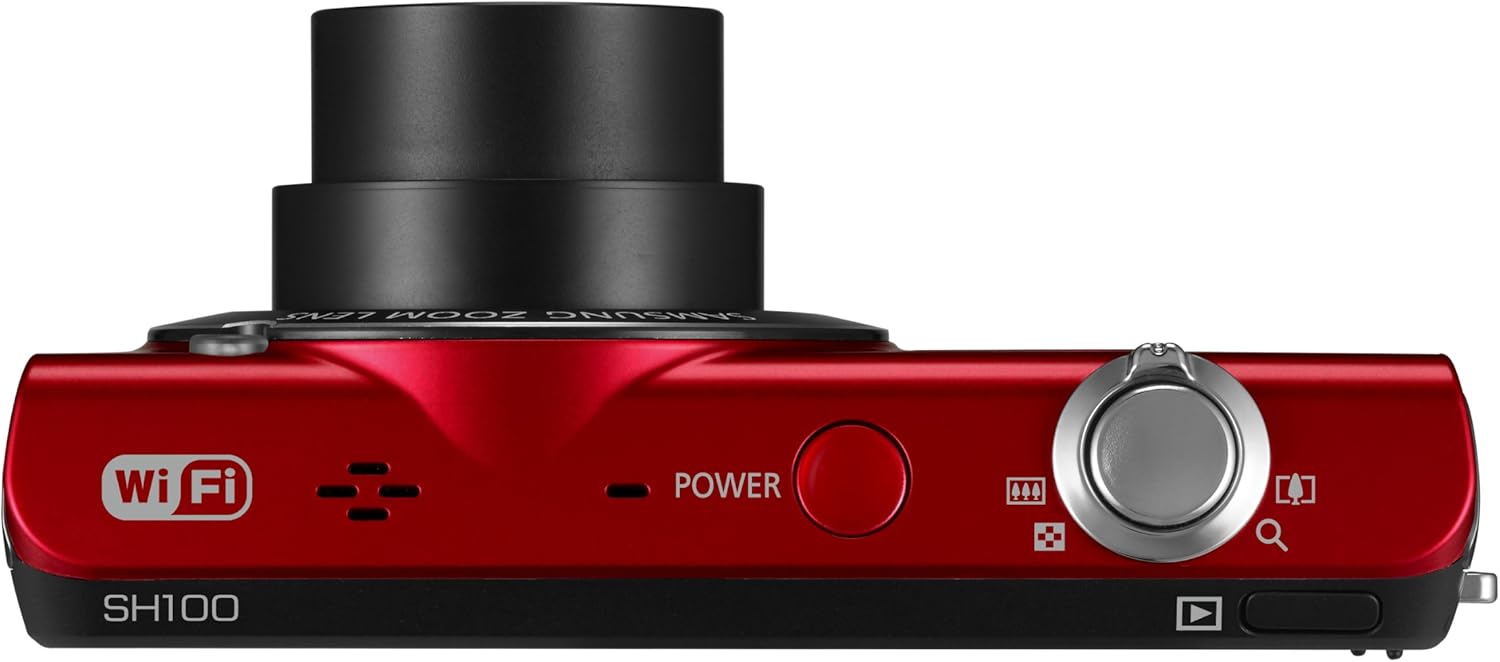
شڪل 3.1: مٿي view of the camera, highlighting the power button.
کي دٻايو پاور ڪئميرا جي چوٽي تي واقع بٽڻ ان کي آن يا آف ڪرڻ لاءِ.
4. ڪئميرا کي هلائڻ
4.1. بنيادي فوٽوگرافي
- ڪئميرا آن ڪريو.
- 3 انچ جي LCD ٽچ اسڪرين استعمال ڪندي پنهنجي شاٽ کي فريم ڪريو.
- ڌيان ڏيڻ لاءِ شٽر بٽڻ کي اڌ دٻايو، پوءِ تصوير کي مڪمل طور تي پڪڙڻ لاءِ.
4.2. Using the Smart Touch Interface

شڪل 4.1: پوئتي view of the camera, showing the Smart Touch interface.
The 3-inch LCD touchscreen allows for intuitive navigation similar to a smartphone. Use the included touch pen or your finger to tap icons, drag, and scroll through menus and images. The "Home" icon provides quick access to the main menu.
4.3. Smart Auto 2.0
The Smart Auto 2.0 feature automatically analyzes the scene and selects the most appropriate shooting mode from 17 photo modes and 4 movie modes to ensure optimal image quality.
4.4. Face, Smile, and Blink Detection
This feature detects up to nine faces in a frame, adjusting lighting for optimal results. The camera can be set to automatically capture a photo when subjects smile or laugh, and prevent a shot if anyone's eyes are closed.
4.5. Digital Image Stabilization
Digital Image Stabilization (DIS) helps reduce blur caused by camera shake, especially in low light conditions or when using the zoom. This feature digitally corrects image data before it is recorded.
4.6. وائي فائي ڪنيڪٽوٽي ۽ شيئرنگ
The EC-SH100's integrated Wi-Fi allows for direct sharing:
- سماجي حصيداري: Upload photos and videos directly to Facebook, Picasa, or YouTube.
- اي ميل: Send photos directly from the camera via email.
- AllShare: Wirelessly connect to a compatible Samsung TV to view تصويرون ۽ وڊيوز.
- PC Auto Backup: Automatically transfer photos and videos to your PC when within range of a configured Wi-Fi network. The camera will power off after backup to conserve energy.
4.7. Magic Frame
Use Magic Frame to combine two photos using predefined templates, creating unique visual effects and poster-quality images.
4.8. ريموٽ Viewڳوليندڙ
When paired with a compatible Samsung Galaxy Phone, the Remote Viewfinder feature allows you to preview images and control the camera's zoom remotely using your smartphone. This also enables geo-tagging of images if your smartphone has GPS.
5. سار سنڀال
5.1. ڪئميرا صاف ڪرڻ
- ڪئميرا جي باڊي کي صاف ڪرڻ لاءِ نرم، سڪل ڪپڙو استعمال ڪريو.
- For the lens and LCD screen, use a specialized lens cleaning cloth and solution. Avoid harsh chemicals.
5.2. بيٽري جي سنڀال
- جڏهن استعمال ۾ نه هجي ته بيٽري کي ٿڌي، سڪل جاءِ تي محفوظ ڪريو.
- بيٽري کي انتهائي گرمي پد تي بي نقاب ڪرڻ کان پاسو ڪريو.
- Charge the battery regularly, even if the camera is not used frequently, to maintain its lifespan.
5.3. فرمائيندڙ تازه ڪاريون
Periodically check the Samsung support website for available firmware updates for your camera. Firmware updates can improve performance and add new features. Follow the instructions provided by Samsung carefully when performing an update, typically involving connecting the camera to a computer.
6. مسئلا حل ڪرڻ
- ڪئميرا آن نٿو ٿئي: پڪ ڪريو ته بيٽري مڪمل طور تي چارج ٿيل آهي ۽ صحيح طرح سان داخل ڪئي وئي آهي.
- تصويرون/وڊيوز نه ٿا ڪڍي سگهجن: Verify that a microSD card is inserted and has sufficient free space.
- ڌنڌليون تصويرون: Ensure Digital Image Stabilization is active. Hold the camera steady. In low light, use a tripod if possible.
- Poor video audio: Ensure the microphone is not obstructed. Note that some users have reported limited audio quality in video recordings.
- وائي فائي ڪنيڪشن جا مسئلا: Check your Wi-Fi network settings and ensure the camera is within range. Re-enter network passwords if necessary.
- Camera turns on by itself: The power button may be accidentally pressed if the camera is stored in a tight space like a purse. Ensure the camera is stored in a way that prevents accidental button presses.
7. وضاحتون
| پيداوار جي ماپ | 3.66 x 0.75 x 2.13 انچ (W x D x H) |
| شيءِ جو وزن | 3.84 اونس |
| تصويري سينسر | 14.2 Megapixels CCD |
| بصري زوم | 5x |
| لينس | 26mm Samsung lens, 4.7-23.5mm (35mm equivalent: 26-130mm) |
| وڌ ۾ وڌ ايپرچر | f/3.3-5.9 |
| ڏيکاريو | 3 انچ LCD ٽچ اسڪرين |
| تصوير جي استحڪام | ڊجيٽل، بصري |
| اندروني ياداشت | 6.9 ايم بي |
| خارجي ياداشت | 8 GB تائين microSD ڪارڊ |
| بيٽري | Rechargeable Lithium-Ion (شامل) |
| حمايت ڪئي File فارميٽ | ايم پي 4 (وڊيو) |
| رابطي | وائي فائي، يو ايس بي |
| آپريٽنگ سسٽم مطابقت | Windows 2000, XP, Vista, 7; Mac OS X 10.3 or higher |
8. وارنٽي ۽ سپورٽ
8.1. محدود وارنٽي
The Samsung EC-SH100 Wi-Fi Digital Camera is backed by a one-year limited warranty on parts and labor. Please refer to the warranty card included in your product package for full terms and conditions.
8.2. ڪسٽمر سپورٽ
For further assistance, technical support, or to download the latest drivers and firmware, please visit the official Samsung support website. You may also refer to the User Manual CD-ROM and Quick Start Manual provided with your camera.


