تعارف
This manual provides comprehensive instructions for the safe and efficient use of your BlackBerry HS-300 Wireless Bluetooth Headset. Please read this manual thoroughly before operating the device and retain it for future reference. The BlackBerry HS-300 is designed for hands-free communication with compatible Bluetooth-enabled devices.
پيڪيج مواد
تصديق ڪريو ته توھان جي پيڪيج ۾ ھيٺيون شيون شامل آھن:
- BlackBerry HS-300 Wireless Bluetooth Headset
- Ear hook (optional, for secure fit)
- Ear gels/tips (various sizes for comfort)
- چارج ڪيبل
- استعمال ڪندڙ جو دستياب (ھي دستاويز)
ڊوائيس ختمview
Familiarize yourself with the components of your BlackBerry HS-300 headset.
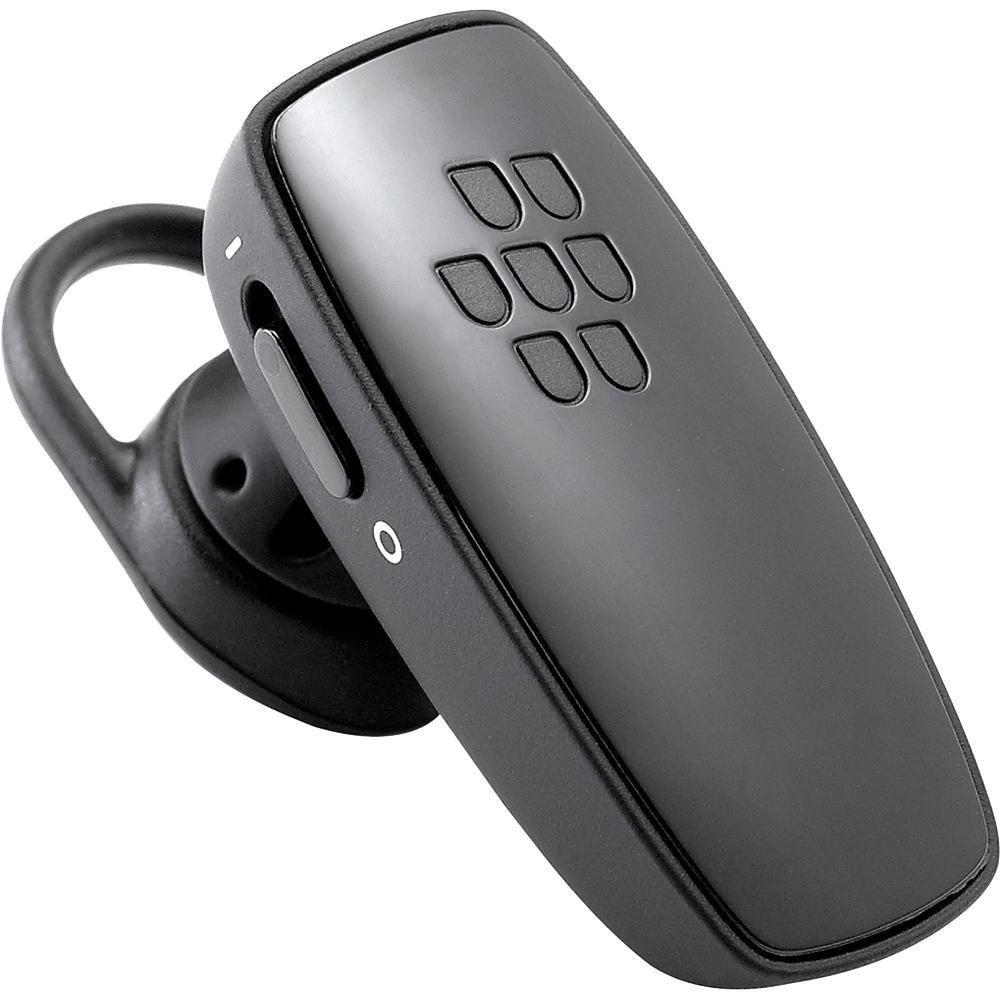
تصوير 1: سامهون view of the BlackBerry HS-300 Wireless Bluetooth Headset. The image displays the main body of the headset, featuring the BlackBerry logo (seven-dot pattern) on the front surface. A slender button, likely for volume control or multi-function, is visible on the side. An ear hook is attached, designed to secure the headset over the ear. A small indicator light is also present near the button.
- ملٽي فنڪشن بٽڻ: Used for answering/ending calls, voice commands, and pairing.
- حجم ڪنٽرول بٽڻ: Adjusts call and media volume.
- LED اشارو نور: Displays status (power, pairing, charging).
- مائڪروفون: Captures your voice during calls.
- پاور سوئچ: هيڊ سيٽ کي آن يا آف ڪري ٿو.
- چارج پورٽ: Connects to the charging cable.
سيٽ اپ ڪريو
1. هيڊ سيٽ کي چارج ڪرڻ
Before initial use, fully charge your headset. The HS-300 features rapid charge capabilities.
- Connect the charging cable to the headset's charging port and to a compatible USB power source.
- The LED indicator will show the charging status (e.g., solid red for charging, solid blue for fully charged).
- مڪمل چارج 4 ڪلاڪن تائين ڳالهائڻ جو وقت فراهم ڪري ٿو.
2. بلوٽوٿ ڊيوائس سان جوڙڻ
To use your headset, it must be paired with a Bluetooth-enabled phone or device.
- پڪ ڪيو ته هيڊٽ بند ٿيل آهي.
- Press and hold the Multi-function Button until the LED indicator flashes blue and red alternately. This indicates pairing mode.
- On your phone, enable Bluetooth and search for new devices.
- Select "BlackBerry HS-300" from the list of available devices.
- جيڪڏهن پاس ڪوڊ لاءِ چيو وڃي ته، "0000" (چار صفر) داخل ڪريو.
- Once paired, the LED indicator will flash blue periodically.
آپريٽنگ هدايتون
پاور آن / آف
- پاور آن ڪرڻ: Slide the Power Switch to the 'On' position. The LED indicator will flash blue.
- پاور آف ڪرڻ: Slide the Power Switch to the 'Off' position. The LED indicator will turn off.
ڪالون ٺاهڻ ۽ وصول ڪرڻ
- ڪال جو جواب ڏيڻ هڪ ڀيرو ملٽي فنڪشن بٽڻ کي دٻايو.
- ڪال ختم ڪرڻ: Press the Multi-function Button once during a call.
- ڪال رد ڪرڻ: Press and hold the Multi-function Button for approximately 2 seconds.
- ڪال ڪرڻ: Dial the number on your phone. The call will automatically transfer to the headset if connected.
- Voice Dialing (if supported by phone): Press the Multi-function Button once when not on a call.
حجم ڪنٽرول
- Use the Volume Control Buttons on the headset to adjust the call or media volume.
سار سنڀال
- هيڊ سيٽ کي باقاعدي طور تي نرم، سڪل ڪپڙي سان صاف ڪريو.
- Avoid exposing the headset to extreme temperatures, moisture, or corrosive substances.
- استعمال ۾ نه هجڻ جي صورت ۾ هيڊ سيٽ کي ٿڌي، سڪل جاءِ تي رکو.
- Do not attempt to disassemble or modify the headset, as this will void the warranty and may cause damage.
مشڪلاتون
| مسئلو | حل |
|---|---|
| هيڊ سيٽ آن نٿو ٿئي. | Ensure the headset is charged. Connect it to a power source using the charging cable. |
| Cannot pair the headset with my phone. |
|
| ڪابه آڊيو يا خراب آڊيو معيار ناهي. |
|
| هيڊ سيٽ بار بار ڪٽجي ويندو آهي. |
|
وضاحتون
| خاصيت | تفصيل |
|---|---|
| ماڊل نمبر | HS-300 |
| رابطي | Bluetooth Wireless (Version 2.1) |
| ڳالهائڻ جو وقت | 4 ڪلاڪ تائين |
| چارج ڪرڻ | Rapid charge capable |
| ڪنٽرول | Volume control, Multi-function button |
| مائڪروفون | ضم ٿيل |
| فارم فيڪٽر | On-ear (single ear) |
| وزن | تقريبن 3.2 آونس |
| طول و عرض | 2.5 x 2 x 6.5 انچ (تقريبن) |
وارنٽي ۽ سپورٽ
For warranty information and technical support, please refer to the documentation provided at the time of purchase or visit the official BlackBerry support webسائيٽ. وارنٽي دعوائن لاءِ خريداري جو ثبوت رکو.
آن لائن سپورٽ: www.blackberry.com/support


