1. تعارف
This manual provides detailed instructions for the safe and efficient operation of your Samsung Glyde U940 mobile phone. Please read this manual thoroughly before using your device to ensure proper functionality and to understand all features.
2. پيڪيج مواد
تصديق ڪريو ته توهان جي پراڊڪٽ پيڪيج ۾ هيٺيون شيون شامل آهن:
- Samsung Glyde U940 Mobile Phone
- معياري بيٽري
- Travel Adapter/Charger
- استعمال ڪندڙ جو دستياب (ھي دستاويز)
- نوٽ: مخصوص لوازمات علائقي يا پرچون ڪندڙ جي لحاظ کان مختلف ٿي سگهن ٿا.
3. ڊوائيس اوورview
The Samsung Glyde U940 features a large touch-sensitive display and a slide-out QWERTY keyboard for versatile input.
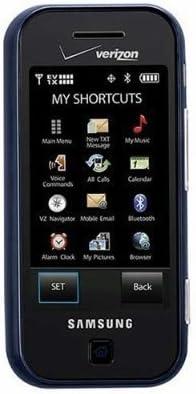
شڪل 3.1: سامهون view of the Samsung Glyde U940, showing the 2.8-inch display and navigation buttons. The screen displays "MY SHORTCUTS" with icons for various functions like Main Menu, New TXT Message, My Music, Voice Commands, All Calls, Calendar, Mobile Email, Bluetooth, Alarm Clock, My Pictures, and Browser. "SET" and "Back" buttons are visible below the screen.
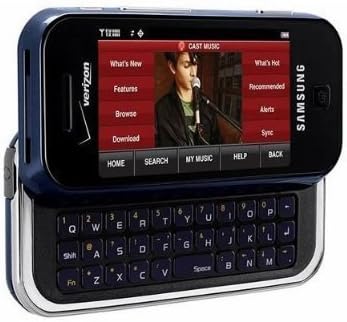
شڪل 3.2: Samsung Glyde U940 with its full QWERTY keyboard extended. The phone is oriented horizontally, displaying a media interface on the screen with options like "What's New", "Features", "Browse", "Download", "What's Hot", "Recommended", "Alerts", and "Sync". Navigation buttons for "HOME", "SEARCH", "MY MUSIC", "HELP", and "BACK" are visible below the screen.
اهم خاصيتون:
- Large 2.8" Display
- Slide-out QWERTY Keyboard
- ٽچ اسڪرين انٽرفيس
- Full HTML Browser
- 2.0 MP Camera and Camcorder
4. سيٽ اپ
4.1. بيٽري کي انسٽال ڪرڻ
- فون جي پوئين پاسي بيٽري جو ڍڪ ڳوليو.
- Gently remove the battery cover by sliding or lifting it.
- بيٽري جي سون جي رابطن کي بيٽري جي ڪمري ۾ رابطن سان ترتيب ڏيو.
- بيٽري کي مضبوطيءَ سان جاءِ تي داخل ڪريو.
- Replace the battery cover, ensuring it clicks securely.
4.2. بيٽري کي چارج ڪرڻ
- Connect the travel adapter to the charging port on your phone.
- Plug the other end of the travel adapter into a standard electrical outlet.
- Allow the phone to charge completely before initial use. The battery indicator on the screen will show charging status.
- بيٽري مڪمل طور تي چارج ٿيڻ کان پوء چارجر کي ختم ڪريو.
4.3. پاور آن/آف
- پاور آن ڪرڻ: Press and hold the Power/End key until the screen lights up.
- پاور آف ڪرڻ: Press and hold the Power/End key until the power-off options appear, then select "Power off".
5. آپريٽنگ هدايتون
5.1. ٽچ اسڪرين استعمال ڪندي
The Samsung Glyde U940 features a resistive touch screen. Use your fingertip or a stylus (if provided) to interact with the display.
- ٽيپ ڪريو: Lightly touch the screen once to select an item or open an application.
- ڇڪيو: ڪنهن به شيءِ کي ڇهو ۽ رکو، پوءِ پنهنجي آڱر کي اسڪرين تي منتقل ڪريو ته جيئن ان کي ٻيهر پوزيشن ۾ رکي سگهجي.
- سکرول: Slide your finger up or down on the screen to navigate through lists or web صفحا.
5.2. Using the QWERTY Keyboard
Slide the screen horizontally to reveal the full QWERTY keyboard. This keyboard is ideal for typing messages, emails, and web ايڊريس.
- Press individual keys to input characters.
- استعمال ڪريو شفٽ key for uppercase letters and symbols.
- جي Fn key provides access to additional functions or symbols.
5.3. ڪالون ڪرڻ ۽ وصول ڪرڻ
- ڪال ڪرڻ: From the home screen, tap the Phone icon or dial the number using the keypad and press the Call key.
- ڪال وصول ڪرڻ: When a call comes in, tap the "Answer" button on the screen.
- ڪال ختم ڪرڻ: Tap the "End" button on the screen or press the Power/End key.
5.4. پيغام رسائي (ايس ايم ايس/ايم ايم ايس)
To send a text or multimedia message:
- From the main menu, select "Messages" or "New TXT Message".
- وصول ڪندڙ جو فون نمبر داخل ڪريو يا پنهنجن رابطن مان چونڊيو.
- Type your message using either the touch screen or the QWERTY keyboard.
- To add multimedia (pictures, videos, audio), select the attachment option.
- "موڪليو" تي ٽيپ ڪريو.
5.5. Camera and Camcorder Functions
The Glyde U940 is equipped with a 2.0 MP camera.
- تصويرون وٺڻ Open the Camera application, frame your shot, and press the dedicated camera button or tap the capture icon on the screen.
- ويڊيو رڪارڊ ڪرڻ: Switch to camcorder mode within the Camera application, press the record button to start, and press again to stop.
- Access your captured media in the "My Pictures" or "Gallery" application.
5.6. Web برائوزر
Utilize the full HTML browser to access the internet.
- From the main menu, select "Browser".
- گهربل داخل ڪريو web ايڊريس ۾ URL بار
- Use the touch screen to navigate pages, zoom in/out, and click links.
6. سار سنڀال
6.1. بيٽري جي سنڀال
- بيٽري کي انتهائي گرمي پد تي بي نقاب ڪرڻ کان پاسو ڪريو.
- بيٽري کي پنڪچر يا نقصان نه پهچايو.
- For optimal battery life, avoid frequent partial discharges and charges.
- جيڪڏهن فون گهڻي وقت تائين استعمال نه ٿيندو، ته ان کي جزوي طور تي چارج ٿيل بيٽري سان گڏ رکو.
6.2. ڊوائيس صاف ڪرڻ
- فون جي اسڪرين ۽ ٻاهرين حصي کي صاف ڪرڻ لاءِ نرم، لِنٽ فري ڪپڙو استعمال ڪريو.
- سخت ڪيميڪل، صفائي اسپري، يا رگڙيندڙ مواد استعمال نه ڪريو.
- Ensure no moisture enters openings such as the charging port or headphone jack.
6.3. سافٽ ويئر اپڊيٽ
Periodically check for available software updates to improve performance and add new features. Consult your service provider or the Samsung webاپڊيٽ جي طريقيڪار لاءِ سائيٽ.
7. مسئلا حل ڪرڻ
This section addresses common issues you might encounter with your Samsung Glyde U940.
| مسئلو | ممڪن حل |
|---|---|
| فون آن نٿو ٿئي. | پڪ ڪريو ته بيٽري صحيح طرح سان نصب ٿيل آهي ۽ مڪمل طور تي چارج ٿيل آهي. چارجر کي ڳنڍيو ۽ پاور آن ڪرڻ جي ڪوشش ڪريو. |
| Touch screen is unresponsive or erratic. |
|
| بيٽري جلدي ختم ٿئي ٿي. |
|
| ڪالون نه ٿو ڪري سگھجي ۽ نه ئي وصول ڪري سگھجي ٿو. | Check network signal strength. Ensure "Airplane Mode" is not enabled. Contact your service provider if network issues persist. |
| QWERTY keyboard input is incorrect. | Ensure the keyboard is fully extended and locked into position. Restart the device if keys are unresponsive. |
8. وضاحتون
| خاصيت | تفصيل |
|---|---|
| ماڊل نمبر | U940 |
| ڏيکاريو | 2.8 Inches, Touch Screen |
| ان پٽ جو طريقو | Touch Screen, Slide-out QWERTY Keyboard |
| ڪئميرا | 2.0 MP (Camera and Camcorder) |
| برائوزر | Full HTML Browser |
| شيءِ جو وزن | 11.2 اونس |
| طول و عرض | 8.1 x 5.4 x 2.2 انچ (پيڪيج طول و عرض) |
| رابطي | Wireless, USB 2.0 |
| ٺاهيندڙ | سامسنگ |
9. وارنٽي ۽ سپورٽ
وارنٽي جي معلومات لاءِ، مھرباني ڪري پنھنجي پراڊڪٽ سان شامل وارنٽي ڪارڊ ڏسو يا سرڪاري سام سنگ اسٽور جو دورو ڪريو. website. For technical support, contact your service provider or Samsung customer service.
سام سنگ ڪسٽمر سروس: www.samsung.com/us/support/


