Введение
This manual provides detailed instructions for the AGPTEK A55PL USB C MP3 Player. It covers setup, operation, maintenance, and troubleshooting to ensure optimal use of your device. The A55PL is a versatile music player featuring USB-C connectivity, 64GB storage, FM radio, and voice recording capabilities, powered by a replaceable AAA battery.
Содержимое упаковки
Убедитесь, что все перечисленные ниже предметы включены в ваш пакет:
- AGPTEK A55PL MP3 Player
- Карта памяти TF на 64 ГБ (предустановлена)
- Зарядный кабель Type-C к USB
- Руководство пользователя

Image: Contents of the AGPTEK A55PL MP3 Player package, showing the player, USB-C cable, 64GB TF card, and user manual.
Продукт болееview и особенности
The AGPTEK A55PL MP3 Player is designed for portability and ease of use, offering multiple functionalities in a compact form factor.
Основные характеристики:
- Direct Type-C & Universal USB Connectivity: Connects directly to Type-C phones for file transfer or to laptops/PCs using the included adapter/cable.
- Swappable AAA Batteries: Operates on a single AAA battery (not included), allowing for instant power replacement without needing charging outlets.
- Огромный объем памяти — 64 ГБ: Comes with a pre-loaded 64GB TF card, supporting over 13,000 songs and high-fidelity formats like FLAC, APE, and WAV. Functions as a U disk for data transfer.
- Crisp LED Display: Features an energy-efficient LED screen for clear navigation and song title display.
- Voice Recorder & FM Radio: Built-in voice recorder for capturing audio and an FM radio (requires wired headset as antenna) for broadcasts.

Изображение: Оверview of the AGPTEK A55PL MP3 Player's capabilities, including its Type-C port, music playback, recording, FM radio, and 64GB TF card storage.
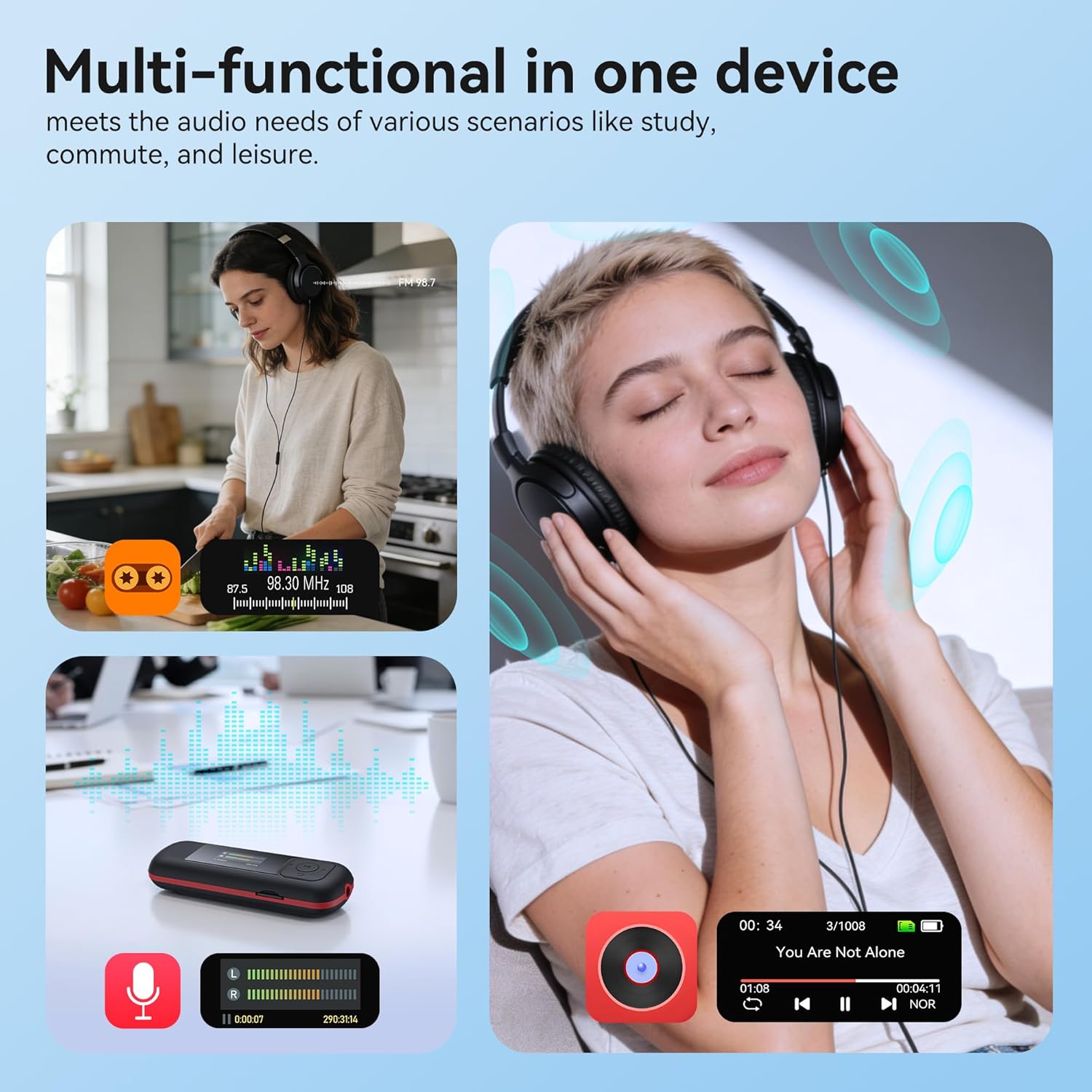
Image: The AGPTEK A55PL MP3 Player showcasing its multi-functional capabilities, including FM radio, voice recording, and music playback, suitable for various scenarios.
Настраивать
1. Установка аккумулятора
The AGPTEK A55PL uses one AAA battery (not included). Ensure correct polarity when inserting the battery.
- Найдите крышку батарейного отсека на задней панели устройства.
- Press the center of the cover and slide it forward to unlock and remove.
- Insert one AAA battery, matching the positive (+) and negative (-) terminals with the indicators inside the compartment.
- Сдвиньте крышку на место до надежного щелчка.

Image: Step-by-step guide for removing the USB cap and installing the AAA battery into the AGPTEK A55PL MP3 Player.
Примечание: USB charging is not supported. The device relies solely on AAA battery power. The battery display on the screen is based on voltage changes at the battery terminal.
2. Первоначальное подключение и File Передача
Вы можете передавать музыку и другие файлы. files to your MP3 player from a computer or a Type-C smartphone.
- Для компьютеров: Use the included Type-C to USB cable. Connect the Type-C end to the player and the USB-A end to your computer's USB port. The player will appear as a removable disk.
- For Type-C Phones: Plug the player's Type-C connector directly into your phone's Type-C port. The player will be recognized as external storage. (For iPhones, a Lightning-to-Type-C OTG adapter is needed, not included).

Image: Demonstrates connecting the AGPTEK A55PL MP3 Player to a computer via USB cable and directly to a Type-C smartphone for file перевод.
Инструкция по эксплуатации
Основные элементы управления
The player features a simple interface with dedicated buttons for easy navigation.
- Кнопка питания: Нажмите и удерживайте, чтобы включить/выключить.
- Кнопка воспроизведения/паузы: Нажмите, чтобы воспроизвести или приостановить музыку.
- Кнопки навигации (вверх/вниз/влево/вправо): Используется для навигации по меню и настройки параметров.
- Кнопки регулировки громкости (+/-): Dedicated buttons on the side to adjust playback volume.
- Кнопка меню (M): Доступ к контекстно-зависимым меню.
- Кнопка «Назад/Вернуться»: Возврат к предыдущему экрану или меню.
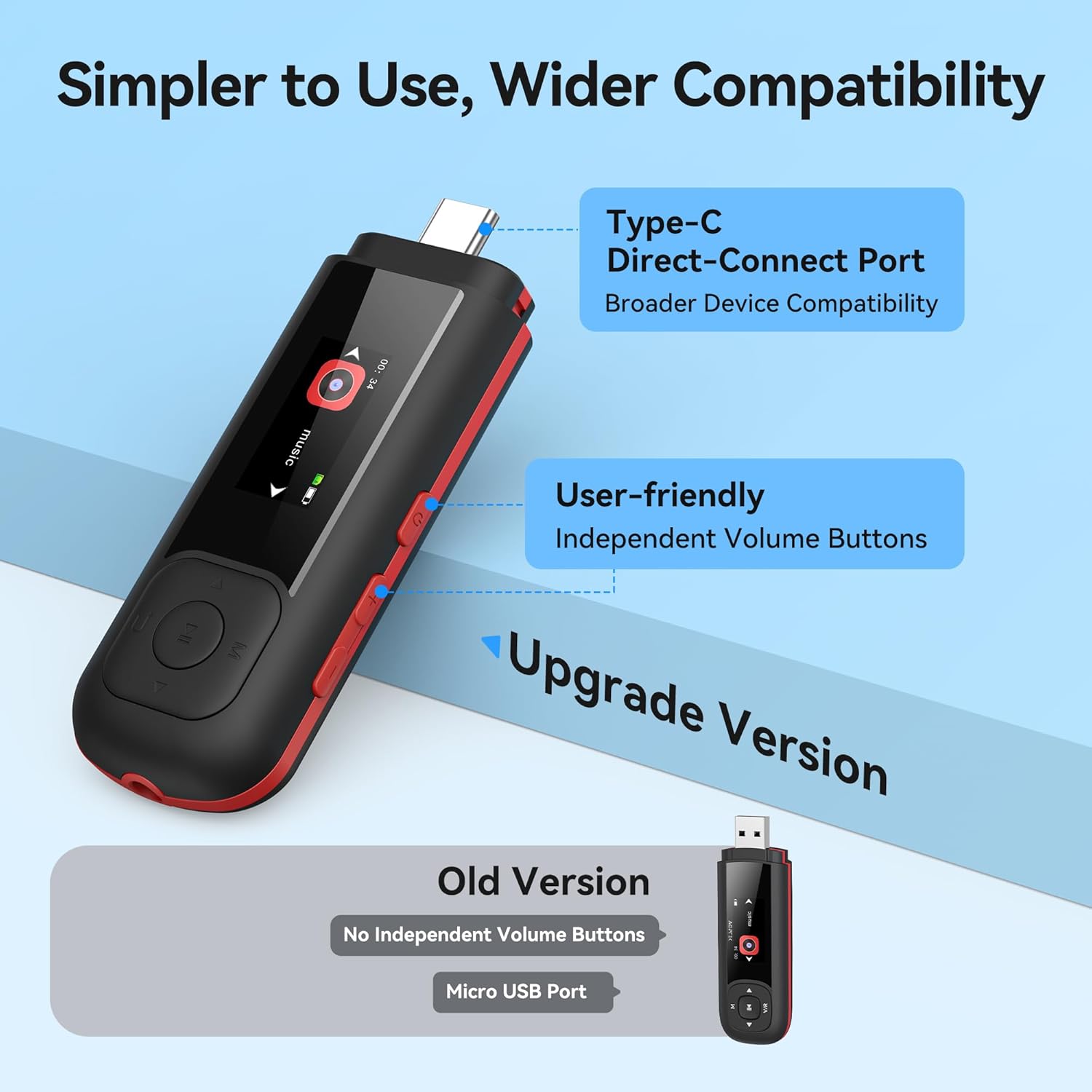
Image: Close-up of the AGPTEK A55PL MP3 Player, showing the Type-C direct-connect port and the independent volume buttons for user-friendly operation.
Воспроизведение музыки
The player supports various audio formats including MP3, WMA, APE, FLAC, and WAV.
- Connect wired headphones to the 3.5mm audio jack.
- Перейдите в раздел «Музыка» в главном меню.
- Browse through your music library by artist, album, or folder.
- Выберите песню для начала воспроизведения.
- Use the Play/Pause button to control playback and the volume buttons to adjust sound levels.

Image: A person enjoying music through headphones, highlighting the AGPTEK A55PL MP3 Player's support for multi-format lossless audio quality.

Image: Illustrates the different playback modes available on the AGPTEK A55PL MP3 Player, including Folder Mode and Music Mode with options like repeat, shuffle, and play in order.
FM-радио
To use the FM radio function, a wired headset must be connected as it acts as the antenna.
- Подключите проводные наушники.
- В главном меню выберите пункт "FM-радио".
- Используйте кнопки навигации для поиска станций или ручной настройки на частоту.

Image: A user enjoying FM radio on the AGPTEK A55PL MP3 Player, emphasizing that wired headphones are required to function as an antenna.
Диктофон
The built-in voice recorder allows you to capture audio on the go.
- Navigate to the "Recorder" option from the main menu.
- Чтобы начать запись, выберите кнопку «Начать запись».
- Press the Play/Pause button to stop and save the recording.
- Recordings can be accessed and played back from the "Recordings" list.

Image: The AGPTEK A55PL MP3 Player showing its portable recorder function, ready for effortless on-the-go audio capture.
Custom Playlists
You can create and manage custom playlists by connecting the player to a computer.
- Connect the MP3 player to your computer using the Type-C to USB cable.
- Access the player's storage as a removable disk.
- Организуйте свою музыку files into folders or create M3U playlist fileнепосредственно на устройстве.
- The player supports up to 3 built-in customizable playlists.

Image: Demonstrates how to create and edit custom playlists by connecting the AGPTEK A55PL MP3 Player to a computer via USB.
Обслуживание
- Уборка: Для очистки устройства используйте мягкую сухую ткань. Избегайте использования жидких чистящих средств или растворителей.
- Хранилище: Храните плеер в прохладном, сухом месте, вдали от прямых солнечных лучей и экстремальных температур.
- Уход батареи: Remove the AAA battery if the device will not be used for an extended period to prevent leakage.
- Резервное копирование данных: Регулярно создавайте резервные копии важных fileпередаются от плеера к компьютеру, чтобы предотвратить потерю данных.
Поиск неисправностей
Устройство не включается
- Ensure the AAA battery is inserted correctly with the correct polarity.
- Замените батарейку типа ААА на новую.
- Нажмите и удерживайте кнопку питания в течение нескольких секунд.
Передача невозможна Files
- Verify the Type-C to USB cable is securely connected to both the player and the computer/phone.
- Попробуйте использовать другой порт USB на вашем компьютере.
- Ensure your computer's operating system recognizes external storage devices.
- For phones, ensure the phone supports OTG (On-The-Go) functionality for external storage.
Нет звука во время воспроизведения
- Check if wired headphones are properly plugged into the 3.5mm audio jack.
- Убедитесь, что громкость не установлена на минимум или не отключена.
- Чтобы исключить проблемы с наушниками, попробуйте использовать другую пару наушников.
- Проверьте звук files are not corrupted and are in a supported format (MP3, WMA, APE, FLAC, WAV).
FM-радио не работает
- Confirm that wired headphones are connected, as they serve as the antenna.
- Try scanning for stations again in an open area.
Технические характеристики
| Особенность | Деталь |
|---|---|
| Название модели | А55ПЛ |
| Бренд | AGPTEK |
| Емкость памяти | 64 GB (via TF Card) |
| Технология связи | USB Type-C, Aux (3.5mm) |
| Особые возможности | FM Radio, Voice Recorder, Replaceable AAA Battery |
| Цвет | Черный |
| Размер экрана | 0.96 Inches (LED) |
| Совместимые устройства | Headphones, Computers, Type-C Smartphones |
| Тип носителя | Микро SD-карта |
| Вес товара | 3.87 унции |
| Размеры упаковки | 6.57 x 5.12 x 0.94 дюйма |
Гарантия и поддержка
For warranty information and technical support, please refer to the official AGPTEK webили обратитесь в службу поддержки клиентов. Сохраните чек о покупке в качестве подтверждения покупки на случай предъявления гарантийных претензий.
Онлайн поддержка: Посетите AGPTEK Store on Amazon для получения информации о продукте и ресурсов поддержки.


