1. Введение
The Philips W2215A F1 Max is a smart watch designed for children, offering enhanced safety features and communication capabilities. This device includes dual cameras, GPS tracking, 4G connectivity for video and voice calls, and an SOS button for emergencies. It is built with a durable, water and dust resistant design and features a long-lasting battery.
2. Содержимое упаковки
- Philips W2215A F1 Max Smart Watch
- Зарядный кабель
- SIM Card Ejection Tool
- Руководство пользователя
3. Устройство перешлоview
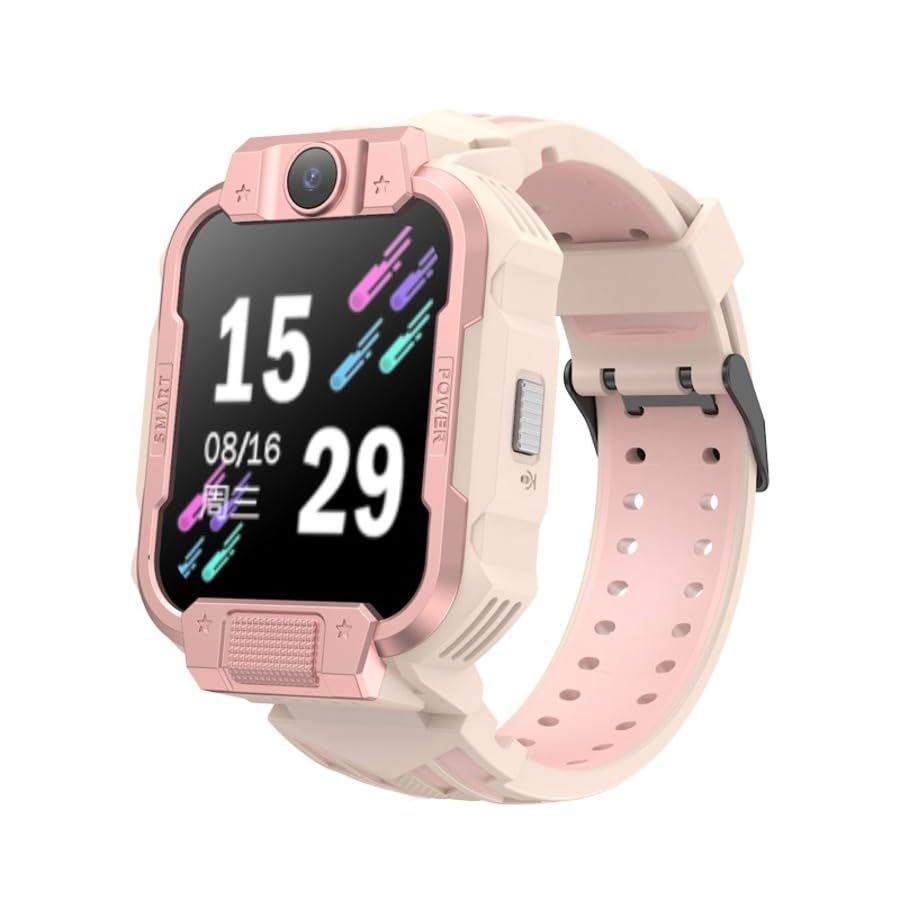

4. Настройка
4.1 Зарядка устройства
Before first use, fully charge the smart watch. Connect the charging cable to the watch's charging port and a compatible USB power adapter. The watch display will indicate charging status. A full charge typically takes approximately 2 hours.
4.2 Установка SIM-карты
- Убедитесь, что часы выключены.
- Найдите слот для SIM-карты на боковой стороне часов (см. рисунок 3.2).
- Use the provided SIM card ejection tool to open the SIM card tray.
- Insert a nano-SIM card into the tray with the gold contacts facing down, ensuring correct orientation.
- Аккуратно задвиньте лоток обратно в слот до щелчка.
Примечание: The watch supports 4G cellular connectivity. Ensure your SIM card is activated and has a data plan.
4.3 Первоначальное включение и сопряжение с приложением
- Press and hold the Power button until the Philips logo appears.
- Download the companion application to your smartphone. Искать the official Philips Kids Watch app in your device's app store.
- Follow the on-screen instructions in the app to register the watch. This typically involves scanning a QR code displayed on the watch screen or entering a device ID.
- Configure contacts, safety zones, and other settings through the app.
5. Инструкция по эксплуатации
5.1 Базовая навигация
The watch features a 1.83-inch AMOLED touchscreen. Swipe left/right to navigate between menus and apps. Swipe down from the top for quick settings and notifications. Tap to select an option.
5.2 Совершение и прием звонков
- Голосовые звонки: Access the 'Contacts' app on the watch. Select a contact and tap the call icon.
- Видеозвонки: The watch supports 4G video calls. Select a contact from the 'Video Call' app to initiate a video call.
- Прием звонков: When a call comes in, tap the green answer icon to accept or the red icon to decline.
5.3 Using the Dual Cameras
The watch is equipped with dual cameras. Access the 'Camera' app to take photos or record videos. You can switch between the front and side cameras within the app interface.
5.4 Функция SOS
In an emergency, press and hold the dedicated SOS button (if available, otherwise typically the power button) for a few seconds. The watch will automatically call pre-set emergency contacts and send location information.
5.5 GPS-слежение
The watch's built-in GPS allows for real-time location tracking. Parents can monitor the child's location through the companion smartphone application. Safety zones can be configured, triggering alerts when the child enters or exits designated areas.
5.6 Обмен сообщениями
The watch supports sending and receiving voice messages. Access the 'Messages' app to record and send short audio clips to approved contacts.
5.7 шагомер
The integrated pedometer tracks daily steps, providing a basic overview of activity levels. This feature can be viewed in the 'Activity' or 'Pedometer' app on the watch.
6. Техническое обслуживание
6.1 Очистка
Wipe the watch screen and body with a soft, dry, lint-free cloth. For stubborn dirt, slightly dampСмочите ткань водой. Избегайте использования едких химикатов и абразивных материалов.
6.2 Защита от воды и пыли
The Philips W2215A F1 Max is designed to be water and dust resistant for daily use. However, it is not suitable for swimming, showering, or prolonged submersion in water. Ensure the SIM card slot cover is securely closed to maintain resistance.
6.3 Уход за аккумулятором
- Не подвергайте часы воздействию экстремальных температур.
- Регулярно заряжайте часы, но избегайте длительного хранения в полностью разряженном состоянии.
- Используйте только прилагаемый зарядный кабель и совместимый адаптер питания.
7. Поиск Неисправностей
7.1 Часы не включаются
- Убедитесь, что часы полностью заряжены. Подключите их к зарядному устройству как минимум на 30 минут.
- Press and hold the Power button for 10-15 seconds to attempt a forced restart.
7.2 Inaccurate Location Tracking
- Ensure the watch has a strong cellular signal. GPS accuracy can be affected by poor signal or indoor environments.
- Verify that the SIM card has an active data plan and sufficient credit.
- Check the companion app settings to ensure location services are enabled and updated frequently.
7.3 Короткое время работы от батареи
- Уменьшите яркость экрана.
- Limit frequent video calls or extensive use of features that consume more power.
- Ensure background apps are closed if possible.
- Check for app updates for both the watch and the companion smartphone app.
7.4 Невозможно совершать/принимать звонки
- Verify the SIM card is correctly installed and activated.
- Check for cellular network coverage in the watch's current location.
- Ensure contacts are correctly synced and approved in the companion app.
8. Технические характеристики
| Название модели | F1 Макс. |
| Номер модели | W2215A |
| Тип дисплея | AMOLED |
| Размер экрана | 1.83 дюйма |
| Внутренняя память | 16 МБ |
| Емкость аккумулятора | 800 мАч |
| Тип батареи | Литий-ионный |
| Средний срок службы батареи | До 4 дней |
| Связность | 4G сотовая связь |
| Основные характеристики | Dual Camera, Video Call, SOS Button, SIM Card Enabled, GPS, Pedometer |
| Прочность | Защита от воды и пыли |
| Диаметр корпуса | 43 мм |
9. Информация о гарантии
This Philips W2215A F1 Max Smart Kids Watch comes with a 2-year official distributor warranty. Please retain your proof of purchase for warranty claims. The warranty covers manufacturing defects under normal use. It does not cover damage caused by misuse, accidents, unauthorized repairs, or normal wear and tear.
10 Поддержка
For further assistance, technical support, or warranty inquiries, please contact your local Philips customer service or the authorized distributor from whom you purchased the product. Refer to the contact information provided in your product packaging or on the official Philips webсайт.