1. Введение
This manual provides instructions for the proper setup, operation, and maintenance of your Audio-Technica ATW-2110c Wireless Bodypack System. Please read this manual thoroughly before using the product to ensure optimal performance and longevity.
The Audio-Technica ATW-2110c is a robust 10-channel wireless audio system designed for various applications, including mobile rigs, small venues, and school auditoriums. It offers reliable wireless sound transmission with a range of approximately 300 feet.
2. Компоненты системы
The ATW-2110c system includes the following main components:
- ATW-R2100c Receiver: A compact half-rack receiver unit.
- ATW-T210c Bodypack Transmitter: A portable transmitter for use with a 4-pin cW-style microphone (microphone not included).
- Rackmount Kit: For integrating the receiver into a standard equipment rack.
- UHF Antennas: A pair of detachable UHF antennas for signal reception.
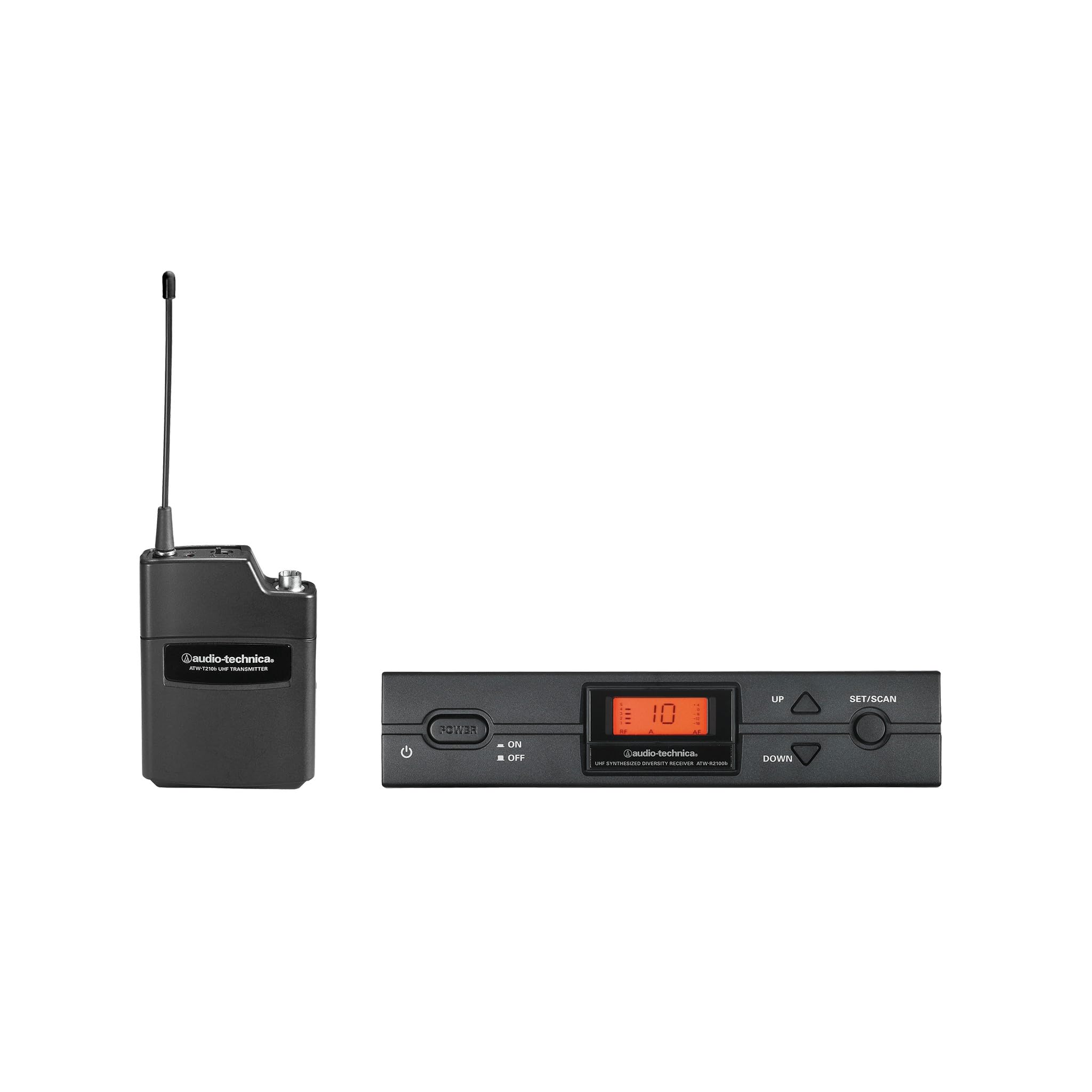
Рисунок 2.1: Болееview of the Audio-Technica ATW-2110c Wireless Bodypack System components.
3. Инструкции по настройке
3.1 Receiver Placement and Antenna Connection
- Расположите приемник: Place the ATW-R2100c receiver in a location free from obstructions and away from potential sources of interference (e.g., computers, digital processors, large metal objects). For rack mounting, use the provided rackmount kit.
- Прикрепите антенны: Screw the two detachable UHF antennas onto the corresponding antenna connectors on the rear panel of the ATW-R2100c receiver. Ensure they are securely tightened. Position the antennas vertically for optimal reception.
- Подключение питания: Connect the supplied AC adapter to the DC input jack on the receiver and then plug it into a standard AC power outlet.
3.2 Настройка поясного передатчика
- Установите батареи: Open the battery compartment of the ATW-T210c bodypack transmitter. Insert two fresh AA alkaline batteries, observing the correct polarity (+/-). Close the compartment securely.
- Подключить микрофон: Plug your 4-pin cW-style microphone (e.g., lavalier, headworn) into the input jack on the bodypack transmitter. Ensure the connector clicks into place.
- Включение питания: Press and hold the power button on the bodypack transmitter until the indicator light illuminates.
3.3 Frequency Synchronization
Follow the receiver's display and controls to select an available channel and synchronize it with the bodypack transmitter. Refer to the receiver's specific instructions for detailed frequency scanning and pairing procedures.
4. Инструкция по эксплуатации
4.1 Включение/выключение питания
- Получатель: The receiver powers on automatically when connected to power. Use the front panel power button if available, or disconnect the AC adapter to power off.
- Передатчик: Press and hold the power button on the bodypack transmitter to turn it on or off. The LED indicator will show power status.
4.2 Регулировка уровня звука
Adjust the output level on the ATW-R2100c receiver to match the input requirements of your mixing console or amplifier. Start with a low level and gradually increase it to avoid distortion. The bodypack transmitter typically has a gain control for the microphone input; adjust this to prevent clipping at the source.
4.3 Мониторинг производительности
Regularly check the RF and AF indicators on the receiver. A steady RF signal indicates good wireless connection. The AF indicator should fluctuate with audio input. If the RF signal is weak or intermittent, reposition the antennas or the transmitter.
5. Техническое обслуживание
- Уборка: Use a soft, dry cloth to clean the exterior of the receiver and transmitter. Do not use harsh chemicals or abrasive cleaners.
- Замена батареи: Replace batteries in the bodypack transmitter when the low battery indicator appears or when performance degrades. Always use fresh, high-quality AA alkaline batteries. Remove batteries if the unit will not be used for an extended period.
- Хранилище: Храните систему в прохладном, сухом месте, вдали от прямых солнечных лучей и экстремальных температур.
6. Поиск Неисправностей
| Проблема | Возможная причина | Решение |
|---|---|---|
| Нет звука |
|
|
| Прерывистый сигнал или обрывы связи |
|
|
| Искаженный звук |
|
|
7. Технические характеристики
| Номер модели | ATW-2110C |
| Бренд | Аудио-Техника |
| Вес товара | 6.61 фунта |
| Размеры упаковки | 27 x 18 x 5 дюйма |
| Цвет | Черный |
| Совместимые устройства | Микрофон |
| Тип разъема | XLR (for receiver output) |
| Источник питания | Battery Powered (Transmitter), AC Adapter (Receiver) |
| Дальность беспроводной связи | Примерно 300 футов (прямая видимость) |
| Каналы | Up to 10 usable channels |
8. Информация о гарантии
Audio-Technica products are designed and manufactured to strict quality standards. For specific warranty terms and conditions applicable to your ATW-2110c Wireless Bodypack System, please refer to the warranty card included with your product or visit the official Audio-Technica webСохраните чек о покупке для предъявления гарантийных претензий.
9. Поддержка клиентов
If you encounter any issues not covered in this manual or require further assistance, please contact Audio-Technica customer support. You can find contact information, FAQs, and additional resources on the official Audio-Technica webсайт:
Please have your model number (ATW-2110C) and purchase date ready when contacting support.


