Введение
Данное руководство содержит основные инструкции по безопасному и эффективному использованию беспроводных наушников Technics EAH-A800 с шумоподавлением. Пожалуйста, внимательно прочтите это руководство перед использованием изделия и сохраните его для дальнейшего использования.

Изображение: Беспроводные накладные наушники Technics EAH-A800 с шумоподавлением, черного цвета, showcasing их элегантный дизайн.
Наушники Technics EAH-A800 разработаны для обеспечения высококачественного звука с использованием передовой технологии шумоподавления и превосходной четкостью звонков. Они оснащены многоточечным подключением для плавного переключения между устройствами и удобными амбушюрами, охватывающими уши, для длительного ношения.
Что в коробке?
Проверьте наличие всех предметов в упаковке:
- Накладные наушники Technics EAH-A800
- USB-кабель для зарядки
- Аудиокабель (разъем 3.5 мм)
- Защитный чехол для переноски

Изображение: Полный комплект поставки, включая наушники, зарядный кабель, аудиокабель и защитный чехол.
Настраивать
1. Зарядка наушников
Перед первым использованием полностью зарядите наушники. Подключите USB-кабель для зарядки к зарядному порту наушников и источнику питания USB. Индикатор зарядки покажет состояние зарядки.
2. Сопряжение по Bluetooth
- Убедитесь, что наушники выключены.
- Нажмите и удерживайте кнопку питания, пока светодиодный индикатор не начнет мигать синим и красным, указывая на режим сопряжения.
- На вашем устройстве (смартфоне, планшете, компьютере) включите Bluetooth и выполните поиск доступных устройств.
- Выберите "Technics EAH-A800" из списка найденных устройств.
- После подключения светодиодный индикатор будет медленно мигать синим.
3. Приложение Technics Audio Connect
Для более полного управления и настройки загрузите приложение Technics Audio Connect из магазина приложений вашего устройства. Приложение позволяет регулировать параметры звука, уровень шумоподавления и другие функции.

Изображение: Скриншоты приложения Technics Audio Connect, иллюстрирующие его интерфейс для настройки параметров звука и окружающего освещения.
Инструкция по эксплуатации
1. Включение/выключение питания
- Для включения: нажмите и удерживайте кнопку питания, пока не загорится светодиодный индикатор.
- Чтобы выключить устройство: нажмите и удерживайте кнопку питания, пока светодиодный индикатор не погаснет.
2. Режимы шумоподавления и окружающего звука
Наушники EAH-A800 оснащены функцией активного шумоподавления для уменьшения внешних отвлекающих факторов и режимом окружающего звука, позволяющим слышать происходящее вокруг.
- Шумоподавление: Снижает уровень окружающего шума для полного погружения в звуковое восприятие.
- Режим окружающей среды: Позволяет слышать внешние звуки, что полезно для повышения осведомленности в общественных местах.
Переключайтесь между режимами с помощью специальной кнопки на наушниках или через приложение Technics Audio Connect.

Изображение: Визуальное представление технологии шумоподавления в действии, демонстрирующее, как минимизируются внешние звуки.
3. Многоточечное подключение
Наушники могут одновременно подключаться к более чем двум устройствам Bluetooth, обеспечивая плавное переключение звука. Например...ampТо есть, вы можете слушать музыку со своего ноутбука и мгновенно отвечать на звонки со своего смартфона без повторного сопряжения.

Изображение: Пользователь плавно переключает звук между смартфоном и ноутбуком, демонстрируя функцию многоточечного подключения.
4. Вызов функций
Наушники EAH-A800 оснащены 8 микрофонами и усовершенствованной системой подавления шума ветра для четкой передачи голоса во время разговоров. Используйте встроенные элементы управления для ответа, завершения или отклонения вызовов.
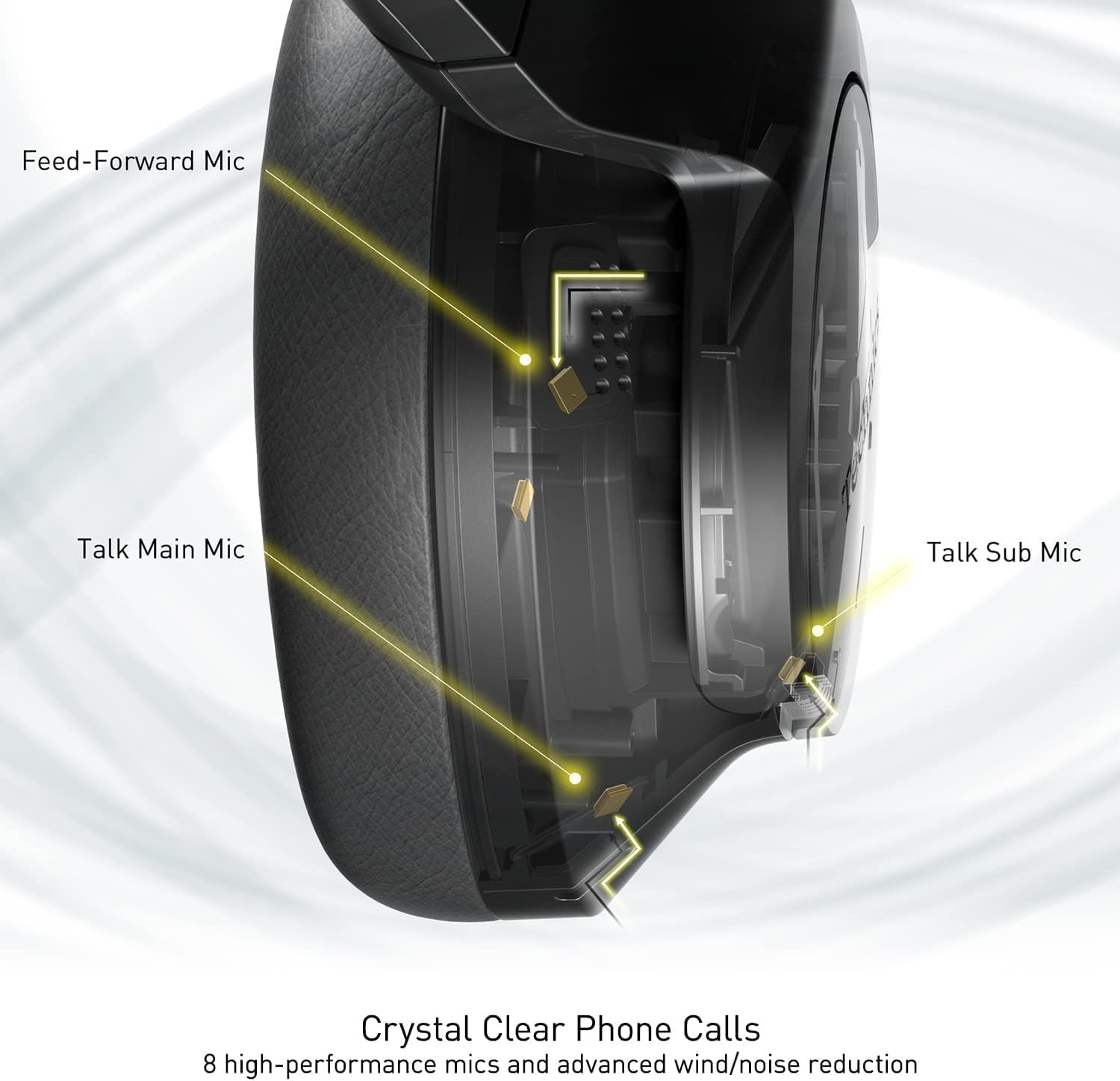
Изображение: Внутренняя схема, иллюстрирующая стратегическое размещение 8 микрофонов внутри наушников для оптимальной четкости звонков.
5. Элементы управления
Наушники оснащены физическими кнопками для включения/выключения, регулировки громкости и переключения режимов, а также сенсорной панелью на одной из чашек для дополнительных функций. Подробное описание расположения элементов управления см. в кратком руководстве пользователя.
6. Срок службы аккумулятора и зарядка
Наушники EAH-A800 обеспечивают до 50 часов воспроизведения с включенным активным шумоподавлением (ANC) на одном заряде. Быстрая 15-минутная зарядка обеспечивает приблизительно 10 часов воспроизведения.

Изображение: Графическое изображение, демонстрирующее впечатляющее время автономной работы и возможности быстрой зарядки наушников.
Обслуживание
1. Уборка
- Протрите наушники мягкой сухой тканью.
- Амбушюры следует аккуратно протереть слегка влажной тряпкой.amp тканью и дайте полностью высохнуть на воздухе перед использованием.
- Не используйте едкие химикаты, растворители или абразивные чистящие средства.
2. Хранение
Когда наушники не используются, храните их в защитном чехле, чтобы предотвратить повреждения от пыли, царапин и ударов. Избегайте воздействия на наушники экстремальных температур или влажности.
Поиск неисправностей
| Проблема | Возможная причина | Решение |
|---|---|---|
| Наушники не включаются | Низкий заряд батареи | Полностью зарядите наушники. |
| Невозможно подключиться через Bluetooth | Наушники не находятся в режиме сопряжения; Bluetooth устройства выключен; Вне зоны действия | Убедитесь, что наушники находятся в режиме сопряжения (мигают синим и красным). Включите Bluetooth на устройстве. Поднесите устройство ближе к наушникам. |
| Нет звука или низкая громкость | Слишком низкий уровень громкости; выбран неправильный аудиовыход; устройство не подключено | Увеличьте громкость наушников и устройства. Проверьте настройки вывода звука на устройстве. Восстановите соединение Bluetooth. |
| Плохое качество связи | Микрофон заблокирован; слабый сигнал; окружающий шум | Убедитесь, что микрофоны работают без помех. Переместитесь в место с лучшим сигналом. Настройте параметры шумоподавления через приложение. |
| Проблемы с многоточечным подключением | Конфликт подключения; устройство не сопряжено должным образом. | Отключитесь от одного устройства и подключитесь снова. Убедитесь, что оба устройства правильно сопряжены. |
Если проблемы сохраняются, обратитесь к приложению Technics Audio Connect для проведения дополнительной диагностики или посетите официальный сайт поддержки Technics. webсайт.
Технические характеристики
| Название модели | Technics EAH-A800 |
| Технология связи | Блютус 5.2 |
| Частотная характеристика | 4 Гц - 40 кГц |
| Контроль шума | Активное шумоподавление |
| Срок службы батареи | До 50 часов (с включенным активным шумоподавлением) |
| Время зарядки | Примерно 3 часа работы (15 минут быстрой зарядки обеспечивают 10 часов воспроизведения) |
| Вес товара | 10.5 унции (298 грамма) |
| Материал | Полиуретан (ПУ) |
| Разъем для наушников | 3.5 мм Jack |
| Совместимые устройства | Мобильные телефоны, настольные компьютеры, ноутбуки, планшеты, телефоны |
| Особые возможности | Быстрая зарядка, складная конструкция, микрофон в комплекте. |
| СКП | 885170381162 |
Гарантия и поддержка
На наушники Technics EAH-A800 распространяется гарантия производителя. Для получения подробной информации о гарантии, регистрации и вопросах поддержки, пожалуйста, обратитесь к официальному сайту Technics. webсайт или свяжитесь с их службой поддержки.
Для получения дополнительной информации, ответов на часто задаваемые вопросы и обновлений программного обеспечения посетите официальный магазин бренда Technics или страницы поддержки:


