1. Введение
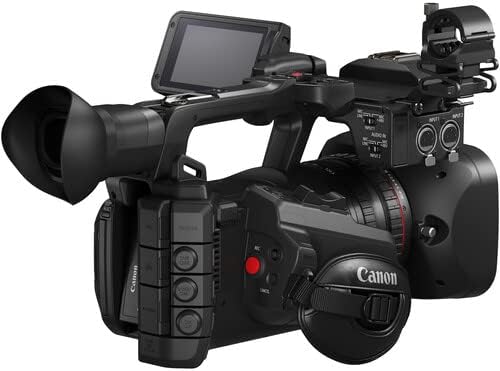
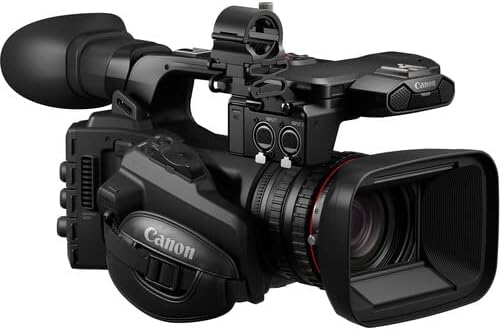
This manual provides detailed instructions for the safe and effective use of your Canon XF605 UHD 4K HDR Pro Camcorder. The XF605 combines high-resolution capture with a mobile workflow, making it suitable for ENG, sports, entertainment, and narrative applications. This compact 1" CMOS sensor camera with a DIGIC DV 7 engine offers high sensitivity, Canon cinema color matrix choices, Canon Log 3, HDR support, and advanced autofocus modes like Eye AF and EOS iTR AF X (head detection). It supports up to UHD 4K60 4:2:2 10-bit capture in various XF-AVC and MP4 H.264/H.265 formats, with simultaneous recording to dual SD card slots. Features include a Direct Touch Control touchscreen menu, four-channel XLR audio, simultaneous outputs, a USB Type-C video output, and an iPhone app for enhanced workflow.
2.Основные характеристики
- High-Resolution Video Capture: Supports UHD 4K60 4:2:2 10-bit recording with a 1" CMOS sensor and DIGIC DV 7 engine. Dual SD card slots allow simultaneous capture of different codecs and rates (XF-AVC and MP4 H.264/H.265).
- Advanced Optics and Autofocus: Features a 15x optical zoom (25.5-382.5mm 35mm equivalent) with separate controls for focus, iris, and zoom. Includes Eye AF and EOS iTR AF X (head detection) for sharp focus.
- Creative Recording Modes: Offers Frame Recording and Interval Recording for time-lapse effects. Provides cinema color matrix selections including Canon Log3, HLG, and PQ HDR for detailed imaging.
- Robust Connectivity and Control: USB-C video output for streaming and webcam use. Intuitive touchscreen control interface (adapted from Canon C70) and a dedicated iPhone app for content transfer and mobile workflow.
- Superior Audio Quality and Ergonomics: Incorporates 4-channel XLR audio inputs. Lightweight and compact design, approximately 25% lighter and 10% smaller than its predecessor, for comfortable handling during extended shoots.
3. Руководство по установке
3.1. Установка аккумулятора
To install the battery, ensure the camcorder is powered off. Open the battery compartment cover, align the battery with the terminals, and slide it into place until it clicks securely. To remove, press the release latch and slide the battery out.
3.2. Установка карты памяти
The XF605 features dual SD card slots. Open the SD card slot cover. Insert the SD card(s) into the designated slot(s) with the label facing the correct direction (usually towards the front of the camera) until it clicks. Close the cover. Ensure cards are formatted in-camera before first use.
3.3. Включение и выключение
To power on the camcorder, slide the POWER switch to the ON position. The camcorder will initiate its startup sequence. To power off, slide the POWER switch to the OFF position. For extended storage, remove the battery.
4. Инструкция по эксплуатации
4.1. Базовая запись
After powering on and ensuring a formatted SD card is inserted, select your desired recording mode (e.g., UHD 4K60) and codec (XF-AVC or MP4) via the menu. Press the REC START/STOP button to begin recording. Press it again to stop. The recording indicator will illuminate during active recording.
4.2. Управление масштабированием
The camcorder features a 15x optical zoom lens. Use the zoom rocker on the handle or the zoom ring on the lens to adjust the focal length. The zoom speed can often be controlled by the pressure applied to the rocker or through menu settings.
4.3. Регулировка фокуса
The XF605 offers advanced autofocus (AF) modes, including Eye AF and EOS iTR AF X (head detection). To switch between AF and manual focus (MF), use the AF/MF switch on the lens barrel. In MF mode, rotate the focus ring to adjust focus. For precise AF, utilize the touchscreen to select focus points.
4.4. Настройки звука
The camcorder supports 4-channel XLR audio inputs. Connect external microphones or audio sources to the XLR ports. Adjust audio levels using the dedicated dials and switches on the camcorder body. Monitor audio levels via the on-screen display or headphones connected to the headphone jack.
4.5. Сенсорный интерфейс
The Direct Touch Control touchscreen LCD provides intuitive access to menu settings, playback, and focus point selection. Tap icons to navigate menus and adjust parameters. Swipe gestures may be used for certain functions.
4.6. Связь
Utilize the HDMI output for external monitoring or live streaming. The USB Type-C port can be used for video output, enabling webcam functionality. An iPhone app is available for remote control and content transfer.
5. Продукт закончилсяview
5.1. Изображения продукта



5.2. Видеоролики о продуктах
В настоящее время официальные видеоролики продавцов для встраивания недоступны.
6. Технические характеристики
| Название бренда | Канон |
| Вес товара | 13.21 фунта |
| Размеры продукта | 15 x 12 x 11 дюйма |
| Номер модели товара | 5076C002_EDI_1_RE |
| Название цвета | Черный |
| Особые возможности | Lightweight, Time Lapse |
| Технология фотодатчика | КМОП |
| Разрешение видеозахвата | 4K |
| Максимальное фокусное расстояние | 382.5 миллиметра |
| Тип флэш-памяти | SD |
| Формат захвата видео | МП4 |
| Поддерживаемый аудиоформат | WAV, AAC |
| Размер экрана | 1 дюйма |
| Технология связи | HDMI, USB |
7. Техническое обслуживание
7.1. Уборка
Regularly clean the camcorder body with a soft, dry cloth. For the lens and LCD screen, use a specialized lens cleaning cloth and solution. Avoid abrasive materials or harsh chemicals. Ensure no dust or debris enters the lens or sensor area.
7.2. Хранение
Store the camcorder in a cool, dry place away from direct sunlight and extreme temperatures. If storing for an extended period, remove the battery and memory cards. Use a protective case to prevent physical damage.
8. Поиск Неисправностей
8.1 Распространенные проблемы
- Camcorder not powering on: Check battery charge, ensure battery is correctly inserted, or try connecting to AC adapter.
- Проблемы с записью: Verify memory card is inserted and formatted, check available storage space, ensure correct recording mode is selected.
- Focus problems: Ensure AF/MF switch is in the desired position. If in AF, try selecting a specific focus point on the touchscreen. If in MF, adjust the focus ring carefully.
- Нет звука: Check microphone connections, audio input levels, and ensure internal/external mic selection is correct.
8.2. Сброс настроек к заводским
If persistent issues occur, a factory reset may resolve them. Refer to the camcorder's on-screen menu for the 'Reset Settings' or 'Initialize' option. Be aware that this will erase all custom settings and return the camcorder to its default state.
9. Что в коробке
The Canon XF605 UHD 4K HDR Pro Camcorder typically includes the following items:
- Canon XF605 UHD 4K HDR Pro Camcorder
- Аккумулятор
- USB-кабель
- Адаптер переменного тока
Note: Additional accessories may be included depending on the specific package or retailer.
10. Гарантия и поддержка
Your Canon XF605 UHD 4K HDR Pro Camcorder is covered by a manufacturer's warranty. Please refer to the warranty card included with your product for specific terms, conditions, and duration. For technical support, service, or further inquiries, please visit the official Canon support webили обратитесь в службу поддержки клиентов. Сохраните чек о покупке для предъявления гарантийных претензий.


