Rsrteng IPC-5200C Plus 8K IP Camera Tester with Cable Tracer User Manual
Model: IPC-5200C Plus
1. Введение
The Rsrteng IPC-5200C Plus is a versatile 8K IP Camera Tester designed for professional CCTV installation and maintenance. This device integrates multiple testing functions, including support for various camera types (IP, AHD, CVI, TVI, SDI, CVBS), network cable testing, PoE power output, and video display capabilities. Its 5.4-inch IPS touch screen and Android operating system provide an intuitive interface for efficient field work.
2.Основные характеристики
Max 8K 32MP IP Camera Testing: Supports H.265/H.264 IP cameras up to 8K 32MP, 12MP, and 4K resolutions. Includes powerful network tools for parameter detection and setup.
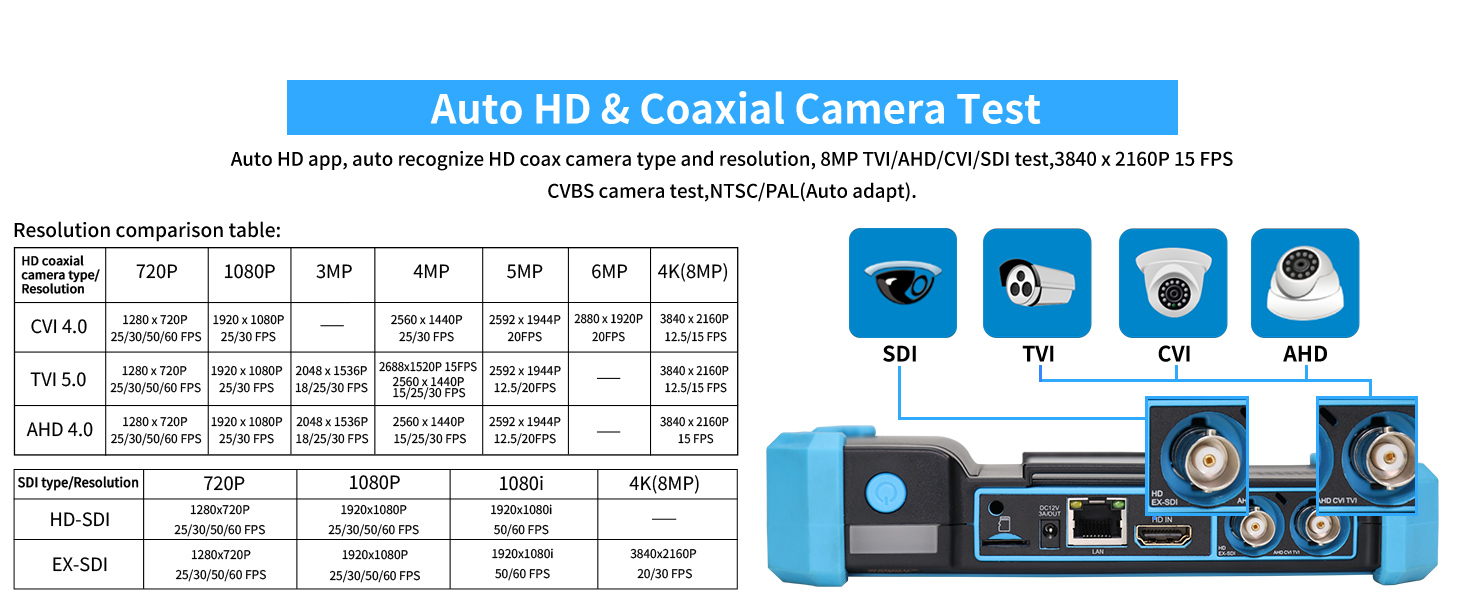
Coaxial CCTV Camera Testing: Supports TVI / AHD / CVI / SDI cameras up to 8MP (3840x2160P), with UTC PTZ control and OSD menu access. Features "Auto HD" app for automatic camera type recognition. Also supports CVBS analog cameras.
Professional Testing Tools: Built-in specialized tools for Hikvision (HIK) and Dahua (DH) cameras, enabling batch settings. Compatible with most existing cameras via Ovif and other brand-specific tools.
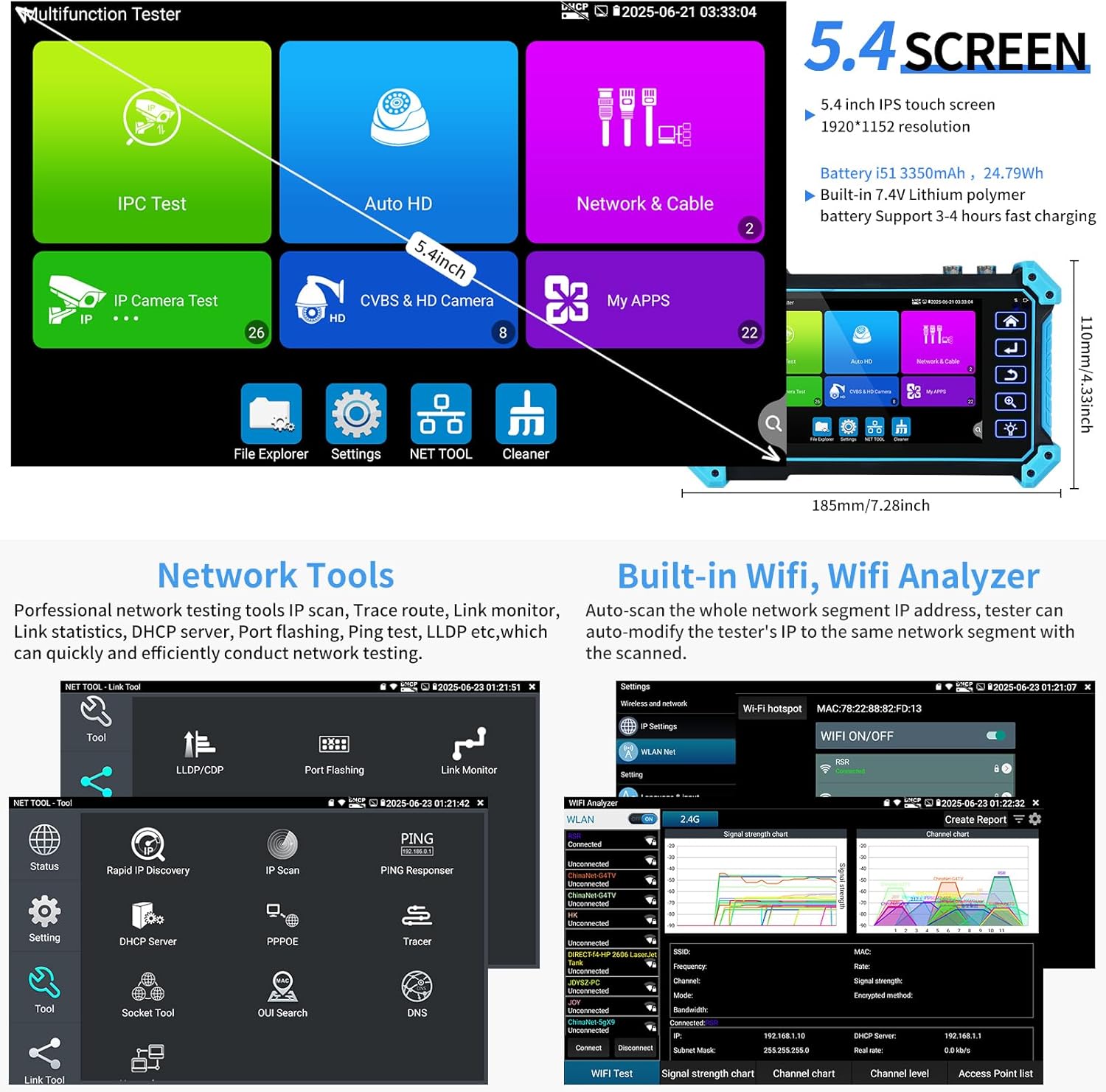
Multi-function Tester: Equipped with a 5.4-inch 1920x1080P touch screen for genuine resolution display. Includes a media player, built-in WiFi with hotspot creation, VGA & HD Input, LED lamp, calculators, snapshot, video record & playback. Runs on Android, allowing for additional app installations.
Поддержка питания через Ethernet (PoE): Supports PoE IEEE802.3af/at 48V with a maximum power output of 25.5W.
Проверка кабелей: Features UTP cable test, POE power output, and RJ45 TDR cable test. Includes a cable tracer.
Длительный срок службы батареи: Powered by a 7.4V/3350mAh lithium-ion battery, providing up to 6 hours of operation after 3-4 hours of charging.
3. Содержимое упаковки
The Rsrteng IPC-5200C Plus package includes the following items:
CCTV Tester (IPC-5200C Plus) x 1
Упаковочная коробка x 1
Cable Tracer (WT255) x 1
Power Adapter (US 12V/1A charger) x 1
Audio Test Cable x 1
Power Output Cable x 1
Ремешок на запястье x 1
BNC Video Cable x 1
BNC to Alligator Clip Cable x 1
RJ45 to BNC Port x 1
RS485 Cable x 1
Image: All components included in the Rsrteng IPC-5200C Plus package, neatly arranged.Изображение: подробное view of the IPC-5200C Plus package listing, showing the main unit and accessories.
4. Настройка
4.1 Зарядка устройства
Before initial use, fully charge the IPC-5200C Plus. Connect the provided power adapter to the DC12V/3A power input port on the tester and plug it into a power outlet. The device typically takes 3-4 hours to fully charge, providing up to 6 hours of operation.
4.2 Включение/выключение питания
Press and hold the power button located on the top left side of the device to power on or power off the tester.
4.3 интерфейсview
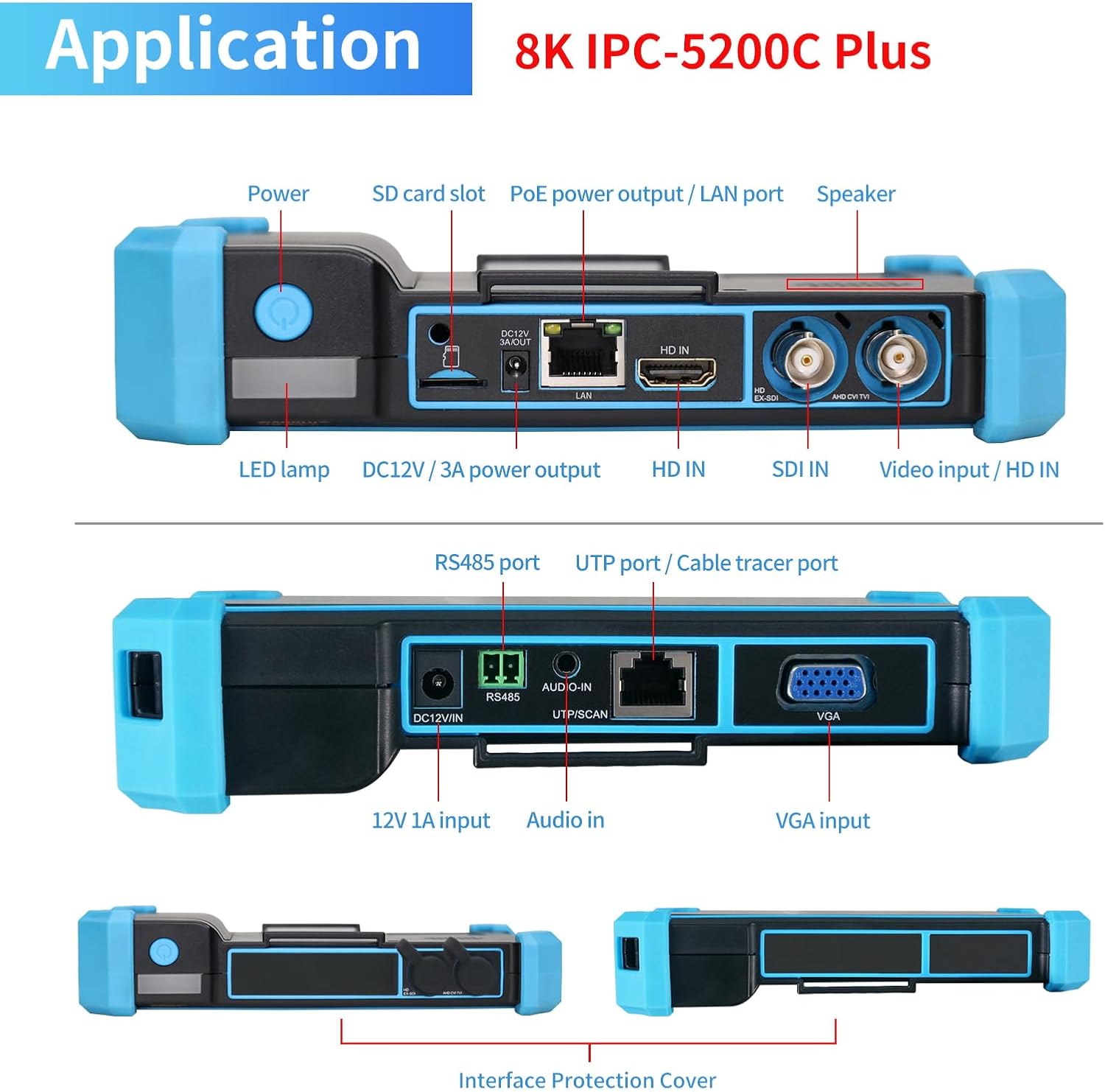
Familiarize yourself with the various ports and controls on the device:
Image: Detailed diagram showing the top and bottom ports of the IPC-5200C Plus, including Power, SD card slot, PoE power output/LAN port, Speaker, LED lamp, DC12V/3A power output, HD IN, SDI IN, Video input/HD IN, RS485 port, UTP port/Cable tracer port, 12V 1A input, Audio in, and VGA input.Изображение: Крупный план view of the application ports, highlighting the DC/12V/3A power output, LAN/PoE port, HD IN, SDI IN, Video IN, RS485, Audio IN, UTP/SCAN, and VGA ports.
5. Инструкция по эксплуатации
5.1 Тестирование IP-камеры
The IPC-5200C Plus supports testing of IP cameras up to 8K 32MP resolution. This includes IP Discovery, Quick IP Test, RTSP play, and client APK support.
Обнаружение IP-адресов: Automatically scans the entire network segment to find IP addresses of connected devices. It can also auto-modify the tester's IP to match the network segment of the scanned cameras.
Тест ONVIF: Supports testing all ONVIF-compatible cameras. The tester can auto-login to the camera and display the camera image.
HIK/DH Test Tools: Dedicated tools for Hikvision and Dahua cameras allow for quick batch settings, including modifying usernames, passwords, and IP parameters.
Image: Screenshot of the IPC Camera Settings interface, showing options for auto-login, image display, PTZ control, image settings, and network settings.Изображение: Оверview of IP Camera Test features, including 8K 32MP IP PoE Camera Test, IP Discovery, Quick IP Test, RTSP play, and Client APK support.Image: Screenshots demonstrating IP Discovery (auto-scanning network segment IP addresses) and Fast IP Conflict Scan (quickly finding IP addresses and supporting MAC address, camera manufacturer, and IP conflict resolution).Image: Screenshots of the HIK Test Tool (one-key activation, image test, modify username/password/IP) and DH Test Tool (batch activation/modification of cameras).
Video: Demonstration of IPC-5200C Plus IP Discovery and Rapid ONVIF Camera Test. This video shows how to connect an IP camera, use the IP Discovery function to find the camera on the network, and then access its video feed through the ONVIF test feature, including basic controls.
5.2 Coaxial CCTV Camera Test
The tester supports various coaxial camera types, including TVI, AHD, CVI, SDI, and CVBS, with resolutions up to 8MP.
Auto HD: The built-in "Auto HD" app automatically recognizes the camera type (AHD/TVI/CVI/SDI) and displays the video feed.
PTZ Control & OSD Menu: Supports UTC PTZ control and allows access to the camera's OSD menu for configuration.
Image: Screenshot of the Auto HD interface, showing automatic recognition of coaxial camera types and resolution, along with a resolution comparison table for CVI, TVI, AHD, and SDI formats.Image: Diagram illustrating the Auto HD app's ability to recognize HD coaxial camera types and resolutions (8MP TVI/AHD/CVI/SDI) and CVBS NTSC/PAL auto-adaptation.Image: Screenshot showing the Coaxial PTZ Control and OSD Menu interface, allowing for camera movement, snapshot, video recording, and playback.
Video: Demonstration of IPC-5200C Plus Coaxial Camera Test (NTSC/PAL). This video illustrates how to connect a coaxial camera to the tester, automatically detect its signal, and access the PTZ control and OSD menu for adjustments.
5.3 Cable Testing
The IPC-5200C Plus offers comprehensive cable testing functionalities.
Digital Cable Tracer (WT255): Locate network cables, BNC cables, and telephone cables quickly and accurately, rejecting noise and false signals. Supports network cable test, host/test box fault location, short circuit test, and PD power test.
RJ45 Cable Tester: Tests speed, continuity, arrangement order, and fault location of network cables. Displays UTP cable connection status on screen.
Тест кабеля RJ45 TDR: Tests cable pair status, length, attenuation, reflectivity, impedance, and skew. Measurement range up to 180m (590ft).
Изображение: Оверview of cable testing features, including PoE 48V/DC12V/3A power output, IP Discovery & Fast IP Conflict Scan, RJ45 TDR Cable Tester, and UTP Cable Tester.Image: Visual representation of the IPC-5200C Plus as a multifunction network cable tester, highlighting UTP Cable Test, RJ45 TDR Cable Test, and Digital Cable Tracer functions.Image: Screenshots showing the Digital Cable Tracer WT255 in action, identifying cable faults and providing details on BNC, network, and telephone cable tracing. Includes electroscope voltage range and frequency information.Image: Screenshots demonstrating the RJ45 Cable Tester (displaying cable sequence and status) and RJ45 TDR Cable Test (showing cable pair status, length, attenuation, and reflectivity).
Video: Demonstration of Cable Tracer WT255 AC Voltage Detector. This video shows how to use the cable tracer to identify network cables, test for voltage presence, and interpret the indicator lights for cable sequence and type.
Video: Demonstration of UTP cable test, RJ45 TDR cable test, and saving test reports. This video guides through performing UTP cable tests, RJ45 TDR tests to check cable status, length, and attenuation, and how to generate and save test reports.
5.4 PoE Power Output
The tester can provide PoE power (IEEE802.3af/at, 48V, max 25.5W) to power cameras directly, simplifying on-site testing without external power sources.
Image: Screenshot showing the PoE Power Output interface, indicating the PoE/DC power output status and power consumption.
5.5 HDMI & VGA Input
The IPC-5200C Plus can function as a display monitor for devices with HDMI or VGA output, supporting resolutions up to 4K 3840x2160@30fps (HDMI) and 1920x1080@60fps (VGA). It supports display, record, screenshot, and playback of incoming images. Примечание: The tester cannot reverse control signal output devices; it is only used as a monitor.
Image: Diagram illustrating the use of HD (HDMI) and VGA inputs, showing the tester connected to an NVR as a display monitor.
5.6 Сетевые инструменты
The device includes professional network testing tools for efficient network diagnostics:
IP-сканирование
Проследить маршрут
Монитор ссылок
DHCP-сервер
Порт мигает
Тест Ping
ЛЛДП
И многое другое...
Image: Screenshot of the Network Tools interface, displaying various diagnostic utilities like Link Tool, Cable Test, Network Calculator, Status, Rapid IP Discovery, IP Scan, Ping Responder, DHCP Server, PPPOE, Tracer, Socket Tool, OUI Search, and DNS.Image: Screenshots of the Network Tools interface, showing various network testing functions such as IP scan, trace route, link monitor, DHCP server, port flashing, and ping test.
5.7 WiFi Analyzer & Hotspot
The built-in WiFi function allows the tester to create a WiFi hotspot, enabling the display of camera images from wireless cameras. The professional WiFi Analyzer provides detailed information on WiFi occupancy, signal strength, and channel level analysis.
Image: Screenshots demonstrating the WiFi Analyzer (displaying signal strength charts and channel levels) and WiFi Hotspot (for connecting wireless cameras and projecting the tester's screen to an Android phone).
6. Техническое обслуживание
Уборка: Для чистки устройства используйте мягкую сухую ткань. Избегайте использования абразивных чистящих средств и растворителей.
Хранилище: Храните тестер в прохладном, сухом месте, вдали от прямых солнечных лучей и экстремальных температур.
Уход батареи: Чтобы продлить срок службы аккумулятора, избегайте его частой полной разрядки. Регулярно заряжайте устройство, даже если оно не используется в течение длительного времени.
Обновления программного обеспечения: The Android operating system allows for application updates. Connect to the internet to check for and install the latest software versions for optimal performance.
Image: Screenshots showing the Application Update interface (Local Update, Online Update, App Management) and Multi-language selection options.
7. Поиск Неисправностей
If you encounter issues with your IPC-5200C Plus, consider the following common solutions:
Устройство не включается: Убедитесь, что батарея заряжена. Подключите адаптер питания и попробуйте снова.
Нет изображения с камеры: Verify all cables are securely connected. Check camera power supply (if using PoE, ensure the camera supports it). For IP cameras, confirm network connectivity and correct IP settings. For coaxial cameras, ensure the correct signal type is selected or use "Auto HD".
Cable Test Errors: Re-check cable connections. Ensure the remote unit is properly connected for cable tests. Refer to the on-screen diagrams for correct wiring sequences.
Низкая производительность: Close unnecessary applications running in the background. Perform a system cleanup if available.
Проблемы с сетевым подключением: Use the built-in network tools (Ping, IP Scan) to diagnose network problems. Check WiFi settings if using a wireless connection.
For further assistance, please refer to the electronic manual built into the device or contact Rsrteng customer support.
Image: Screenshot of the Electronic Manual interface, providing user guides, quick guides, and FAQs for Tester operation.
8. Технические характеристики
Особенность
Деталь
Отображать
5.4 inch IPS touch screen, 1920x1152 resolution
Операционная система
Андроид 11.0
Тест IP-камеры
Max 8K 32MP H.265/H.264, IP Discovery, Quick ONVIF, RTSP, Client APK
Coaxial Camera Test
Max 8MP TVI/AHD/CVI/SDI, CVBS (NTSC/PAL auto adapt), UTC PTZ control, OSD menu
Вход HDMI
Max 4K 3840x2160 30fps
Вход VGA
Max 1920x1080 60fps
Выходная мощность PoE
IEEE802.3af/at 48V, max 25.5W
DC12V/3A Power Output
Provides power supply for cameras
Цифровой кабельный трассировщик
Search BNC, network, telephone cables, PD power test
7.4V/3350mAh Lithium-ion, 24.79Wh, 3-4 hours charging for 6 hours operation
Размеры
185x110x41mm (7.28x4.33x1.61 inches)
Масса
0.43 кг (0.95 фунта)
Image: Comprehensive table detailing the product parameters and specifications of the IPC-5200C Plus.Image: Diagram showing the dimensions (length, width, thickness) and net weight of the IPC-5200C Plus.Image: Detailed information about the IPC-5200C Plus battery (i51), including capacity (3350mAh, 24.79Wh), type (built-in 7.4V Lithium polymer), and fast charging support.
9. Гарантия и поддержка
Rsrteng is committed to providing high-quality products and customer satisfaction. For any technical support, warranty claims, or service inquiries, please contact the seller or refer to the official Rsrteng website for detailed support information. We have a professional technical team available for consultation to ensure all your questions are addressed.